Attention: Here be dragons
This is the latest
(unstable) version of this documentation, which may document features
not available in or compatible with released stable versions of Godot.
Checking the stable version of the documentation...
GDScript reference
GDScript is a high-level, object-oriented, imperative, and gradually typed programming language built for Godot. It uses an indentation-based syntax similar to languages like Python. Its goal is to be optimized for and tightly integrated with Godot Engine, allowing great flexibility for content creation and integration.
GDScript is entirely independent from Python and is not based on it.
Historie
Poznámka
Dokumentace o historii GDScript byla přesunuta do Často kladené otázky.
Příklad GDScriptu
Some people can learn better by taking a look at the syntax, so here's an example of how GDScript looks.
# Everything after "#" is a comment.
# A file is a class!

# (optional) icon to show in the editor dialogs:
@icon("res://path/to/optional/icon.svg")

# (optional) class definition:
class_name MyClass

# Inheritance:
extends BaseClass


# Member variables.
var a = 5
var s = "Hello"
var arr = [1, 2, 3]
var dict = {"key": "value", 2: 3}
var other_dict = {key = "value", other_key = 2}
var typed_var: int
var inferred_type := "String"

# Constants.
const ANSWER = 42
const THE_NAME = "Charly"

# Enums.
enum {UNIT_NEUTRAL, UNIT_ENEMY, UNIT_ALLY}
enum Named {THING_1, THING_2, ANOTHER_THING = -1}

# Built-in vector types.
var v2 = Vector2(1, 2)
var v3 = Vector3(1, 2, 3)


# Function, with a default value for the last parameter.
func some_function(param1, param2, param3 = 123):
    const local_const = 5

    if param1 < local_const:
        print(param1)
    elif param2 > 5:
        print(param2)
    else:
        print("Fail!")

    for i in range(20):
        print(i)

    while param2 != 0:
        param2 -= 1

    match param3:
        3:
            print("param3 is 3!")
        _:
            print("param3 is not 3!")

    var local_var = param1 + 3
    return local_var


# Functions override functions with the same name on the base/super class.
# If you still want to call them, use "super":
func something(p1, p2):
    super(p1, p2)


# It's also possible to call another function in the super class:
func other_something(p1, p2):
    super.something(p1, p2)


# Inner class
class Something:
    var a = 10


# Constructor
func _init():
    print("Constructed!")
    var lv = Something.new()
    print(lv.a)
Pokud máte předchozí zkušenosti se staticky typovanými jazyky, jako C, C++ nebo C#, ale nikdy předtím jste dynamicky typovaný jazyk nepoužívali, doporučujeme vám přečíst si tento návod: GDScript: Úvod do dynamických jazyků.
Identifikátory
Jako identifikátor lze použít jakýkoli řetězec, který se omezuje na znaky abecedy (a až z a A až Z), číslice (0 až 9) a _. Identifikátory navíc nesmí začínat číslicí. U identifikátorů se rozlišují malá a velká písmena (foo se liší od FOO).
Identifiers may also contain most Unicode characters part of UAX#31. This allows you to use identifier names written in languages other than English. Unicode characters that are considered "confusable" for ASCII characters and emoji are not allowed in identifiers.
Klíčová slova
Následuje seznam klíčových slov podporovaných tímto jazykem. Protože klíčová slova jsou rezervovaná slova (tokeny), nelze je používat jako identifikátory. Rezervované jsou také operátory (jako in, not, and nebo or) a názvy vestavěných typů uvedené v následujících kapitolách.
Klíčová slova jsou definována v GDScript tokenizeru, pokud se chcete podívat pod pokličku.
Klíčové slovo |
Popis |
|---|---|
if |
Viz if/else/elif. |
elif |
Viz if/else/elif. |
else |
Viz if/else/elif. |
for |
Viz for. |
while |
Viz while. |
match |
Viz match. |
when |
Used by pattern guards in |
break |
Ukončí provádění aktuální smyčky |
continue |
Okamžitě přeskočí na další iteraci cyklu |
pass |
Používá se tam, kde je příkaz syntakticky vyžadován, ale provedení kódu je nežádoucí, např. v prázdných funkcích. |
return |
Vrací hodnotu z funkce. |
class |
Defines an inner class. See Inner classes. |
class_name |
Defines the script as a globally accessible class with the specified name. See Registering named classes. |
extends |
Definuje, jakou třídu chcete rozšířit o aktuální třídu. |
is |
Testuje, zda proměnná rozšiřuje danou třídu nebo zda je daného vestavěného typu. |
in |
Tests whether a value is within a string, array, range, dictionary, or node. When used with |
as |
Pokud je to možné, přetypujte hodnotu na daný typ. |
self |
Refers to current class instance. See self. |
super |
Resolves the scope of the parent method. See Inheritance. |
signal |
Defines a signal. See Signals. |
func |
Defines a function. See Functions. |
static |
Defines a static function or a static member variable. |
const |
Defines a constant. See Constants. |
enum |
Defines an enum. See Enums. |
var |
Defines a variable. See Variables. |
breakpoint |
Editor helper for debugger breakpoints. Unlike breakpoints created by clicking in the gutter, |
preload |
Předběžně načte třídu nebo proměnnou. Viz Classes as resources. |
await |
Waits for a signal or a coroutine to finish. See Awaiting signals or coroutines. |
yield |
Previously used for coroutines. Kept as keyword for transition. |
assert |
Uplatní podmínku, při selhání zaznamená chybu. Ignorováno v sestaveních bez ladění. Viz klíčové slovo Assert. |
void |
Used to represent that a function does not return any value. |
PI |
Konstanta PI. |
TAU |
Konstanta TAU. |
INF |
Infinity constant. Used for comparisons and as result of calculations. |
NAN |
NAN (not a number) constant. Used as impossible result from calculations. |
Operátory
The following is the list of supported operators and their precedence. All binary operators are left-associative,
including the ** operator. This means that 2 ** 2 ** 3 is equal to (2 ** 2) ** 3. Use parentheses to explicitly specify precedence you need, for
example 2 ** (2 ** 3). The ternary if/else operator is right-associative.
Operátor |
Popis |
|---|---|
|
Grouping (highest priority) Parentheses are not really an operator, but allow you to explicitly specify the precedence of an operation. |
|
Subscription |
|
Odkaz na atribut |
|
Volání funkce |
|
|
x is Nodex is not Node |
Type checking See also is_instance_of() function. |
|
Power Multiplies |
|
Bitové NOT |
+x-x |
Identity / Negation |
x * yx / yx % y |
Násobení / dělení / zbytek The Note: These operators have the same behavior as C++, which may be unexpected for users coming from Python, JavaScript, etc. See a detailed note after the table. |
x + yx - y |
Addition (or Concatenation) / Subtraction |
x << yx >> y |
Posouvání bitů |
|
Bitově AND |
|
Bitový XOR |
|
Bitové OR |
x == yx != yx < yx > yx <= yx >= y |
Comparison See a detailed note after the table. |
x in yx not in y |
Inclusion checking
|
not x!x |
Boolean NOT and its unrecommended alias |
x and yx && y |
Boolean AND and its unrecommended alias |
x or yx || y |
Boolean OR and its unrecommended alias |
|
Ternární if/else |
|
|
x = yx += yx -= yx *= yx /= yx **= yx %= yx &= yx |= yx ^= yx <<= yx >>= y |
Přiřazení (nejnižší priorita) You cannot use an assignment operator inside an expression. |
Poznámka
The behavior of some operators may differ from what you expect:
If both operands of the
/operator are int, then integer division is performed instead of fractional. For example5 / 2 == 2, not2.5. If this is not desired, use at least one float literal (x / 2.0), cast (float(x) / y), or multiply by1.0(x * 1.0 / y).The
%operator is only available for ints, for floats use the fmod() function.For negative values, the
%operator andfmod()use truncation instead of rounding towards negative infinity. This means that the remainder has a sign. If you need the remainder in a mathematical sense, use the posmod() and fposmod() functions instead.The
==and!=operators sometimes allow you to compare values of different types (for example,1 == 1.0is true), but in other cases it can cause a runtime error. If you're not sure about the types of the operands, you can safely use the is_same() function (but note that it is more strict about types and references). To compare floats, use the is_equal_approx() and is_zero_approx() functions instead.
Literály
Example(s) |
Popis |
|
Null value |
|
Boolean values |
|
Celé číslo základu 10 |
|
Celé číslo o základu 16 (hexadecimální) |
|
Celé číslo základu 2 (binární) |
|
Číslo s plovoucí desetinnou čárkou (reálné) |
|
Regular strings |
|
Triple-quoted regular strings |
|
Raw strings |
|
Triple-quoted raw strings |
|
|
|
There are also two constructs that look like literals, but actually are not:
Příklad |
Popis |
|
Zkratka pro |
|
Shorthand for |
Integers and floats can have their numbers separated with _ to make them more readable.
The following ways to write numbers are all valid:
12_345_678  # Equal to 12345678.
3.141_592_7  # Equal to 3.1415927.
0x8080_0000_ffff  # Equal to 0x80800000ffff.
0b11_00_11_00  # Equal to 0b11001100.
Regular string literals can contain the following escape sequences:
Escape sekvence |
Rozšiřuje se na |
|
Nový řádek (line feed) |
|
Vodorovný znak tabulátoru |
|
návrat vozíku |
|
Výstraha (pípnutí / zvonek) |
|
Backspace |
|
Přerušení stránky Formfeed |
|
Svislý znak tabulátoru |
|
Dvojitá uvozovka |
|
Jednoduchá uvozovka |
|
Zpětné lomítko |
|
UTF-16 Unicode codepoint
|
|
UTF-32 Unicode codepoint
|
There are two ways to represent an escaped Unicode character above 0xFFFF:
as a UTF-16 surrogate pair
\uXXXX\uXXXX.as a single UTF-32 codepoint
\UXXXXXX.
Also, using \ followed by a newline inside a string will allow you to continue it in the next line,
without inserting a newline character in the string itself.
A string enclosed in quotes of one type (for example ") can contain quotes of another type
(for example ') without escaping. Triple-quoted strings allow you to avoid escaping up to
two consecutive quotes of the same type (unless they are adjacent to the string edges).
Raw string literals always encode the string as it appears in the source code.
This is especially useful for regular expressions. A raw string literal doesn't process escape sequences,
however it does recognize \\ and \" (\') and replaces them with themselves.
Thus, a string can have a quote that matches the opening one, but only if it's preceded by a backslash.
print("\tchar=\"\\t\"")  # Prints `    char="\t"`.
print(r"\tchar=\"\\t\"") # Prints `\tchar=\"\\t\"`.
Poznámka
Some strings cannot be represented using raw string literals: you cannot have an odd number of backslashes at the end of a string or have an unescaped opening quote inside the string. However, in practice this doesn't matter since you can use a different quote type or use concatenation with a regular string literal.
GDScript also supports format strings.
Annotations
Annotations are special tokens in GDScript that act as modifiers to an entire script, a declaration, a statement, or a location in the source code. Annotations may affect how the script is treated by the Godot editor and the GDScript compiler.
Every annotation starts with the @ character and is specified by a name. A
detailed description and example for each annotation can be found inside the
GDScript class reference.
For instance, you can use it to export a value to the editor:
@export_range(1, 100, 1, "or_greater")
var ranged_var: int = 50
For more information about exporting properties, read the GDScript exports article.
Any constant expression compatible with the required argument type can be passed as an annotation argument value:
const MAX_SPEED = 120.0

@export_range(0.0, 0.5 * MAX_SPEED)
var initial_speed: float = 0.25 * MAX_SPEED
Annotations can be specified one per line or all in the same line. They affect the next statement that isn't an annotation. Annotations can have arguments sent between parentheses and separated by commas.
Both of these are the same:
@annotation_a
@annotation_b
var variable

@annotation_a @annotation_b var variable
@onready annotation
Při použití uzlů je běžné chtít uchovávat odkazy na části scény v proměnné. Jelikož u scén je zaručeno, že budou konfigurovány pouze při vstupu do aktivního stromu scén, dílčí uzly lze získat pouze při volání funkce Node.ready ().
var my_label


func _ready():
    my_label = get_node("MyLabel")
This can get a little cumbersome, especially when nodes and external
references pile up. For this, GDScript has the @onready annotation, that
defers initialization of a member variable until _ready() is called. It
can replace the above code with a single line:
@onready var my_label = get_node("MyLabel")
Varování
Applying @onready and any @export annotation to the same variable
doesn't work as you might expect. The @onready annotation will cause
the default value to be set after the @export takes effect and will
override it:
@export var a = "init_value_a"
@onready @export var b = "init_value_b"

func _init():
    prints(a, b) # init_value_a <null>

func _notification(what):
    if what == NOTIFICATION_SCENE_INSTANTIATED:
        prints(a, b) # exported_value_a exported_value_b

func _ready():
    prints(a, b) # exported_value_a init_value_b
Therefore, the ONREADY_WITH_EXPORT warning is generated, which is treated
as an error by default. We do not recommend disabling or ignoring it.
Code regions
Code regions are special types of comments that the script editor understands as foldable regions. This means that after writing code region comments, you can collapse and expand the region by clicking the arrow that appears at the left of the comment. This arrow appears within a purple square to be distinguishable from standard code folding.
The syntax is as follows:
# Important: There must be *no* space between the `#` and `region` or `endregion`.

# Region without a description:
#region
...
#endregion

# Region with a description:
#region Some description that is displayed even when collapsed
...
#endregion
Tip
To create a code region quickly, select several lines in the script editor, right-click the selection then choose Create Code Region. The region description will be selected automatically for editing.
It is possible to nest code regions within other code regions.
Here's a concrete usage example of code regions:
# This comment is outside the code region. It will be visible when collapsed.
#region Terrain generation
# This comment is inside the code region. It won't be visible when collapsed.
func generate_lakes():
    pass

func generate_hills():
    pass
#endregion

#region Terrain population
func place_vegetation():
    pass

func place_roads():
    pass
#endregion
This can be useful to organize large chunks of code into easier to understand sections. However, remember that external editors generally don't support this feature, so make sure your code is easy to follow even when not relying on folding code regions.
Poznámka
Individual functions and indented sections (such as if and for) can
always be collapsed in the script editor. This means you should avoid
using a code region to contain a single function or indented section, as it
won't bring much of a benefit. Code regions work best when they're used to
group multiple elements together.
Line continuation
A line of code in GDScript can be continued on the next line by using a backslash
(\). Add one at the end of a line and the code on the next line will act like
it's where the backslash is. Here is an example:
var a = 1 + \
2
A line can be continued multiple times like this:
var a = 1 + \
4 + \
10 + \
4
Vestavěné typy
Built-in types are stack-allocated. They are passed as values. This means a copy
is created on each assignment or when passing them as arguments to functions.
The exceptions are Object, Array, Dictionary, and packed arrays
(such as PackedByteArray), which are passed by reference so they are shared.
All arrays, Dictionary, and some objects (Node, Resource)
have a duplicate() method that allows you to make a copy.
Základní vestavěné typy
Proměnné mouhou v jazyce GDScript nabývat několika vestavěných typů.
null
null je prázdný datový typ, který neobsahuje žádné informace a nelze mu přiřadit žádnou jinou hodnotu.
Only types that inherit from Object can have a null value
(Object is therefore called a "nullable" type).
Variant types must have a valid value at all times,
and therefore cannot have a null value.
bool
Zkratka pro "boolean", může obsahovat pouze true nebo false.
int
Short for "integer", it stores whole numbers (positive and negative).
It is stored as a 64-bit value, equivalent to int64_t in C++.
float
Stores real numbers, including decimals, using floating-point values.
It is stored as a 64-bit value, equivalent to double in C++.
Note: Currently, data structures such as Vector2, Vector3, and
PackedFloat32Array store 32-bit single-precision float values.
String
Posloupnost znaků ve formátu Unicode.
StringName
An immutable string that allows only one instance of each name. They are slower to create and may result in waiting for locks when multithreading. In exchange, they're very fast to compare, which makes them good candidates for dictionary keys.
NodePath
A pre-parsed path to a node or a node property. It can be easily assigned to, and from, a String. They are useful to interact with the tree to get a node, or affecting properties like with Tweens.
Vektorové vestavěné typy
Vector2
2D vektorový typ obsahující pole x a y. Lze k němu přistupovat také jako k poli.
Vector2i
Same as a Vector2 but the components are integers. Useful for representing items in a 2D grid.
Rect2
Typ 2D Obdélník obsahující dvě pole vektorů: position (pozic) a size (velikost). Obsahuje také pole end, což je position + size.
Vector3
3D vektorový typ obsahující pole x, y a z. Lze k němu přistupovat také jako k poli.
Vector3i
Same as Vector3 but the components are integers. Can be use for indexing items in a 3D grid.
Transform2D
matice (matrix) 3×2 používaná pro 2D transformace.
Plane
Typ 3D roviny v normalizovaném tvaru, který obsahuje normál vektorové pole normály k rovině a skalární vzdálenost d.
Quaternion
Kvaternion je datový typ používaný k reprezentaci 3D rotace. Je užitečný pro interpolaci rotací.
AABB
Osově zarovnaný ohraničující box (nebo 3D box) obsahuje 2 pole vektorů: position a size. Obsahuje také pole end, což je position + size.
Basis
matice 3x3 používaná pro 3D rotaci a měřítko. Obsahuje 3 vektorová pole (x, y a z) a lze k ní přistupovat také jako k poli 3D vektorů.
Transform3D
3D transformace obsahuje pole Basis basis a pole Vector3 origin.
Vestavěné typy enginu
Color
Datový typ Color (barva) obsahuje pole r, g, b a a. Lze k nim také přistupovat jako h, s a v pro odstín/sytost/hodnotu.
RID
ID zdroje (RID). Servery používají generické identifikátory RID k odkazování na neprůhledná data.
Object
Základní třída pro cokoli, co není vestavěným typem.
Kontejnerové vestavěné typy
Array (Pole)
Obecná posloupnost objektů libovolného typu, včetně jiných polí nebo slovníků (viz níže). Velikost pole se může dynamicky měnit. Pole jsou indexována od indexu 0. Záporné indexy se počítají od konce.
var arr = []
arr = [1, 2, 3]
var b = arr[1] # This is 2.
var c = arr[arr.size() - 1] # This is 3.
var d = arr[-1] # Same as the previous line, but shorter.
arr[0] = "Hi!" # Replacing value 1 with "Hi!".
arr.append(4) # Array is now ["Hi!", 2, 3, 4].
Typed arrays
Godot also features support for typed arrays. On write operations, Godot checks that
element values match the specified type, so the array cannot contain invalid values.
The GDScript static analyzer takes typed arrays into account, however array methods like
front() and back() still have the Variant return type.
Typed arrays have the syntax Array[Type], where Type can be any Variant type,
native or user class, or enum. Nested array types (like Array[Array[int]]) are not supported.
var a: Array[int]
var b: Array[Node]
var c: Array[MyClass]
var d: Array[MyEnum]
var e: Array[Variant]
Array and Array[Variant] are the same thing.
Poznámka
Arrays are passed by reference, so the array element type is also an attribute of the in-memory structure referenced by a variable in runtime. The static type of a variable restricts the structures that it can reference to. Therefore, you cannot assign an array with a different element type, even if the type is a subtype of the required type.
If you want to convert a typed array, you can create a new array and use the Array.assign() method:
var a: Array[Node2D] = [Node2D.new()]

# (OK) You can add the value to the array because `Node2D` extends `Node`.
var b: Array[Node] = [a[0]]

# (Error) You cannot assign an `Array[Node2D]` to an `Array[Node]` variable.
b = a

# (OK) But you can use the `assign()` method instead. Unlike the `=` operator,
# the `assign()` method copies the contents of the array, not the reference.
b.assign(a)
The only exception was made for the Array (Array[Variant]) type, for user convenience
and compatibility with old code. However, operations on untyped arrays are considered unsafe.
Packed arrays
PackedArrays are generally faster to iterate on and modify compared to a typed Array of the same type (e.g. PackedInt64Array versus Array[int]) and consume less memory. In the worst case, they are expected to be as fast as an untyped Array. Conversely, non-Packed Arrays (typed or not) have extra convenience methods such as Array.map that PackedArrays lack. Consult the class reference for details on the methods available. Typed Arrays are generally faster to iterate on and modify than untyped Arrays.
While all Arrays can cause memory fragmentation when they become large enough,
if memory usage and performance (iteration and modification speed) is a concern
and the type of data you're storing is compatible with one of the Packed
Array types, then using those may yield improvements. However, if you do not
have such concerns (e.g. the size of your array does not reach the tens of
thousands of elements) it is likely more helpful to use regular or typed
Arrays, as they provide convenience methods that can make your code easier to
write and maintain (and potentially faster if your data requires such
operations a lot). If the data you will store is of a known type (including
your own defined classes), prefer to use a typed Array as it may yield better
performance in iteration and modification compared to an untyped Array.
PackedByteArray: An array of bytes (integers from 0 to 255).
PackedInt32Array: An array of 32-bit integers.
PackedInt64Array: An array of 64-bit integers.
PackedFloat32Array: An array of 32-bit floats.
PackedFloat64Array: An array of 64-bit floats.
PackedStringArray: An array of strings.
PackedVector2Array: An array of Vector2 values.
PackedVector3Array: An array of Vector3 values.
PackedVector4Array: An array of Vector4 values.
PackedColorArray: An array of Color values.
Dictionary (Slovník)
Asociativní kontejner, který obsahuje hodnoty odkazované pomocí jedinečných klíčů.
var d = {4: 5, "A key": "A value", 28: [1, 2, 3]}
d["Hi!"] = 0
d = {
    22: "value",
    "some_key": 2,
    "other_key": [2, 3, 4],
    "more_key": "Hello"
}
Lua-style table syntax is also supported. Lua-style uses = instead of :
and doesn't use quotes to mark string keys (making for slightly less to write).
However, keys written in this form can't start with a digit (like any GDScript
identifier), and must be string literals.
var d = {
    test22 = "value",
    some_key = 2,
    other_key = [2, 3, 4],
    more_key = "Hello"
}
To add a key to an existing dictionary, access it like an existing key and assign to it:
var d = {} # Create an empty Dictionary.
d.waiting = 14 # Add String "waiting" as a key and assign the value 14 to it.
d[4] = "hello" # Add integer 4 as a key and assign the String "hello" as its value.
d["Godot"] = 3.01 # Add String "Godot" as a key and assign the value 3.01 to it.

var test = 4
# Prints "hello" by indexing the dictionary with a dynamic key.
# This is not the same as `d.test`. The bracket syntax equivalent to
# `d.test` is `d["test"]`.
print(d[test])
Poznámka
Syntaxi závorek lze použít pro přístup k vlastnostem libovolného Object, nejen ke slovníkům. Mějte na paměti, že použití neexistující vlastnosti jako indexu způsobí chybu skriptu. Chcete-li se tomu vyhnout, použijte místo toho metody Object.get() a Object.set(), které v takovém případě vrátí null.
Typed dictionaries
Godot 4.4 added support for typed dictionaries. On write operations, Godot checks that
element keys and values match the specified type, so the dictionary cannot contain invalid
keys or values. The GDScript static analyzer takes typed dictionaries into account. However,
dictionary methods that return values still have the Variant return type.
Typed dictionaries have the syntax Dictionary[KeyType, ValueType], where KeyType and ValueType
can be any Variant type, native or user class, or enum. Both the key and value type must be specified,
but you can use Variant to make either of them untyped.
Nested typed collections (like Dictionary[String, Dictionary[String, int]])
are not supported.
var a: Dictionary[String, int]
var b: Dictionary[String, Node]
var c: Dictionary[Vector2i, MyClass]
var d: Dictionary[MyEnum, float]
# String keys, values can be any type.
var e: Dictionary[String, Variant]
# Keys can be any type, boolean values.
var f: Dictionary[Variant, bool]
Dictionary and Dictionary[Variant, Variant] are the same thing.
Signal
A signal is a message that can be emitted by an object to those who want to listen to it. The Signal type can be used for passing the emitter around.
Signals are better used by getting them from actual objects, e.g. $Button.button_up.
Callable
Contains an object and a function, which is useful for passing functions as values (e.g. when connecting to signals).
Getting a method as a member returns a callable. var x = $Sprite2D.rotate
will set the value of x to a callable with $Sprite2D as the object and
rotate as the method.
You can call it using the call method: x.call(PI).
Proměnné
Proměnné mohou existovat jako členské proměnné třídy nebo jako lokální proměnné funkcí. Vytvářejí se pomocí klíčového slova var a při inicializaci jim může být volitelně přiřazena hodnota.
var a # Data type is 'null' by default.
var b = 5
var c = 3.8
var d = b + c # Variables are always initialized in direct order (see below).
Proměnné mohou mít volitelně specifikaci typu. Pokud je typ specifikován, bude proměnná nucena mít vždy stejný typ a pokus o přiřazení nekompatibilní hodnoty vyvolá chybu.
Typy se v deklaraci proměnné uvádějí pomocí symbolu : (dvojtečka) za názvem proměnné, za kterým následuje typ.
var my_vector2: Vector2
var my_node: Node = Sprite2D.new()
If the variable is initialized within the declaration, the type can be inferred, so it's possible to omit the type name:
var my_vector2 := Vector2() # 'my_vector2' is of type 'Vector2'.
var my_node := Sprite2D.new() # 'my_node' is of type 'Sprite2D'.
Odvození typu je možné pouze v případě, že přiřazovaná hodnota má definovaný typ, jinak dojde k chybě.
Platné typy jsou:
Vestavěné typy (Array, Vektor2, int, String, atd.).
Engine classes (Node, Resource, RefCounted, etc.).
Názvy konstant, pokud obsahují zdroj skriptu (
MyScript, pokud jste deklarovaliconst MyScript = preload("res://my_script.gd")).Ostatní třídy ve stejném skriptu, s respektováním rozsahu platnosti (
InnerClass.NestedClass, pokud jste deklarovaliclass NestedClassuvnitřclass InnerClassve shodném rozsahu platnosti).Třídy skriptů deklarované pomocí klíčového slova
class_name.Autoloads registered as singletons.
Poznámka
While Variant is a valid type specification, it's not an actual type. It
only means there's no set type and is equivalent to not having a static type
at all. Therefore, inference is not allowed by default for Variant,
since it's likely a mistake.
You can turn off this check, or make it only a warning, by changing it in the project settings. See GDScript výstražný systém for details.
Initialization order
Member variables are initialized in the following order:
Depending on the variable's static type, the variable is either
null(untyped variables and objects) or has a default value of the type (0forint,falseforbool, etc.).The specified values are assigned in the order of the variables in the script, from top to bottom.
(Only for
Node-derived classes) If the@onreadyannotation is applied to a variable, its initialization is deferred to step 5.
If defined, the
_init()method is called.When instantiating scenes and resources, the exported values are assigned.
(Only for
Node-derived classes)@onreadyvariables are initialized.(Only for
Node-derived classes) If defined, the_ready()method is called.
Varování
You can specify a complex expression as a variable initializer, including function calls. Make sure the variables are initialized in the correct order, otherwise your values may be overwritten. For example:
var a: int = proxy("a", 1)
var b: int = proxy("b", 2)
var _data: Dictionary = {}

func proxy(key: String, value: int):
    _data[key] = value
    print(_data)
    return value

func _init() -> void:
    print(_data)
Will print:
{ "a": 1 }
{ "a": 1, "b": 2 }
{  }
To fix this, move the _data variable definition above the a definition
or remove the empty dictionary assignment (= {}).
Static variables
A class member variable can be declared static:
static var a
Static variables belong to the class, not instances. This means that static variables share values between multiple instances, unlike regular member variables.
From inside a class, you can access static variables from any function, both static and non-static. From outside the class, you can access static variables using the class or an instance (the second is not recommended as it is less readable).
Poznámka
The @export and @onready annotations cannot be applied to a static variable.
Local variables cannot be static.
The following example defines a Person class with a static variable named max_id.
We increment the max_id in the _init() function. This makes it easy to keep track
of the number of Person instances in our game.
# person.gd
class_name Person

static var max_id = 0

var id
var name

func _init(p_name):
    max_id += 1
    id = max_id
    name = p_name
In this code, we create two instances of our Person class and check that the class
and every instance have the same max_id value, because the variable is static and accessible to every instance.
# test.gd
extends Node

func _ready():
    var person1 = Person.new("John Doe")
    var person2 = Person.new("Jane Doe")

    print(person1.id) # 1
    print(person2.id) # 2

    print(Person.max_id)  # 2
    print(person1.max_id) # 2
    print(person2.max_id) # 2
Static variables can have type hints, setters and getters:
static var balance: int = 0

static var debt: int:
    get:
        return -balance
    set(value):
        balance = -value
A base class static variable can also be accessed via a child class:
class A:
    static var x = 1

class B extends A:
    pass

func _ready():
    prints(A.x, B.x) # 1 1
    A.x = 2
    prints(A.x, B.x) # 2 2
    B.x = 3
    prints(A.x, B.x) # 3 3
Poznámka
When referencing a static variable from a tool script, the other script containing the static variable must also be a tool script. See Running code in the editor for details.
@static_unload annotation
Since GDScript classes are resources, having static variables in a script prevents it from being unloaded even if there are no more instances of that class and no other references left. This can be important if static variables store large amounts of data or hold references to other project resources, such as scenes. You should clean up this data manually, or use the @static_unload annotation if static variables don't store important data and can be reset.
Varování
Currently, due to a bug, scripts are never freed, even if @static_unload annotation is used.
Note that @static_unload applies to the entire script (including inner classes)
and must be placed at the top of the script, before class_name and extends:
@static_unload
class_name MyNode
extends Node
See also Static functions and Static constructor.
Přetypování
Hodnoty přiřazené typovaným proměnným musí mít kompatibilní typ. Pokud je potřeba vynutit, aby hodnota byla určitého typu, zejména pro typy objektů, můžete použít operátor přetypování as.
Přetypování mezi objektovými typy vrací stejný objekt, pokud je hodnota stejného typu jako je typ na který se přetypovává nebo je jeho potomkem.
var my_node2D: Node2D
my_node2D = $Sprite2D as Node2D # Works since Sprite2D is a subtype of Node2D.
Pokud hodnota není potomkem (podtypem), výsledkem operace přetypování je hodnota null.
var my_node2D: Node2D
my_node2D = $Button as Node2D # Results in 'null' since a Button is not a subtype of Node2D.
V případě vestavěných typů budou tyto typy, pokud to bude možné, násilně převedeny, jinak engine vyvolá chybu.
var my_int: int
my_int = "123" as int # The string can be converted to int.
my_int = Vector2() as int # A Vector2 can't be converted to int, this will cause an error.
Casting is also useful to have better type-safe variables when interacting with the scene tree:
# Will infer the variable to be of type Sprite2D.
var my_sprite := $Character as Sprite2D

# Will fail if $AnimPlayer is not an AnimationPlayer, even if it has the method 'play()'.
($AnimPlayer as AnimationPlayer).play("walk")
Konstanty
Konstanty jsou hodnoty, které nelze za běhu hry měnit. Jejich hodnota musí být známa při kompilaci. Použití klíčového slova const umožňuje dát konstantní hodnotě jméno. Při pokusu přiřadit hodnotu konstantě po její deklaraci dojde k chybě.
Doporučujeme používat konstanty vždy, když se hodnota nemá měnit.
const A = 5
const B = Vector2(20, 20)
const C = 10 + 20 # Constant expression.
const D = Vector2(20, 30).x # Constant expression: 20.
const E = [1, 2, 3, 4][0] # Constant expression: 1.
const F = sin(20) # 'sin()' can be used in constant expressions.
const G = x + 20 # Invalid; this is not a constant expression!
const H = A + 20 # Constant expression: 25 (`A` is a constant).
Although the type of constants is inferred from the assigned value, it's also possible to add explicit type specification:
const A: int = 5
const B: Vector2 = Vector2()
Při priřazení hodnoty nekompatibilního typu bude výsledkem error.
You can also create constants inside a function, which is useful to name local magic values.
Enums (Výčty)
Enumy jsou v podstatě zkratkou pro konstanty a jsou docela užitečné, pokud chcete nějaké konstantě přiřadit po sobě jdoucí celá čísla.
enum {TILE_BRICK, TILE_FLOOR, TILE_SPIKE, TILE_TELEPORT}

# Is the same as:
const TILE_BRICK = 0
const TILE_FLOOR = 1
const TILE_SPIKE = 2
const TILE_TELEPORT = 3
If you pass a name to the enum, it will put all the keys inside a constant Dictionary of that name. This means all constant methods of a dictionary can also be used with a named enum. This only works for GDScript enums, not for enums from built-in classes.
Důležité
Keys in a named enum are not registered
as global constants. They should be accessed prefixed
by the enum's name (Name.KEY).
enum State {STATE_IDLE, STATE_JUMP = 5, STATE_SHOOT}

# Is the same as:
const State = {STATE_IDLE = 0, STATE_JUMP = 5, STATE_SHOOT = 6}
# Access values with State.STATE_IDLE, etc.

func _ready():
    # Access values with Name.KEY, prints '5'
    print(State.STATE_JUMP)
    # Use dictionary methods:
    # prints '["STATE_IDLE", "STATE_JUMP", "STATE_SHOOT"]'
    print(State.keys())
    # prints '{ "STATE_IDLE": 0, "STATE_JUMP": 5, "STATE_SHOOT": 6 }'
    print(State)
    # prints '[0, 5, 6]'
    print(State.values())
If not assigning a value to a key of an enum it will be assigned the previous value plus one,
or 0 if it is the first entry in the enum. Multiple keys with the same value are allowed.
Funkce
Functions always belong to a class. The scope priority for
variable look-up is: local → class member → global. The self variable is
always available and is provided as an option for accessing class members
(see self), but is not always required (and should not be sent as the
function's first argument, unlike Python).
func my_function(a, b):
    print(a)
    print(b)
    return a + b  # Return is optional; without it 'null' is returned.
Funkce se může vrátit hodnotu v libovolném okamžiku. Výchozí návratová hodnota je null.
By default, all function parameters are required. You can make one or more parameters at the end optional by assigning a default value to them:
# Since the last two parameters are optional, all these calls are valid:
# - my_function(1)
# - my_function(1, 20)
# - my_function(1, 20, 100)
func my_function(a_required, b_optional = 10, c_optional = 42):
    print(a_required)
    print(b_optional)
    print(c_optional)
If a function contains only one line of code, it can be written on one line:
func square(a): return a * a

func hello_world(): print("Hello World")

func empty_function(): pass
Functions can also have type specification for the arguments and for the return value. Types for arguments can be added in a similar way to variables:
func my_function(a: int, b: String):
    pass
If a function argument has a default value, it's possible to infer the type:
func my_function(int_arg := 42, String_arg := "string"):
    pass
The return type of the function can be specified after the arguments list using
the arrow token (->):
func my_int_function() -> int:
    return 0
Funkce s návratovým typem musí vracet správnou hodnotu. Nastavení typu void znamená, že funkce nic nevrací. Void funkce mohou vracet dříve pomocí klíčového slova return, ale nemohou vracet žádnou hodnotu.
func void_function() -> void:
    return # Can't return a value.
Poznámka
Ne-void funkce musí vždy vracet hodnotu, takže pokud váš kód obsahuje příkazy větvení (například konstrukce if/else), všechny možné cesty musí mít návratovou hodnotu. Např. pokud máte return uvnitř bloku if, ale ne za ním, editor zobrazí chybovou hlášku, protože pokud se blok neprovede, funkce nebude mít platnou hodnotu, kterou by mohla vrátit.
Odkazování na funkce
Functions are first-class values in terms of the Callable object. Referencing a function by name without calling it will automatically generate the proper callable. This can be used to pass functions as arguments.
func map(arr: Array, function: Callable) -> Array:
    var result = []
    for item in arr:
        result.push_back(function.call(item))
    return result

func add1(value: int) -> int:
    return value + 1;

func _ready() -> void:
    var my_array = [1, 2, 3]
    var plus_one = map(my_array, add1)
    print(plus_one) # Prints `[2, 3, 4]`.
Poznámka
Callables must be called with the call() method.
You cannot use the () operator directly. This behavior is implemented to avoid
performance issues on direct function calls.
Lambda functions
Lambda functions allow you to declare functions that do not belong to a class. Instead, a Callable object is created and assigned to a variable directly. This can be useful to create callables to pass around without polluting the class scope.
var lambda = func (x):
    print(x)
To call the created lambda you can use the call() method:
lambda.call(42) # Prints `42`.
Lambda functions can be named for debugging purposes (the name is displayed in the Debugger):
var lambda = func my_lambda(x):
    print(x)
You can specify type hints for lambda functions in the same way as for regular ones:
var lambda := func (x: int) -> void:
    print(x)
Note that if you want to return a value from a lambda function, an explicit return
is required (you can't omit return):
var lambda = func (x): return x ** 2
print(lambda.call(2)) # Prints `4`.
Lambda functions capture the local environment:
var x = 42
var lambda = func ():
    print(x) # Prints `42`.
lambda.call()
Varování
Local variables are captured by value once, when the lambda is created. So they won't be updated in the lambda if reassigned in the outer function:
var x = 42
var lambda = func (): print(x)
lambda.call() # Prints `42`.
x = "Hello"
lambda.call() # Prints `42`.
Also, a lambda cannot reassign an outer local variable. After exiting the lambda, the variable will be unchanged, because the lambda capture implicitly shadows it:
var x = 42
var lambda = func ():
    print(x) # Prints `42`.
    x = "Hello" # Produces the `CONFUSABLE_CAPTURE_REASSIGNMENT` warning.
    print(x) # Prints `Hello`.
lambda.call()
print(x) # Prints `42`.
However, if you use pass-by-reference data types (arrays, dictionaries, and objects), then the content changes are shared until you reassign the variable:
var a = []
var lambda = func ():
    a.append(1)
    print(a) # Prints `[1]`.
    a = [2] # Produces the `CONFUSABLE_CAPTURE_REASSIGNMENT` warning.
    print(a) # Prints `[2]`.
lambda.call()
print(a) # Prints `[1]`.
Statické funkce
A function can be declared static. When a function is static, it has no access to the instance member variables or self.
A static function has access to static variables. Also static functions are useful to make libraries of helper functions:
static func sum2(a, b):
    return a + b
Lambda functions cannot be declared static.
See also Static variables and Static constructor.
Variadic functions
A variadic function is a function that can take a variable number of arguments. Since Godot 4.5, GDScript supports variadic functions. To declare a variadic function, you need to use the rest parameter, which collects all the excess arguments into an array.
func my_func(a, b = 0, ...args):
    prints(a, b, args)

func _ready():
    my_func(1)             # 1 0 []
    my_func(1, 2)          # 1 2 []
    my_func(1, 2, 3)       # 1 2 [3]
    my_func(1, 2, 3, 4)    # 1 2 [3, 4]
    my_func(1, 2, 3, 4, 5) # 1 2 [3, 4, 5]
A function can have at most one rest parameter, which must be the last one in the parameter list. The rest parameter cannot have a default value. Static and lambda functions can also be variadic.
Static typing works for variadic functions too. However, typed arrays are currently not supported as a static type of the rest parameter:
# You cannot specify `...values: Array[int]`.
func sum(...values: Array) -> int:
    var result := 0
    for value in values:
        assert(value is int)
        result += value
    return result
Poznámka
Although you can declare functions as variadic using the rest parameter, unpacking parameters
when calling a function using spread syntax that exists in some languages (JavaScript, PHP)
is currently not supported in GDScript. However, you can use callv() to call a function
with an array of arguments:
func test_func(...args):
    #log_data(...args) # This won't work.
    log_data.callv(args) # This will work.

func log_data(...values):
    # You should use `callv()` if you want to pass `values` as the argument list,
    # rather than passing the array as the first argument.
    prints.callv(values)
    # You can use array concatenation to prepend/append the argument list.
    write_data.callv(["user://log.txt"] + values)

func write_data(path, ...values):
    # ...
Abstract functions
Příkazy pro řízení běhu programu
Příkazy jsou standardní a může to být přiřazení, volání funkce, struktury toku řízení atd. (viz níže). ; jako oddělovač příkazů je zcela nepovinný.
Expressions
Expressions are sequences of operators and their operands in orderly fashion. An expression by itself can be a statement too, though only calls are reasonable to use as statements since other expressions don't have side effects.
Expressions return values that can be assigned to valid targets. Operands to some operator can be another expression. An assignment is not an expression and thus does not return any value.
Here are some examples of expressions:
2 + 2 # Binary operation.
-5 # Unary operation.
"okay" if x > 4 else "not okay" # Ternary operation.
x # Identifier representing variable or constant.
x.a # Attribute access.
x[4] # Subscript access.
x > 2 or x < 5 # Comparisons and logic operators.
x == y + 2 # Equality test.
do_something() # Function call.
[1, 2, 3] # Array definition.
{A = 1, B = 2} # Dictionary definition.
preload("res://icon.svg") # Preload builtin function.
self # Reference to current instance.
Identifiers, attributes, and subscripts are valid assignment targets. Other expressions cannot be on the left side of an assignment.
self
self can be used to refer to the current instance and is often equivalent to
directly referring to symbols available in the current script. However, self
also allows you to access properties, methods, and other names that are defined
dynamically (i.e. are expected to exist in subtypes of the current class, or are
provided using _set() and/or
_get()).
extends Node

func _ready():
    # Compile time error, as `my_var` is not defined in the current class or its ancestors.
    print(my_var)
    # Checked at runtime, thus may work for dynamic properties or descendant classes.
    print(self.my_var)

    # Compile time error, as `my_func()` is not defined in the current class or its ancestors.
    my_func()
    # Checked at runtime, thus may work for descendant classes.
    self.my_func()
Varování
Beware that accessing members of child classes in the base class is often considered a bad practice, because this blurs the area of responsibility of any given piece of code, making the overall relationship between parts of your game harder to reason about. Besides that, one can simply forget that the parent class had some expectations about it's descendants.
if/else/elif
Jednoduché podmínky se vytvářejí pomocí syntaxe if/else/elif`. Závorky kolem podmínek jsou povoleny, ale nejsou povinné. Vzhledem k povaze odsazení na základě tabulátoru lze pro zachování úrovně odsazení použít místo else/if elif.
if (expression):
    statement(s)
elif (expression):
    statement(s)
else:
    statement(s)
Short statements can be written on the same line as the condition:
if 1 + 1 == 2: return 2 + 2
else:
    var x = 3 + 3
    return x
Sometimes, you might want to assign a different initial value based on a boolean expression. In this case, ternary-if expressions come in handy:
var x = (value) if (expression) else (value)
y += 3 if y < 10 else -1
Ternary-if expressions can be nested to handle more than 2 cases. When nesting ternary-if expressions, it is recommended to wrap the complete expression over multiple lines to preserve readability:
var count = 0

var fruit = (
        "apple" if count == 2
        else "pear" if count == 1
        else "banana" if count == 0
        else "orange"
)
print(fruit)  # banana

# Alternative syntax with backslashes instead of parentheses (for multi-line expressions).
# Less lines required, but harder to refactor.
var fruit_alt = \
        "apple" if count == 2 \
        else "pear" if count == 1 \
        else "banana" if count == 0 \
        else "orange"
print(fruit_alt)  # banana
You may also wish to check if a value is contained within something. You can
use an if statement combined with the in operator to accomplish this:
# Check if a letter is in a string.
var text = "abc"
if 'b' in text: print("The string contains b")

# Check if a variable is contained within a node.
if "varName" in get_parent(): print("varName is defined in parent!")
while
Simple loops are created by using while syntax. Loops can be broken
using break or continued using continue (which skips to the next
iteration of the loop without executing any further code in the current iteration):
while (expression):
    statement(s)
for
Pro cykly s pevným počtem opakování, například průchod polem nebo tabulkou, se používá smyčka for. Při průchodu polem je aktuální prvek pole uložen v proměnné cyklu. Při průchodu slovníkem je v proměnné cyklu uložen aktuální klíč.
for x in [5, 7, 11]:
    statement # Loop iterates 3 times with 'x' as 5, then 7 and finally 11.

var names = ["John", "Marta", "Samantha", "Jimmy"]
for name: String in names: # Typed loop variable.
    print(name) # Prints name's content.

var dict = {"a": 0, "b": 1, "c": 2}
for i in dict:
    print(dict[i]) # Prints 0, then 1, then 2.

for i in range(3):
    statement # Similar to [0, 1, 2] but does not allocate an array.

for i in range(1, 3):
    statement # Similar to [1, 2] but does not allocate an array.

for i in range(2, 8, 2):
    statement # Similar to [2, 4, 6] but does not allocate an array.

for i in range(8, 2, -2):
    statement # Similar to [8, 6, 4] but does not allocate an array.

for c in "Hello":
    print(c) # Iterate through all characters in a String, print every letter on new line.

for i in 3:
    statement # Similar to range(3).

for i in 2.2:
    statement # Similar to range(ceil(2.2)).
If you want to assign values on an array as it is being iterated through, it
is best to use for i in array.size().
for i in array.size():
    array[i] = "Hello World"
The loop variable is local to the for-loop and assigning to it will not change the value on the array. Objects passed by reference (such as nodes) can still be manipulated by calling methods on the loop variable.
for string in string_array:
    string = "Hello World" # This has no effect

for node in node_array:
    node.add_to_group("Cool_Group") # This has an effect
match
Příkaz match slouží k větvení provádění programu. Je to ekvivalent příkazu switch, který se vyskytuje v mnoha jiných jazycích, ale nabízí některé další vlastnosti.
Varování
match is more type strict than the == operator. For example 1 will not match 1.0. The only exception is String vs StringName matching:
for example, the String "hello" is considered equal to the StringName &"hello".
Základní syntaxe
match <test value>:
    <pattern(s)>:
        <block>
    <pattern(s)> when <pattern guard>:
        <block>
    <...>
Crash Klkurz pro lidi, kteří jsou obeznámen s příkazy switch
Nahraďte
switchpříkazemmatch.Odstraňte
case.Remove any
breaks.Změňte
defaultna jedno podtržítko.
Kontrola toku
The patterns are matched from top to bottom.
If a pattern matches, the first corresponding block will be executed. After that, the execution continues below the match statement.
Poznámka
The special continue behavior in match supported in 3.x was removed in Godot 4.0.
The following pattern types are available:
- Literal pattern
Matches a literal:
match x:
    1:
        print("We are number one!")
    2:
        print("Two are better than one!")
    "test":
        print("Oh snap! It's a string!")
- Expression pattern
Matches a constant expression, an identifier, or an attribute access (
A.B):match typeof(x): TYPE_FLOAT: print("float") TYPE_STRING: print("text") TYPE_ARRAY: print("array")
- Vzor zástupného znaku
Tento vzor vyhovuje všemu. Zapisuje se jedním podtržítkem.
It can be used as the equivalent of the
defaultin aswitchstatement in other languages:match x: 1: print("It's one!") 2: print("It's one times two!") _: print("It's not 1 or 2. I don't care to be honest.")
- Spojovací vzor
A binding pattern introduces a new variable. Like the wildcard pattern, it matches everything - and also gives that value a name. It's especially useful in array and dictionary patterns:
match x:
    1:
        print("It's one!")
    2:
        print("It's one times two!")
    var new_var:
        print("It's not 1 or 2, it's ", new_var)
- Vzor pole
Porovnává pole. Každý jednotlivý prvek pole je sám o sobě vzorem takže je možné vzory vnořovat.
Nejprve se testuje délka pole, která musí být stejná jako velikost vzoru, jinak vzor nevyhovuje.
Pole s otevřeným koncem: Pole může být delší než vzor, když jako poslední dílčí vzor použijeme
....Každý dílčí vzor musí být oddělen čárkou.
match x:
    []:
        print("Empty array")
    [1, 3, "test", null]:
        print("Very specific array")
    [var start, _, "test"]:
        print("First element is ", start, ", and the last is \"test\"")
    [42, ..]:
        print("Open ended array")
- Vzor slovníku
Funguje stejně jako vzor pole. Každý klíč musí být konstantní vzor.
Nejprve se testuje velikost slovníku, která musí být stejná jako velikost vzoru, jinak vzor testování nevyhovuje.
Slovník s otevřeným koncem: Slovník může být větší než vzor, když jako poslední dílčí vzor použijeme
....Každý dílčí vzor musí být oddělen čárkou.
Pokud hodnotu nezadáte, kontroluje se pouze existence klíče.
Vzor hodnoty je od vzoru klíče oddělen znakem
:.match x: {}: print("Empty dict") {"name": "Dennis"}: print("The name is Dennis") {"name": "Dennis", "age": var age}: print("Dennis is ", age, " years old.") {"name", "age"}: print("Has a name and an age, but it's not Dennis :(") {"key": "godotisawesome", ..}: print("I only checked for one entry and ignored the rest")
- Násobné vzory
Můžete zadat i více vzorů oddělených čárkou. Tyto vzory nesmějí obsahovat žádné spojovací vzory.
match x:
    1, 2, 3:
        print("It's 1 - 3")
    "Sword", "Splash potion", "Fist":
        print("Yep, you've taken damage")
Pattern guards
A pattern guard is an optional condition that follows the pattern list
and allows you to make additional checks before choosing a match branch.
Unlike a pattern, a pattern guard can be an arbitrary expression.
Only one branch can be executed per match. Once a branch is chosen, the rest are not checked.
If you want to use the same pattern for multiple branches or to prevent choosing a branch with too general pattern,
you can specify a pattern guard after the list of patterns with the when keyword:
match point:
    [0, 0]:
        print("Origin")
    [_, 0]:
        print("Point on X-axis")
    [0, _]:
        print("Point on Y-axis")
    [var x, var y] when y == x:
        print("Point on line y = x")
    [var x, var y] when y == -x:
        print("Point on line y = -x")
    [var x, var y]:
        print("Point (%s, %s)" % [x, y])
If there is no matching pattern for the current branch, the pattern guard is not evaluated and the patterns of the next branch are checked.
If a matching pattern is found, the pattern guard is evaluated.
If it's true, then the body of the branch is executed and
matchends.If it's false, then the patterns of the next branch are checked.
Třídy
By default, all script files are unnamed classes. In this case, you can only
reference them using the file's path, using either a relative or an absolute
path. For example, if you name a script file character.gd:
# Inherit from 'character.gd'.

extends "res://path/to/character.gd"

# Load character.gd and create a new node instance from it.

var Character = load("res://path/to/character.gd")
var character_node = Character.new()
Registrace pojmenovaných tříd
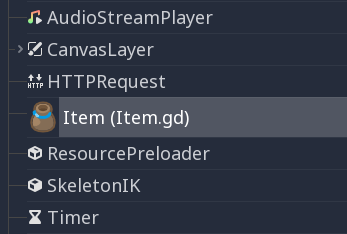
You can give your class a name to register it as a new type in Godot's
editor. For that, you use the class_name keyword. You can optionally use
the @icon annotation with a path to an image, to use it as an icon. Your
class will then appear with its new icon in the editor:
# item.gd

@icon("res://interface/icons/item.png")
class_name Item
extends Node
Tip
SVG images that are used as custom node icons should have the Editor > Scale With Editor Scale and Editor > Convert Icons With Editor Theme import options enabled. This allows icons to follow the editor's scale and theming settings if the icons are designed with the same color palette as Godot's own icons.
Zde je příklad souboru třídy:
# Saved as a file named 'character.gd'.

class_name Character


var health = 5


func print_health():
    print(health)


func print_this_script_three_times():
    print(get_script())
    print(ResourceLoader.load("res://character.gd"))
    print(Character)
If you want to use extends too, you can keep both on the same line:
class_name MyNode extends Node
Named classes are globally registered, which means they become available to use
in other scripts without the need to load or preload them:
var player

func _ready():
    player = Character.new()
Poznámka
Godot initializes non-static variables every time you create an instance, and this includes arrays and dictionaries. This is in the spirit of thread safety, since scripts can be initialized in separate threads without the user knowing.
Varování
The Godot editor will hide these custom classes with names that begin with the prefix "Editor" in the 'Create New Node' or 'Create New Scene' dialog windows. The classes are available for instantiation at runtime via their class names, but are automatically hidden by the editor windows along with the built-in editor nodes used by the Godot editor.
Abstract classes and methods
Since Godot 4.5, you can define abstract classes and methods using
the @abstract annotation.
An abstract class is a class that cannot be instantiated directly. Instead, it is meant to be inherited by other classes. Attempting to instantiate an abstract class will result in an error.
An abstract method is a method that has no implementation. Therefore, a newline or a semicolon is expected after the function header. This defines a contract that inheriting classes must conform to, because the method signature must be compatible when overriding.
Inheriting classes must either provide implementations for all abstract methods, or the inheriting class must be marked as abstract. If a class has at least one abstract method (either its own or an unimplemented inherited one), then it must also be marked as abstract. However, the reverse is not true: an abstract class is allowed to have no abstract methods.
Tip
If you want to declare a method as optional to be overridden, you should use a non-abstract method and provide a default implementation.
For example, you could have an abstract class called Shape that defines
an abstract method called draw(). You can then create subclasses like Circle
and Square that implement the draw() method in their own way.
This allows you to define a common interface for all shapes without
having to implement all the details in the abstract class itself:
@abstract class Shape:
    @abstract func draw()

# This is a concrete (non-abstract) subclass of Shape.
# You **must** implement all abstract methods in concrete classes.
class Circle extends Shape:
    func draw():
        print("Drawing a circle.")

class Square extends Shape:
    func draw():
        print("Drawing a square.")
Both inner classes and classes created using class_name can be abstract.
This example creates two abstract classes, one of which is a subclass of another
abstract class:
@abstract
class_name AbstractClass
extends Node

@abstract class AbstractInnerClass:
    func _ready():
        pass

# This is an example of a concrete subclass of `AbstractInnerClass`.
# This class can be instantiated using `AbstractClass.ConcreteInnerClass.new()`
# in other scripts, even though it's part of an abstract `class_name` script.
class ConcreteInnerClass extends AbstractInnerClass:
    func _ready():
        print("Concrete class ready.")
Varování
Since an abstract class cannot be instantiated, it is not possible to attach an abstract class to a node. If you attempt to do so, the engine will print an error when running the scene:
Cannot set object script. Script '<path to script>' should not be abstract.
Unnamed classes can also be defined as abstract, the @abstract annotation
must precede extends:
@abstract
extends Node
Dědičnost
Třída (uložená jako soubor) může dědit z:
Globální třídy.
Dalšího souboru třídy.
Vnitřní třídy uvnitř jiného souboru třídy.
Vícenásobné dědění není povoleno.
Inheritance uses the extends keyword:
# Inherit/extend a globally available class.
extends SomeClass

# Inherit/extend a named class file.
extends "somefile.gd"

# Inherit/extend an inner class in another file.
extends "somefile.gd".SomeInnerClass
Poznámka
If inheritance is not explicitly defined, the class will default to inheriting RefCounted.
To check if a given instance inherits from a given class,
the is keyword can be used:
# Cache the enemy class.
const Enemy = preload("enemy.gd")

# [...]

# Use 'is' to check inheritance.
if entity is Enemy:
    entity.apply_damage()
To call a function in a super class (i.e. one extend-ed in your current
class), use the super keyword:
super(args)
This is especially useful because functions in extending classes replace
functions with the same name in their super classes. If you still want to
call them, you can use super:
func some_func(x):
    super(x) # Calls the same function on the super class.
If you need to call a different function from the super class, you can specify the function name with the attribute operator:
func overriding():
    return 0 # This overrides the method in the base class.

func dont_override():
    return super.overriding() # This calls the method as defined in the base class.
Varování
One of the common misconceptions is trying to override non-virtual engine methods
such as get_class(), queue_free(), etc. This is not supported for technical reasons.
In Godot 3, you can shadow engine methods in GDScript, and it will work if you call this method in GDScript. However, the engine will not execute your code if the method is called inside the engine on some event.
In Godot 4, even shadowing may not always work, as GDScript optimizes native method calls.
Therefore, we added the NATIVE_METHOD_OVERRIDE warning, which is treated as an error by default.
We strongly advise against disabling or ignoring the warning.
Note that this does not apply to virtual methods such as _ready(), _process() and others
(marked with the virtual qualifier in the documentation and the names start with an underscore).
These methods are specifically for customizing engine behavior and can be overridden in GDScript.
Signals and notifications can also be useful for these purposes.
Konstruktor třídy
The class constructor, called on class instantiation, is named _init. If you
want to call the base class constructor, you can also use the super syntax.
Note that every class has an implicit constructor that is always called
(defining the default values of class variables). super is used to call the
explicit constructor:
func _init(arg):
   super("some_default", arg) # Call the custom base constructor.
This is better explained through examples. Consider this scenario:
# state.gd (inherited class).
var entity = null
var message = null


func _init(e = null):
    entity = e


func enter(m):
    message = m


# idle.gd (inheriting class).
extends "state.gd"


func _init(e = null, m = null):
    super(e)
    # Do something with 'e'.
    message = m
Je třeba mít na paměti několik věcí:
If the inherited class (
state.gd) defines an_initconstructor that takes arguments (ein this case), then the inheriting class (idle.gd) must define_initas well and pass appropriate parameters to_initfromstate.gd.idle.gdcan have a different number of arguments than the base classstate.gd.In the example above,
epassed to thestate.gdconstructor is the sameepassed in toidle.gd.If
idle.gd's_initconstructor takes 0 arguments, it still needs to pass some value to thestate.gdbase class, even if it does nothing. This brings us to the fact that you can pass expressions to the base constructor as well, not just variables, e.g.:
# idle.gd

func _init():
    super(5)
Static constructor
A static constructor is a static function _static_init that is called automatically
when the class is loaded, after the static variables have been initialized:
static var my_static_var = 1

static func _static_init():
    my_static_var = 2
A static constructor cannot take arguments and must not return any value.
Vnitřní třídy
Soubor třídy může obsahovat vnitřní třídy. Vnitřní třídy se definují pomocí klíčového slova class. Jejich instance se vytváříí pomocí Jménotřídy.new().
# Inside a class file.

# An inner class in this class file.
class SomeInnerClass:
    var a = 5


    func print_value_of_a():
        print(a)


# This is the constructor of the class file's main class.
func _init():
    var c = SomeInnerClass.new()
    c.print_value_of_a()
Třídy jako zdroje
Classes stored as files are treated as GDScripts. They
must be loaded from disk to access them in other classes. This is done using
either the load or preload functions (see below). Instancing of a loaded
class resource is done by calling the new function on the class object:
# Load the class resource when calling load().
var MyClass = load("myclass.gd")

# Preload the class only once at compile time.
const MyClass = preload("myclass.gd")


func _init():
    var a = MyClass.new()
    a.some_function()
Exporty
Poznámka
Dokumentace o exportech byla přesunuta do GDScript exported properties.
Properties (setters and getters)
Sometimes, you want a class' member variable to do more than just hold data and actually perform some validation or computation whenever its value changes. It may also be desired to encapsulate its access in some way.
For this, GDScript provides a special syntax to define properties using the set and get
keywords after a variable declaration. Then you can define a code block that will be executed
when the variable is accessed or assigned.
Příklad:
var milliseconds: int = 0
var seconds: int:
    get:
        return milliseconds / 1000
    set(value):
        milliseconds = value * 1000
Poznámka
Unlike setget in previous Godot versions, set and get methods are always called (except as noted below),
even when accessed inside the same class (with or without prefixing with self.). This makes the behavior
consistent. If you need direct access to the value, use another variable for direct access and make the property
code use that name.
Alternative syntax
Also there is another notation to use existing class functions if you want to split the code from the variable declaration or you need to reuse the code across multiple properties (but you can't distinguish which property the setter/getter is being called for):
var my_prop:
    get = get_my_prop, set = set_my_prop
This can also be done in the same line:
var my_prop: get = get_my_prop, set = set_my_prop
The setter and getter must use the same notation, mixing styles for the same variable is not allowed.
Poznámka
You cannot specify type hints for inline setters and getters. This is done on purpose to reduce the boilerplate. If the variable is typed, then the setter's argument is automatically of the same type, and the getter's return value must match it. Separated setter/getter functions can have type hints, and the type must match the variable's type or be a wider type.
When setter/getter is not called
When a variable is initialized, the value of the initializer will be written directly to the variable.
Including if the @onready annotation is applied to the variable.
Using the variable's name to set it inside its own setter or to get it inside its own getter will directly access the underlying member, so it won't generate infinite recursion and saves you from explicitly declaring another variable:
signal changed(new_value)
var warns_when_changed = "some value":
    get:
        return warns_when_changed
    set(value):
        changed.emit(value)
        warns_when_changed = value
This also applies to the alternative syntax:
var my_prop: set = set_my_prop

func set_my_prop(value):
    my_prop = value # No infinite recursion.
Varování
The exception does not propagate to other functions called in the setter/getter. For example, the following code will cause an infinite recursion:
var my_prop:
    set(value):
        set_my_prop(value)

func set_my_prop(value):
    my_prop = value # Infinite recursion, since `set_my_prop()` is not the setter.
Tool mode
By default, scripts don't run inside the editor and only the exported
properties can be changed. In some cases, it is desired that they do run
inside the editor (as long as they don't execute game code or manually
avoid doing so). For this, the @tool annotation exists and must be
placed at the top of the file:
@tool
extends Button

func _ready():
    print("Hello")
Více informací naleznete v Running code in the editor.
Varování
Buďte opatrní při uvolňování uzlů pomocí queue_free() nebo free() ve skriptech nástrojů (zejména u vlastníka skriptu). Protože skripty nástrojů spouštějí svůj kód v editoru, může jejich nesprávné použití vést k pádu editoru.
Správa paměti
Godot implements reference counting to free certain instances that are no longer
used, instead of a garbage collector, or requiring purely manual management.
Any instance of the RefCounted class (or any class that inherits
it, such as Resource) will be freed automatically when no longer
in use. For an instance of any class that is not a RefCounted
(such as Node or the base Object type), it will
remain in memory until it is deleted with free() (or queue_free()
for Nodes).
Poznámka
If a Node is deleted via free() or queue_free(),
all of its children will also recursively be deleted.
To avoid reference cycles that can't be freed, a WeakRef function is provided for creating weak references, which allow access to the object without preventing a RefCounted from freeing. Here is an example:
extends Node

var my_file_ref

func _ready():
    var f = FileAccess.open("user://example_file.json", FileAccess.READ)
    my_file_ref = weakref(f)
    # the FileAccess class inherits RefCounted, so it will be freed when not in use

    # the WeakRef will not prevent f from being freed when other_node is finished
    other_node.use_file(f)

func _this_is_called_later():
    var my_file = my_file_ref.get_ref()
    if my_file:
        my_file.close()
Pokud se nepoužívají reference, lze ke kontrole, zda byl objekt uvolněn, použít příkaz is_instance_valid(instance).
Signály
Signály představují nástroj pro vyslání zprávy objektem tak, aby na ní mohly ostatní objekty reagovat. Chcete-li pro třídu vytvořit vlastní signály, použijte klíčové slovo signal.
extends Node


# A signal named health_depleted.
signal health_depleted
Poznámka
Signály představují mechanismus zpětného volání tzv. Callback. Plní také roli Pozorovatelů (Observers), což je běžný návrhový vzor. Další informace naleznete v tutoriálu Observer v elektronické knize Návrhové vzory ve hrách .
You can connect these signals to methods the same way you connect built-in signals of nodes like Button or RigidBody3D.
In the example below, we connect the health_depleted signal from a
Character node to a Game node. When the Character node emits the
signal, the game node's _on_character_health_depleted is called:
# game.gd

func _ready():
    var character_node = get_node('Character')
    character_node.health_depleted.connect(_on_character_health_depleted)


func _on_character_health_depleted():
    get_tree().reload_current_scene()
Spolu se signálem můžete vyslat libovolný počet argumentů.
Zde je příklad, kdy je to užitečné. Řekněme, že chceme mít na obrazovce ukazatel života, který bude reagovat na změny zdraví pomocí animace, ale zároveň v našem stromu scén chceme udržet uzly uživatelského rozhraní a hráče oddělené.
In our character.gd script, we define a health_changed signal and emit
it with Signal.emit(), and from
a Game node higher up our scene tree, we connect it to the Lifebar using
the Signal.connect() method:
# character.gd

...
signal health_changed


func take_damage(amount):
    var old_health = health
    health -= amount

    # We emit the health_changed signal every time the
    # character takes damage.
    health_changed.emit(old_health, health)
...
# lifebar.gd

# Here, we define a function to use as a callback when the
# character's health_changed signal is emitted.

...
func _on_Character_health_changed(old_value, new_value):
    if old_value > new_value:
        progress_bar.modulate = Color.RED
    else:
        progress_bar.modulate = Color.GREEN

    # Imagine that `animate` is a user-defined function that animates the
    # bar filling up or emptying itself.
    progress_bar.animate(old_value, new_value)
...
V uzlu Game získáme uzly Character a Lifebar, pak připojíme Character, který signál vysílá, k přijemci, v tomto případě k uzlu Lifebar.
# game.gd

func _ready():
    var character_node = get_node('Character')
    var lifebar_node = get_node('UserInterface/Lifebar')

    character_node.health_changed.connect(lifebar_node._on_Character_health_changed)
To umožňuje uzlu "Lifebar" reagovat na změny stavu zdraví, aniž by byl součástí uzlu "Character".
You can write optional argument names in parentheses after the signal's definition:
# Defining a signal that forwards two arguments.
signal health_changed(old_value, new_value)
These arguments show up in the editor's Signals dock, and Godot can use them to generate callback functions for you. However, you can still emit any number of arguments when you emit signals; it's up to you to emit the correct values.
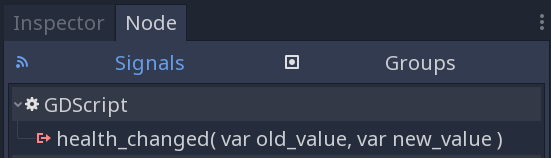
You can also create copies of GDScript Callable objects which accept additional arguments using Callable.bind(). This allows you to add extra information to the connection if the emitted signal itself doesn't give you access to all the data that you need.
When the signal is emitted, the callback method receives the bound values, in addition to those provided by the signal.
Building on the example above, let's say we want to display a log of the damage
taken by each character on the screen, like Player1 took 22 damage.. The
health_changed signal doesn't give us the name of the character that took
damage. So when we connect the signal to the in-game console, we can add the
character's name using the bind method:
# game.gd

func _ready():
    var character_node = get_node('Character')
    var battle_log_node = get_node('UserInterface/BattleLog')

    character_node.health_changed.connect(battle_log_node._on_Character_health_changed.bind(character_node.name))
Our BattleLog node receives each bound element as an extra argument:
# battle_log.gd

func _on_Character_health_changed(old_value, new_value, character_name):
    if not new_value <= old_value:
        return

    var damage = old_value - new_value
    label.text += character_name + " took " + str(damage) + " damage."
Awaiting signals or coroutines
The await keyword can be used to create coroutines
which wait until a signal is emitted before continuing execution. Using the await keyword with a signal or a
call to a function that is also a coroutine will immediately return the control to the caller. When the signal is
emitted (or the called coroutine finishes), it will resume execution from the point on where it stopped.
For example, to stop execution until the user presses a button, you can do something like this:
func wait_confirmation():
    print("Prompting user")
    await $Button.button_up # Waits for the button_up signal from Button node.
    print("User confirmed")
    return true
In this case, the wait_confirmation becomes a coroutine, which means that the caller also needs to await it:
func request_confirmation():
    print("Will ask the user")
    var confirmed = await wait_confirmation()
    if confirmed:
        print("User confirmed")
    else:
        print("User cancelled")
Note that requesting a coroutine's return value without await will trigger an error:
func wrong():
    var confirmed = wait_confirmation() # Will give an error.
However, if you don't depend on the result, you can just call it asynchronously, which won't stop execution and won't make the current function a coroutine:
func okay():
    wait_confirmation()
    print("This will be printed immediately, before the user press the button.")
If you use await with an expression that isn't a signal nor a coroutine, the value will be returned immediately and the function won't give the control back to the caller:
func no_wait():
    var x = await get_five()
    print("This doesn't make this function a coroutine.")

func get_five():
    return 5
This also means that returning a signal from a function that isn't a coroutine will make the caller await that signal:
func get_signal():
    return $Button.button_up

func wait_button():
    await get_signal()
    print("Button was pressed")
Poznámka
Unlike yield in previous Godot versions, you cannot obtain the function state object.
This is done to ensure type safety.
With this type safety in place, a function cannot say that it returns an int while it actually returns a function state object
during runtime.
You can store the arguments passed to the signal's parameters. If there is only one parameter, the awaited value will have the same type as the argument:
func toggled():
    var signal_args = await $Button.toggled
    assert(typeof(signal_args) == TYPE_BOOL)
If there is more than one parameter, the awaited value will be of type Array:
func request_completed():
    var signal_args = await $HTTPRequest.request_completed
    assert(typeof(signal_args) == TYPE_ARRAY)
Otherwise, the awaited value will be null:
func button_up():
    var signal_args = await $Button.button_up
    assert(signal_args == null)
Klíčové slovo Assert
Klíčové slovo assert lze použít ke kontrole podmínek při ladění . Při ostatních sestaveních jsou tato tvrzení ignorována. To znamená, že výraz předaný jako argument nebude v projektu exportovaném v režimu release vyhodnocován. Z tohoto důvodu nesmí aserce obsahovat výrazy, které mají side effects. Jinak by se chování skriptu lišilo v závislosti na tom, zda je či není projekt sestavován pro ladění .
# Check that 'i' is 0. If 'i' is not 0, an assertion error will occur.
assert(i == 0)
Při spuštění projektu z editoru se projekt pozastaví, pokud dojde k chybě příkazu assert.
You can optionally pass a custom error message to be shown if the assertion fails:
assert(enemy_power < 256, "Enemy is too powerful!")
Komentáře
Cokoli od ''#'' do konce řádku je ignorováno a je považováno za komentář.
# This is a comment.Tip
In the Godot script editor, special keywords are highlighted within comments to bring the user's attention to specific comments:
Critical (appears in red):
ALERT,ATTENTION,CAUTION,CRITICAL,DANGER,SECURITYWarning (appears in yellow):
BUG,DEPRECATED,FIXME,HACK,TASK,TBD,TODO,WARNINGNotice (appears in green):
INFO,NOTE,NOTICE,TEST,TESTINGThese keywords are case-sensitive, so they must be written in uppercase for them to be recognized:
The list of highlighted keywords and their colors can be changed in the Text Editor > Theme > Comment Markers section of the Editor Settings.
Use two hash symbols (
##) instead of one (#) to add a documentation comment, which will appear in the script documentation and in the inspector description of an exported variable. Documentation comments must be placed directly above a documentable item (such as a member variable), or at the top of a file. Dedicated formatting options are also available. See GDScript documentation comments for details.