Attention: Here be dragons
This is the latest
(unstable) version of this documentation, which may document features
not available in or compatible with released stable versions of Godot.
Checking the stable version of the documentation...
Tween
繼承: RefCounted < Object
通過腳本進行通用動畫的羽量級物件,使用 Tweener。
說明
Tweens are mostly useful for animations requiring a numerical property to be interpolated over a range of values. The name tween comes from in-betweening, an animation technique where you specify keyframes and the computer interpolates the frames that appear between them. Animating something with a Tween is called tweening.
Tween is more suited than AnimationPlayer for animations where you don't know the final values in advance. For example, interpolating a dynamically-chosen camera zoom value is best done with a Tween; it would be difficult to do the same thing with an AnimationPlayer node. Tweens are also more light-weight than AnimationPlayer, so they are very much suited for simple animations or general tasks that don't require visual tweaking provided by the editor. They can be used in a "fire-and-forget" manner for some logic that normally would be done by code. You can e.g. make something shoot periodically by using a looped CallbackTweener with a delay.
A Tween can be created by using either SceneTree.create_tween() or Node.create_tween(). Tweens created manually (i.e. by using Tween.new()) are invalid and can't be used for tweening values.
A tween animation is created by adding Tweeners to the Tween object, using tween_property(), tween_interval(), tween_callback(), tween_method(), tween_subtween(), or tween_await():
var tween = get_tree().create_tween()
tween.tween_property($Sprite, "modulate", Color.RED, 1.0)
tween.tween_property($Sprite, "scale", Vector2(), 1.0)
tween.tween_callback($Sprite.queue_free)
Tween tween = GetTree().CreateTween();
tween.TweenProperty(GetNode("Sprite"), "modulate", Colors.Red, 1.0f);
tween.TweenProperty(GetNode("Sprite"), "scale", Vector2.Zero, 1.0f);
tween.TweenCallback(Callable.From(GetNode("Sprite").QueueFree));
This sequence will make the $Sprite node turn red, then shrink, before finally calling Node.queue_free() to free the sprite. Tweeners are executed one after another by default. This behavior can be changed using parallel() and set_parallel().
When a Tweener is created with one of the tween_* methods, a chained method call can be used to tweak the properties of this Tweener. For example, if you want to set a different transition type in the above example, you can use set_trans():
var tween = get_tree().create_tween()
tween.tween_property($Sprite, "modulate", Color.RED, 1.0).set_trans(Tween.TRANS_SINE)
tween.tween_property($Sprite, "scale", Vector2(), 1.0).set_trans(Tween.TRANS_BOUNCE)
tween.tween_callback($Sprite.queue_free)
Tween tween = GetTree().CreateTween();
tween.TweenProperty(GetNode("Sprite"), "modulate", Colors.Red, 1.0f).SetTrans(Tween.TransitionType.Sine);
tween.TweenProperty(GetNode("Sprite"), "scale", Vector2.Zero, 1.0f).SetTrans(Tween.TransitionType.Bounce);
tween.TweenCallback(Callable.From(GetNode("Sprite").QueueFree));
Most of the Tween methods can be chained this way too. In the following example the Tween is bound to the running script's node and a default transition is set for its Tweeners:
var tween = get_tree().create_tween().bind_node(self).set_trans(Tween.TRANS_ELASTIC)
tween.tween_property($Sprite, "modulate", Color.RED, 1.0)
tween.tween_property($Sprite, "scale", Vector2(), 1.0)
tween.tween_callback($Sprite.queue_free)
var tween = GetTree().CreateTween().BindNode(this).SetTrans(Tween.TransitionType.Elastic);
tween.TweenProperty(GetNode("Sprite"), "modulate", Colors.Red, 1.0f);
tween.TweenProperty(GetNode("Sprite"), "scale", Vector2.Zero, 1.0f);
tween.TweenCallback(Callable.From(GetNode("Sprite").QueueFree));
Another interesting use for Tweens is animating arbitrary sets of objects:
var tween = create_tween()
for sprite in get_children():
    tween.tween_property(sprite, "position", Vector2(0, 0), 1.0)
Tween tween = CreateTween();
foreach (Node sprite in GetChildren())
    tween.TweenProperty(sprite, "position", Vector2.Zero, 1.0f);
In the example above, all children of a node are moved one after another to position (0, 0).
You should avoid using more than one Tween per object's property. If two or more tweens animate one property at the same time, the last one created will take priority and assign the final value. If you want to interrupt and restart an animation, consider assigning the Tween to a variable:
var tween
func animate():
    if tween:
        tween.kill() # Abort the previous animation.
    tween = create_tween()
private Tween _tween;

public void Animate()
{
    if (_tween != null)
        _tween.Kill(); // Abort the previous animation
    _tween = CreateTween();
}
Some Tweeners use transitions and eases. The first accepts a TransitionType constant, and refers to the way the timing of the animation is handled (see easings.net for some examples). The second accepts an EaseType constant, and controls where the trans_type is applied to the interpolation (in the beginning, the end, or both). If you don't know which transition and easing to pick, you can try different TransitionType constants with EASE_IN_OUT, and use the one that looks best.
Tween easing and transition types cheatsheet
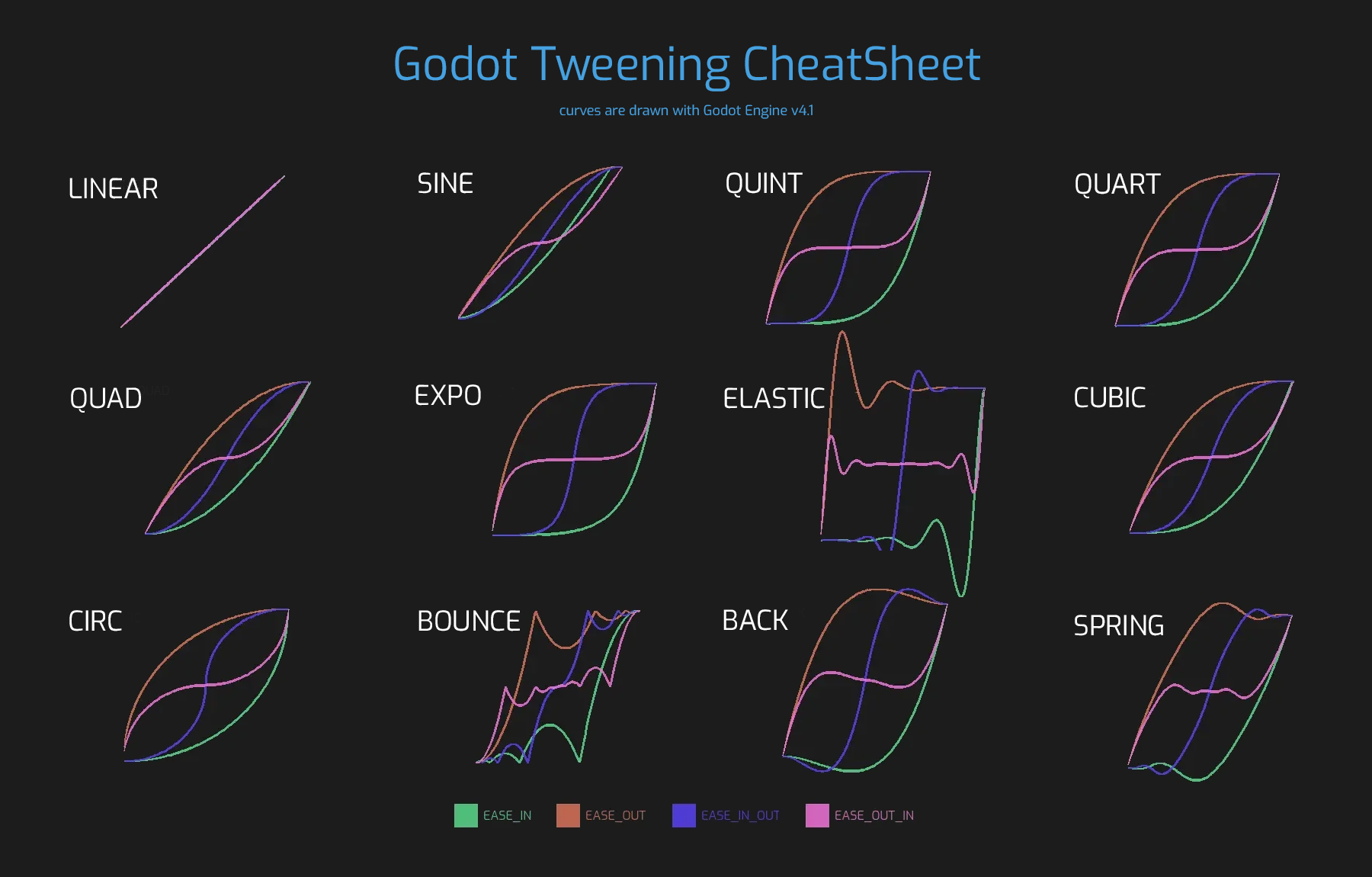
Note: Tweens are not designed to be reused and trying to do so results in an undefined behavior. Create a new Tween for each animation and every time you replay an animation from start. Keep in mind that Tweens start immediately, so only create a Tween when you want to start animating.
Note: The tween is processed after all of the nodes in the current frame, i.e. node's Node._process() method would be called before the tween (or Node._physics_process() depending on the value passed to set_process_mode()).
方法
chain() |
|
custom_step(delta: float) |
|
get_loops_left() const |
|
get_total_elapsed_time() const |
|
has_tweeners() const |
|
interpolate_value(initial_value: Variant, delta_value: Variant, elapsed_time: float, duration: float, trans_type: TransitionType, ease_type: EaseType) static |
|
is_valid() |
|
void |
kill() |
parallel() |
|
void |
pause() |
void |
play() |
set_ignore_time_scale(ignore: bool = true) |
|
set_parallel(parallel: bool = true) |
|
set_pause_mode(mode: TweenPauseMode) |
|
set_process_mode(mode: TweenProcessMode) |
|
set_speed_scale(speed: float) |
|
set_trans(trans: TransitionType) |
|
void |
stop() |
tween_await(signal: Signal) |
|
tween_callback(callback: Callable) |
|
tween_interval(time: float) |
|
tween_method(method: Callable, from: Variant, to: Variant, duration: float) |
|
tween_property(object: Object, property: NodePath, final_val: Variant, duration: float) |
|
tween_subtween(subtween: Tween) |
訊號
finished() 🔗
該 Tween 完成所有補間時發出。該 Tween 設為無限迴圈時不會發出(見 set_loops())。
loop_finished(loop_count: int) 🔗
完成一次迴圈時觸發(見 set_loops()),會提供該迴圈的索引號。這個訊號不會在最後一次迴圈後觸發,這種情況請使用 finished 代替。
完成該 Tween 的一步完成後觸發,會提供這一步的索引號。一步指的是單個 Tweener 或一組並存執行的 Tweener。
列舉
enum TweenProcessMode: 🔗
TweenProcessMode TWEEN_PROCESS_PHYSICS = 0
該 Tween 在每個物理影格之後進行更新(見 Node._physics_process())。
TweenProcessMode TWEEN_PROCESS_IDLE = 1
該 Tween 在每個處理影格之後進行更新(見 Node._process())。
enum TweenPauseMode: 🔗
TweenPauseMode TWEEN_PAUSE_BOUND = 0
如果該 Tween 綁定了節點,它將在該節點可以處理時進行處理(見 Node.process_mode)。否則與 TWEEN_PAUSE_STOP 相同。
TweenPauseMode TWEEN_PAUSE_STOP = 1
如果 SceneTree 被暫停,則該 Tween 也會暫停。
TweenPauseMode TWEEN_PAUSE_PROCESS = 2
無論 SceneTree 是否被暫停,該 Tween 都會處理。
enum TransitionType: 🔗
TransitionType TRANS_LINEAR = 0
動畫是線性插值的。
TransitionType TRANS_SINE = 1
動畫使用正弦函式進行插值。
TransitionType TRANS_QUINT = 2
動畫使用五次(5 次方)函式進行插值。
TransitionType TRANS_QUART = 3
動畫使用四次(4 次方)函式進行插值。
TransitionType TRANS_QUAD = 4
動畫使用二次(2 次方)函式進行插值。
TransitionType TRANS_EXPO = 5
動畫使用指數(x 次方)函式進行插值。
TransitionType TRANS_ELASTIC = 6
動畫彈性插值,在邊緣擺動。
TransitionType TRANS_CUBIC = 7
動畫使用三次(3 次方)函式進行插值。
TransitionType TRANS_CIRC = 8
動畫使用平方根的函式進行插值。
TransitionType TRANS_BOUNCE = 9
動畫通過在末尾彈跳插值。
TransitionType TRANS_BACK = 10
動畫在末端重播插值。
TransitionType TRANS_SPRING = 11
動畫像朝著末尾的彈簧一樣插值。
enum EaseType: 🔗
EaseType EASE_IN = 0
插值開始緩慢,並加速接近結束。
EaseType EASE_OUT = 1
插值開始快速,接近結束時減慢。
EaseType EASE_IN_OUT = 2
EASE_IN 和 EASE_OUT 的組合。兩端的插值最慢。
EaseType EASE_OUT_IN = 3
方法說明
將這個 Tween 綁定到給定的 node 上。Tween 是由 SceneTree 直接處理的,所以不依賴被動畫的節點運作。將該 Tween 綁定到某個 Node 後,該對象不在樹中時該 Tween 就會暫停動畫,綁定對象被釋放時該 Tween 會被自動銷毀。另外,TWEEN_PAUSE_BOUND 會讓暫停行為依賴於綁定的節點。
使用 Node.create_tween() 來建立並綁定 Tween 更簡單。
用於在使用 true 呼叫 set_parallel() 後,將兩個 Tweener 串聯。
var tween = create_tween().set_parallel(true)
tween.tween_property(...)
tween.tween_property(...) # 會和上一條並存執行。
tween.chain().tween_property(...) # 會在前兩條完成後執行。
Tween tween = CreateTween().SetParallel(true);
tween.TweenProperty(...);
tween.TweenProperty(...); // 會和上一條並存執行。
tween.Chain().TweenProperty(...); // 會在前兩條完成後執行。
bool custom_step(delta: float) 🔗
使用給定的差異量秒數 delta 處理該 Tween。最常見的用法是在該 Tween 暫停時對其進行手動控制。也可用於立即停止該 Tween 的動畫,將 delta 設得比完整長度更大即可。
如果該 Tween 仍然有未完成的 Tweener,則返回 true。
返回該 Tween 所剩的迴圈數(見 set_loops())。返回 -1 表示 Tween 無限迴圈,返回 0 表示 Tween 已結束。
float get_total_elapsed_time() const 🔗
返回該 Tween 已進行動畫的總時長(即自開始以來經過的時間,不計算暫停等時間),單位為秒。時長會受到 set_speed_scale() 影響,stop() 會將其重設為 0。
注意:由於時長是由影格的差異量時間累計而來的,該 Tween 完成動畫後所返回的時長會比 Tween 的實際時長略大。
Returns true if any Tweener has been added to the Tween and the Tween is valid. Useful when tweeners are added dynamically and the tween can end up empty. Killing an empty tween before it starts will prevent errors.
Variant interpolate_value(initial_value: Variant, delta_value: Variant, elapsed_time: float, duration: float, trans_type: TransitionType, ease_type: EaseType) static 🔗
不想使用 Tween 進行動畫時,可以使用這個方法進行手動插值。與 @GlobalScope.lerp() 類似,但支援自訂過渡和緩動。
initial_value 為插值的起始值。
delta_value 為插值的變化值,即等於 final_value - initial_value。
elapsed_time 為插值開始後所經過的秒數,用於控制插值的位置。例如,等於 duration 的一半時,插值後的值位於初始值和最終值的一半。這個值也可以比 duration 大或者比 0 小,此時會進行外插。
duration 為插值的總時長。
注意:如果 duration 等於 0,那麼無論提供的 elapsed_time 為多少,該方法返回的始終是最終值。
返回該 Tween 目前是否正在執行,即未暫停且未完成。
返回該 Tween 是否有效。有效的 Tween 是由場景樹包含的 Tween(即 SceneTree.get_processed_tweens() 返回的陣列中包含這個 Tween)。Tween 失效的情況有:補間完成、被銷毀、使用 Tween.new() 建立。無效的 Tween 不能追加 Tweener。
void kill() 🔗
中止所有補間操作,並使該 Tween 無效。
Makes the next Tweener run parallelly to the previous one.
var tween = create_tween()
tween.tween_property(...)
tween.parallel().tween_property(...)
tween.parallel().tween_property(...)
Tween tween = CreateTween();
tween.TweenProperty(...);
tween.Parallel().TweenProperty(...);
tween.Parallel().TweenProperty(...);
All Tweeners in the example will run at the same time.
You can make the Tween parallel by default by using set_parallel().
void pause() 🔗
暫停補間。可使用 play() 恢復動畫。
注意:如果一個Tween被暫停並且沒有綁定到任何節點,它將無限期地存在,直到手動啟動或失效。如果遺失了對此類 Tween 的引用,可以使用 SceneTree.get_processed_tweens() 檢索它。
void play() 🔗
恢復已暫停或已停止的 Tween。
Tween set_ease(ease: EaseType) 🔗
Sets the default ease type for PropertyTweeners and MethodTweeners appended after this method.
Before this method is called, the default ease type is EASE_IN_OUT.
var tween = create_tween()
tween.tween_property(self, "position", Vector2(300, 0), 0.5) # Uses EASE_IN_OUT.
tween.set_ease(Tween.EASE_IN)
tween.tween_property(self, "rotation_degrees", 45.0, 0.5) # Uses EASE_IN.
Tween tween = CreateTween();
tween.TweenProperty(this, "position", new Vector2(300, 0), 0.5); // Uses EaseType.InOut.
tween.SetEase(Tween.EaseType.In);
tween.TweenProperty(this, "rotation_degrees", 45.0, 0.5); // Uses EaseType.In.
Tween set_ignore_time_scale(ignore: bool = true) 🔗
If ignore is true, the tween will ignore Engine.time_scale and update with the real, elapsed time. This affects all Tweeners and their delays. Default value is false.
Tween set_loops(loops: int = 0) 🔗
這只該補間序列的重複次數,即 set_loops(2) 會讓動畫執行兩次。
呼叫這個方法時如果不帶參數,那麼該 Tween 會無限執行,直到被 kill() 銷毀、該 Tween 綁定的節點被釋放、或者所有進行動畫的物件都被釋放(無法再進行任何動畫)。
警告:使用無限迴圈時請一定要加入一些時長/延遲。為了防止遊戲凍結,0 時長的迴圈動畫(例如單個不帶延遲的 CallbackTweener)會在迴圈若干次後停止,造成出乎預料的結果。如果 Tween 的生命期依賴於某個節點,請一定使用 bind_node()。
Tween set_parallel(parallel: bool = true) 🔗
If parallel is true, the Tweeners appended after this method will by default run simultaneously, as opposed to sequentially.
Note: Just like with parallel(), the tweener added right before this method will also be part of the parallel step.
tween.tween_property(self, "position", Vector2(300, 0), 0.5)
tween.set_parallel()
tween.tween_property(self, "modulate", Color.GREEN, 0.5) # Runs together with the position tweener.
Tween set_pause_mode(mode: TweenPauseMode) 🔗
Determines the behavior of the Tween when the SceneTree is paused.
Default value is TWEEN_PAUSE_BOUND.
Tween set_process_mode(mode: TweenProcessMode) 🔗
決定該 Tween 應當在處理影格(見 Node._process())還是物理影格(見 Node._physics_process())執行。
預設值為 TWEEN_PROCESS_IDLE。
Tween set_speed_scale(speed: float) 🔗
補間的速度縮放。影響所有 Tweener 及其延遲。
Tween set_trans(trans: TransitionType) 🔗
Sets the default transition type for PropertyTweeners and MethodTweeners appended after this method.
Before this method is called, the default transition type is TRANS_LINEAR.
var tween = create_tween()
tween.tween_property(self, "position", Vector2(300, 0), 0.5) # Uses TRANS_LINEAR.
tween.set_trans(Tween.TRANS_SINE)
tween.tween_property(self, "rotation_degrees", 45.0, 0.5) # Uses TRANS_SINE.
void stop() 🔗
Stops the tweening and resets the Tween to its initial state. This will not remove any appended Tweeners.
Note: This does not reset targets of PropertyTweeners to their values when the Tween first started.
var tween = create_tween()

# Will move from 0 to 500 over 1 second.
position.x = 0.0
tween.tween_property(self, "position:x", 500, 1.0)

# Will be at (about) 250 when the timer finishes.
await get_tree().create_timer(0.5).timeout

# Will now move from (about) 250 to 500 over 1 second,
# thus at half the speed as before.
tween.stop()
tween.play()
Note: If a Tween is stopped and not bound to any node, it will exist indefinitely until manually started or invalidated. If you lose a reference to such Tween, you can retrieve it using SceneTree.get_processed_tweens().
AwaitTweener tween_await(signal: Signal) 🔗
Creates and appends an AwaitTweener. This method can be used to await a signal to be emitted and create asynchronous animations or cutscenes.
The animation will not progress to the next step until the awaited signal is emitted or the connection becomes invalid (e.g. as a result of freeing the target object). If you know that the emission may not happen, use AwaitTweener.set_timeout().
Note: The awaited signal should be emitted during the step when AwaitTweener is active.
Example: An object launches itself and explodes upon collision or after 4 seconds.
var tween = create_tween()
tween.tween_callback(launch)
tween.tween_await(collided).set_timeout(4.0)
tween.tween_callback(explode)
Example: A character walks to a specific point, says some lines and walks back when the player closes the message box.
var tween = create_tween()
tween.tween_callback(walk_to.bind(600.0))
tween.tween_await(destination_reached)
tween.tween_callback(say_dialogue.bind("Good day, sir!"))
tween.tween_await(dialogue_closed)
tween.tween_callback(walk_to.bind(0.0))
Note: If you are awaiting a signal from a callback called in the same Tween, make sure the signal is emitted after the await starts. If it can't be reasonably guaranteed, you can await and emit in the same step:
var tween = create_tween()
tween.tween_await(signal)
tween.parallel().tween_callback(method_that_emits_signal)
CallbackTweener tween_callback(callback: Callable) 🔗
Creates and appends a CallbackTweener. This method can be used to call an arbitrary method in any object. Use Callable.bind() to bind additional arguments for the call.
Example: Object that keeps shooting every 1 second:
var tween = get_tree().create_tween().set_loops()
tween.tween_callback(shoot).set_delay(1.0)
Tween tween = GetTree().CreateTween().SetLoops();
tween.TweenCallback(Callable.From(Shoot)).SetDelay(1.0f);
Example: Turning a sprite red and then blue, with 2 second delay:
var tween = get_tree().create_tween()
tween.tween_callback($Sprite.set_modulate.bind(Color.RED)).set_delay(2)
tween.tween_callback($Sprite.set_modulate.bind(Color.BLUE)).set_delay(2)
Tween tween = GetTree().CreateTween();
Sprite2D sprite = GetNode<Sprite2D>("Sprite");
tween.TweenCallback(Callable.From(() => sprite.Modulate = Colors.Red)).SetDelay(2.0f);
tween.TweenCallback(Callable.From(() => sprite.Modulate = Colors.Blue)).SetDelay(2.0f);
IntervalTweener tween_interval(time: float) 🔗
Creates and appends an IntervalTweener. This method can be used to create delays in the tween animation, as an alternative to using the delay in other Tweeners, or when there's no animation (in which case the Tween acts as a timer). time is the length of the interval, in seconds.
Example: Creating an interval in code execution:
# ... some code
await create_tween().tween_interval(2).finished
# ... more code
// ... some code
await ToSignal(CreateTween().TweenInterval(2.0f), Tween.SignalName.Finished);
// ... more code
Example: Creating an object that moves back and forth and jumps every few seconds:
var tween = create_tween().set_loops()
tween.tween_property($Sprite, "position:x", 200.0, 1.0).as_relative()
tween.tween_callback(jump)
tween.tween_interval(2)
tween.tween_property($Sprite, "position:x", -200.0, 1.0).as_relative()
tween.tween_callback(jump)
tween.tween_interval(2)
Tween tween = CreateTween().SetLoops();
tween.TweenProperty(GetNode("Sprite"), "position:x", 200.0f, 1.0f).AsRelative();
tween.TweenCallback(Callable.From(Jump));
tween.TweenInterval(2.0f);
tween.TweenProperty(GetNode("Sprite"), "position:x", -200.0f, 1.0f).AsRelative();
tween.TweenCallback(Callable.From(Jump));
tween.TweenInterval(2.0f);
MethodTweener tween_method(method: Callable, from: Variant, to: Variant, duration: float) 🔗
Creates and appends a MethodTweener. This method is similar to a combination of tween_callback() and tween_property(). It calls a method over time with a tweened value provided as an argument. The value is tweened between from and to over the time specified by duration, in seconds. Use Callable.bind() to bind additional arguments for the call. You can use MethodTweener.set_ease() and MethodTweener.set_trans() to tweak the easing and transition of the value or MethodTweener.set_delay() to delay the tweening.
Example: Making a 3D object look from one point to another point:
var tween = create_tween()
tween.tween_method(look_at.bind(Vector3.UP), Vector3(-1, 0, -1), Vector3(1, 0, -1), 1.0) # The look_at() method takes up vector as second argument.
Tween tween = CreateTween();
tween.TweenMethod(Callable.From((Vector3 target) => LookAt(target, Vector3.Up)), new Vector3(-1.0f, 0.0f, -1.0f), new Vector3(1.0f, 0.0f, -1.0f), 1.0f); // Use lambdas to bind additional arguments for the call.
Example: Setting the text of a Label, using an intermediate method and after a delay:
func _ready():
    var tween = create_tween()
    tween.tween_method(set_label_text, 0, 10, 1.0).set_delay(1.0)

func set_label_text(value: int):
    $Label.text = "Counting " + str(value)
public override void _Ready()
{
    base._Ready();

    Tween tween = CreateTween();
    tween.TweenMethod(Callable.From<int>(SetLabelText), 0.0f, 10.0f, 1.0f).SetDelay(1.0f);
}

private void SetLabelText(int value)
{
    GetNode<Label>("Label").Text = $"Counting {value}";
}
PropertyTweener tween_property(object: Object, property: NodePath, final_val: Variant, duration: float) 🔗
Creates and appends a PropertyTweener. This method tweens a property of an object between an initial value and final_val in a span of time equal to duration, in seconds. The initial value by default is the property's value at the time the tweening of the PropertyTweener starts.
var tween = create_tween()
tween.tween_property($Sprite, "position", Vector2(100, 200), 1.0)
tween.tween_property($Sprite, "position", Vector2(200, 300), 1.0)
Tween tween = CreateTween();
tween.TweenProperty(GetNode("Sprite"), "position", new Vector2(100.0f, 200.0f), 1.0f);
tween.TweenProperty(GetNode("Sprite"), "position", new Vector2(200.0f, 300.0f), 1.0f);
will move the sprite to position (100, 200) and then to (200, 300). If you use PropertyTweener.from() or PropertyTweener.from_current(), the starting position will be overwritten by the given value instead. See other methods in PropertyTweener to see how the tweening can be tweaked further.
Note: You can find the correct property name by hovering over the property in the Inspector. You can also provide the components of a property directly by using "property:component" (eg. position:x), where it would only apply to that particular component.
Example: Moving an object twice from the same position, with different transition types:
var tween = create_tween()
tween.tween_property($Sprite, "position", Vector2.RIGHT * 300, 1.0).as_relative().set_trans(Tween.TRANS_SINE)
tween.tween_property($Sprite, "position", Vector2.RIGHT * 300, 1.0).as_relative().from_current().set_trans(Tween.TRANS_EXPO)
Tween tween = CreateTween();
tween.TweenProperty(GetNode("Sprite"), "position", Vector2.Right * 300.0f, 1.0f).AsRelative().SetTrans(Tween.TransitionType.Sine);
tween.TweenProperty(GetNode("Sprite"), "position", Vector2.Right * 300.0f, 1.0f).AsRelative().FromCurrent().SetTrans(Tween.TransitionType.Expo);
SubtweenTweener tween_subtween(subtween: Tween) 🔗
Creates and appends a SubtweenTweener. This method can be used to nest subtween within this Tween, allowing for the creation of more complex and composable sequences.
# Subtween will rotate the object.
var subtween = create_tween()
subtween.tween_property(self, "rotation_degrees", 45.0, 1.0)
subtween.tween_property(self, "rotation_degrees", 0.0, 1.0)

# Parent tween will execute the subtween as one of its steps.
var tween = create_tween()
tween.tween_property(self, "position:x", 500, 3.0)
tween.tween_subtween(subtween)
tween.tween_property(self, "position:x", 300, 2.0)
Note: The methods pause(), stop(), and set_loops() can cause the parent Tween to get stuck on the subtween step; see the documentation for those methods for more information.
Note: The pause and process modes set by set_pause_mode() and set_process_mode() on subtween will be overridden by the parent Tween's settings.