プレイヤーに死亡判定を設定する
敵キャラクターの上にジャンプすることで敵を倒すことはできるようになりましたが、プレイヤーはゲームオーバーになりません。これを修正していきましょう。
敵に殴られた場合と押し潰された場合とで、検知の仕方を変えたいです。プレイヤーが床を動いているときは死にますが、空中にいるときは倒されないようにしたいです。2種類の衝突を区別するためにベクトル演算ノードを使うことも可能です。しかし、ここでは代わりに Area3D ノードを使ってみましょう。こちらのノードのほうが Hitbox に適しています。
Areaノードによるヒットボックス
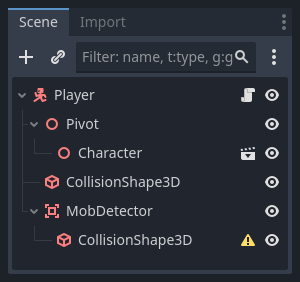
player.tscn シーンに戻り、新しい子ノード Area3D を追加します。MobDetector と名付け、 CollisionShape3D ノードをこれの子ノードとして追加します。
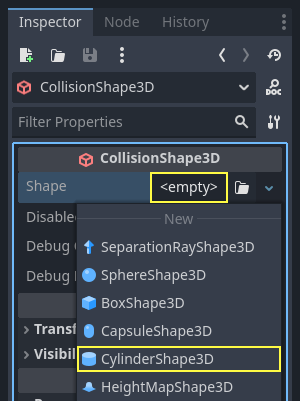
インスペクター(Inspector)で、これにシリンダーの形状を割り当てます。
ここでは、プレイヤーが地面やそれに近いところにいるときだけ衝突が起こるようにするトリックを使います。シリンダーの高さを小さくして、キャラクターの上部に移動させます。こうすることで、プレイヤーがジャンプしたときに、形状が高すぎて敵が衝突しにくくなります。
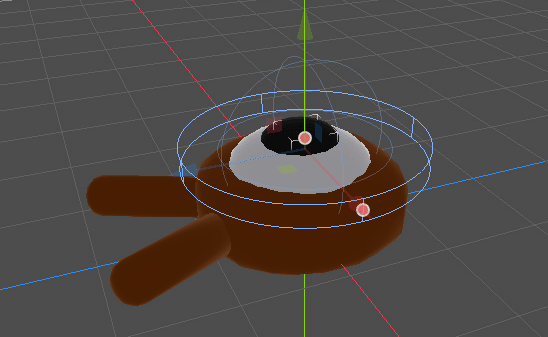
また、シリンダーの幅は球よりも広くします。こうすると、衝突してモンスターのコリジョンボックスの上に押し出される前に、プレイヤーは当たることになります。
シリンダーの幅が広いほど、プレイヤーは殺されやすくなります。
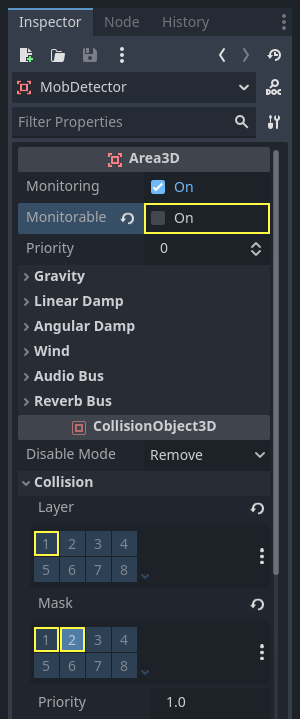
次に、MobDetectorノードを再度選択し、インスペクター(Inspector)で、Monitorableプロパティをオフにしてください。これにより、他の物理ノードがその領域を検出できないようにします。補完的なMonitoringプロパティにより、衝突を検出することができます。次に、Collision -> Layerでレイヤーを削除して、敵レイヤーにマスクを設定します。
領域は衝突を検出するとシグナルを発信します。この内の1つを``Player`` ノードへ接続します。 MobDetector を選択してから Inspector の Node タブに移動し、 body_entered シグナルをダブルクリックして Player に接続してください
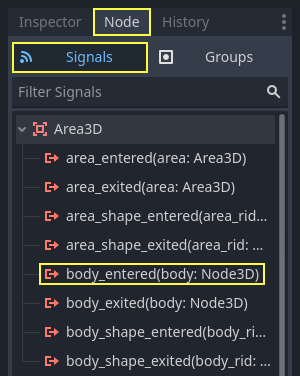
CharacterBody3D または RigidBody3D ノードが入った際に、 MobDetector は body_entered を発信します。"敵" の物理レイヤーをマスクするだけなので、 Mob ノードのみが検出されます.
コード的には、2つのことをします:ゲームを終了するために後で使用するシグナルを発信することと、プレーヤーを破壊することです。これらの操作をdie()関数でラップすることにより、コードに説明的なラベルを付けることができます。
# Emitted when the player was hit by a mob.
# Put this at the top of the script.
signal hit


# And this function at the bottom.
func die():
    hit.emit()
    queue_free()


func _on_mob_detector_body_entered(body):
    die()
// Don't forget to rebuild the project so the editor knows about the new signal.

// Emitted when the player was hit by a mob.
[Signal]
public delegate void HitEventHandler();

// ...

private void Die()
{
    EmitSignal(SignalName.Hit);
    QueueFree();
}

// We also specified this function name in PascalCase in the editor's connection window.
private void OnMobDetectorBodyEntered(Node3D body)
{
    Die();
}
ゲームオーバーを設定する
ゲームオーバーは Player の hit シグナルを使用して実装することができます。あとは Main ノードに接続して、シグナルに応じて MobTimer を止めるだけです。
main.tscn を開き、 Player ノードを選択し、 Node ドックで hit シグナルを Main ノードに接続します。
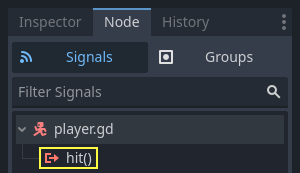
これで、 _on_player_hit() 関数の中で Timer を 取得し、停止することができます。
func _on_player_hit():
    $MobTimer.stop()
// We also specified this function name in PascalCase in the editor's connection window.
private void OnPlayerHit()
{
    GetNode<Timer>("MobTimer").Stop();
}
今ゲームを試しに実行してみると、プレイヤー自身が死ぬとモンスターの出現が止まり、残ったモンスターはスクリーンから去っていきます。
また、プレイヤーが死んだときに、今度はゲームがクラッシュしたりエラーが表示されたりしなくなったことにも注目してください。MobTimerを停止しているため、 _on_mob_timer_timeout() 関数が実行されなくなったのです。
また、敵がプレイヤーに衝突して死ぬかどうかは、 Player と Mob の衝突判定のサイズと位置によって決まることに注意してください。プレイヤーの感覚に合ったゲーム体験を実現するためには、衝突判定を動かしたり、サイズを変更したりして調整する必要があるかもしれません。
まだ少し荒削りではありますが、完璧な 3D ゲームが試作できたことを誇りに思ってください。
ここから、スコア表示やリトライするオプションを追加し、最小限のアニメーションでゲームをより生き生きとしたものにするにはどうすればよいのか、学習していきましょう。
ここまでのコードの確認
以下は Main ノード、 Mob ノード、 Player ノードのスクリプトです。あなたが書いたコードと比較したりチェックしたりするのに使ってください。
main.gd から見ていきましょう。
extends Node

@export var mob_scene: PackedScene


func _on_mob_timer_timeout():
    # Create a new instance of the Mob scene.
    var mob = mob_scene.instantiate()

    # Choose a random location on the SpawnPath.
    # We store the reference to the SpawnLocation node.
    var mob_spawn_location = get_node("SpawnPath/SpawnLocation")
    # And give it a random offset.
    mob_spawn_location.progress_ratio = randf()

    var player_position = $Player.position
    mob.initialize(mob_spawn_location.position, player_position)

    # Spawn the mob by adding it to the Main scene.
    add_child(mob)

func _on_player_hit():
    $MobTimer.stop()
using Godot;

public partial class Main : Node
{
    [Export]
    public PackedScene MobScene { get; set; }

    private void OnMobTimerTimeout()
    {
        // Create a new instance of the Mob scene.
        Mob mob = MobScene.Instantiate<Mob>();

        // Choose a random location on the SpawnPath.
        // We store the reference to the SpawnLocation node.
        var mobSpawnLocation = GetNode<PathFollow3D>("SpawnPath/SpawnLocation");
        // And give it a random offset.
        mobSpawnLocation.ProgressRatio = GD.Randf();

        Vector3 playerPosition = GetNode<Player>("Player").Position;
        mob.Initialize(mobSpawnLocation.Position, playerPosition);

        // Spawn the mob by adding it to the Main scene.
        AddChild(mob);
    }

    private void OnPlayerHit()
    {
        GetNode<Timer>("MobTimer").Stop();
    }
}
次に mob.gd を記載します。
extends CharacterBody3D

# Minimum speed of the mob in meters per second.
@export var min_speed = 10
# Maximum speed of the mob in meters per second.
@export var max_speed = 18

# Emitted when the player jumped on the mob
signal squashed

func _physics_process(_delta):
    move_and_slide()

# This function will be called from the Main scene.
func initialize(start_position, player_position):
    # We position the mob by placing it at start_position
    # and rotate it towards player_position, so it looks at the player.
    look_at_from_position(start_position, player_position, Vector3.UP)
    # Rotate this mob randomly within range of -45 and +45 degrees,
    # so that it doesn't move directly towards the player.
    rotate_y(randf_range(-PI / 4, PI / 4))

    # We calculate a random speed (integer)
    var random_speed = randi_range(min_speed, max_speed)
    # We calculate a forward velocity that represents the speed.
    velocity = Vector3.FORWARD * random_speed
    # We then rotate the velocity vector based on the mob's Y rotation
    # in order to move in the direction the mob is looking.
    velocity = velocity.rotated(Vector3.UP, rotation.y)

func _on_visible_on_screen_notifier_3d_screen_exited():
    queue_free()

func squash():
    squashed.emit()
    queue_free() # Destroy this node
using Godot;

public partial class Mob : CharacterBody3D
{
    // Emitted when the played jumped on the mob.
    [Signal]
    public delegate void SquashedEventHandler();

    // Minimum speed of the mob in meters per second
    [Export]
    public int MinSpeed { get; set; } = 10;
    // Maximum speed of the mob in meters per second
    [Export]
    public int MaxSpeed { get; set; } = 18;

    public override void _PhysicsProcess(double delta)
    {
        MoveAndSlide();
    }

    // This function will be called from the Main scene.
    public void Initialize(Vector3 startPosition, Vector3 playerPosition)
    {
        // We position the mob by placing it at startPosition
        // and rotate it towards playerPosition, so it looks at the player.
        LookAtFromPosition(startPosition, playerPosition, Vector3.Up);
        // Rotate this mob randomly within range of -45 and +45 degrees,
        // so that it doesn't move directly towards the player.
        RotateY((float)GD.RandRange(-Mathf.Pi / 4.0, Mathf.Pi / 4.0));

        // We calculate a random speed (integer)
        int randomSpeed = GD.RandRange(MinSpeed, MaxSpeed);
        // We calculate a forward velocity that represents the speed.
        Velocity = Vector3.Forward * randomSpeed;
        // We then rotate the velocity vector based on the mob's Y rotation
        // in order to move in the direction the mob is looking.
        Velocity = Velocity.Rotated(Vector3.Up, Rotation.Y);
    }

    public void Squash()
    {
        EmitSignal(SignalName.Squashed);
        QueueFree(); // Destroy this node
    }

    private void OnVisibilityNotifierScreenExited()
    {
        QueueFree();
    }
}
最後に、最も長いスクリプトの player.gd を記載しておきます:
extends CharacterBody3D

signal hit

# How fast the player moves in meters per second
@export var speed = 14
# The downward acceleration while in the air, in meters per second squared.
@export var fall_acceleration = 75
# Vertical impulse applied to the character upon jumping in meters per second.
@export var jump_impulse = 20
# Vertical impulse applied to the character upon bouncing over a mob
# in meters per second.
@export var bounce_impulse = 16

var target_velocity = Vector3.ZERO


func _physics_process(delta):
    # We create a local variable to store the input direction
    var direction = Vector3.ZERO

    # We check for each move input and update the direction accordingly
    if Input.is_action_pressed("move_right"):
        direction.x = direction.x + 1
    if Input.is_action_pressed("move_left"):
        direction.x = direction.x - 1
    if Input.is_action_pressed("move_back"):
        # Notice how we are working with the vector's x and z axes.
        # In 3D, the XZ plane is the ground plane.
        direction.z = direction.z + 1
    if Input.is_action_pressed("move_forward"):
        direction.z = direction.z - 1

    # Prevent diagonal moving fast af
    if direction != Vector3.ZERO:
        direction = direction.normalized()
        # Setting the basis property will affect the rotation of the node.
        $Pivot.basis = Basis.looking_at(direction)

    # Ground Velocity
    target_velocity.x = direction.x * speed
    target_velocity.z = direction.z * speed

    # Vertical Velocity
    if not is_on_floor(): # If in the air, fall towards the floor. Literally gravity
        target_velocity.y = target_velocity.y - (fall_acceleration * delta)

    # Jumping.
    if is_on_floor() and Input.is_action_just_pressed("jump"):
        target_velocity.y = jump_impulse

    # Iterate through all collisions that occurred this frame
    # in C this would be for(int i = 0; i < collisions.Count; i++)
    for index in range(get_slide_collision_count()):
        # We get one of the collisions with the player
        var collision = get_slide_collision(index)

        # If the collision is with ground
        if collision.get_collider() == null:
            continue

        # If the collider is with a mob
        if collision.get_collider().is_in_group("mob"):
            var mob = collision.get_collider()
            # we check that we are hitting it from above.
            if Vector3.UP.dot(collision.get_normal()) > 0.1:
                # If so, we squash it and bounce.
                mob.squash()
                target_velocity.y = bounce_impulse
                # Prevent further duplicate calls.
                break

    # Moving the Character
    velocity = target_velocity
    move_and_slide()

# And this function at the bottom.
func die():
    hit.emit()
    queue_free()

func _on_mob_detector_body_entered(body):
    die()
using Godot;

public partial class Player : CharacterBody3D
{
    // Emitted when the player was hit by a mob.
    [Signal]
    public delegate void HitEventHandler();

    // How fast the player moves in meters per second.
    [Export]
    public int Speed { get; set; } = 14;
    // The downward acceleration when in the air, in meters per second squared.
    [Export]
    public int FallAcceleration { get; set; } = 75;
    // Vertical impulse applied to the character upon jumping in meters per second.
    [Export]
    public int JumpImpulse { get; set; } = 20;
    // Vertical impulse applied to the character upon bouncing over a mob in meters per second.
    [Export]
    public int BounceImpulse { get; set; } = 16;

    private Vector3 _targetVelocity = Vector3.Zero;

    public override void _PhysicsProcess(double delta)
    {
        // We create a local variable to store the input direction.
        var direction = Vector3.Zero;

        // We check for each move input and update the direction accordingly.
        if (Input.IsActionPressed("move_right"))
        {
            direction.X += 1.0f;
        }
        if (Input.IsActionPressed("move_left"))
        {
            direction.X -= 1.0f;
        }
        if (Input.IsActionPressed("move_back"))
        {
            // Notice how we are working with the vector's X and Z axes.
            // In 3D, the XZ plane is the ground plane.
            direction.Z += 1.0f;
        }
        if (Input.IsActionPressed("move_forward"))
        {
            direction.Z -= 1.0f;
        }

        // Prevent diagonal moving fast af
        if (direction != Vector3.Zero)
        {
            direction = direction.Normalized();
            // Setting the basis property will affect the rotation of the node.
            GetNode<Node3D>("Pivot").Basis = Basis.LookingAt(direction);
        }

        // Ground Velocity
        _targetVelocity.X = direction.X * Speed;
        _targetVelocity.Z = direction.Z * Speed;

        // Vertical Velocity
        if (!IsOnFloor()) // If in the air, fall towards the floor. Literally gravity
        {
            _targetVelocity.Y -= FallAcceleration * (float)delta;
        }

        // Jumping.
        if (IsOnFloor() && Input.IsActionJustPressed("jump"))
        {
            _targetVelocity.Y = JumpImpulse;
        }

        // Iterate through all collisions that occurred this frame.
        for (int index = 0; index < GetSlideCollisionCount(); index++)
        {
            // We get one of the collisions with the player.
            KinematicCollision3D collision = GetSlideCollision(index);

            // If the collision is with a mob.
            if (collision.GetCollider() is Mob mob)
            {
                // We check that we are hitting it from above.
                if (Vector3.Up.Dot(collision.GetNormal()) > 0.1f)
                {
                    // If so, we squash it and bounce.
                    mob.Squash();
                    _targetVelocity.Y = BounceImpulse;
                    // Prevent further duplicate calls.
                    break;
                }
            }
        }

        // Moving the Character
        Velocity = _targetVelocity;
        MoveAndSlide();
    }

    private void Die()
    {
        EmitSignal(SignalName.Hit);
        QueueFree();
    }

    private void OnMobDetectorBodyEntered(Node3D body)
    {
        Die();
    }
}
次回のレッスンでは、スコア表示とリトライオプションを追加しましょう。