フィーチャータグ
はじめに
Godotは、機能の可用性をタグ付けするための特別なシステムを持っています。各 フィーチャー は文字列として表され、次の多くを参照できます。
プラットフォーム名。
プラットフォームアーキテクチャ(64ビットまたは32ビット、x86またはARM)。
プラットフォームの種類 (デスクトップ、モバイル、Web)。
プラットフォームでサポートされているテクスチャ圧縮アルゴリズム。
ビルドが
debugかreleaseか(debugにはエディタが含まれます)。プロジェクトがエディタから実行されているか、「スタンドアロン」バイナリから実行されているか。
その他のもの。
Features can be queried at runtime from the singleton API by calling:
OS.has_feature(name)
OS.HasFeature(name);
OS feature tags are used by GDExtension to determine which libraries to load.
For example, a library for linux.debug.editor.x86_64 will be
loaded only on a debug editor build for Linux x86_64.
デフォルトのフィーチャー
Godotのほとんどのフィーチャータグのリストを次に示します。大文字と小文字を区別する ことに注意してください:
フィーチャータグ |
説明 |
|---|---|
android |
Running on Android (but not within a Web browser) |
bsd |
Running on *BSD (but not within a Web browser) |
linux |
Running on Linux (but not within a Web browser) |
macos |
Running on macOS (but not within a Web browser) |
ios |
Running on iOS (but not within a Web browser) |
visionos |
Running on visionOS (but not within a Web browser) |
windows |
Windowsで実行 |
linuxbsd |
Running on Linux or *BSD |
debug |
デバッグ ビルドで実行 (エディタを含む) |
release |
リリースビルドで実行 |
editor |
エディタビルドで実行 |
editor_hint |
Running on an editor build, and inside the editor |
editor_runtime |
Running on an editor build, and running the project |
template |
Running on a non-editor (export template) build |
double |
Running on a double-precision build |
single |
Running on a single-precision build |
64 |
64ビット ビルドで実行 (任意のアーキテクチャ) |
32 |
32ビットビルドでの実行 (任意のアーキテクチャ) |
x86_64 |
x86の64ビットビルドで実行 |
x86_32 |
x86の32ビットビルドで実行 |
x86 |
Running on an x86 build (any bitness) |
arm64 |
ARMの64ビットビルドで実行 |
arm32 |
ARMの32ビットビルドで実行 |
arm |
Running on an ARM build (any bitness) |
rv64 |
Running on a 64-bit RISC-V build |
riscv |
Running on a RISC-V build (any bitness) |
ppc64 |
Running on a 64-bit PowerPC build |
ppc32 |
Running on a 32-bit PowerPC build |
ppc |
Running on a PowerPC build (any bitness) |
wasm64 |
Running on a 64-bit WebAssembly build (not yet possible) |
wasm32 |
Running on a 32-bit WebAssembly build |
wasm |
Running on a WebAssembly build (any bitness) |
mobile |
ホストOSはモバイルプラットフォーム |
pc |
ホストOSはPCプラットフォーム(デスクトップ/ラップトップ) |
web |
ホストOSはWebブラウザ |
nothreads |
Running without threading support |
threads |
Running with threading support |
web_android |
Host OS is a Web browser running on Android |
web_ios |
Host OS is a Web browser running on iOS |
web_linuxbsd |
Host OS is a Web browser running on Linux or *BSD |
web_macos |
Host OS is a Web browser running on macOS |
web_windows |
Host OS is a Web browser running on Windows |
etc |
ETC1圧縮を使用したテクスチャがサポートされています |
etc2 |
ETC2圧縮を使用したテクスチャがサポートされています |
s3tc |
S3TC(DXT/BC)圧縮を使用したテクスチャがサポートされています |
movie |
Movie Maker mode is active |
shader_baker |
Project was exported with shader baking enabled (only applies to the exported project, not when running in the editor) |
dedicated_server |
Project was exported as a dedicated server (only applies to the exported project, not when running in the editor) |
警告
With the exception of texture compression, web_<platform> and
movie feature tags, default feature tags are immutable.
This means that they will not change depending on runtime conditions.
For example, OS.has_feature("mobile") will return false
when running a project exported to Web on a mobile device.
To check whether a project exported to Web is running on a mobile device,
use OS.has_feature("web_android") or OS.has_feature("web_ios").
カスタム機能
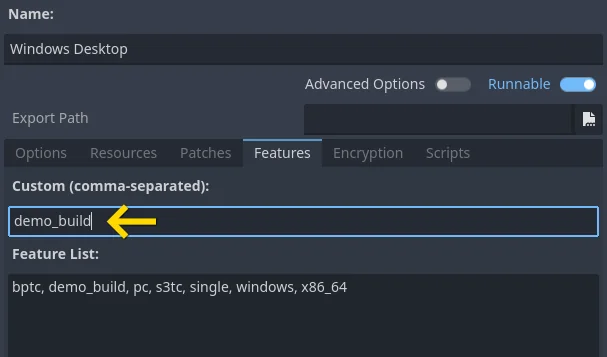
ビルドにカスタム機能を追加することができます。生成に使用される エクスポートプリセット の関連フィールドを使用します。
注釈
Custom feature tags are only used when running the exported project (including with ワンクリック・デプロイ). They are not used when running the project from the editor, even if the export preset marked as Runnable for your current platform has custom feature tags defined.
Custom feature tags are also not used in EditorExportPlugin scripts. Instead, feature tags in EditorExportPlugin will reflect the device the editor is currently running on.
プロジェクト設定のオーバーライド
機能を使用して、プロジェクト設定の特定の構成値を上書きできます。これにより、ビルドを実行するときに構成をより適切にカスタマイズできます。
次の例では、ゲームのデモビルドに別のアイコンが追加されています(特別なエクスポートプリセットでカスタマイズされ、デモレベルのみが含まれています)。
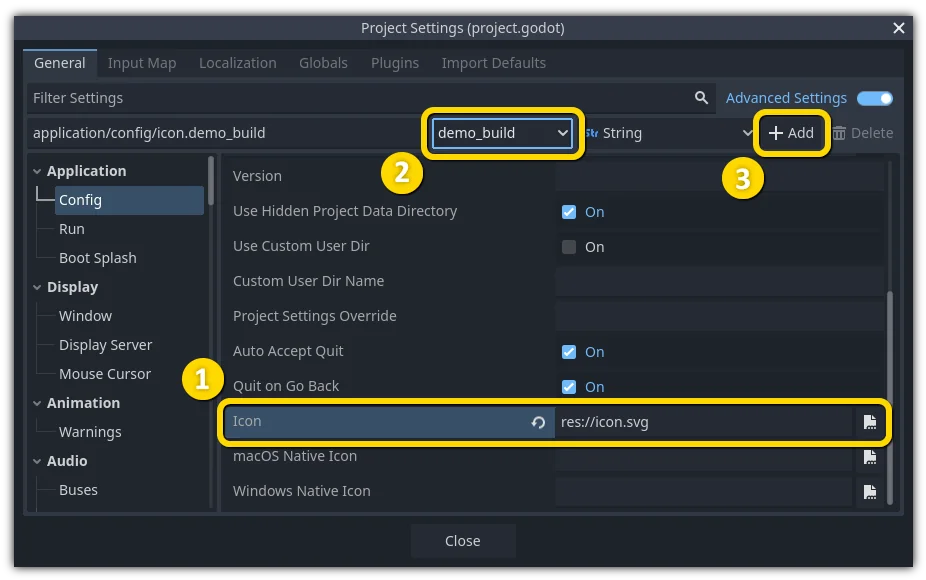
The desired configuration is selected, which effectively copies its properties to the panel above (1). The "demo_build" feature tag is selected (2). The configuration is added to the project settings (3).
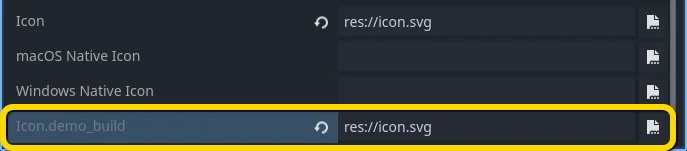
After overriding, a new field is added for this specific configuration.
注釈
When using the project settings "override.cfg" functionality (which is unrelated to feature tags), remember that feature tags still apply. Therefore, make sure to also override the setting with the desired feature tag(s) if you want them to override base project settings on all platforms and configurations.
デフォルトのオーバーライド
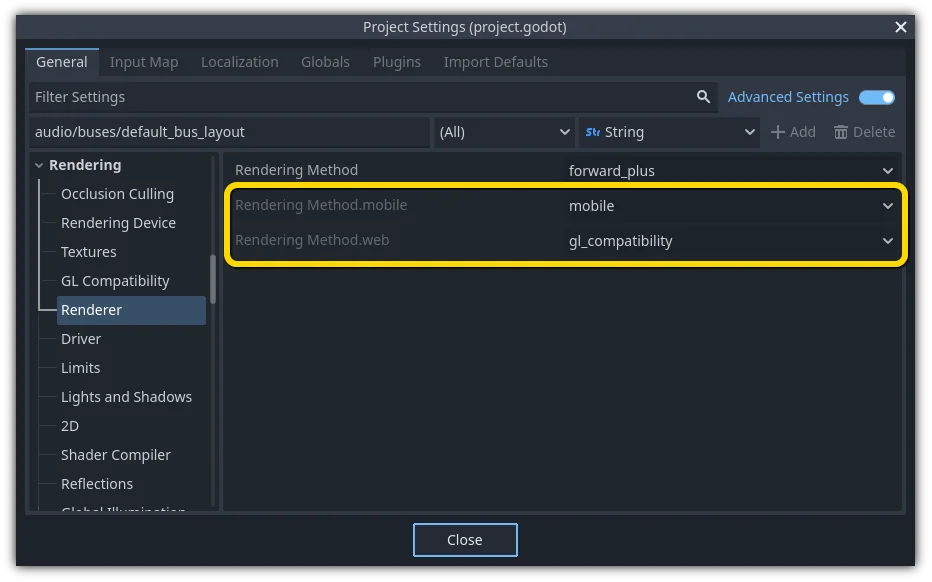
デフォルトでは、すでに多くの設定がオーバーライドされています。プロジェクト設定の多くのセクションにあります。
ビルドのカスタマイズ
Feature tags can be used to customize a build process too, by writing a custom ExportPlugin. They are also used to specify which shared library is loaded and exported in GDExtension.