Pack、パッチ、そしてModをエクスポートする
使用事例
Oftentimes, one would like to add functionality to one's game after it has been deployed.
例に含まれるのは……
ダウンロードコンテンツ: 機能とコンテンツをゲームに追加します。
パッチ: 出荷済みの製品に見つかったバグを修正します。
Mod: 他の人々でもゲームのコンテンツを製作できるようにします。
これらのツールが、最初のリリース後も開発を続ける助けになるのです。
Overview of PCK/ZIP files
Godot enables this via a feature called resource packs (PCK files,
with the .pck extension, or ZIP files).
利点:
段階的なアップデート / パッチ
DLCの提供
Modサポートの提供
Modのためにソースコードの公開は不要
プロジェクト構造をよりモジュール化
ユーザーはゲーム全体を置き換えずにすむ
The first part of using them involves exporting and delivering the project to players. Then, when one wants to add functionality or content later on, they just deliver the updates via PCK/ZIP files to the users.
PCK/ZIP files usually contain, but are not limited to:
スクリプト
シーン
シェーダー
モデル
テクスチャ
サウンドエフェクト
音楽
その他ゲームへのインポートに適したアセット
The PCK/ZIP files can even be an entirely different Godot project, which the original game loads in at runtime.
It is possible to load both PCK and ZIP files as additional packs at the same time. See PCK と ZIP、 packファイル形式の比較 for a comparison of the two formats.
参考
If you want to load loose files at runtime (not packed in a PCK or ZIP by Godot), consider using Runtime file loading and saving instead. This is useful for loading user-generated content that is not made with Godot, without requiring users to pack their mods into a specific file format.
The downside of this approach is that it's less transparent to the game logic, as it will not benefit from the same resource management as PCK/ZIP files.
PCKファイルの生成
In order to pack all resources of a project into a PCK file, open the project and go to Project > Export and click on Export PCK/ZIP. Also, make sure to have an export preset selected while doing so.
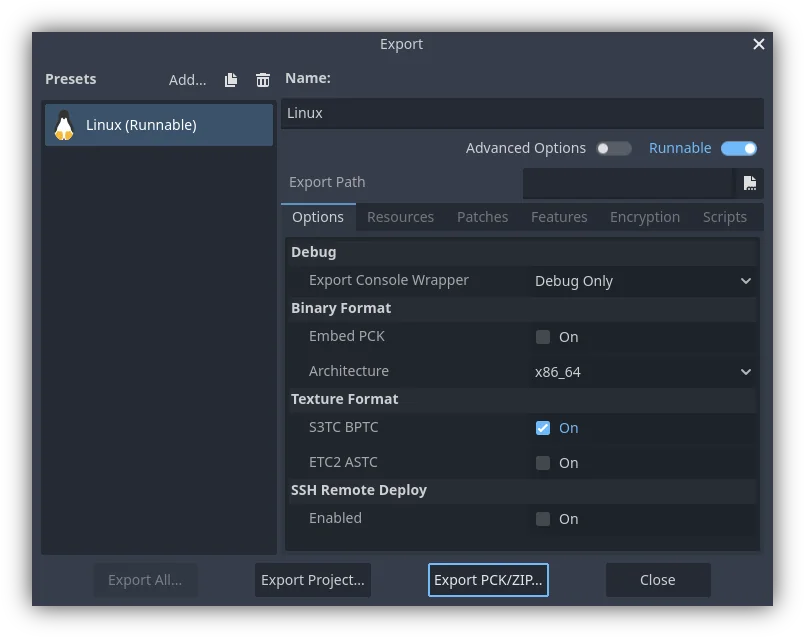
Another method would be to export from the command line
with --export-pack. The output file must with a .pck or .zip
file extension. The export process will build that type of file for the
chosen platform.
注釈
もしゲームにModを追加できるようにしたい場合、ユーザーにも同様にエクスポートしたファイルを作成してもらう必要があります。元のゲームで、PCK内のリソースは決められたディレクトリ構造に置くようにするか、もしくはスクリプトにMod用のインターフェースを用意してから、次の選択肢は…
ディレクトリ構造かインターフェースについてのドキュメンテーションを公開し、Mod作者たちにGodotエンジンをインストールしてもらい、(確実に動作するように)ドキュメンテーションに定義されたAPIに沿ってModを製作してもらいます。それから、上記の解説どおりにGodot内蔵のエクスポート・ツールにてPCKファイルを作成してもらいます。
The developer uses Godot to build a GUI tool for adding their exact API content to a project. This Godot tool must either run on a tools-enabled build of the engine or have access to one (distributed alongside or perhaps in the original game's files). The tool can then use the Godot executable to export a PCK file from the command line with OS.execute(). The game itself shouldn't use a tool-build of the engine (for security), so it's best to keep the modding tool and game separate.
Opening PCK or ZIP files at runtime
To load a PCK or ZIP file, one uses the ProjectSettings singleton. The following
example expects a mod.pck file in the directory of the game's executable.
The PCK or ZIP file contains a mod_scene.tscn test scene in its root.
func _your_function():
    # This could fail if, for example, mod.pck cannot be found.
    var success = ProjectSettings.load_resource_pack(OS.get_executable_path().get_base_dir().path_join("mod.pck"))

    if success:
        # Now one can use the assets as if they had them in the project from the start.
        var imported_scene = load("res://mod_scene.tscn")
private void YourFunction()
{
    // This could fail if, for example, mod.pck cannot be found.
    var success = ProjectSettings.LoadResourcePack(OS.get_executable_path().get_base_dir().path_join("mod.pck));

    if (success)
    {
        // Now one can use the assets as if they had them in the project from the start.
        var importedScene = (PackedScene)ResourceLoader.Load("res://mod_scene.tscn");
    }
}
警告
By default, if you import a file with the same file path/name as one you already have in your project, the imported one will replace it. This is something to watch out for when creating DLC or mods. You can solve this problem by using a tool that isolates mods to a specific mods subfolder.
However, it is also a way of creating patches for one's own game. A PCK/ZIP file of this kind can fix the content of a previously loaded PCK/ZIP (therefore, the order in which packs are loaded matters).
To opt out of this behavior, pass false as the second argument to
ProjectSettings.load_resource_pack().
注釈
C#プロジェクトの場合、最初にDLLをビルドし、プロジェクトディレクトリに配置する必要があります。次に、リソースパックをロードする前に、次のようにDLLをロードする必要があります: Assembly.LoadFile("mod.dll")
トラブルシューティング
If you are loading a resource pack and are not noticing any changes, it may be due to the pack being loaded too late. This is particularly the case with menu scenes that may preload other scenes using preload(). This means that loading a pack in the menu will not affect the other scene that was already preloaded.
To avoid this, you need to load the pack as early as possible.
To do so, create a new autoload script and
call ProjectSettings.load_resource_pack()
in the autoload script's _init() function, rather than _enter_tree()
or _ready().
要約
This tutorial explains how to add mods, patches, or DLC to a game. The most important thing is to identify how one plans to distribute future content for their game and develop a workflow that is customized for that purpose. Godot should make that process smooth regardless of which route a developer pursues.