Upgrading from Godot 4.4 to Godot 4.5
For most games and apps made with 4.4 it should be relatively safe to migrate to 4.5. This page intends to cover everything you need to pay attention to when migrating your project.
破壊的変更
If you are migrating from 4.4 to 4.5, the breaking changes listed here might affect you. Changes are grouped by areas/systems.
警告
In order to support new Google Play requirements Android now requires targeting .NET 9 when exporting C# projects to Android, other platforms continue to use .NET 8 as the minimum required version but newer versions are supported and encouraged.
If you are using C# in your project and want to export to Android, you will need to upgrade your project to .NET 9 (see Upgrading to a new .NET version for instructions).
この記事では、各破壊的変更がGDScriptに影響するかどうか、またC#の破壊的変更が バイナリ互換 なのか ソース互換 なのかを示します:
Binary compatible - Existing binaries will load and execute successfully without recompilation, and the run-time behavior won't change.
ソース互換: Godotをアップグレードしてもソースコードの変更なしでコンパイルに成功します。
Core
Change |
GDScript Compatible |
C# バイナリ互換 |
C# ソース互換 |
Introduced |
|---|---|---|---|---|
JSONRPC |
||||
Method |
❌ |
❌ |
❌ |
|
Node |
||||
Method |
❌ |
✔️ |
✔️ |
|
Method |
✔️ |
✔️ |
✔️ |
レンダリング
Change |
GDScript Compatible |
C# バイナリ互換 |
C# ソース互換 |
Introduced |
|---|---|---|---|---|
DisplayServer |
||||
Method |
✔️ |
✔️ |
✔️ |
|
Method |
✔️ |
✔️ |
✔️ |
|
RenderingDevice |
||||
Method |
✔️ |
✔️ |
✔️ |
|
RenderingServer |
||||
Method |
❌ |
✔️ |
✔️ |
|
Method |
❌ |
✔️ |
✔️ |
注釈
In C#, the enum RenderingDevice.Features breaks compatibility because of the way the bindings generator
detects the enum prefix. New members were added to the enum in GH-103941 that caused the enum member
Address to be renamed to BufferDeviceAddress.
GLTF
Change |
GDScript Compatible |
C# バイナリ互換 |
C# ソース互換 |
Introduced |
|---|---|---|---|---|
GLTFAccessor |
||||
Property |
✔️ |
❌ |
❌ |
|
Property |
✔️ |
❌ |
❌ |
|
Property |
✔️ |
❌ |
❌ |
|
Property |
✔️ |
❌ |
❌ |
|
Property |
✔️ |
❌ |
❌ |
|
Property |
✔️ |
❌ |
❌ |
|
Property |
✔️ |
❌ |
❌ |
|
GLTFBufferView |
||||
Property |
✔️ |
❌ |
❌ |
|
Property |
✔️ |
❌ |
❌ |
|
Property |
✔️ |
❌ |
❌ |
注釈
As a result of changing the type metadata, the C# bindings changed the type from int (32-bytes) to long (64-bytes).
Text
Change |
GDScript Compatible |
C# バイナリ互換 |
C# ソース互換 |
Introduced |
|---|---|---|---|---|
CanvasItem |
||||
Method |
✔️ |
✔️ |
✔️ |
|
Method |
✔️ |
✔️ |
✔️ |
|
Method |
✔️ |
✔️ |
✔️ |
|
Method |
✔️ |
✔️ |
✔️ |
|
Method |
✔️ |
✔️ |
✔️ |
|
Method |
✔️ |
✔️ |
✔️ |
|
Font |
||||
Method |
✔️ |
✔️ |
✔️ |
|
Method |
✔️ |
✔️ |
✔️ |
|
Method |
✔️ |
✔️ |
✔️ |
|
Method |
✔️ |
✔️ |
✔️ |
|
Method |
✔️ |
✔️ |
✔️ |
|
Method |
✔️ |
✔️ |
✔️ |
|
RichTextLabel |
||||
Method |
✔️ |
✔️ |
✔️ |
|
Method |
✔️ |
✔️ |
✔️ |
|
Method |
✔️ |
✔️ |
✔️ |
|
Method |
✔️ |
✔️ |
✔️ |
|
Method |
✔️ |
✔️ |
✔️ |
|
Method |
✔️ |
✔️ |
✔️ |
|
TextLine |
||||
Method |
✔️ |
✔️ |
✔️ |
|
Method |
✔️ |
✔️ |
✔️ |
|
TextParagraph |
||||
Method |
✔️ |
✔️ |
✔️ |
|
Method |
✔️ |
✔️ |
✔️ |
|
Method |
✔️ |
✔️ |
✔️ |
|
Method |
✔️ |
✔️ |
✔️ |
|
Method |
✔️ |
✔️ |
✔️ |
|
Method |
✔️ |
✔️ |
✔️ |
|
TextServer |
||||
Method |
✔️ |
✔️ |
✔️ |
|
Method |
✔️ |
✔️ |
✔️ |
|
Method |
✔️ |
✔️ |
✔️ |
|
Method |
✔️ |
✔️ |
✔️ |
|
TreeItem |
||||
Method |
✔️ |
✔️ |
✔️ |
|
TextServerExtension |
||||
Method |
❌ |
❌ |
❌ |
|
Method |
❌ |
❌ |
❌ |
|
Method |
❌ |
❌ |
❌ |
|
Method |
❌ |
❌ |
❌ |
XR
Change |
GDScript Compatible |
C# バイナリ互換 |
C# ソース互換 |
Introduced |
|---|---|---|---|---|
OpenXRAPIExtension |
||||
Method |
✔️ |
✔️ |
✔️ |
|
Method |
✔️ |
✔️ |
✔️ |
|
Method |
✔️ |
✔️ |
✔️ |
|
Method |
✔️ |
✔️ |
✔️ |
|
OpenXRBindingModifierEditor |
||||
Type |
❌ |
❌ |
❌ |
|
OpenXRInteractionProfileEditor |
||||
Type |
❌ |
❌ |
❌ |
|
OpenXRInteractionProfileEditorBase |
||||
Type |
❌ |
❌ |
❌ |
注釈
Classes OpenXRBindingModifierEditor, OpenXRInteractionProfileEditor, and OpenXRInteractionProfileEditorBase
are only available in the editor. Using them outside of the editor will result in a compilation error.
In C#, this means the types are moved from the GodotSharp assembly to the GodotSharpEditor assembly.
Make sure to wrap code that uses these types in a #if TOOLS block to ensure they are not included in an exported game.
This change was also backported to 4.4.1.
エディタプラグイン
Change |
GDScript Compatible |
C# バイナリ互換 |
C# ソース互換 |
Introduced |
|---|---|---|---|---|
EditorExportPlatform |
||||
Method |
✔️ |
✔️ |
✔️ |
|
EditorUndoRedoManager |
||||
Method |
✔️ |
✔️ |
✔️ |
|
EditorExportPlatformExtension |
||||
Method |
✔️ |
❌ |
❌ |
Behavior changes
In 4.5, some behavior changes have been introduced, which might require you to adjust your project.
TileMapLayer
TileMapLayer.get_coords_for_body_rid()
will return different values in 4.5 compared to 4.4,
as TileMapLayer physics chunking is enabled by default. Higher values of
TileMapLayer.physics_quadrant_size
will make this function less precise. To get the exact cell coordinates like in 4.4 and prior
versions, you need to set
TileMapLayer.physics_quadrant_size
to 1, which disables physics chunking.
3D Model Import
A fix has been made to the 3D model importers to correctly handle non-joint nodes within a skeleton hierarchy (GH-104184).
To preserve compatibility, the default behavior is to import existing files with the same behavior as before (GH-107352).
New .gltf, .glb, .blend, and .fbx files (without a corresponding .import file)
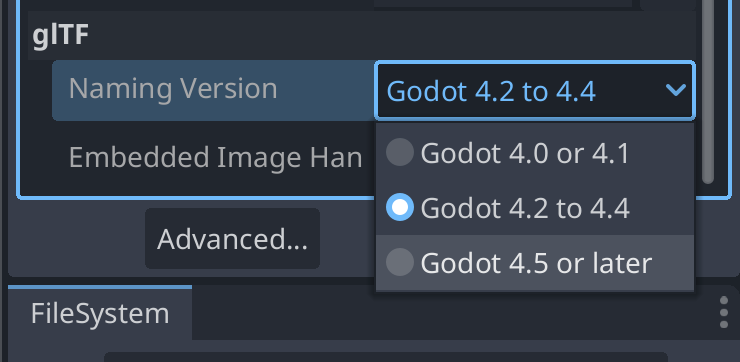
will be imported with the new behavior. However, for existing files, if you want to use the
new behavior, you must change the "Naming Version" option at the bottom of the Import dock:
Core
注釈
Resource.duplicate(true) (which performs deep duplication) now only duplicates resources internal to the resource file it's called on. In 4.4, this duplicated everything instead, including external resources. If you were deep-duplicating a resource that contained references to other external resources, those external resources aren't duplicated anymore. You must call Resource.duplicate_deep(RESOURCE_DEEP_DUPLICATE_ALL) instead to keep the old behavior.
注釈
ProjectSettings.add_property_info()
now prints a warning when the dictionary parameter has missing keys or invalid keys.
Most importantly, it will now warn when a usage key is passed, as this key is not used.
This was also the case before 4.5, but it was silently ignored instead.
As a reminder, to set property usage information correctly, you must use
ProjectSettings.set_as_basic(),
ProjectSettings.set_restart_if_changed(),
or ProjectSettings.set_as_internal() instead.
注釈
In C#, StringExtensions.PathJoin now avoids adding an extra path separator when the original string is empty,
or when the appended path starts with a path separator (GH-105281).
注釈
In C#, StringExtensions.GetExtension now returns an empty string instead of the original string
when the original string does not contain an extension (GH-108041).
注釈
In C#, the Quaternion(Vector3, Vector3) constructor now correctly creates a quaternion representing
the shortest arc between the two input vectors. Previously, it would return incorrect values for certain inputs
(GH-107618).
物理
注釈
When the 3D physics engine is set to Jolt Physics, you will now always have overlaps between Area3D and static
bodies reported by default, as the physics/jolt_physics_3d/simulation/areas_detect_static_bodies project setting
has been removed (GH-105746). If you still want such overlaps to be ignored, you will need to change the collision mask
or layer of either the Area3D or the static body instead.
Text
注釈
In GDScript, calls to functions RichTextLabel::add_image and RichTextLabel::update_image will continue to work,
but the size_in_percent argument will now be used as the value for width_in_percent and height_in_percent
will default to false (GH-107347). To restore the previous behavior, you can explicitly set height_in_percent
to the same value you were passing as size_in_percent.