GDExtension documentation system
Bemerkung
Adding documentation for GDExtensions is only possible for Godot 4.3 and later. The support can be integrated into your project
regardless because the snippet will check if you use the appropriate godot-cpp version.
If you set the compatibility_minimum to 4.2 and you load a project with the extension through a 4.2 editor, the
documentation page for that class will be empty. The extension itself will still work.
The GDExtension documentation system works in a similar manner to the built-in engine documentation. It uses a series of XML files (one per class) to document the exposed constructors, properties, methods, constants, signals, and theme items of each class.
Bemerkung
We are assuming you are using the project files explained in the GDExtension C++ Example with the following structure:
gdextension_cpp_example/  # GDExtension directory
|
+--demo/                  # game example/demo to test the extension
|   |
|   +--main.tscn
|   |
|   +--bin/
|       |
|       +--gdexample.gdextension
|
+--godot-cpp/             # C++ bindings
|
+--src/                   # source code of the extension we are building
|   |
|   +--register_types.cpp
|   +--register_types.h
|   +--gdexample.cpp
|   +--gdexample.h
Inside the Godot demo project directory of your GDExtension directory, run the following terminal command:
# Replace "godot" with the full path to a Godot editor binary
# if Godot is not installed in your `PATH`.
godot --doctool ../ --gdextension-docs
This command calls upon the Godot editor binary to generate documentation via the --doctool
and --gdextension-docs commands. The ../ addition is to let Godot know where the GDExtension
SConstruct file is located. By calling this command, Godot generates a doc_classes directory inside the
project directory in which it generates XML files for the GDExtension classes. Those files
can then be edited to add information about member variables, methods, signals, and more.
To add the now edited documentation to the GDExtension and let the editor load it, you need to add the following lines to your SConstruct file:
if env["target"] in ["editor", "template_debug"]:
try:
    doc_data = env.GodotCPPDocData("src/gen/doc_data.gen.cpp", source=Glob("doc_classes/*.xml"))
    sources.append(doc_data)
except AttributeError:
    print("Not including class reference as we're targeting a pre-4.3 baseline.")
The if-statement checks if we are compiling the GDExtension library with the editor and template_debug
flags. SCons then tries to load all the XML files inside the doc_classes directory and appends them
to the sources variable which already includes all the source files of your extension. If it fails
it means we are currently trying to compile the library when the godot_cpp is set to a version before 4.3.
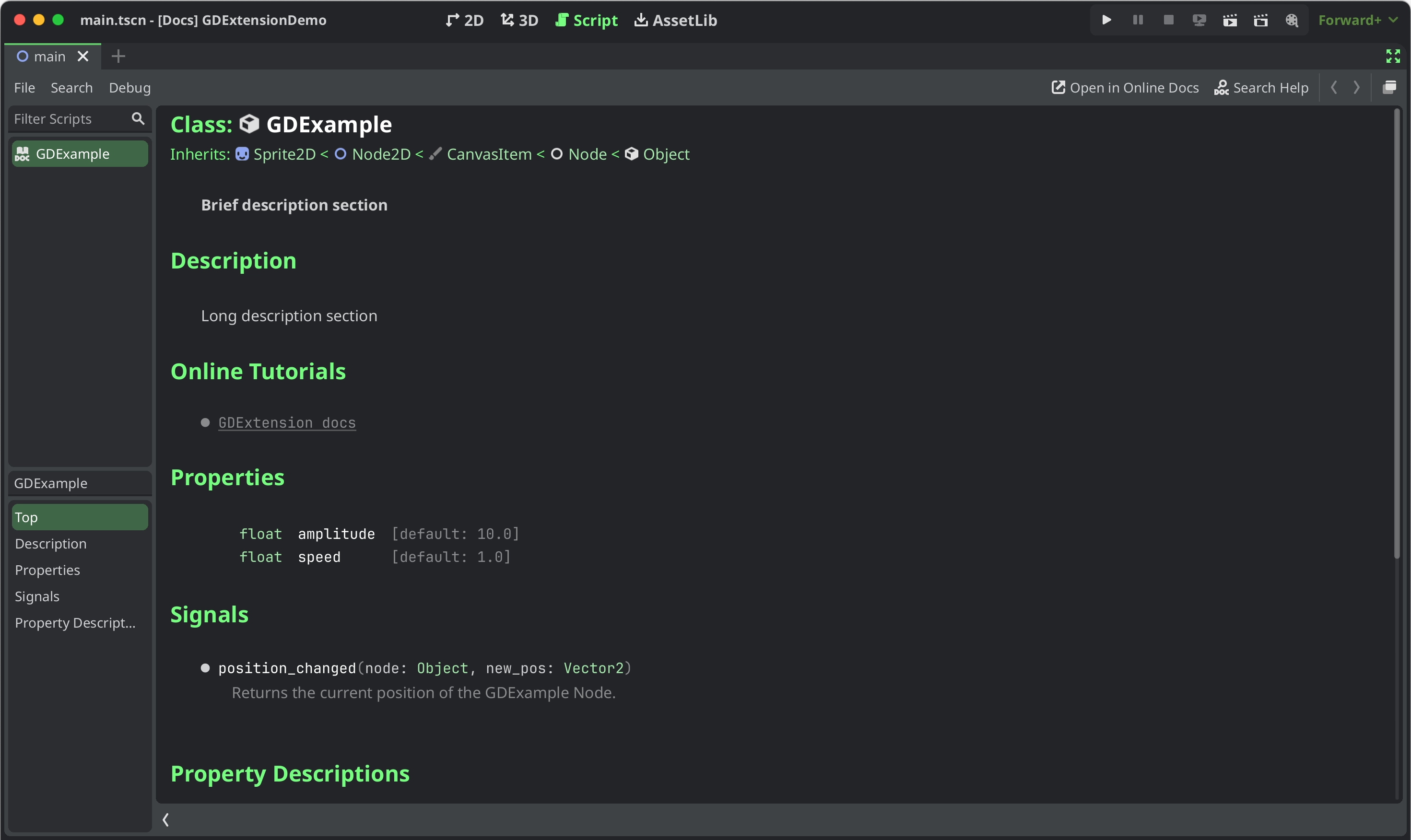
After loading the extension in a 4.3 Godot editor or later and open the documentation of your extension class either by Ctrl + Click in the script editor or the Editor help dialog you will see something like this:
Documentation styling
To style specific parts of text you can use BBCode tags similarly to how they can be used in RichTextLabels. You can set text as bold, italic, underlined, colored, codeblocks etc. by embedding them in tags like this:
[b]this text will be shown as bold[/b]
Currently they supported tags for the GDExtension documentation system are:
Tag |
Beispiel |
b
Verwendet die fette (oder fett-kursive) Schriftart von
RichTextLabel für {text}. |
|
i
Macht
{text} zur kursiven (oder fett-kursiven) Schriftart von RichTextLabel. |
|
u
Stellt
{text} unterstrichen dar. |
|
s
Stellt
{Text} durchgestrichen dar. |
|
kbd
Makes
{text} use a grey beveled background, indicating a keyboard shortcut. |
|
code
Makes inline
{text} use the mono font and styles the text color and background like code. |
|
codeblocks
Makes multiline
{text} use the mono font and styles the text color and background like code.The addition of the
[gdscript] tag highlights the GDScript specific syntax. |
[codeblocks][gdscript]{text}[/gdscript][/codeblocks] |
center
Stellt
{text} horizontal zentriert dar.Dasselbe wie
[p align=center]. |
|
url
Erzeugt einen Hyperlink (unterstrichener und anklickbarer Text). Kann optionalen
{text} enthalten oder {link} so anzeigen, wie er ist. |
[url]{link}[/url][url={link}]{text}[/url] |
img
Fügt ein Bild aus dem
{path} ein (kann jede gültige Texture2D-Ressource sein).Wenn
{width} angegeben ist, wird das Bild versuchen, sich dieser Breite anzupassen, wobei das Seitenverhältnis beibehalten wird.Wenn sowohl
{width} als auch {height} angegeben werden, wird das Bild auf diese Größe skaliert.Fügen Sie
% am Ende des {width}- oder {height}-Wertes hinzu, um ihn als Prozentsatz der Breite des Steuerelements anstelle von Pixeln anzugeben.Wenn die Konfiguration
{valign} angegeben ist, wird das Bild versuchen, sich an dem umgebenden Text auszurichten, siehe Vertikale Ausrichtung von Bildern und Tabellen.Unterstützt Konfigurationsoptionen, siehe Bild-Optionen.
|
[img]{path}[/img][img={width}]{path}[/img][img={width}x{height}]{path}[/img][img={valign}]{path}[/img][img {options}]{path}[/img] |
color
Ändert die Farbe von
{text}. Die Farbe muss durch einen allgemeinen Namen (siehe Benannte Farben) oder durch das HEX-Format (z.B. #ff00ff, siehe Hexadezimale Farbcodes) angegeben werden. |
|
Publishing documentation online
You may want to publish an online reference for your GDExtension, similar to this website.
The most important step is to build reStructuredText (.rst) files from your XML class reference:
# You need a version.py file, so download it first.
curl -sSLO https://raw.githubusercontent.com/godotengine/godot/refs/heads/master/version.py

# Edit version.py according to your project before proceeding.
# Then, run the rst generator. You'll need to have Python installed for this command to work.
curl -sSL https://raw.githubusercontent.com/godotengine/godot/master/doc/tools/make_rst.py | python3 - -o "docs/classes" -l "en" doc_classes
Your .rst files will now be available in docs/classes/. From here, you can use
any documentation builder that supports reStructuredText syntax to create a website from them.
godot-docs uses Sphinx. You can use the repository as a basis to build your own documentation system. The following guide describes the basic steps, but they are not exhaustive: You will need a bit of personal insight to make it work.
Add godot-docs as a submodule to your
docs/folder.Copy over its
conf.py,index.rst,.readthedocs.yamlfiles into/docs/. You may later decide to copy over and edit more of godot-docs' files, like_templates/layout.html.Modify these files according to your project. This mostly involves adjusting paths to point to the
godot-docssubfolder, as well as strings to reflect it's your project rather than Godot you're building the docs for.Create an account on readthedocs.org. Import your project, and modify its base
.readthedocs.yamlfile path to/docs/.readthedocs.yaml.
Once you have completed all these steps, your documentation should be available at <repo-name>.readthedocs.io.