Localization using gettext (PO files)
In addition to importing translations in
CSV format, Godot also
supports loading translation files written in the GNU gettext format
(text-based .po and compiled .mo since Godot 4.0).
Nota
Para obter uma introdução ao gettext, consulte A Quick Gettext Tutorial. Ele foi escrito com projetos em C em mente, mas muitos dos conselhos também se aplicam ao Godot (com exceção de xgettext).
For the complete documentation, see GNU Gettext.
Vantagens
gettext is a standard format, which can be edited using any text editor or GUI editors such as Poedit. This can be significant as it provides a lot of tools for translators, such as marking outdated strings, finding strings that haven't been translated etc.
gettext supports plurals and context.
gettext é suportado por plataformas de tradução como Transifex e Weblate, o que torna mais fácil para as pessoas colaborarem na localização.
Compared to CSV, gettext files work better with version control systems like Git, as each locale has its own messages file.
Multiline strings are more convenient to edit in gettext PO files compared to CSV files.
Desvantagens
gettext PO files have a more complex format than CSV and can be harder to grasp for people new to software localization.
Pessoas que mantêm arquivos de localização terão que instalar ferramentas gettext em seus sistemas. No entanto, como o Godot não usa arquivos de objeto de mensagem compilados (
.mo), os tradutores podem testar seu trabalho sem ter que instalar ferramentas gettext.gettext PO files usually use English as the base language. Translators will use this base language to translate to other languages. You could still user other languages as the base language, but this is not common.
Instalando ferramentas gettext
As ferramentas gettext de linha de comando são necessárias para executar operações de manutenção, como atualizar arquivos de mensagens. Portanto, é altamente recomendável instalá-las.
Windows: Baixe um instalador a partir desta página. Qualquer arquitetura e tipo binário (compartilhado ou estático) funciona; em caso de dúvida, escolha o instalador estático de 64 bits.
macOS: Install gettext either using Homebrew with the
brew install gettextcommand, or using MacPorts with thesudo port install gettextcommand.Linux: Na maioria das distribuições, instale o pacote
gettextdo gerenciador de pacotes de sua distribuição.
For a GUI tool you can get Poedit from its Official website. The basic version is open source and available under the MIT license.
Creating the PO template
Automatic generation using the editor
Since Godot 4.0, the editor can generate a PO template automatically from
specified scene and GDScript files. This POT generation also supports translation
contexts and pluralization if used in a script, with the optional second
argument of tr() and the tr_n() method.
Open the Project Settings' Localization > POT Generation tab, then use the Add… button to specify the path to your project's scenes and scripts that contain localizable strings:
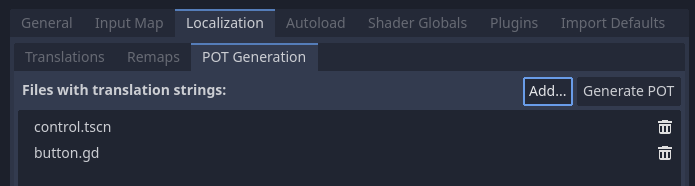
Creating a PO template in the Localization > POT Generation tab of the Project Settings
After adding at least one scene or script, click Generate POT in the
top-right corner, then specify the path to the output file. This file can be
placed anywhere in the project directory, but it's recommended to keep it in a
subdirectory such as locale, as each locale will be defined in its own file.
See below for how to add comments for translators or exclude some strings from being added to the PO template for GDScript files.
You can then move over to creating a messages file from a PO template.
Nota
Remember to regenerate the PO template after making any changes to localizable strings, or after adding new scenes or scripts. Otherwise, newly added strings will not be localizable and translators won't be able to update translations for outdated strings.
Manual creation
If the automatic generation approach doesn't work out for your needs, you can create a PO template by hand in a text editor. This file can be placed anywhere in the project directory, but it's recommended to keep it in a subdirectory, as each locale will be defined in its own file.
Create a directory named locale in the project directory. In this directory,
save a file named messages.pot with the following contents:
# Don't remove the two lines below, they're required for gettext to work correctly.
msgid ""
msgstr ""

# Example of a regular string.
msgid "Hello world!"
msgstr ""

# Example of a string with pluralization.
msgid "There is %d apple."
msgid_plural "There are %d apples."
msgstr[0] ""
msgstr[1] ""

# Example of a string with a translation context.
msgctxt "Actions"
msgid "Close"
msgstr ""
Mensagens em gettext são feitas de pares msgid e msgstr. msgid é a string fonte (geralmente em inglês), msgstr será a string traduzida.
Aviso
O valor msgstr em arquivos de modelo PO (.pot) deve sempre estar vazio. A localização será feita nos arquivos .po gerados.
Criando um arquivo de mensagens a partir de um modelo PO
O comando msginit é usado para transformar um modelo PO em um arquivo de mensagens. Por exemplo, para criar um arquivo de localização em francês, use o seguinte comando enquanto estiver no diretório locale:
msginit --no-translator --input=messages.pot --locale=fr
O comando acima criará um arquivo chamado fr.po no mesmo diretório do modelo PO.
Alternativamente, você pode fazer isso graficamente usando o Poedit ou enviando o arquivo POT para a plataforma web de sua escolha.
Carregando um arquivo de mensagens no Godot
Para registrar um arquivo de mensagens como uma tradução em um projeto, abra as Configurações do Projeto e vá para a aba Localização. Em Traduções, clique em Adicionar… e escolha o arquivo .po na caixa de diálogo do arquivo. O locale será inferido da propriedade "Language: <code>\n" no arquivo de mensagens.
Nota
Veja Internacionalizando jogos para mais informações sobre como importar e testar traduções no Godot.
Atualizando arquivos de mensagem para seguir o modelo PO
Após atualizar o modelo PO, você terá que atualizar os arquivos de mensagens para que contenham novas strings, enquanto remove as strings que não estão mais presentes no modelo PO. Isto pode ser feito automaticamente utilizando a ferramenta msgmerge:
# The order matters: specify the message file *then* the PO template!
msgmerge --update --backup=none fr.po messages.pot
Se você deseja manter um backup do arquivo da mensagem original (que seria salvo como fr.po~ neste exemplo), remova o argumento --backup=none.
Nota
After running msgmerge, strings which were modified in the source language
will have a "fuzzy" comment added before them in the .po file. This comment
denotes that the translation should be updated to match the new source string,
as the translation will most likely be inaccurate until it's updated.
Strings with "fuzzy" comments will not be read by Godot until the translation is updated and the "fuzzy" comment is removed.
Verificando a validade de um arquivo ou modelo PO
It is possible to check whether a gettext file's syntax is valid.
If you open with Poeditor, it will display the appropriate warnings if there's some syntax errors. You can also verify by running the gettext command below:
msgfmt fr.po --check
Se houver erros de sintaxe ou avisos, eles serão exibidos no console. Caso contrário, msgfmt não exibirá nada.
Using binary MO files (useful for large projects only)
For large projects with several thousands of strings to translate or more, it can be worth it to use binary (compiled) MO message files instead of text-based PO files. Binary MO files are smaller and faster to read than the equivalent PO files.
You can generate an MO file with the command below:
msgfmt fr.po --no-hash -o fr.mo
If the PO file is valid, this command will create an fr.mo file besides
the PO file. This MO file can then be loaded in Godot as described above.
The original PO file should be kept in version control so you can update your translation in the future. In case you lose the original PO file and wish to decompile an MO file into a text-based PO file, you can do so with:
msgunfmt fr.mo > fr.po
The decompiled file will not include comments or fuzzy strings, as these are never compiled in the MO file in the first place.
Extracting localizable strings from GDScript files
The built-in editor plugin recognizes a variety of patterns in source code to extract localizable strings from GDScript files, including but not limited to the following:
tr(),tr_n(),atr(), andatr_n()calls;assigning properties
text,placeholder_text, andtooltip_text;add_tab(),add_item(),set_tab_title(), and other calls;FileDialogfilters like"*.png ; PNG Images".
Nota
The argument or right operand must be a constant string, otherwise the plugin will not be able to evaluate the expression and will ignore it.
If the plugin extracts unnecessary strings, you can ignore them with the NO_TRANSLATE comment.
You can also provide additional information for translators using the TRANSLATORS: comment.
These comments must be placed either on the same line as the recognized pattern or precede it.
$CharacterName.text = "???" # NO_TRANSLATE

# NO_TRANSLATE: Language name.
$TabContainer.set_tab_title(0, "Python")

item.text = "Tool" # TRANSLATORS: Up to 10 characters.

# TRANSLATORS: This is a reference to Lewis Carroll's poem "Jabberwocky",
# make sure to keep this as it is important to the plot.
say(tr("He took his vorpal sword in hand. The end?"))
Using context
The context parameter can be used to differentiate the situation where a translation
is used, or to differentiate polysemic words (words with multiple meanings).
Por exemplo:
tr("Start", "Main Menu")
tr("End", "Main Menu")
tr("Shop", "Main Menu")
tr("Shop", "In Game")
Updating PO files
Some time or later, you'll add new content to our game, and there will be new strings that need to be translated. When this happens, you'll need to update the existing PO files to include the new strings.
First, generate a new POT file containing all the existing strings plus the newly added strings. After that, merge the existing PO files with the new POT file. There are two ways to do this:
Use a gettext editor, and it should have an option to update a PO file from a POT file.
Use the gettext
msgmergetool:
# The order matters: specify the message file *then* the PO template!
msgmerge --update --backup=none fr.po messages.pot
Se você deseja manter um backup do arquivo da mensagem original (que seria salvo como fr.po~ neste exemplo), remova o argumento --backup=none.
POT generation custom plugin
If you have any extra file format to deal with, you could write a custom plugin to parse and and extract the strings from the custom file. This custom plugin will extract the strings and write into the POT file when you hit Generate POT. To learn more about how to create the translation parser plugin, see EditorTranslationParserPlugin.