Work in progress
The content of this page was not yet updated for Godot
4.3
and may be outdated. If you know how to improve this page or you can confirm
that it's up to date, feel free to open a pull request.
Flux audio
Introduction
Comme vous l'avez peut-être déjà lu dans Bus audio, le son est envoyé à chaque bus via un nœud AudioStreamPlayer. Il existe différents types de AudioStreamPlayers. Chacun charge un AudioStream et le lit.
Flux audio
Un flux audio est un objet abstrait qui émet un son. Le son peut provenir de plusieurs endroits, mais il est le plus souvent chargé depuis le système de fichiers. Les fichiers audio peuvent être chargés comme AudioStreams et placés dans un AudioStreamPlayer. Vous trouverez des informations sur les formats pris en charge et leurs différences dans Importer des échantillons audio.
There are other types of AudioStreams, such as AudioStreamRandomizer. This one picks a different audio stream from a list of streams each time it's played back, and applies random pitch and volume shifting. This can be helpful for adding variation to sounds that are played back often.
AudioStreamPlayer
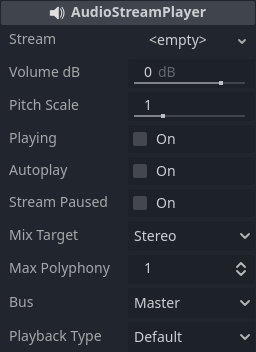
C'est le lecteur de flux standard non positionnel. Il peut jouer sur n'importe quel bus. Dans les configurations de son 5.1, il peut envoyer de l'audio au mixage stéréo ou aux enceintes avant.
Playback Type is an experimental setting, and could change in future versions of Godot. It exists so Web exports use Web Audio-API based samples instead of streaming all sounds to the browser, unlike most platforms. This prevents the audio from being garbled in single-threaded Web exports. By default, only the Web platform will use samples. Changing this setting is not recommended, unless you have an explicit reason to. You can change the default playback type for the web and other platforms in the project settings under Audio > General (advanced settings must be turned on to see the setting).
AudioStreamPlayer2D
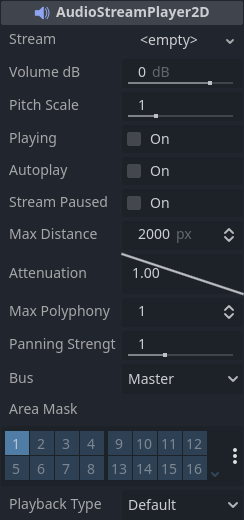
C'est une variante de l'AudioStreamPlayer, il émet des son pour un environnement 2d. Quand il est proche du bord gauche de l'écran, le "Panning" va vers la gauche. Quand il est proche du droit, le "Panning" le suit.
Note
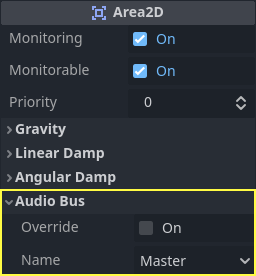
Les Area2D peuvent être utilisés pour dévier le son depuis n'importe lequel des AudioStreamPlayer2D qu'elles contiennent jusqu'à certains bus spécifiques. Cela rend possible de créer des bu avec différentes réverbération ou qualité sonore pour gérer les actions qui se produisent à certains endroits spécifiques de votre monde de jeu.
AudioStreamPlayer3D
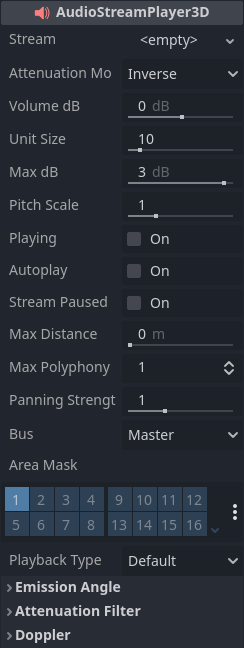
Il s'agit d'une variante d'AudioStreamPlayer, mais qui émet du son dans un environnement positionnel 3D. Selon l'emplacement du joueur par rapport à l'écran, il peut positionner le son en stéréo, 5.1 ou 7.1 selon la configuration audio choisie.
Similar to AudioStreamPlayer2D, an Area3D can divert the sound to an audio bus.
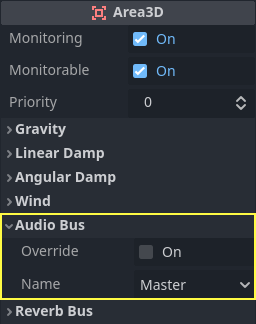
Contrairement à sa version 2D, l'AudioStreamPlayer a quelques options plus avancée :
Bus de réverbération
Avertissement
This feature is not supported on the web platform if the AudioStreamPlayer's playback mode is set to Sample, which is the default. It will only work if the playback mode is set to Stream, at the cost of increased latency if threads are not enabled.
See Audio playback in the Exporting for the Web documentation for details.
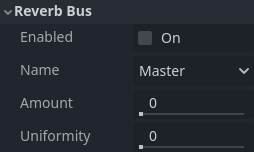
Godot allows for 3D audio streams that enter a specific Area3D node to send dry and wet audio to separate buses. This is useful when you have several reverb configurations for different types of rooms. This is done by enabling this type of reverb in the Reverb Bus section of the Area3D's properties:
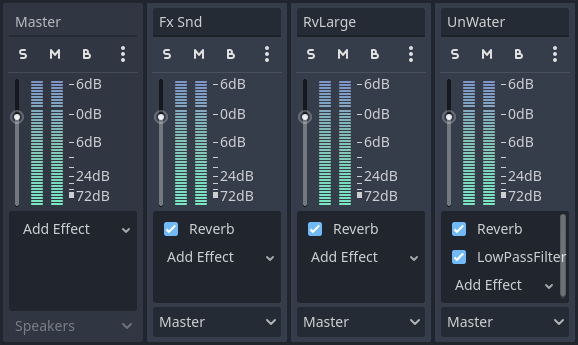
At the same time, a special bus layout is created where each Area3D receives the reverb info from each Area3D. A Reverb effect needs to be created and configured in each reverb bus to complete the setup for the desired effect:
The Area3D's Reverb Bus section also has a parameter named Uniformity. Some types of rooms bounce sounds more than others (like a warehouse), so reverberation can be heard almost uniformly across the room even though the source may be far away. Playing around with this parameter can simulate that effect.
Doppler
Avertissement
This feature is not supported on the web platform if the AudioStreamPlayer's playback mode is set to Sample, which is the default. It will only work if the playback mode is set to Stream, at the cost of increased latency if threads are not enabled.
See Audio playback in the Exporting for the Web documentation for details.
Lorsque la vitesse relative entre une source et un récepteur de son change, ceci est perçu comme une augmentation ou diminution de la fréquence du son émis. Godot peut garder la traces de ces changements de vitesse dans les nœuds AudioStreamPlayer3D et Camera. Chacun de ces nœuds ont cette propriétés qui doit être activé manuellement :
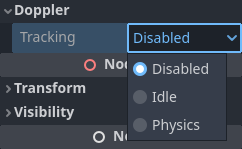
Activez-le en le paramétrant en fonction de la façon dont les objets seront déplacés : utilisez Idle pour les objets déplacés avec _process, ou Physics pour les objets déplacés avec _physics_process. Le suivi se fera automatiquement.