Up to date
This page is up to date for Godot 4.3.
If you still find outdated information, please open an issue.
Langue de shading
Introduction
Godot utilise un langage de shading semblable à celui de GLSL ES 3.0. La plupart des types de données et des fonctions sont pris en charge, et les quelques autres seront probablement ajoutés au fil du temps.
Si vous êtes déjà familier avec GLSL, le Godot Shader Migration Guide est une ressource qui vous aidera à faire la transition entre GLSL normal et le langage de shading de Godot.
types
La plupart des types de GLSL ES 3.0 sont supportés :
Type |
Description |
|---|---|
void |
Type void, seulement utile pour les fonctions ne retournant rien. |
bool |
Type de données booléen, ne peut contenir que |
bvec2 |
vecteur à deux composants de booléens. |
bvec3 |
Vecteur de booléens à trois composants. |
bvec4 |
Vecteur de booléens à quatre composants. |
int |
32 bit signed scalar integer. |
ivec2 |
Vecteur d'entier signé (int) à deux composants. |
ivec3 |
Vecteur d'entier signé (int) à trois composants. |
ivec4 |
Vecteur d'entier signé (int) à quatre composants. |
uint |
Entier scalaire non-signé ; ne peut contenir de nombre négatif. |
uvec2 |
Vecteur d'entier non-signé (unsigned int) à deux composants. |
uvec3 |
Vecteur d'entier non-signé (unsigned int) à trois composants. |
uvec4 |
Vecteur d'entier non-signé (unsigned int) à quatre composants. |
float |
32 bit floating-point scalar. |
vec2 |
Vecteur à deux composantes de valeurs à virgule flottante. |
vec3 |
Vecteur à trois composantes de valeurs à virgule flottante. |
vec4 |
Vecteur à quatre composantes de valeurs à virgule flottante. |
mat2 |
Matrice 2x2, dans l'ordre principal des colonnes. |
mat3 |
Matrice 3x3, dans l'ordre principal des colonnes. |
mat4 |
Matrice 4x4, dans l'ordre principal des colonnes. |
sampler2D |
Type d'échantillonneur pour lier des textures 2D, qui sont lues comme des flottants. |
isampler2D |
Type d'échantillonneur pour lier des textures 2D, qui sont lues comme des entiers signés. |
usampler2D |
Type d'échantillonneur pour lier des textures 2D, qui sont lues comme des entiers non signés. |
Sampler2DArray |
Type d'échantillonneur pour lier des tableaux de textures 2D, qui sont lues comme des flottants. |
isampler2DArray |
Type d'échantillonneur pour lier des tableaux de textures 2D, qui sont lues comme des entiers signés. |
usampler2DArray |
Type d'échantillonneur pour lier des tableaux de textures 2D, qui sont lues comme des entiers non signés. |
sampler3D |
Type d'échantillonneur pour lier des textures 3D, qui sont lues comme des flottants. |
isampler3D |
Type d'échantillonneur pour lier des textures 3D, qui sont lues comme des entiers signés. |
usampler3D |
Type d'échantillonneur pour lier des textures 3D, qui sont lues comme des entiers non signés. |
samplerCube |
Sampler type for binding Cubemaps, which are read as float. |
samplerCubeArray |
Sampler type for binding Cubemap arrays, which are read as float. Only supported in Forward+ and Mobile, not Compatibility. |
Avertissement
Local variables are not initialized to a default value such as 0.0. If
you use a variable without assigning it first, it will contain whatever
value was already present at that memory location, and unpredictable visual
glitches will appear. However, uniforms and varyings are initialized to a
default value.
Conversion de type
Comme dans GLSL ES 3.0, les conversions (casts) implicites entre sclaires et vecteurs de la même taille mais de type différent sont interdites. La conversion de type de différentes tailles est aussi interdite. Les conversions doivent être faites explicitement via les constructeurs.
Exemple :
float a = 2; // invalid
float a = 2.0; // valid
float a = float(2); // valid
Les entiers de base sont signés, ce qui oblige l'utilisation des casts pour convertir en non-signé :
int a = 2; // valid
uint a = 2; // invalid
uint a = uint(2); // valid
Membres
Les membre scalaires des types vecteurs sont accessible par les membres "x", "y", "z" et "w". Cependant, utiliser "r", "g", "b" et "a" fonctionne aussi et est équivalent. Utilisez ce qui correspond le mieux à vos besoins.
For matrices, use the m[column][row] indexing syntax to access each scalar,
or m[column] to access a vector by column index. For example, for accessing the
y-component of the translation from a mat4 transform matrix (4th column, 2nd line) you use m[3][1] or m[3].y.
Construction
La construction de vecteurs doit toujours passer :
// The required amount of scalars
vec4 a = vec4(0.0, 1.0, 2.0, 3.0);
// Complementary vectors and/or scalars
vec4 a = vec4(vec2(0.0, 1.0), vec2(2.0, 3.0));
vec4 a = vec4(vec3(0.0, 1.0, 2.0), 3.0);
// A single scalar for the whole vector
vec4 a = vec4(0.0);
Construction of matrix types requires vectors of the same dimension as the
matrix, interpreted as columns. You can also build a diagonal matrix using matx(float) syntax.
Accordingly, mat4(1.0) is an identity matrix.
mat2 m2 = mat2(vec2(1.0, 0.0), vec2(0.0, 1.0));
mat3 m3 = mat3(vec3(1.0, 0.0, 0.0), vec3(0.0, 1.0, 0.0), vec3(0.0, 0.0, 1.0));
mat4 identity = mat4(1.0);
Matrices can also be built from a matrix of another dimension. There are two rules:
1. If a larger matrix is constructed from a smaller matrix, the additional rows and columns are set to the values they would have in an identity matrix. 2. If a smaller matrix is constructed from a larger matrix, the top, left submatrix of the larger matrix is used.
mat3 basis = mat3(MODEL_MATRIX);
mat4 m4 = mat4(basis);
mat2 m2 = mat2(m4);
Mélange
Il est possible d'obtenir n'importe quelle combinaison de composants dans n'importe quel ordre, tant que le résultat est un autre type vecteur (ou scalaire). C'est plus facile à montrer qu'à expliquer :
vec4 a = vec4(0.0, 1.0, 2.0, 3.0);
vec3 b = a.rgb; // Creates a vec3 with vec4 components.
vec3 b = a.ggg; // Also valid; creates a vec3 and fills it with a single vec4 component.
vec3 b = a.bgr; // "b" will be vec3(2.0, 1.0, 0.0).
vec3 b = a.xyz; // Also rgba, xyzw are equivalent.
vec3 b = a.stp; // And stpq (for texture coordinates).
float c = b.w; // Invalid, because "w" is not present in vec3 b.
vec3 c = b.xrt; // Invalid, mixing different styles is forbidden.
b.rrr = a.rgb; // Invalid, assignment with duplication.
b.bgr = a.rgb; // Valid assignment. "b"'s "blue" component will be "a"'s "red" and vice versa.
Précision
Il est possible d'ajouter des modificateurs de précision aux types de données. Utilisez-les pour les uniformes, les variables, les arguments et les varyings :
lowp vec4 a = vec4(0.0, 1.0, 2.0, 3.0); // low precision, usually 8 bits per component mapped to 0-1
mediump vec4 a = vec4(0.0, 1.0, 2.0, 3.0); // medium precision, usually 16 bits or half float
highp vec4 a = vec4(0.0, 1.0, 2.0, 3.0); // high precision, uses full float or integer range (32 bit default)
L'utilisation d'une précision inférieure pour certaines opérations peut accélérer les calculs (au prix d'une moindre précision). Ceci est rarement nécessaire dans la fonction de processeur de vertex (où la précision maximum est nécessaire la plupart du temps), mais c'est souvent utile dans le processeur de fragment.
Certaines architectures (principalement mobiles) peuvent en bénéficier de manière significative, mais il y a des inconvénients tels que le surcoût de la conversion entre les précisions. Pour plus d'informations, veuillez vous reporter à la documentation de l'architecture cible. Dans de nombreux cas, les pilotes mobiles provoquent un comportement incohérent ou inattendu et il est préférable d'éviter de spécifier la précision, sauf si cela s'avère nécessaire.
Les tableaux
Arrays are containers for multiple variables of a similar type.
Tableaux locaux
Les tableaux locaux sont déclarés dans les fonctions. Ils peuvent utiliser tous les types de données autorisés, sauf les samplers. La déclaration du tableau suit une syntaxe de type C : [const] + [precision] + typename + identifier + [array size].
void fragment() {
    float arr[3];
}
Ils peuvent être initialisés au début comme cela :
float float_arr[3] = float[3] (1.0, 0.5, 0.0); // first constructor

int int_arr[3] = int[] (2, 1, 0); // second constructor

vec2 vec2_arr[3] = { vec2(1.0, 1.0), vec2(0.5, 0.5), vec2(0.0, 0.0) }; // third constructor

bool bool_arr[] = { true, true, false }; // fourth constructor - size is defined automatically from the element count
Vous pouvez déclarer plusieurs tableaux (même avec des tailles différentes) dans une expression :
float a[3] = float[3] (1.0, 0.5, 0.0),
b[2] = { 1.0, 0.5 },
c[] = { 0.7 },
d = 0.0,
e[5];
Pour accéder à un élément de tableau, utilisez la syntaxe d'indexation :
float arr[3];

arr[0] = 1.0; // setter

COLOR.r = arr[0]; // getter
Les tableaux ont aussi une fonction intégrée .length() (à ne pas confondre avec la fonction intégrée length()). Il n'accepte aucun paramètre et retourne la taille du tableau.
float arr[] = { 0.0, 1.0, 0.5, -1.0 };
for (int i = 0; i < arr.length(); i++) {
    // ...
}
Note
If you use an index either below 0 or greater than array size - the shader will
crash and break rendering. To prevent this, use length(), if, or
clamp() functions to ensure the index is between 0 and the array's
length. Always carefully test and check your code. If you pass a constant
expression or a number, the editor will check its bounds to prevent
this crash.
Global arrays
You can declare arrays at global space like:
shader_type spatial;

const lowp vec3 v[1] = lowp vec3[1] ( vec3(0, 0, 1) );

void fragment() {
  ALBEDO = v[0];
}
Note
Global arrays have to be declared as global constants, otherwise they can be declared the same as local arrays.
Constantes
Utilisez le mot-clé const avant la déclaration de la variable pour rendre cette variable immuable, ce qui signifie qu'elle ne peut pas être modifiée. Tous les types de base, sauf les samplers, peuvent être déclarés comme des constantes. L'accès et l'utilisation d'une valeur constante est légèrement plus rapide que l'utilisation d'un uniforme. Les constantes doivent être initialisées lors de leur déclaration.
const vec2 a = vec2(0.0, 1.0);
vec2 b;

a = b; // invalid
b = a; // valid
Les constantes ne peuvent pas être modifiées et ne peuvent pas non plus avoir d'indices, mais plusieurs d'entre elles (si elles ont le même type) peuvent être déclarées dans une seule expression, par exemple
const vec2 V1 = vec2(1, 1), V2 = vec2(2, 2);
Comme les variables, les tableaux peuvent aussi être déclarés avec const.
const float arr[] = { 1.0, 0.5, 0.0 };

arr[0] = 1.0; // invalid

COLOR.r = arr[0]; // valid
Les constantes peuvent être déclarées à la fois globalement (en dehors de toute fonction) ou localement (à l'intérieur d'une fonction). Les constantes globales sont utiles lorsque vous voulez avoir accès à une valeur dans tout votre shader qui n'a pas besoin d'être modifiée. Comme les uniformes, les constantes globales sont partagées entre tous les étages de shaders, mais elles ne sont pas accessibles en dehors du shader.
shader_type spatial;

const float GOLDEN_RATIO = 1.618033988749894;
Constants of the float type must be initialized using . notation after the
decimal part or by using the scientific notation. The optional f post-suffix is
also supported.
float a = 1.0;
float b = 1.0f; // same, using suffix for clarity
float c = 1e-1; // gives 0.1 by using the scientific notation
Constants of the uint (unsigned int) type must have a u suffix to differentiate them from signed integers.
Alternatively, this can be done by using the uint(x) built-in conversion function.
uint a = 1u;
uint b = uint(1);
Structs
Structs are compound types which can be used for better abstraction of shader code. You can declare them at the global scope like:
struct PointLight {
    vec3 position;
    vec3 color;
    float intensity;
};
After declaration, you can instantiate and initialize them like:
void fragment()
{
    PointLight light;
    light.position = vec3(0.0);
    light.color = vec3(1.0, 0.0, 0.0);
    light.intensity = 0.5;
}
Or use struct constructor for same purpose:
PointLight light = PointLight(vec3(0.0), vec3(1.0, 0.0, 0.0), 0.5);
Structs may contain other struct or array, you can also instance them as global constant:
shader_type spatial;

...

struct Scene {
    PointLight lights[2];
};

const Scene scene = Scene(PointLight[2](PointLight(vec3(0.0, 0.0, 0.0), vec3(1.0, 0.0, 0.0), 1.0), PointLight(vec3(0.0, 0.0, 0.0), vec3(1.0, 0.0, 0.0), 1.0)));

void fragment()
{
    ALBEDO = scene.lights[0].color;
}
You can also pass them to functions:
shader_type canvas_item;

...

Scene construct_scene(PointLight light1, PointLight light2) {
    return Scene({light1, light2});
}

void fragment()
{
    COLOR.rgb = construct_scene(PointLight(vec3(0.0, 0.0, 0.0), vec3(1.0, 0.0, 0.0), 1.0), PointLight(vec3(0.0, 0.0, 0.0), vec3(1.0, 0.0, 1.0), 1.0)).lights[0].color;
}
Opérateurs
Le langage de shading de Godot prend en charge le même ensemble d'opérateurs que GLSL ES 3.0. Vous trouverez ci-dessous la liste de ces derniers par ordre de priorité :
Priorité |
Classe |
Opérateur |
1 (le plus élevé) |
groupement entre parenthèses |
() |
2 |
unaire |
+, -, !, ~ |
3 |
multiplicatif |
/, *, % |
4 |
additif |
+, - |
5 |
décalage par bits |
<<, >> |
6 |
relationnel |
<, >, <=, >= |
7 |
égalité |
==, != |
8 |
bit-wise ET |
& |
9 |
bit-wise OU exclusif |
^ |
10 |
bit-wise OU inclusif |
| |
11 |
ET logique |
&& |
12 (le plus bas) |
OU inclusif logique |
|| |
Contrôle de flux
Le langage de Shading de Godot prend en charge les types de contrôle de flux les plus courants :
// `if` and `else`.
if (cond) {

} else {

}

// Ternary operator.
// This is an expression that behaves like `if`/`else` and returns the value.
// If `cond` evaluates to `true`, `result` will be `9`.
// Otherwise, `result` will be `5`.
int result = cond ? 9 : 5;

// `switch`.
switch (i) { // `i` should be a signed integer expression.
    case -1:
        break;
    case 0:
        return; // `break` or `return` to avoid running the next `case`.
    case 1: // Fallthrough (no `break` or `return`): will run the next `case`.
    case 2:
        break;
    //...
    default: // Only run if no `case` above matches. Optional.
        break;
}

// `for` loop. Best used when the number of elements to iterate on
// is known in advance.
for (int i = 0; i < 10; i++) {

}

// `while` loop. Best used when the number of elements to iterate on
// is not known in advance.
while (cond) {

}

// `do while`. Like `while`, but always runs at least once even if `cond`
// never evaluates to `true`.
do {

} while (cond);
Keep in mind that in modern GPUs, an infinite loop can exist and can freeze your application (including editor). Godot can't protect you from this, so be careful not to make this mistake!
Also, when comparing floating-point values against a number, make sure to compare them against a range instead of an exact number.
A comparison like if (value == 0.3) may not evaluate to true.
Floating-point math is often approximate and can defy expectations. It can also
behave differently depending on the hardware.
Ne faites pas ceci.
float value = 0.1 + 0.2;

// May not evaluate to `true`!
if (value == 0.3) {
    // ...
}
Instead, always perform a range comparison with an epsilon value. The larger the floating-point number (and the less precise the floating-point number), the larger the epsilon value should be.
const float EPSILON = 0.0001;
if (value >= 0.3 - EPSILON && value <= 0.3 + EPSILON) {
    // ...
}
Voir floating-point-gui.de pour plus d'information.
Jeter
Fragment and light functions can use the discard keyword. If used, the
fragment is discarded and nothing is written.
Beware that discard has a performance cost when used, as it will prevent the
depth prepass from being effective on any surfaces using the shader. Also, a
discarded pixel still needs to be rendered in the vertex shader, which means a
shader that uses discard on all of its pixels is still more expensive to
render compared to not rendering any object in the first place.
Fonctions
Il est possible de définir des fonctions dans un shader Godot. Elles utilisent la syntaxe suivante :
ret_type func_name(args) {
    return ret_type; // if returning a value
}

// a more specific example:

int sum2(int a, int b) {
    return a + b;
}
You can only use functions that have been defined above (higher in the editor) the function from which you are calling them. Redefining a function that has already been defined above (or is a built-in function name) will cause an error.
Les arguments de fonction peuvent avoir des qualificateurs spéciaux :
in : Signifie que l'argument est seulement en lecture seule (par défaut).
out : Cela signifie que l'argument est en écriture seule.
inout : Signifie que l'argument est entièrement passé par la référence.
const: Means the argument is a constant and cannot be changed, may be combined with in qualifier.
Exemple ci-dessous :
void sum2(int a, int b, inout int result) {
    result = a + b;
}
Note
Unlike GLSL, Godot's shader language does not support function overloading. This means that a function cannot be defined several times with different argument types or numbers of arguments. As a workaround, use different names for functions that accept a different number of arguments or arguments of different types.
Varyings
Pour envoyer des données de la fonction de traitement de sommets à la fonction de traitement de fragments, des varyings sont utilisées. Ils sont définis pour chaque sommet primitif dans le traitement de sommets, et la valeur est interpolée pour chaque pixel dans le traitement de fragments.
shader_type spatial;

varying vec3 some_color;

void vertex() {
    some_color = NORMAL; // Make the normal the color.
}

void fragment() {
    ALBEDO = some_color;
}

void light() {
    DIFFUSE_LIGHT = some_color * 100; // optionally
}
Il est possible d'utiliser un tableau comme Varying :
shader_type spatial;

varying float var_arr[3];

void vertex() {
    var_arr[0] = 1.0;
    var_arr[1] = 0.0;
}

void fragment() {
    ALBEDO = vec3(var_arr[0], var_arr[1], var_arr[2]); // red color
}
Il est également possible d'envoyer des données depuis fragment vers les processeurs light en utilisant le mot clé varying. Pour ce faire, vous pouvez l'affecter dans fragment et l'utiliser plus tard dans la fonction light.
shader_type spatial;

varying vec3 some_light;

void fragment() {
    some_light = ALBEDO * 100.0; // Make a shining light.
}

void light() {
    DIFFUSE_LIGHT = some_light;
}
Notez qu'un varying ne peut pas être attribué dans les fonctions personnalisées ou dans un processeur de lumière comme :
shader_type spatial;

varying float test;

void foo() {
    test = 0.0; // Error.
}

void vertex() {
    test = 0.0;
}

void light() {
    test = 0.0; // Error too.
}
Cette limite a été introduite pour empêcher un usage incorrect avec l'initialisation.
Qualificateurs d'interpolation
Certaines valeurs sont interpolées pendant le pipeline de shading. Vous pouvez modifier la façon dont ces interpolations sont effectuées en utilisant les qualificateurs d'interpolation.
shader_type spatial;

varying flat vec3 our_color;

void vertex() {
    our_color = COLOR.rgb;
}

void fragment() {
    ALBEDO = our_color;
}
Il y a deux qualificateur d'interpolation possibles :
Qualificateur |
Description |
|---|---|
flat |
La valeur n'est pas interpolée. |
smooth |
La valeur est interpolée de façon à corriger la perspective. C'est la valeur par défaut. |
Uniforms
La transmission de valeurs aux shaders est possible. Ces dernieres sont globales à l'ensemble des shaders et sont appelés uniforms. Lorsqu'un shader est ultérieurement affecté à un matériau, les uniforms y apparaissent comme des paramètres modifiables. Les uniforms ne peuvent pas être écrites de l'intérieur du shader.
shader_type spatial;

uniform float some_value;

uniform vec3 colors[3];
Vous pouvez définir des uniforms dans l'éditeur du matériau. Ou vous pouvez les définir via GDScript :
material.set_shader_parameter("some_value", some_value)

material.set_shader_parameter("colors", [Vector3(1, 0, 0), Vector3(0, 1, 0), Vector3(0, 0, 1)])
Note
The first argument to set_shader_parameter is the name of the uniform
in the shader. It must match exactly to the name of the uniform in
the shader or else it will not be recognized.
Note
There is a limit to the total size of shader uniforms that you can use
in a single shader. On most desktop platforms, this limit is 65536
bytes, or 4096 vec4 uniforms. On mobile platforms, the limit is
typically 16384 bytes, or 1024 vec4 uniforms. Vector uniforms
smaller than a vec4, such as vec2 or vec3, are padded to
the size of a vec4. Scalar uniforms such as int or float
are not padded, and bool is padded to the size of an int.
Arrays count as the total size of their contents. If you need a uniform array that is larger than this limit, consider packing the data into a texture instead, since the contents of a texture do not count towards this limit, only the size of the sampler uniform.
Tout type GLSL, à l'exception de vide, peut être un uniform. En outre, Godot fournit des indices de shader facultatifs pour faire comprendre au compilateur pour quoi l'uniform est utilisé, et comment l'éditeur devrait permettre aux utilisateurs de le modifier.
shader_type spatial;

uniform vec4 color : source_color;
uniform float amount : hint_range(0, 1);
uniform vec4 other_color : source_color = vec4(1.0); // Default values go after the hint.
uniform sampler2D image : source_color;
It's important to understand that textures that are supplied as color require
hints for proper sRGB -> linear conversion (i.e. source_color), as Godot's
3D engine renders in linear color space. If this is not done, the texture will
appear washed out.
Note
The 2D renderer also renders in linear color space if the
Rendering > Viewport > HDR 2D project setting is enabled, so
source_color must also be used in canvas_item shaders. If 2D HDR is
disabled, source_color will keep working correctly in canvas_item
shaders, so it's recommend to use it either way.
Liste complète des indices ci-dessous :
Type |
Suggestion |
Description |
|---|---|---|
vec3, vec4 |
source_color |
Utilisé comme couleur. |
int, float |
hint_range(min, max[, step]) |
Limité aux valeurs d'un intervalle (avec min/max/étape). |
sampler2D |
source_color |
Used as albedo color. |
sampler2D |
hint_normal |
Utilisé comme une NormalMap. |
sampler2D |
hint_default_white |
As value or albedo color, default to opaque white. |
sampler2D |
hint_default_black |
As value or albedo color, default to opaque black. |
sampler2D |
hint_default_transparent |
As value or albedo color, default to transparent black. |
sampler2D |
hint_anisotropy |
Comme flowmap, par défaut à droite. |
sampler2D |
hint_roughness[_r, _g, _b, _a, _normal, _gray] |
Used for roughness limiter on import (attempts reducing specular aliasing).
|
sampler2D |
filter[_nearest, _linear][_mipmap][_anisotropic] |
Enabled specified texture filtering. |
sampler2D |
repeat[_enable, _disable] |
Répétition de texture activée. |
sampler2D |
hint_screen_texture |
La texture est la texture de l'écran. |
sampler2D |
hint_depth_texture |
La texture est la texture de profondeur. |
sampler2D |
hint_normal_roughness_texture |
Texture is the normal roughness texture (only supported in Forward+). |
GDScript utilise des types de variables différents de ceux de GLSL, donc lors du passage des variables de GDScript aux shaders, Godot convertit le type automatiquement. Vous trouverez ci-dessous un tableau des types correspondants :
type GLSL |
Type GDScript |
Notes |
|---|---|---|
bool |
bool |
|
bvec2 |
int |
Bitwise packed int where bit 0 (LSB) corresponds to x. For example, a bvec2 of (bx, by) could be created in the following way: bvec2_input: int = (int(bx)) | (int(by) << 1)
|
bvec3 |
int |
Bitwise packed int where bit 0 (LSB) corresponds to x. |
bvec4 |
int |
Bitwise packed int where bit 0 (LSB) corresponds to x. |
int |
int |
|
ivec2 |
Vector2i |
|
ivec3 |
Vector3i |
|
ivec4 |
Vector4i |
|
uint |
int |
|
uvec2 |
Vector2i |
|
uvec3 |
Vector3i |
|
uvec4 |
Vector4i |
|
float |
float |
|
vec2 |
Vector2 |
|
vec3 |
Vector3, Color |
When Color is used, it will be interpreted as (r, g, b). |
vec4 |
Vector4, Color, Rect2, Plane, Quaternion |
When Color is used, it will be interpreted as (r, g, b, a). When Rect2 is used, it will be interpreted as (position.x, position.y, size.x, size.y). When Plane is used it will be interpreted as (normal.x, normal.y, normal.z, d). |
mat2 |
Transform2D |
|
mat3 |
Basis |
|
mat4 |
Projection, Transform3D |
When a Transform3D is used, the w Vector is set to the identity. |
sampler2D |
Texture2D |
|
isampler2D |
Texture2D |
|
usampler2D |
Texture2D |
|
Sampler2DArray |
Texture2DArray |
|
isampler2DArray |
Texture2DArray |
|
usampler2DArray |
Texture2DArray |
|
sampler3D |
Texture3D |
|
isampler3D |
Texture3D |
|
usampler3D |
Texture3D |
|
samplerCube |
Cubemap |
See Changing import type for instructions on importing cubemaps for use in Godot. |
samplerCubeArray |
CubemapArray |
Only supported in Forward+ and Mobile, not Compatibility. |
Note
Faites attention lorsque vous définissez des uniforms de shader à partir de GDScript, aucune erreur ne sera lancée si le type ne correspond pas. Votre shader ne fera que présenter un comportement indéfini.
Avertissement
As with the last note, no error will be thrown if the typing does not match while setting a shader uniform, this unintuitively includes setting a (GDscript) 64 bit int/float into a Godot shader language int/float (32 bit). This may lead to unintentional consequences in cases where high precision is required.
Des valeurs par défaut peuvent également être attribuées aux uniforms :
shader_type spatial;

uniform vec4 some_vector = vec4(0.0);
uniform vec4 some_color : source_color = vec4(1.0);
Note that when adding a default value and a hint, the default value goes after the hint.
If you need to make multiple uniforms to be grouped in the specific category of an inspector, you can use a group_uniform keyword like:
group_uniforms MyGroup;
uniform sampler2D test;
You can close the group by using:
group_uniforms;
The syntax also supports subgroups (it's not mandatory to declare the base group before this):
group_uniforms MyGroup.MySubgroup;
Global uniforms
Sometimes, you want to modify a parameter in many different shaders at once.
With a regular uniform, this takes a lot of work as all these shaders need to be
tracked and the uniform needs to be set for each of them. Global uniforms allow
you to create and update uniforms that will be available in all shaders, in
every shader type (canvas_item, spatial, particles, sky and
fog).
Global uniforms are especially useful for environmental effects that affect many objects in a scene, like having foliage bend when the player is nearby, or having objects move with the wind.
To create a global uniform, open the Project Settings then go to the Shader Globals tab. Specify a name for the uniform (case-sensitive) and a type, then click Add in the top-right corner of the dialog. You can then edit the value assigned to the uniform by clicking the value in the list of uniforms:

Adding a global uniform in the Shader Globals tab of the Project Settings
After creating a global uniform, you can use it in a shader as follows:
shader_type canvas_item;

global uniform vec4 my_color;

void fragment() {
    COLOR = my_color.rgb;
}
Note that the global uniform must exist in the Project Settings at the time
the shader is saved, or compilation will fail. While you can assign a default
value using global uniform vec4 my_color = ... in the shader code, it will
be ignored as the global uniform must always be defined in the Project Settings
anyway.
To change the value of a global uniform at run-time, use the RenderingServer.global_shader_parameter_set method in a script:
RenderingServer.global_shader_parameter_set("my_color", Color(0.3, 0.6, 1.0))
Assigning global uniform values can be done as many times as desired without impacting performance, as setting data doesn't require synchronization between the CPU and GPU.
You can also add or remove global uniforms at run-time:
RenderingServer.global_shader_parameter_add("my_color", RenderingServer.GLOBAL_VAR_TYPE_COLOR, Color(0.3, 0.6, 1.0))
RenderingServer.global_shader_parameter_remove("my_color")
Adding or removing global uniforms at run-time has a performance cost, although it's not as pronounced compared to getting global uniform values from a script (see the warning below).
Avertissement
While you can query the value of a global uniform at run-time in a script
using RenderingServer.global_shader_parameter_get("uniform_name"), this
has a large performance penalty as the rendering thread needs to synchronize
with the calling thread.
Therefore, it's not recommended to read global shader uniform values continuously in a script. If you need to read values in a script after setting them, consider creating an autoload where you store the values you need to query at the same time you're setting them as global uniforms.
Per-instance uniforms
Note
Per-instance uniforms are only available in spatial (3D) shaders.
Note
Per-instance uniforms are not supported when using the Compatibility renderer.
Sometimes, you want to modify a parameter on each node using the material. As an example, in a forest full of trees, when you want each tree to have a slightly different color that is editable by hand. Without per-instance uniforms, this requires creating a unique material for each tree (each with a slightly different hue). This makes material management more complex, and also has a performance overhead due to the scene requiring more unique material instances. Vertex colors could also be used here, but they'd require creating unique copies of the mesh for each different color, which also has a performance overhead.
Per-instance uniforms are set on each GeometryInstance3D, rather than on each Material instance. Take this into account when working with meshes that have multiple materials assigned to them, or MultiMesh setups.
shader_type spatial;

// Provide a hint to edit as a color. Optionally, a default value can be provided.
// If no default value is provided, the type's default is used (e.g. opaque black for colors).
instance uniform vec4 my_color : source_color = vec4(1.0, 0.5, 0.0, 1.0);

void fragment() {
    ALBEDO = my_color.rgb;
}
After saving the shader, you can change the per-instance uniform's value using the inspector:
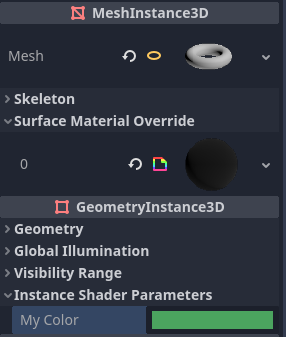
Setting a per-instance uniform's value in the GeometryInstance3D section of the inspector
Per-instance uniform values can also be set at run-time using set_instance_shader_parameter method on a node that inherits from GeometryInstance3D:
$MeshInstance3D.set_instance_shader_parameter("my_color", Color(0.3, 0.6, 1.0))
When using per-instance uniforms, there are some restrictions you should be aware of:
Per-instance uniforms do not support textures, only regular scalar and vector types. As a workaround, you can pass a texture array as a regular uniform, then pass the index of the texture to be drawn using a per-instance uniform.
There is a practical maximum limit of 16 instance uniforms per shader.
If your mesh uses multiple materials, the parameters for the first mesh material found will "win" over the subsequent ones, unless they have the same name, index and type. In this case, all parameters are affected correctly.
If you run into the above situation, you can avoid clashes by manually specifying the index (0-15) of the instance uniform by using the
instance_indexhint:
instance uniform vec4 my_color : source_color, instance_index(5);
Variables intégrées
Un grand nombre de variables intégrées sont disponibles, comme UV, COLOR et VERTEX. Les variables disponibles dépendent du type de shader (spatial, canvas_item ou particle) et de la fonction utilisée (vertex, fragment ou light). Pour une liste des variables intégrées qui sont disponibles, veuillez consulter les pages correspondantes :
Fonctions intégrées
Un grand nombre de fonctions intégrées sont prises en charge, conformément à GLSL ES 3.0. Lorsque la nomenclature vec_type (float), vec_int_type, vec_uint_type, vec_bool_type est utilisée, elle peut être scalaire ou vectorielle.
Fonction |
Description / retour de valeur |
|---|---|
vec_type radians (vec_type degrees) |
Convertit les degrés en radians. |
vec_type degrees (vec_type radians) |
Convertit les radians en degrés. |
vec_type sin (vec_type x) |
Sinus. |
vec_type cos (vec_type x) |
Cosinus. |
vec_type tan (vec_type x) |
Tangente. |
vec_type asin (vec_type x) |
Arc sinus. |
vec_type acos (vec_type x) |
Arc cosinus. |
vec_type atan (vec_type y_over_x) |
Arc Tangente. |
vec_type atan (vec_type y, vec_type x) |
Arc Tangente. |
vec_type sinh (vec_type x) |
Sinus hyperbolique. |
vec_type cosh (vec_type x) |
Cosinus hyperbolique. |
vec_type tanh (vec_type x) |
Tangente hyperbolique. |
vec_type asinh (vec_type x) |
Sinus hyperbolique inverse. |
vec_type acosh (vec_type x) |
Cosinus hyperbolique inverse. |
vec_type atanh (vec_type x) |
Tangente hyperbolique inverse. |
vec_type pow (vec_type x, vec_type y) |
Puissance (indéfinie si |
vec_type exp (vec_type x) |
Exponentielle de base e. |
vec_type exp2 (vec_type x) |
Exponentielle de base 2. |
vec_type log (vec_type x) |
Logarithme naturel. |
vec_type log2 (vec_type x) |
Logarithme de base 2. |
vec_type sqrt (vec_type x) |
Racine carrée. |
vec_type inversesqrt (vec_type x) |
Racine carrée inverse. |
vec_type abs (vec_type x) ivec_type abs (ivec_type x) |
Absolute value (returns positive value if negative). |
vec_type sign (vec_type x) ivec_type sign (ivec_type x) |
Sign (returns |
vec_type floor (vec_type x) |
Arrondit à l’entier inférieur. |
vec_type round (vec_type x) |
Arrondit à l’entier le plus proche. |
vec_type roundEven (vec_type x) |
Arrondit à l’entier pair le plus proche. |
vec_type trunc (vec_type x) |
Troncature. |
vec_type ceil (vec_type x) |
Arrondit à l’entier supérieur. |
vec_type fract (vec_type x) |
Fractional (returns |
vec_type mod (vec_type x, vec_type y) vec_type mod (vec_type x, float y) |
Modulo (reste de la division). |
vec_type modf (vec_type x, out vec_type i) |
Partie fractionnaire de |
vec_type min (vec_type a, vec_type b) |
Plus petite valeur entre |
vec_type max (vec_type a, vec_type b) |
Highest value between |
vec_type clamp (vec_type x, vec_type min, vec_type max) |
Clamp |
float mix (float a, float b, float c) vec_type mix (vec_type a, vec_type b, float c) vec_type mix (vec_type a, vec_type b, bvec_type c) |
Linear interpolate between |
vec_type fma (vec_type a, vec_type b, vec_type c) |
Performs a fused multiply-add operation: |
vec_type step (vec_type a, vec_type b) |
|
vec_type step (float a, vec_type b) |
|
vec_type smoothstep (vec_type a, vec_type b, vec_type c) vec_type smoothstep (float a, float b, vec_type c) |
Hermite interpolate between |
bvec_type isnan (vec_type x) |
Renvoie |
bvec_type isinf (vec_type x) |
Renvoie |
ivec_type floatBitsToInt (vec_type x) |
Copie de bits Float->Int, sans conversion. |
uvec_type floatBitsToUint (vec_type x) |
Copie de bits Float->UInt, sans conversion. |
vec_type intBitsToFloat (ivec_type x) |
Copie de bits Int->Float, sans conversion. |
vec_type uintBitsToFloat (uvec_type x) |
Copie de bits UInt->Float, sans conversion. |
float length (vec_type x) |
Longueur du vecteur. |
float distance (vec_type a, vec_type b) |
Distance entre les vecteurs, c'est à dire |
float dot (vec_type a, vec_type b) |
Produit scalaire. |
vec3 cross (vec3 a, vec3 b) |
Produit Vectoriel. |
vec_type normalize (vec_type x) |
Normaliser à la longueur unitaire. |
vec3 reflect (vec3 I, vec3 N) |
Réflexion. |
vec3 refract (vec3 I, vec3 N, float eta) |
Réfraction. |
vec_type faceforward (vec_type N, vec_type I, vec_type Nref) |
Si |
mat_type matrixCompMult (mat_type x, mat_type y) |
Multiplication de composants matriciels. |
mat_type outerProduct (vec_type column, vec_type row) |
Produit matriciel tensoriel (outer product). |
mat_type transpose (mat_type m) |
Matrice transposée. |
float determinant (mat_type m) |
Déterminant de la matrice. |
mat_type inverse (mat_type m) |
Matrice inverse. |
bvec_type lessThan (vec_type x, vec_type y) |
Comparaison de bool vector < sur des vectors int/uint/float. |
bvec_type greaterThan (vec_type x, vec_type y) |
Comparaison de bool vector > sur des vectors int/uint/float. |
bvec_type lessThanEqual (vec_type x, vec_type y) |
Comparaison de bool vector <= sur des vectors int/uint/float. |
bvec_type greaterThanEqual (vec_type x, vec_type y) |
Comparaison de bool vector >= sur des vectors int/uint/float. |
bvec_type equal (vec_type x, vec_type y) |
Comparaison de bool vector == sur des vectors int/uint/float. |
bvec_type nonEgaux (vec_type x, vec_type y) |
Comparaison de bool vector != sur des vectors int/uint/float. |
bool n'importe (bvec_type x) |
|
bool all (bvec_type x) |
|
bvec_type not (bvec_type x) |
Inverser le vecteur booléen. |
ivec2 textureSize (gsampler2D s, int lod) ivec3 textureSize (gsampler2DArray s, int lod) ivec3 textureSize (gsampler3D s, int lod) ivec2 textureSize (samplerCube s, int lod) ivec2 textureSize (samplerCubeArray s, int lod) |
Donne la taille d'une texture. The LOD defines which mipmap level is used. An LOD value of |
vec2 textureQueryLod (gsampler2D s, vec2 p) vec3 textureQueryLod (gsampler2DArray s, vec2 p) vec2 textureQueryLod (gsampler3D s, vec3 p) vec2 textureQueryLod (samplerCube s, vec3 p) |
Compute the level-of-detail that would be used to sample from a
texture. The |
int textureQueryLevels (gsampler2D s) int textureQueryLevels (gsampler2DArray s) int textureQueryLevels (gsampler3D s) int textureQueryLevels (samplerCube s) |
Donne le nombre de niveaux de mipmap accessibles d'une texture. If the texture is unassigned to a sampler, |
gvec4_type texture (gsampler2D s, vec2 p [, float bias]) vec4_type texture (sampler2DArray_type s, vec3 uv [, float bias]) vec4_type texture (sampler3D_type s, vec3 uv [, float bias]) vec4 texture (samplerCube s, vec3 p [, float bias]) vec4 texture (samplerCubeArray s, vec4 p [, float bias]) |
Effectue une lecture de texture. |
gvec4_type textureProj (gsampler2D s, vec3 p [, float bias]) gvec4_type textureProj (gsampler2D s, vec4 p [, float bias]) vec4_type textureProj (sampler3D_type s, vec4 uv [, float bias]) |
Effectue une lecture de texture avec projection. |
gvec4_type textureLod (gsampler2D s, vec2 p, float lod) gvec4_type textureLod (gsampler2DArray s, vec3 p, float lod) gvec4_type textureLod (gsampler3D s, vec3 p, float lod) vec4 textureLod (samplerCube s, vec3 p, float lod) vec4 textureLod (samplerCubeArray s, vec4 p, float lod) |
Effectue une lecture de texture avec mipmap personnalisé. The LOD defines which mipmap level is used. An LOD value of |
gvec4_type textureProjLod (gsampler2D s, vec3 p, float lod) gvec4_type textureProjLod (gsampler2D s, vec4 p, float lod) gvec4_type textureProjLod (gsampler3D s, vec4 p, float lod) |
Effectue une lecture de texture avec projection/LOD. The LOD defines which mipmap level is used. An LOD value of |
gvec4_type textureGrad (gsampler2D s, vec2 p, vec2 dPdx, vec2 dPdy) gvec4_type textureGrad (gsampler2DArray s, vec3 p, vec2 dPdx, vec2 dPdy) gvec4_type textureGrad (gsampler3D s, vec3 p, vec2 dPdx, vec2 dPdy) vec4 textureGrad (samplerCube s, vec3 p, vec3 dPdx, vec3 dPdy) vec4 textureGrad (samplerCubeArray s, vec3 p, vec3 dPdx, vec3 dPdy) |
Effectue une lecture de texture avec des dégradés explicites. |
gvec4_type textureProjGrad (gsampler2D s, vec3 p, vec2 dPdx, vec2 dPdy) gvec4_type textureProjGrad (gsampler2D s, vec4 p, vec2 dPdx, vec2 dPdy) gvec4_type textureProjGrad (gsampler3D s, vec4 p, vec3 dPdx, vec3 dPdy) |
Effectue une lecture de texture avec projection/LOD et avec des dégradés explicites. |
gvec4_type texelFetch (gsampler2D s, ivec2 p, int lod) gvec4_type texelFetch (gsampler2DArray s, ivec3 p, int lod) gvec4_type texelFetch (gsampler3D s, ivec3 p, int lod) |
Récupère un seul texel à l'aide de coordonnées entières. The LOD defines which mipmap level is used. An LOD value of |
gvec4_type textureGather (gsampler2D s, vec2 p [, int comps]) vec4_type texture (sampler2DArray_type s, vec3 uv [, float bias]) vec4 textureGather (samplerCube s, vec3 p [, int comps]) |
Gathers four texels from a texture.
Use |
vec_type dFdx (vec_type p) |
Derivative in |
vec_type dFdxCoarse (vec_type p) |
Calculates derivative with respect to |
vec_type dFdxFine (vec_type p) |
Calculates derivative with respect to |
vec_type dFdy (vec_type p) |
Derivative in |
vec_type dFdyCoarse (vec_type p) |
Calculates derivative with respect to |
vec_type dFdyFine (vec_type p) |
Calculates derivative with respect to |
vec_type fwidth (vec_type p) |
Sum of absolute derivative in |
vec_type fwidthCoarse (vec_type p) |
Sum of absolute derivative in |
vec_type fwidthFine (vec_type p) |
Sum of absolute derivative in |
uint packHalf2x16 (vec2 v) vec2 unpackHalf2x16 (uint v) |
Convert two 32-bit floating-point numbers into 16-bit and pack them into a 32-bit unsigned integer and vice-versa. |
uint packUnorm2x16 (vec2 v) vec2 unpackUnorm2x16 (uint v) |
Convert two 32-bit floating-point numbers (clamped within 0..1 range) into 16-bit and pack them into a 32-bit unsigned integer and vice-versa. |
uint packSnorm2x16 (vec2 v) vec2 unpackSnorm2x16 (uint v) |
Convert two 32-bit floating-point numbers (clamped within -1..1 range) into 16-bit and pack them into a 32-bit unsigned integer and vice-versa. |
uint packUnorm4x8 (vec4 v) vec4 unpackUnorm4x8 (uint v) |
Convert four 32-bit floating-point numbers (clamped within 0..1 range) into 8-bit and pack them into a 32-bit unsigned integer and vice-versa. |
uint packSnorm4x8 (vec4 v) vec4 unpackSnorm4x8 (uint v) |
Convert four 32-bit floating-point numbers (clamped within -1..1 range) into 8-bit and pack them into a 32-bit unsigned integer and vice-versa. |
ivec_type bitfieldExtract (ivec_type value, int offset, int bits) uvec_type bitfieldExtract (uvec_type value, int offset, int bits) |
Extracts a range of bits from an integer. |
ivec_type bitfieldInsert (ivec_type base, ivec_type insert, int offset, int bits) uvec_type bitfieldInsert (uvec_type base, uvec_type insert, int offset, int bits) |
Insert a range of bits into an integer. |
ivec_type bitfieldReverse (ivec_type value) uvec_type bitfieldReverse (uvec_type value) |
Reverse the order of bits in an integer. |
ivec_type bitCount (ivec_type value) uvec_type bitCount (uvec_type value) |
Counts the number of 1 bits in an integer. |
ivec_type findLSB (ivec_type value) uvec_type findLSB (uvec_type value) |
Find the index of the least significant bit set to 1 in an integer. |
ivec_type findMSB (ivec_type value) uvec_type findMSB (uvec_type value) |
Find the index of the most significant bit set to 1 in an integer. |
void imulExtended (ivec_type x, ivec_type y, out ivec_type msb, out ivec_type lsb) void umulExtended (uvec_type x, uvec_type y, out uvec_type msb, out uvec_type lsb) |
Multiplies two 32-bit numbers and produce a 64-bit result.
|
uvec_type uaddCarry (uvec_type x, uvec_type y, out uvec_type carry) |
Adds two unsigned integers and generates carry. |
uvec_type usubBorrow (uvec_type x, uvec_type y, out uvec_type borrow) |
Subtracts two unsigned integers and generates borrow. |
vec_type ldexp (vec_type x, out ivec_type exp) |
Assemble a floating-point number from a value and exponent. If this product is too large to be represented in the floating-point type the result is undefined. |
vec_type frexp (vec_type x, out ivec_type exp) |
Splits a floating-point number( For |
Commentaires
The shading language supports the same comment syntax as used in C# and C++:
Additionally, you can use documentation comments that are displayed in the inspector when hovering a shader parameter. Documentation comments are currently only supported when placed immediately above a
uniformdeclaration. These documentation comments only support the multiline comment syntax and must use two leading asterisks (/**) instead of just one (/*):The asterisks on the follow-up lines are not required, but are recommended as per the Guide de style des shaders. These asterisks are automatically stripped by the inspector, so they won't appear in the tooltip.