Progettando la scena del mob
In questa parte, programmerai i mostri, che chiameremo mob. Nella prossima lezione, li genereremo casualmente attorno l'area di gioco.
Progettiamo i mostri stessi in una nuova scena. La struttura dei nodi sarà simile a quella della scena player.tscn.
Create a scene with, once again, a CharacterBody3D node as its root. Name it
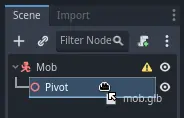
Mob. Add a child node Node3D, name it Pivot. And drag and drop
the file mob.glb from the FileSystem dock onto the Pivot to add the
monster's 3D model to the scene.
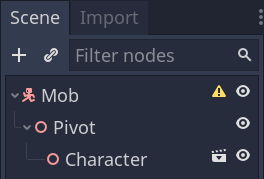
You can rename the newly created mob node
into Character.
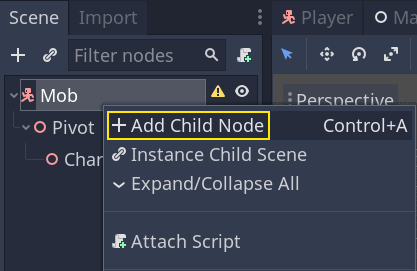
We need a collision shape for our body to work. Right-click on the Mob node,
the scene's root, and click Add Child Node.
Aggiungi un CollisionShape3D.
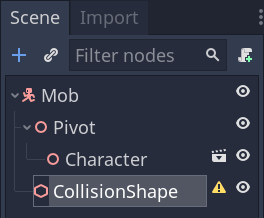
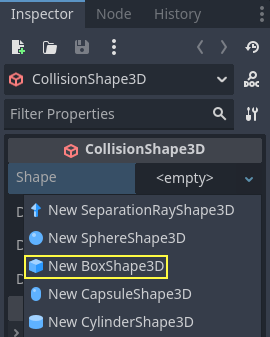
In the Inspector, assign a BoxShape3D to the Shape property.
Dovremmo cambiarne le dimensioni per adattarle meglio al modello 3D. Puoi farlo interattivamente cliccando e trascinando i punti arancioni.
The box should touch the floor and be a little thinner than the model. Physics engines work in such a way that if the player's sphere touches even the box's corner, a collision will occur. If the box is a little too big compared to the 3D model, you may die at a distance from the monster, and the game will feel unfair to the players.
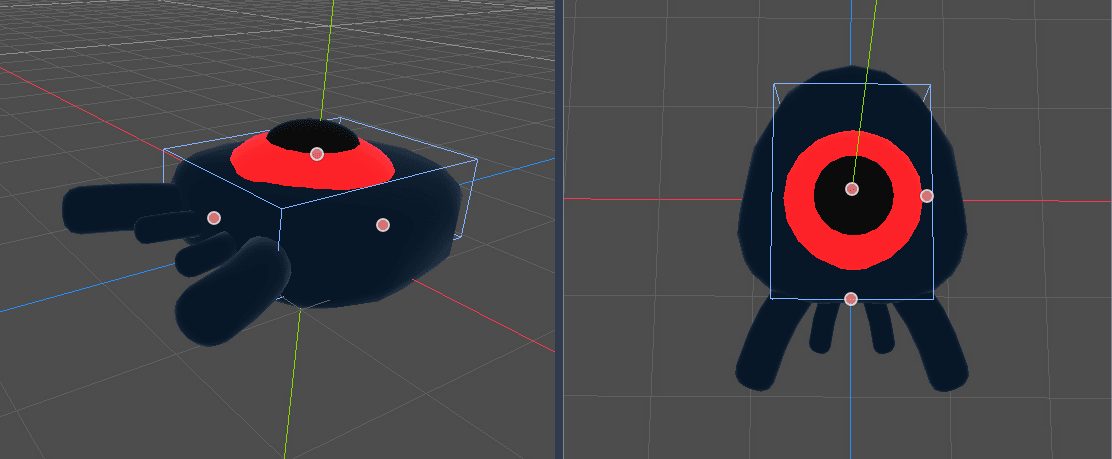
Notice that my box is taller than the monster. It is okay in this game because we're looking at the scene from above and using a fixed perspective. Collision shapes don't have to match the model exactly. It's the way the game feels when you test it that should dictate their form and size.
Rimozione dei mostri fuori dallo schermo
Faremo comparire mostri a intervalli regolari nel livello di gioco. Se non stiamo attenti, il loro numero potrebbe aumentare all'infinito, e non vogliamo che ciò accada. Ogni istanza di mob ha un costo sia di memoria sia di elaborazione, e non vogliamo pagarlo quando il mob è fuori dallo schermo.
Una volta che un mostro lascia lo schermo, non ne abbiamo più bisogno, quindi dovremmo eliminarlo. Godot ha un nodo che rileva quando gli oggetti lasciano lo schermo, VisibleOnScreenNotifier3D, e lo utilizzeremo per distruggere i nostri mob.
Nota
Quando si istanzia continuamente un oggetto, esiste una tecnica che permette di evitare il costo di creare e distruggere istanze continuamente, chiamata "pooling". Consiste nel creare in anticipo un array di oggetti e riutilizzarli più e più volte.
Quando si lavora con GDScript, non c'è bisogno di preoccuparsi di questo aspetto. Il motivo principale per cui si utilizzano i "pool" è evitare blocchi con linguaggi con garbage collection come C# o Lua. GDScript utilizza una tecnica diversa per gestire la memoria, il conteggio dei riferimenti, che non ha questo limite. Puoi saperne di più qui: Gestione della memoria.
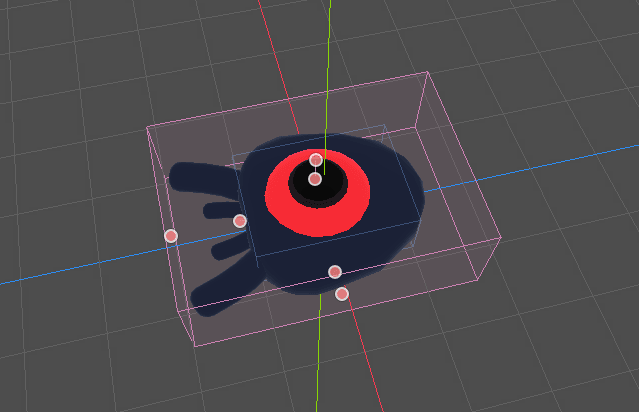
Seleziona il nodo Mob e aggiungi un nodo figlio VisibleOnScreenNotifier3D. Apparirà un altro riquadro, stavolta rosa. Quando questo riquadro scomparirà completamente dallo schermo, il nodo emetterà un segnale.
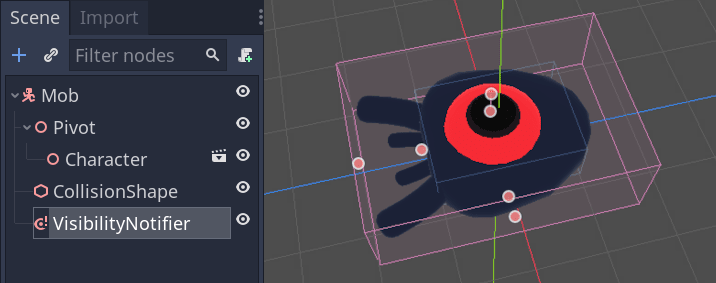
Ridimensionalo tramite i punti arancioni fino a coprire tutto il modello 3D.
Programmare il movimento del mob
Implementiamo il movimento del mostro. Lo faremo in due passaggi. Per prima cosa, scriveremo uno script sulla scena Mob che definisce una funzione per inizializzare il mostro. Poi scriveremo il codice per il meccanismo di generazione casuale nella scena main.tscn e chiameremo la funzione da lì.
Aggiungi uno script al Mob.
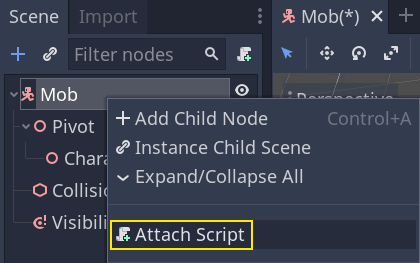
Here's the movement code to start with. We define two properties, min_speed
and max_speed, to define a random speed range, which we will later use to define CharacterBody3D.velocity.
extends CharacterBody3D

# Minimum speed of the mob in meters per second.
@export var min_speed = 10
# Maximum speed of the mob in meters per second.
@export var max_speed = 18


func _physics_process(_delta):
    move_and_slide()
using Godot;

public partial class Mob : CharacterBody3D
{
    // Don't forget to rebuild the project so the editor knows about the new export variable.

    // Minimum speed of the mob in meters per second
    [Export]
    public int MinSpeed { get; set; } = 10;
    // Maximum speed of the mob in meters per second
    [Export]
    public int MaxSpeed { get; set; } = 18;

    public override void _PhysicsProcess(double delta)
    {
        MoveAndSlide();
    }
}
Similarly to the player, we move the mob every frame by calling the function
CharacterBody3D.move_and_slide(). This time, we don't update
the velocity every frame; we want the monster to move at a constant speed
and leave the screen, even if it were to hit an obstacle.
We need to define another function to calculate the CharacterBody3D.velocity. This
function will turn the monster towards the player and randomize both its angle
of motion and its velocity.
The function will take a start_position,the mob's spawn position, and the
player_position as its arguments.
We position the mob at start_position and turn it towards the player using
the look_at_from_position() method, and randomize the angle by rotating a
random amount around the Y axis. Below, randf_range() outputs a random value
between -PI / 4 radians and PI / 4 radians.
# This function will be called from the Main scene.
func initialize(start_position, player_position):
    # We position the mob by placing it at start_position
    # and rotate it towards player_position, so it looks at the player.
    look_at_from_position(start_position, player_position, Vector3.UP)
    # Rotate this mob randomly within range of -45 and +45 degrees,
    # so that it doesn't move directly towards the player.
    rotate_y(randf_range(-PI / 4, PI / 4))
// This function will be called from the Main scene.
public void Initialize(Vector3 startPosition, Vector3 playerPosition)
{
    // We position the mob by placing it at startPosition
    // and rotate it towards playerPosition, so it looks at the player.
    LookAtFromPosition(startPosition, playerPosition, Vector3.Up);
    // Rotate this mob randomly within range of -45 and +45 degrees,
    // so that it doesn't move directly towards the player.
    RotateY((float)GD.RandRange(-Mathf.Pi / 4.0, Mathf.Pi / 4.0));
}
We got a random position, now we need a random_speed. randi_range() will be useful as it gives random int values, and we will use min_speed and max_speed.
random_speed is just an integer, and we just use it to multiply our CharacterBody3D.velocity. After random_speed is applied, we rotate CharacterBody3D.velocity Vector3 towards the player.
func initialize(start_position, player_position):
    # ...

    # We calculate a random speed (integer)
    var random_speed = randi_range(min_speed, max_speed)
    # We calculate a forward velocity that represents the speed.
    velocity = Vector3.FORWARD * random_speed
    # We then rotate the velocity vector based on the mob's Y rotation
    # in order to move in the direction the mob is looking.
    velocity = velocity.rotated(Vector3.UP, rotation.y)
public void Initialize(Vector3 startPosition, Vector3 playerPosition)
{
    // ...

    // We calculate a random speed (integer).
    int randomSpeed = GD.RandRange(MinSpeed, MaxSpeed);
    // We calculate a forward velocity that represents the speed.
    Velocity = Vector3.Forward * randomSpeed;
    // We then rotate the velocity vector based on the mob's Y rotation
    // in order to move in the direction the mob is looking.
    Velocity = Velocity.Rotated(Vector3.Up, Rotation.Y);
}
Lasciare lo schermo
We still have to destroy the mobs when they leave the screen. To do so, we'll
connect our VisibleOnScreenNotifier3D node's screen_exited signal to the Mob.
Torna sulla viewport 3D cliccando sull'etichetta 3D nella parte superiore dell'editor. Puoi anche premere Ctrl + F2 (oppure Opt + 2 su macOS) per accedervi.

Select the VisibleOnScreenNotifier3D node and on the right side of the interface,
navigate to the Node dock. Double-click the screen_exited() signal.
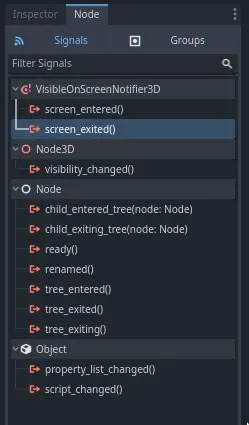
Connetti il segnale al Mob
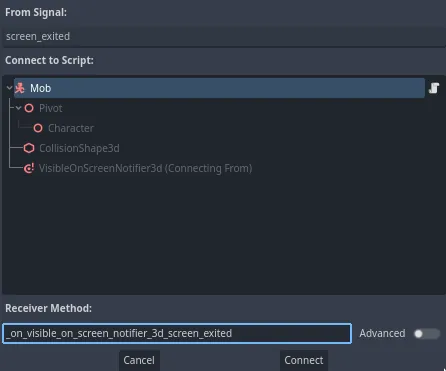
This will add a new function for you in your mob script,
_on_visible_on_screen_notifier_3d_screen_exited(). From it, call the queue_free()
method. This function destroys the instance it's called on.
func _on_visible_on_screen_notifier_3d_screen_exited():
    queue_free()
// We also specified this function name in PascalCase in the editor's connection window.
private void OnVisibilityNotifierScreenExited()
{
    QueueFree();
}
Our monster is ready to enter the game! In the next part, you will spawn monsters in the game level.
Here is the complete mob.gd script for reference.
extends CharacterBody3D

# Minimum speed of the mob in meters per second.
@export var min_speed = 10
# Maximum speed of the mob in meters per second.
@export var max_speed = 18

func _physics_process(_delta):
    move_and_slide()

# This function will be called from the Main scene.
func initialize(start_position, player_position):
    # We position the mob by placing it at start_position
    # and rotate it towards player_position, so it looks at the player.
    look_at_from_position(start_position, player_position, Vector3.UP)
    # Rotate this mob randomly within range of -45 and +45 degrees,
    # so that it doesn't move directly towards the player.
    rotate_y(randf_range(-PI / 4, PI / 4))

    # We calculate a random speed (integer)
    var random_speed = randi_range(min_speed, max_speed)
    # We calculate a forward velocity that represents the speed.
    velocity = Vector3.FORWARD * random_speed
    # We then rotate the velocity vector based on the mob's Y rotation
    # in order to move in the direction the mob is looking.
    velocity = velocity.rotated(Vector3.UP, rotation.y)

func _on_visible_on_screen_notifier_3d_screen_exited():
    queue_free()
using Godot;

public partial class Mob : CharacterBody3D
{
    // Minimum speed of the mob in meters per second.
    [Export]
    public int MinSpeed { get; set; } = 10;
    // Maximum speed of the mob in meters per second.
    [Export]
    public int MaxSpeed { get; set; } = 18;

    public override void _PhysicsProcess(double delta)
    {
        MoveAndSlide();
    }

    // This function will be called from the Main scene.
    public void Initialize(Vector3 startPosition, Vector3 playerPosition)
    {
        // We position the mob by placing it at startPosition
        // and rotate it towards playerPosition, so it looks at the player.
        LookAtFromPosition(startPosition, playerPosition, Vector3.Up);
        // Rotate this mob randomly within range of -45 and +45 degrees,
        // so that it doesn't move directly towards the player.
        RotateY((float)GD.RandRange(-Mathf.Pi / 4.0, Mathf.Pi / 4.0));

        // We calculate a random speed (integer).
        int randomSpeed = GD.RandRange(MinSpeed, MaxSpeed);
        // We calculate a forward velocity that represents the speed.
        Velocity = Vector3.Forward * randomSpeed;
        // We then rotate the velocity vector based on the mob's Y rotation
        // in order to move in the direction the mob is looking.
        Velocity = Velocity.Rotated(Vector3.Up, Rotation.Y);
    }

    // We also specified this function name in PascalCase in the editor's connection window.
    private void OnVisibilityNotifierScreenExited()
    {
        QueueFree();
    }
}