Renderer
Vedi anche
This page gives an overview of Godot's renderers, focusing on the differences between their rendering features. For more technical details on the renderers, see Internal rendering architecture.
Introduzione
Godot 4 include tre renderer:
Forward+. Il renderer più avanzato, adatto solo a piattaforme desktop. Utilizzato come predefinito sulle piattaforme desktop. Questo renderer utilizza Vulkan, Direct3D 12 o Metal come driver di rendering e si basa sul backend RenderingDevice.
Mobile. Meno funzionalità, ma renderizza scene semplici più velocemente. Adatto a piattaforme mobili e desktop. Utilizzato come predefinito sulle piattaforme mobili. Questo renderer utilizza Vulkan, Direct3D 12 o Metal come driver di rendering e si basa sul backend RenderingDevice.
Compatibilità, talvolta chiamato Compatibilità GL. Il renderer meno avanzato, adatto a piattaforme desktop e mobili di fascia bassa. Utilizzato come predefinito sulla piattaforma web. Questo renderer utilizza OpenGL come driver di rendering.
Renderers, rendering drivers, and RenderingDevice
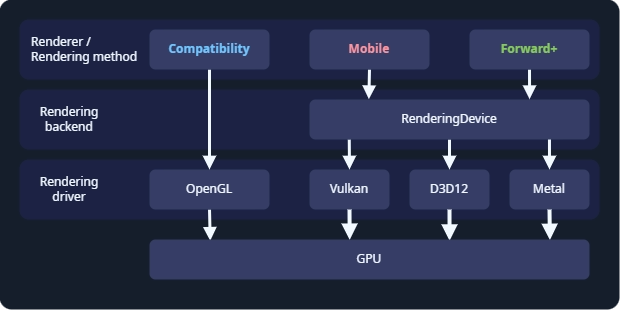
Godot's rendering abstraction layers.
The renderer, or rendering method, determines which features are available. Most of the time, this is the only thing you need to think about. Godot's renderers are Forward+, Mobile, and Compatibility.
The rendering driver tells the GPU what to do, using a graphics API. Godot can use the OpenGL, Vulkan, Direct3D 12, and Metal rendering drivers. Not every GPU supports every rendering driver, and therefore not every GPU supports all renderers. Vulkan, Direct3D 12, and Metal are modern, low-level graphics APIs, and requires newer hardware. OpenGL is an older graphics API that runs on most hardware.
RenderingDevice is a rendering backend, an abstraction layer between the renderer and the rendering driver. It is used by the Forward+ and Mobile renderers, and these renderers are sometimes called "RenderingDevice-based renderers".
Choosing a renderer
Choosing a renderer is a complex question, and depends on your hardware and the which platforms you are developing for. As a starting point:
Choose Forward+ if:
You are developing for desktop.
You have relatively new hardware which supports Vulkan, Direct3D 12, or Metal.
You are developing a 3D game.
You want to use the most advanced rendering features.
Choose Mobile if:
You are developing for newer mobile devices, desktop XR, or desktop.
You have relatively new hardware which supports Vulkan, Direct3D 12, or Metal.
You are developing a 3D game.
You want to use advanced rendering features, subject to the limitations of mobile hardware.
Scegli Compatibilità se:
You are developing for older mobile devices, older desktop devices, or standalone XR. The Compatibility renderer supports the widest range of hardware.
You are developing for web. In this case, Compatibility is the only choice.
You have older hardware which does not support Vulkan. In this case, Compatibility is the only choice.
You are developing a 2D game, or a 3D game which does not need advanced rendering features.
You want the best performance possible on all devices and don't need advanced rendering features.
Keep in mind every game is unique, and this is only a starting point. For example, you might choose to use the Compatibility renderer even though you have the latest GPU, so you can support the widest range of hardware. Or you might want to use the Forward+ renderer for a 2D game, so you can advanced features like compute shaders.
Switching between renderers
In the editor, you can always switch between renderers by clicking on the renderer name in the upper-right corner of the editor.
Switching between renderers may require some manual tweaks to your scene, lighting, and environment, since each renderer is different. In general, switching between the Mobile and Forward+ renderers will require fewer adjustments than switching between the Compatibility renderer and the Forward+ or Mobile renderers.
Since Godot 4.4, when using Forward+ or Mobile, if Vulkan is not supported, the engine will fall back to Direct3D 12 and vice versa. If the attempted fallback driver is not supported either, the engine will then fall back to Compatibility when the RenderingDevice backend is not supported. This allows the project to run anyway, but it may look different than the intended appearance due to the more limited renderer. This behavior can be disabled in the project settings by unchecking Rendering > Rendering Device > Fallback to OpenGL 3.
Confronto di funzionalità
This is not a complete list of the features of each renderer. If a feature is not listed here, it is available in all renderers, though it may be much faster on some renderers. For a list of all features in Godot, see Elenco delle funzionalità.
Hardware with RenderingDevice support is hardware which can run Vulkan, Direct3D 12, or Metal.
Confronto generale
Funzionalità |
Compatibilità |
Mobile |
Forward+ |
|---|---|---|---|
Hardware richiesto |
Più vecchi o di fascia bassa. |
Più recente o di fascia alta. Richiede supporto per Vulkan, Direct3D 12 o Metal. |
Più recente o di fascia alta. Richiede supporto per Vulkan, Direct3D 12 o Metal. |
Funziona su nuovo hardware |
✔️ Si. |
✔️ Si. |
✔️ Si. |
Funziona su hardware vecchio e di fascia bassa |
✔️ Si. |
✔️ Sì, ma più lento di Compatibilità. |
✔️ Sì, ma è il più lento tra tutti i renderer. |
Funziona su hardware senza supporto per RenderingDevice |
✔️ Si. |
❌ No. |
❌ No. |
Piattaforme di destinazione |
Dispositivi mobili, desktop di fascia bassa, web. |
Dispositivi mobili, desktop. |
Desktop. |
Desktop |
✔️ Si. |
✔️ Si. |
✔️ Si. |
Mobile |
✔️ Yes (fascia passa). |
✔️ Si (fascia alta). |
⚠️ Supportato, ma scarsamente ottimizzato. Utilizzare invece Mobile o Compatibilità. |
XR |
✔️ Sì. Consigliato per visori autonomi. |
|
⚠️ Supportato, ma scarsamente ottimizzato. Utilizzare invece Mobile o Compatibilità. |
Web |
✔️ Si. |
❌ No. |
❌ No. |
Giochi 2D |
✔️ Si. |
✔️ Sì, ma Compatibilità è solitamente sufficiente per il 2D. |
✔️ Sì, ma Compatibilità è solitamente sufficiente per il 2D. |
Giochi 3D |
✔️ Si. |
✔️ Si. |
✔️ Si. |
Set di funzionalità |
Funzionalità 2D, e 3D di base. |
La maggior parte delle funzionalità di rendering. |
Tutte le funzionalità di rendering. |
Funzionalità di rendering 2D |
✔️ Si. |
✔️ Si. |
✔️ Si. |
Funzionalità fondamentali di rendering 3D |
✔️ Si. |
✔️ Si. |
✔️ Si. |
Funzionalità avanzate di rendering |
❌ No. |
⚠️ Sì, limitato dall'hardware mobile. |
✔️ Sì. Sono supportate tutte le funzionalità di rendering. |
Nuove funzionalità |
⚠️ Alcune nuove funzionalità di rendering vengono aggiunte a Compatibilità. Le funzionalità vengono aggiunte dopo Mobile e Forward+. |
✔️ La maggior parte delle nuove funzionalità di rendering viene aggiunta a Mobile. Solitamente, le nuove funzionalità vengono introdotte insieme a Forward+. |
✔️ Tutte le nuove funzionalità vengono aggiunte a Forward+. Essendo il fulcro dello sviluppo, Forward+ riceve le funzionalità per primo. |
Costo di rendering |
Basso costo di base, ma elevato costo di scalabilità. |
Costo di base medio, e costo di scalabilità medio. |
Costo di base più elevato, e costi di scalabilità bassi. |
Driver di rendering |
OpenGL. |
Vulkan, Direct3D 12 o Metal. |
Vulkan, Direct3D 12 o Metal. |
Luci e ombre
Consultare Luci e ombre 3D per maggiori informazioni.
Funzionalità |
Compatibilità |
Mobile |
Forward+ |
|---|---|---|---|
Approccio di illuminazione |
Forward |
Forward |
Clustered Forward |
Massimo di OmniLight |
8 per mesh. Si può aumentare. |
8 per mesh, 256 per vista. |
512 per cluster. Si può aumentare. |
Massimo di SpotLight |
8 per mesh. Si può aumentare. |
8 per mesh, 256 per vista. |
512 per cluster. Si può aumentare. |
Massimo di DirectionalLight |
8 |
8 |
8 |
PCSS per OmniLight e SpotLight |
❌ Non supportato. |
✔️ Supportato. |
✔️ Supportato. |
PCSS per DirectionalLight |
❌ Non supportato. |
❌ Non supportato. |
✔️ Supportato. |
Texture per i proiettori di luce |
❌ Non supportato. |
✔️ Supportato. |
✔️ Supportato. |
Illuminazione globale
Consulta Introduzione all'illuminazione globale per ulteriori informazioni.
Funzionalità |
Compatibilità |
Mobile |
Forward+ |
|---|---|---|---|
ReflectionProbe |
✔️ Supportato, 2 per mesh. |
✔️ Supportato, 8 per mesh. |
✔️ Supportato, illimitato. |
LightmapGI |
⚠️ È supportato il rendering delle lightmap elaborate. L'elaborazione richiede hardware con supporto per RenderingDevice. |
✔️ Supportato. |
✔️ Supportato. |
VoxelGI |
❌ Non supportato. |
❌ Non supportato. |
✔️ Supportato. |
Screen-Space Indirect Lighting (SSIL) |
❌ Non supportato. |
❌ Non supportato. |
✔️ Supportato. |
Signed Distance Field Global Illumination (SDFGI) |
❌ Non supportato. |
❌ Non supportato. |
✔️ Supportato. |
Environment and post-processing
Consultare Environment and post-processing per maggiori informazioni.
Funzionalità |
Compatibilità |
Mobile |
Forward+ |
|---|---|---|---|
Nebbia (profondità e altezza) |
✔️ Supportato. |
✔️ Supportato. |
✔️ Supportato. |
Volumetric Fog |
❌ Non supportato. |
❌ Non supportato. |
✔️ Supportato. |
Mappatura dei toni |
✔️ Supportato. |
✔️ Supportato. |
✔️ Supportato. |
Riflessi nello spazio dello schermo |
❌ Non supportato. |
❌ Non supportato. |
✔️ Supportato. |
Screen-Space Ambient Occlusion (SSAO) |
❌ Non supportato. |
❌ Non supportato. |
✔️ Supportato. |
Screen-Space Indirect Lighting (SSIL) |
❌ Non supportato. |
❌ Non supportato. |
✔️ Supportato. |
Signed Distance Field Global Illumination (SDFGI) |
❌ Non supportato. |
❌ Non supportato. |
✔️ Supportato. |
Bagliore |
✔️ Supportato. |
✔️ Supportato. |
✔️ Supportato. |
Aggiustamenti |
✔️ Supportato. |
✔️ Supportato. |
✔️ Supportato. |
Post-elaborazione personalizzata con quad a schermo intero |
✔️ Supportato. |
✔️ Supportato. |
✔️ Supportato. |
Post-elaborazione personalizzata con CompositorEffect |
❌ Non supportato. |
✔️ Supportato. |
✔️ Supportato. |
Antialiasing
Consultare Antialiasing 3D per maggiori informazioni.
Funzionalità |
Compatibilità |
Mobile |
Forward+ |
|---|---|---|---|
MSAA 3D |
✔️ Supportato. |
✔️ Supportato. |
✔️ Supportato. |
MSAA 2D |
❌ Non supportato. |
✔️ Supportato. |
✔️ Supportato. |
TAA |
❌ Non supportato. |
❌ Non supportato. |
✔️ Supportato. |
FSR2 |
❌ Non supportato. |
❌ Non supportato. |
✔️ Supportato. |
FXAA |
❌ Non supportato. |
✔️ Supportato. |
✔️ Supportato. |
SSAA |
✔️ Supportato. |
✔️ Supportato. |
✔️ Supportato. |
Screen-space roughness limiter |
❌ Non supportato. |
✔️ Supportato. |
✔️ Supportato. |
Funzionalità di StandardMaterial
Consultare Standard Material 3D and ORM Material 3D per maggiori informazioni.
Funzionalità |
Compatibilità |
Mobile |
Forward+ |
|---|---|---|---|
Sub-surface scattering |
❌ Non supportato. |
❌ Non supportato. |
✔️ Supportato. |
Funzionalità di shader
Consultare Shading reference per maggiori informazioni.
Funzionalità |
Compatibilità |
Mobile |
Forward+ |
|---|---|---|---|
Texture di schermo |
✔️ Supportato. |
✔️ Supportato. |
✔️ Supportato. |
Texture di profondità |
✔️ Supportato. |
✔️ Supportato. |
✔️ Supportato. |
Texture di normali/rugosità |
❌ Non supportato. |
❌ Non supportato. |
✔️ Supportato. |
Shader di calcolo |
❌ Non supportato. |
⚠️ Supportato, ma comporta una riduzione delle prestazioni sui dispositivi più vecchi. |
✔️ Supportato. |
Altre funzionalità
Funzionalità |
Compatibilità |
Mobile |
Forward+ |
|---|---|---|---|
Variable rate shading |
❌ Non supportato. |
✔️ Supportato. |
✔️ Supportato. |
Decalcomanie |
❌ Non supportato. |
✔️ Supportato. |
✔️ Supportato. |
Sfocatura della profondità di campo |
❌ Non supportato. |
✔️ Supportato. |
✔️ Supportato. |
Modalità adattiva e mailbox di Vsync |
❌ Non supportato. |
✔️ Supportato. |
✔️ Supportato. |
Viewport con HDR in 2D |
❌ Non supportato. |
✔️ Supportato. |
✔️ Supportato. |
Accesso a RenderingDevice |
❌ Non supportato. |
✔️ Supportato. |
✔️ Supportato. |