GDScriptドキュメントコメント
GDScriptではコメントを使用してコードをドキュメント化し、スクリプトのメンバーに説明を追加できます。通常のコメントとドキュメントコメントには2つの違いがあります。まずドキュメントのコメントは二重ハッシュ記号 ## で始まる必要があります。次にスクリプトメンバーの直前に配置するか、スクリプトの説明の場合はスクリプトの先頭に配置する必要があります。エクスポートされた変数がドキュメント化されている場合、その説明はエディタのツールチップとして使用されます。このドキュメントは、エディタによってXMLファイルとして生成できます。
スクリプトのドキュメント化
スクリプトをドキュメント化するコメントは、メンバーのドキュメントよりも前に配置する必要があります。スクリプトドキュメントの推奨形式は次の3つのセクションに分けることができます。
スクリプトの概要 (簡単な説明)。
スクリプトの詳細な説明。
チュートリアルと非推奨/実験的マーク。
これらを互いに区別するために、ドキュメントのコメントは特別なタグが使用されます。タグは行の先頭にあり (前の空白は無視されます)、 @ の後にキーワードが続く形式でなければなりません。
スクリプトメンバーのドキュメント化
ドキュメント化の対象となるメンバー:
シグナル
列挙型
列挙値
定数
変数
関数
内部クラス
スクリプトメンバーのドキュメントは、メンバーまたはそのアノテーション (ある場合) の直前に置く必要があります。説明には複数行を含めることができますが、ドキュメントの一部としてみなされるには、すべての行が二重ハッシュ記号 ## で始まる必要があります。
タグ
説明 |
タグはありません。 |
非推奨 |
@deprecated@deprecated: Use [member another] instead. |
実験的 |
@experimental@experimental: This method is incomplete. |
For example:
## The description of the variable.
## @deprecated: Use [member other_var] instead.
var my_var
もしくはインラインドキュメントのコメントを使用することもできます:
signal my_signal ## My signal.
enum MyEnum { ## My enum.
VALUE_A = 0, ## Value A.
VALUE_B = 1, ## Value B.
}
const MY_CONST = 1 ## My constant.
var my_var ## My variable.
func my_func(): ## My func.
pass
class MyClass: ## My class.
pass
スクリプトのドキュメントは、スクリプトが更新されるたびにエディターのヘルプウィンドウで更新されます。なおメンバー変数または関数名がアンダースコアで始まる場合はプライベートとして扱われます。これはドキュメントには表示されず、ヘルプウィンドウでは無視されます。
スクリプトの例
extends Node2D
## A brief description of the class's role and functionality.
##
## The description of the script, what it can do,
## and any further detail.
##
## @tutorial:             https://example.com/tutorial_1
## @tutorial(Tutorial 2): https://example.com/tutorial_2
## @experimental
## The description of a signal.
signal my_signal
## This is a description of the below enum.
enum Direction {
## Direction up.
UP = 0,
## Direction down.
DOWN = 1,
## Direction left.
LEFT = 2,
## Direction right.
RIGHT = 3,
}
## The description of a constant.
const GRAVITY = 9.8
## The description of the variable v1.
var v1
## This is a multiline description of the variable v2.[br]
## The type information below will be extracted for the documentation.
var v2: int
## If the member has any annotation, the annotation should
## immediately precede it.
@export
var v3 := some_func()
## As the following function is documented, even though its name starts with
## an underscore, it will appear in the help window.
func _fn(p1: int, p2: String) -> int:
return 0
# The below function isn't documented and its name starts with an underscore
# so it will treated as private and will not be shown in the help window.
func _internal() -> void:
pass
## Documenting an inner class.
##
## The same rules apply here. The documentation must
## immediately precede the class definition.
##
## @tutorial: https://example.com/tutorial
## @experimental
class Inner:
## Inner class variable v4.
var v4
## Inner class function fn.
func fn(): pass
@deprecated タグと @experimental タグ
クラスまたはそのメンバーを非推奨または実験的としてマークできます。これにより対応するアイコンが組み込みドキュメントビューアに追加されます。オプションでAPIが推奨されない理由を説明する短いメッセージを提供できます。これはプラグインやライブラリの作成者にとって特に役立ちます。
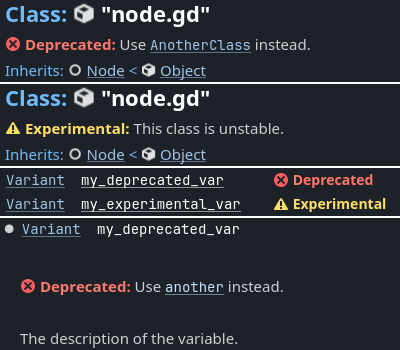
非推奨 は将来のメジャーリリースで削除または互換性のない変更が行われる可能性があるAPIを示します。通常、非推奨APIは下位互換性のために保持されます。
実験的 は現在のメジャーブランチで変更または削除される可能性がある新しい不安定なAPIを示します。この API を製品コードで使用することは推奨されません。
注釈
技術的には同じクラス/メンバー上で @deprecated タグと @experimental タグの両方を使用できますが、一般的な規則に反するため、これはお勧めできません。
BBCodeとクラスリファレンス
Godotのクラスリファレンスは、BBCodeのようなタグをサポートしています。これらにより、テキストに素敵な書式を追加し、ドキュメントでも使用できます。 class reference bbcode も参照してください。これは RichTextLabel BBCode とは少し異なることに注意してください。
別のクラスのメンバーにリンクするときは、必ずクラス名を指定する必要があります。同じクラスへのリンクの場合はクラス名はオプションであり省略できます。
利用可能なタグのリストは次のとおりです。
タグと説明 |
サンプル |
結果 |
|---|---|---|
[Class]クラスへのリンク
|
|
Move the Sprite2D. |
[annotation Class.name]アノテーションへのリンク
|
|
See @GDScript.@rpc. |
[constant Class.name]定数へのリンク
|
|
Color.RED を参照。 |
[enum Class.name]列挙型へのリンク
|
|
See Mesh.ArrayType. |
[member Class.name]メンバー(プロパティ)へのリンク
|
|
Get Node2D.scale. |
[method Class.name]メソッドへのリンク
|
|
Call Node3D.hide(). |
[constructor Class.name]組み込みコンストラクターへのリンク
|
|
Use Color.Color. |
[operator Class.name]組み込み演算子へのリンク
|
|
Use Color.operator *. |
[signal Class.name]シグナルへのリンク
|
|
Emit Node.renamed. |
[theme_item Class.name]テーマアイテムへのリンク
|
|
See Label.font. |
[param name]パラメータ名 (コードとして)
|
|
Takes |
[br]改行
|
Line 1.[br]Line 2. |
Line 1.
Line 2.
|
[lb] [rb][ と ] |
|
[b]text[/b] |
[b] [/b]太字
|
|
Do not call this method. |
[i] [/i]斜体
|
|
Returns the global position. |
[u] [/u]下線
|
|
Always use this method. |
[s] [/s]取り消し線
|
|
|
[color] [/color]色
|
|
Error! |
[font] [/font]フォント
|
|
LICENSE |
[img] [/img]画像
|
|

|
[url] [/url]ハイパーリンク
|
[url]https://example.com[/url][url=https://example.com]Website[/url] |
|
[center] [/center]水平方向のセンタリング
|
|
|
[kbd] [/kbd]キーボードとマウスのショートカット
|
|
Press Ctrl + C. |
[code] [/code]インラインのコードフラグメント
|
|
Returns |
[codeblock][/codeblock]複数行のコードブロック
|
下記参照。 |
下記参照。 |
注釈
現在、アノテーションがあるのは @GDScript のみです。
[kbd]は、パーサーが[/kbd]に遭遇するまで BBCode を無効にします。[code]は、パーサーが[/code]に遭遇するまで BBCode を無効にします。[codeblock]は、パーサーが[/codeblock]に遭遇するまで BBCode を無効にします。
警告
事前にフォーマットされたコードブロックには [codeblock] を使用します。 [codeblock] 内では、インデントには常に **4 つのスペース**を使用してください (パーサーはタブを削除します)。
## Do something for this plugin. Before using the method
## you first have to [method initialize] [MyPlugin].[br]
## [color=yellow]Warning:[/color] Always [method clean] after use.[br]
## Usage:
## [codeblock]
## func _ready():
##     the_plugin.initialize()
##     the_plugin.do_something()
##     the_plugin.clean()
## [/codeblock]
func do_something():
    pass
デフォルトでは [codeblock] は GDScript 構文をハイライトします。これは lang 属性を使用して言語を変更できます。現在サポートされているオプションは次のとおりです。
[codeblock lang=text]は構文のハイライトを無効にします;[codeblock lang=gdscript]は GDScript 構文をハイライトします;[codeblock lang=csharp]は C# 構文をハイライトします (.NET バージョンのみ)。