シェーディング言語
はじめに
Godotは、GLSL ES 3.0と同様のシェーディング言語を使用します。ほとんどのデータ型と関数がサポートされており、残りのいくつかのデータ型は今後追加される可能性があります。
既にGLSLに精通している場合は、Godot Shader Migration Guide が、通常の GLSL からGodotのシェーディング言語への移行に役立つ資料です。
データ型
ほとんどのGLSL ES 3.0データ型がサポートされています:
タイプ(型) |
説明 |
|---|---|
void |
Voidデータ型。何も返さない関数にのみ有用です。 |
bool |
Boolデータ型には、 |
bvec2 |
Bool値の2要素ベクトル。 |
bvec3 |
Bool値の3要素ベクトル。 |
bvec4 |
Bool値の4要素ベクトル。 |
int |
32ビット符号付きスカラー整数。 |
ivec2 |
符号付き整数の2要素ベクトル。 |
ivec3 |
符号付き整数の3要素ベクトル。 |
ivec4 |
符号付き整数の4要素ベクトル。 |
uint |
符号なしスカラー整数。負の数を含めることはできません。 |
uvec2 |
符号なし整数の2要素ベクトル。 |
uvec3 |
符号なし整数の3要素ベクトル。 |
uvec4 |
符号なし整数の4要素ベクトル。 |
float |
32ビット浮動小数点のスカラー。 |
vec2 |
浮動小数点の2要素ベクトル。 |
vec3 |
浮動小数点の3要素ベクトル。 |
vec4 |
浮動小数点の4要素ベクトル。 |
mat2 |
列優先順の2x2行列。 |
mat3 |
列優先順の3x3行列。 |
mat4 |
列優先順の4x4行列。 |
sampler2D |
floatとして読み取られる2Dテクスチャをバインドするためのサンプラータイプ。 |
isampler2D |
intとして読み取られる2Dテクスチャをバインドするためのサンプラータイプ。 |
usampler2D |
uintとして読み取られる2Dテクスチャをバインドするためのサンプラータイプ。 |
sampler2DArray |
floatとして読み取られる2Dテクスチャ配列をバインドするためのサンプラータイプ。 |
isampler2DArray |
intとして読み取られる2Dテクスチャ配列をバインドするためのサンプラータイプ。 |
usampler2DArray |
uintとして読み取られる2Dテクスチャ配列をバインドするためのサンプラータイプ。 |
sampler3D |
floatとして読み取られる3Dテクスチャをバインドするためのサンプラータイプ。 |
isampler3D |
intとして読み取られる3Dテクスチャをバインドするためのサンプラータイプ。 |
usampler3D |
uintとして読み取られる3Dテクスチャをバインドするためのサンプラータイプ。 |
samplerCube |
キューブマップテクスチャをバインドするためのサンプラータイプ。floatとして読み込まれます。 |
samplerCubeArray |
キューブマップテクスチャ配列をバインドするためのサンプラータイプ。これはfloatとして読み込まれます。互換性レンダラーはサポートされず、Forward+ レンダラーとモバイルレンダラーでのみサポートされます。 |
samplerExternalOES |
外部サンプラータイプ。互換性レンダラーの Android プラットフォームでのみサポートされます。 |
警告
ローカル変数は 0.0 などのデフォルト値で初期化されません。変数は最初に代入せずに使用した場合、そのメモリ位置にすでに存在していた値が含まれることになり、予期しない視覚的な不具合が発生します。ただし、uniform と varyings はデフォルト値で初期化されます。
キャスト
GLSL ES 3.0と同様に、同じサイズで異なるタイプのスカラーとベクトル間の暗黙的なキャストは許可されていません。異なるサイズの型のキャストも許可されていません。変換は、コンストラクターを介して明示的に実行する必要があります。
例:
float a = 2; // invalid
float a = 2.0; // valid
float a = float(2); // valid
デフォルトの整数定数は符号付きなので、符号なしに変換するには常にキャストが必要です:
int a = 2; // valid
uint a = 2; // invalid
uint a = uint(2); // valid
メンバー
ベクタータイプの個々のスカラーメンバーには、"x"、"y"、"z"、"w" メンバーを介してアクセスします。あるいは、"r"、"g"、"b" および "a" を使用しても機能し、同等です。ニーズに最適なものを使用してください。
For matrices, use the m[column][row] indexing syntax to access each scalar,
or m[column] to access a vector by column index. For example, for accessing the
y-component of the translation from a mat4 transform matrix (4th column, 2nd line) you use m[3][1] or m[3].y.
コンストラクタ
ベクトル型の構築は常に代入する必要があります:
// The required amount of scalars
vec4 a = vec4(0.0, 1.0, 2.0, 3.0);
// Complementary vectors and/or scalars
vec4 a = vec4(vec2(0.0, 1.0), vec2(2.0, 3.0));
vec4 a = vec4(vec3(0.0, 1.0, 2.0), 3.0);
// A single scalar for the whole vector
vec4 a = vec4(0.0);
Construction of matrix types requires vectors of the same dimension as the
matrix, interpreted as columns. You can also build a diagonal matrix using matx(float) syntax.
Accordingly, mat4(1.0) is an identity matrix.
mat2 m2 = mat2(vec2(1.0, 0.0), vec2(0.0, 1.0));
mat3 m3 = mat3(vec3(1.0, 0.0, 0.0), vec3(0.0, 1.0, 0.0), vec3(0.0, 0.0, 1.0));
mat4 identity = mat4(1.0);
行列は別の次元の行列からも構築することもできます。ルールは 2 つあります:
1. If a larger matrix is constructed from a smaller matrix, the additional rows and columns are set to the values they would have in an identity matrix. 2. If a smaller matrix is constructed from a larger matrix, the top, left submatrix of the larger matrix is used.
mat3 basis = mat3(MODEL_MATRIX);
mat4 m4 = mat4(basis);
mat2 m2 = mat2(m4);
Swizzling
結果が別のベクトル型(またはスカラー)である限り、任意の順序で要素の任意の組み合わせを取得することが可能です。これは説明されるよりも簡単に示されます:
vec4 a = vec4(0.0, 1.0, 2.0, 3.0);
vec3 b = a.rgb; // Creates a vec3 with vec4 components.
vec3 b = a.ggg; // Also valid; creates a vec3 and fills it with a single vec4 component.
vec3 b = a.bgr; // "b" will be vec3(2.0, 1.0, 0.0).
vec3 b = a.xyz; // Also rgba, xyzw are equivalent.
vec3 b = a.stp; // And stpq (for texture coordinates).
float c = b.w; // Invalid, because "w" is not present in vec3 b.
vec3 c = b.xrt; // Invalid, mixing different styles is forbidden.
b.rrr = a.rgb; // Invalid, assignment with duplication.
b.bgr = a.rgb; // Valid assignment. "b"'s "blue" component will be "a"'s "red" and vice versa.
精度
データ型に精度修飾子を追加することができます。それらをuniform、変数、引数、およびvaryingに使用します。
lowp vec4 a = vec4(0.0, 1.0, 2.0, 3.0); // low precision, usually 8 bits per component mapped to 0-1
mediump vec4 a = vec4(0.0, 1.0, 2.0, 3.0); // medium precision, usually 16 bits or half float
highp vec4 a = vec4(0.0, 1.0, 2.0, 3.0); // high precision, uses full float or integer range (32 bit default)
一部の操作に低い精度を使用すると、関係する計算が高速化されます(精度は低下します)。これは、頂点プロセッサ関数ではほとんど必要ありません(ほとんどの場合、完全な精度が必要です)が、フラグメントプロセッサではしばしば有用です。
一部のアーキテクチャ (主にモバイル) では、これによって大きなメリットが得られますが、精度間の変換による追加のオーバーヘッドなどの欠点もあります。詳細については、ターゲットアーキテクチャのドキュメントを参照してください。多くの場合、モバイル環境のドライバーは一貫性のない動作や予期しない動作を引き起こすため、必要な場合を除いて精度を指定しないことをお勧めします。
配列
配列は複数の同じ型の変数のコンテナです。
ローカル配列
ローカル配列は関数内で宣言されます。サンプラーを除くすべての許可されたデータ型を使用できます。配列宣言は、Cスタイルの構文 [const] + [precision] + typename + identifier + [array size] に従います。
void fragment() {
    float arr[3];
}
これらは、最初のように初期化することができます:
float float_arr[3] = float[3] (1.0, 0.5, 0.0); // first constructor

int int_arr[3] = int[] (2, 1, 0); // second constructor

vec2 vec2_arr[3] = { vec2(1.0, 1.0), vec2(0.5, 0.5), vec2(0.0, 0.0) }; // third constructor

bool bool_arr[] = { true, true, false }; // fourth constructor - size is defined automatically from the element count
1つの式で複数の配列(サイズが異なる場合でも)を宣言できます:
float a[3] = float[3] (1.0, 0.5, 0.0),
b[2] = { 1.0, 0.5 },
c[] = { 0.7 },
d = 0.0,
e[5];
配列要素にアクセスするには、インデックス構文を使用します:
float arr[3];

arr[0] = 1.0; // setter

COLOR.r = arr[0]; // getter
配列には組み込み関数 .length() もあります(組み込みの length() 関数と混同しないでください)。パラメーターを受け入れず、配列のサイズを返します。
float arr[] = { 0.0, 1.0, 0.5, -1.0 };
for (int i = 0; i < arr.length(); i++) {
    // ...
}
注釈
0未満または配列サイズより大きいインデックスを使用すると、シェーダーがクラッシュしてレンダリングが中断します。これを防ぐには、length()、if または clamp() 関数を使用して、インデックスが0と配列の長さの間にあることを確認してください。コードは常に慎重にテストおよびチェックしてください。定数式または単純な数値を渡すと、エディタはその境界をチェックしてこのクラッシュを防ぎます。
グローバル配列
You can declare arrays in global space as either const or uniform:
shader_type spatial;

const lowp vec3 v[1] = lowp vec3[1] ( vec3(0, 0, 1) );
uniform lowp vec3 w[1];

void fragment() {
  ALBEDO = v[0] + w[0];
}
注釈
Global arrays use the same syntax as local arrays, except with a const
or uniform added to their declaration. Note that uniform arrays can't
have a default value.
定数
変数宣言の前に const キーワードを使用して、その変数を変更できないようにします。サンプラーを除くすべての基本型は、定数として宣言できます。定数値へのアクセスと使用は、ユニフォームの使用よりもわずかに高速です。定数は、宣言時に初期化する必要があります。
const vec2 a = vec2(0.0, 1.0);
vec2 b;

a = b; // invalid
b = a; // valid
定数は変更できず、さらにヒントを持つことはできませんが、複数の(同じ型の場合)を単一の式で宣言できます。例:
const vec2 V1 = vec2(1, 1), V2 = vec2(2, 2);
変数と同様に、配列は const で宣言することもできます。
const float arr[] = { 1.0, 0.5, 0.0 };

arr[0] = 1.0; // invalid

COLOR.r = arr[0]; // valid
定数は、グローバル(関数の外部)またはローカル(関数の内部)の両方で宣言できます。グローバル定数は、変更する必要のないシェーダー全体の値にアクセスする場合に役立ちます。ユニフォームと同様に、グローバル定数はすべてのシェーダーステージ間で共有されますが、シェーダーの外部からはアクセスできません。
shader_type spatial;

const float GOLDEN_RATIO = 1.618033988749894;
float 型の定数は整数部の後に . 表記を使用するか科学表記法を使用して初期化する必要があります。オプションの f 後置接尾語もサポートされています。
float a = 1.0;
float b = 1.0f; // same, using suffix for clarity
float c = 1e-1; // gives 0.1 by using the scientific notation
uint (unsigned int) 型の定数には、 int (signed int) 型と区別するために u 接尾辞が必要です。もしくは組み込み変換関数 uint(x) を使用することもできます。
uint a = 1u;
uint b = uint(1);
構造体
構造体はシェーダーコードをより適切に抽象化するために使用できる複合型です。次のようにグローバルスコープで宣言できます。
struct PointLight {
    vec3 position;
    vec3 color;
    float intensity;
};
宣言後、次のようにインスタンス化して初期化できます。
void fragment()
{
    PointLight light;
    light.position = vec3(0.0);
    light.color = vec3(1.0, 0.0, 0.0);
    light.intensity = 0.5;
}
また、同じ目的で構造体のコンストラクタを使用できます。
PointLight light = PointLight(vec3(0.0), vec3(1.0, 0.0, 0.0), 0.5);
構造体には他の構造体や配列を含めることができ、それらをグローバル定数としてインスタンス化することもできます。
shader_type spatial;

...

struct Scene {
    PointLight lights[2];
};

const Scene scene = Scene(PointLight[2](PointLight(vec3(0.0, 0.0, 0.0), vec3(1.0, 0.0, 0.0), 1.0), PointLight(vec3(0.0, 0.0, 0.0), vec3(1.0, 0.0, 0.0), 1.0)));

void fragment()
{
    ALBEDO = scene.lights[0].color;
}
構造体のインスタンスを関数へ渡すこともできます。
shader_type canvas_item;

...

Scene construct_scene(PointLight light1, PointLight light2) {
    return Scene({light1, light2});
}

void fragment()
{
    COLOR.rgb = construct_scene(PointLight(vec3(0.0, 0.0, 0.0), vec3(1.0, 0.0, 0.0), 1.0), PointLight(vec3(0.0, 0.0, 0.0), vec3(1.0, 0.0, 1.0), 1.0)).lights[0].color;
}
オペレーター
Godotシェーディング言語は、GLSL ES 3.0と同じ一連の演算子をサポートしています。以下に優先順位のリストを示します:
優先順位 |
クラス |
演算子 |
1 (最高) |
カッコ内のグループ化 |
() |
2 |
単項 |
+、-、!、~ |
3 |
乗除算 |
/、*、% |
4 |
加減算 |
+、- |
5 |
ビット単位のシフト |
<<、>> |
6 |
大小比較 |
<、>、<=、>= |
7 |
一致、不一致 |
==、!= |
8 |
ビット単位のAND |
& |
9 |
ビット単位の排他的OR |
^ |
10 |
ビット単位の包括的OR |
| |
11 |
論理AND |
&& |
12 (最低) |
論理OR |
|| |
注釈
Most operators that accept vectors or matrices (multiplication, division, etc) operate component-wise, meaning the function is applied to the first value of each vector and then on the second value of each vector, etc. Some examples:
Operation |
Equivalent Scalar Operation |
|---|---|
|
|
|
|
|
|
The GLSL Language Specification says under section 5.10 Vector and Matrix Operations:
With a few exceptions, operations are component-wise. Usually, when an operator operates on a vector or matrix, it is operating independently on each component of the vector or matrix, in a component-wise fashion. [...] The exceptions are matrix multiplied by vector, vector multiplied by matrix, and matrix multiplied by matrix. These do not operate component-wise, but rather perform the correct linear algebraic multiply.
構文制御
Godotシェーディング言語は、最も一般的なタイプの構文制御をサポートしています:
// `if`, `else if` and `else`.
if (cond) {

} else if (other_cond) {

} else {

}

// Ternary operator.
// This is an expression that behaves like `if`/`else` and returns the value.
// If `cond` evaluates to `true`, `result` will be `9`.
// Otherwise, `result` will be `5`.
int result = cond ? 9 : 5;

// `switch`.
switch (i) { // `i` should be a signed integer expression.
    case -1:
        break;
    case 0:
        return; // `break` or `return` to avoid running the next `case`.
    case 1: // Fallthrough (no `break` or `return`): will run the next `case`.
    case 2:
        break;
    //...
    default: // Only run if no `case` above matches. Optional.
        break;
}

// `for` loop. Best used when the number of elements to iterate on
// is known in advance.
for (int i = 0; i < 10; i++) {

}

// `while` loop. Best used when the number of elements to iterate on
// is not known in advance.
while (cond) {

}

// `do while`. Like `while`, but always runs at least once even if `cond`
// never evaluates to `true`.
do {

} while (cond);
最近のGPUでは無限ループが存在すると、アプリケーション(エディタを含む)がフリーズする可能性があることに注意してください。 Godotはこれを防ぐことはできないので、この間違いをしないように注意してください!
また、浮動小数点値を比較する場合は、正確な数値ではなく 範囲 と比較してください。
if (value == 0.3) のような比較は、 true と評価されない可能性があります。浮動小数点演算は近似的なことが多く、期待を裏切る可能性があります。また、ハードウェアに応じて動作が異なる場合もあります。
これは 書かないでください 。
float value = 0.1 + 0.2;

// May not evaluate to `true`!
if (value == 0.3) {
    // ...
}
代わりに、イプシロン値との範囲比較を行います。浮動小数点数が大きいほど (浮動小数点数の精度が低いほど)、イプシロン値も大きくする必要があります。
const float EPSILON = 0.0001;
if (value >= 0.3 - EPSILON && value <= 0.3 + EPSILON) {
    // ...
}
詳細については floating-point-gui.de を見てください。
ピクセルの破棄
Fragment, light, and custom functions (called from fragment or light) can use the
discard keyword. If used, the fragment is discarded and nothing is written.
discard を使用すると、シェーダを使用するサーフェス上で深度プリパスが有効にならなくなるため、使用するとパフォーマンスが低下することに注意してください。また、破棄されたピクセルでも依然として頂点シェーダーで処理する必要があります。つまり、すべてのピクセルが discard で破棄されるとしても、最初からオブジェクトをレンダリングしない場合と比較してレンダリングにはコストがかかります。
関数
Godotシェーダーで関数を定義することが可能です。次の構文を使用します:
ret_type func_name(args) {
    return ret_type; // if returning a value
}

// a more specific example:

int sum2(int a, int b) {
    return a + b;
}
呼び出し元の関数から見て上記(エディタの上方)で定義された関数のみを使用できます。上記で既に定義されている関数 (または組み込み関数名) を再定義するとエラーが発生します。
関数の引数には特別な修飾子を含めることができます:
in: 引数が読み取り専用であることを意味します(デフォルト)。
out: 引数が書き込み専用であることを意味します。
inout: 引数が参照を介して完全に渡されることを意味します。
const: 引数が定数で変更できないことを意味します。 in 修飾子と組み合わせることができます。
以下はその例です:
void sum2(int a, int b, inout int result) {
    result = a + b;
}
Function overloading is supported. You can define multiple functions with the same
name, but different arguments. Note that implicit casting in overloaded
function calls is not allowed, such as from int to float (1 to 1.0).
vec3 get_color(int t) {
    return vec3(1, 0, 0); // Red color.
}
vec3 get_color(float t) {
    return vec3(0, 1, 0); // Green color.
}
void fragment() {
    vec3 red = get_color(1);
    vec3 green = get_color(1.0);
}
Varying(可変)
頂点からフラグメント (またはライト) プロセッサ関数にデータを送信するには、varying が使用されます。それらは 頂点プロセッサ のすべてのプリミティブ頂点に対して設定され、フラグメント プロセッサ のすべてのピクセルに対して値が補間されます。
shader_type spatial;

varying vec3 some_color;

void vertex() {
    some_color = NORMAL; // Make the normal the color.
}

void fragment() {
    ALBEDO = some_color;
}

void light() {
    DIFFUSE_LIGHT = some_color * 100; // optionally
}
Varyingは配列にも指定できます:
shader_type spatial;

varying float var_arr[3];

void vertex() {
    var_arr[0] = 1.0;
    var_arr[1] = 0.0;
}

void fragment() {
    ALBEDO = vec3(var_arr[0], var_arr[1], var_arr[2]); // red color
}
variing キーワードを使用して、fragment から light プロセッサにデータを送信することもできます。これを行うには、fragment で割り当てて、後で light 関数で使用します。
shader_type spatial;

varying vec3 some_light;

void fragment() {
    some_light = ALBEDO * 100.0; // Make a shining light.
}

void light() {
    DIFFUSE_LIGHT = some_light;
}
以下のようなカスタム関数や light 関数では、varying に代入することはできないことに注意してください。
shader_type spatial;

varying float test;

void foo() {
    test = 0.0; // Error.
}

void vertex() {
    test = 0.0;
}

void light() {
    test = 0.0; // Error too.
}
この制限は、初期化前の誤った使用を防ぐために導入されました。
補間修飾子
特定の値は、シェーディングパイプライン中に補間されます。補間修飾子 を使用して、これらの補間の実行方法を変更できます。
shader_type spatial;

varying flat vec3 our_color;

void vertex() {
    our_color = COLOR.rgb;
}

void fragment() {
    ALBEDO = our_color;
}
次の2つの補間修飾子があります:
修飾子 |
説明 |
|---|---|
flat |
値は補間されません。 |
smooth |
値は、パースペクティブに応じた方法で補間されます。これがデフォルトです。 |
Uniform(ユニフォーム)
Passing values to shaders is possible with uniforms, which are defined in the
global scope of the shader, outside of functions. When a shader is later
assigned to a material, the uniforms will appear as editable parameters in the
material's inspector. Uniforms can't be written from within the shader. Any
data type except for void can be a uniform.
shader_type spatial;

uniform float some_value;

uniform vec3 colors[3];
You can set uniforms in the editor in the material's inspector. Alternately, you can set them from code.
Uniform hints
Godot provides optional uniform hints to make the compiler understand what the uniform is used for, and how the editor should allow users to modify it.
shader_type spatial;

uniform vec4 color : source_color;
uniform float amount : hint_range(0, 1);
uniform vec4 other_color : source_color = vec4(1.0); // Default values go after the hint.
uniform sampler2D image : source_color;
Uniformにはデフォルト値を割り当てることもできます:
shader_type spatial;

uniform vec4 some_vector = vec4(0.0);
uniform vec4 some_color : source_color = vec4(1.0);
デフォルト値とヒントを追加する場合、デフォルト値がヒントの後に来ることに注意してください。
Full list of uniform hints below:
タイプ(型) |
ヒント |
説明 |
|---|---|---|
vec3, vec4 |
source_color |
色として使用します。 |
int |
hint_enum("String1", "String2") |
Displays int input as a dropdown widget in the editor. |
int, float |
hint_range(min, max[, step]) |
値の制限範囲を指定します (min/max/step)。 |
sampler2D |
source_color |
アルベド色として使用します。 |
sampler2D |
hint_normal |
法線マップとして使用します。 |
sampler2D |
hint_default_white |
アルベド色として使用します。デフォルトは白色。 |
sampler2D |
hint_default_black |
アルベド色として使用します。デフォルトは黒色。 |
sampler2D |
hint_default_transparent |
アルベド色として使用します。デフォルトは黒色。 |
sampler2D |
hint_anisotropy |
フローマップとして使用します。デフォルトは右方向。 |
sampler2D |
hint_roughness[_r, _g, _b, _a, _normal, _gray] |
インポート時のラフネスリミッターに使用されます (鏡面反射光エイリアシングの軽減を試みます)。 |
sampler2D |
filter[_nearest, _linear][_mipmap][_anisotropic] |
指定されたテクスチャフィルタリングを有効にします。 |
sampler2D |
repeat[_enable, _disable] |
テクスチャのリピートを有効にします。 |
sampler2D |
hint_screen_texture |
スクリーンのテクスチャを指定します。 |
sampler2D |
hint_depth_texture |
深度テクスチャを指定します。 |
sampler2D |
hint_normal_roughness_texture |
法線とラフネスのテクスチャです (Forward+ でのみサポートされています)。 |
Using hint_enum
You can access int values as a readable dropdown widget using the hint_enum uniform:
uniform int noise_type : hint_enum("OpenSimplex2", "Cellular", "Perlin", "Value") = 0;
You can assign explicit values to the hint_enum uniform using colon syntax similar to GDScript:
uniform int character_speed: hint_enum("Slow:30", "Average:60", "Very Fast:200") = 60;
The value will be stored as an integer, corresponding to the index of the selected
option (i.e. 0, 1, or 2) or the value assigned by colon syntax
(i.e. 30, 60, or 200). When setting the value with
set_shader_parameter(), you must use the integer value, not the String
name.
Using source_color
Any texture which contains sRGB color data requires a source_color hint
in order to be correctly sampled. This is because Godot renders in linear
color space, but some textures contain sRGB color data. If this hint is not
used, the texture will appear washed out.
Albedo and color textures should typically have a source_color hint. Normal,
roughness, metallic, and height textures typically do not need a source_color
hint.
Using source_color hint is required in the Forward+ and Mobile renderers,
and in canvas_item shaders when HDR 2D
is enabled. The source_color hint is optional for the Compatibility renderer,
and for canvas_item shaders if HDR 2D is disabled. However, it is
recommended to always use the source_color hint, because it works even
if you change renderers or disable HDR 2D.
Uniform groups
To group multiple uniforms in a section in the inspector, you can use a
group_uniform keyword like this:
group_uniforms MyGroup;
uniform sampler2D test;
そしてこちらを使用してグループを閉じることができます:
group_uniforms;
この構文はサブグループもサポートしています (これより前にベースのグループを宣言することは必須ではありません):
group_uniforms MyGroup.MySubgroup;
グローバルUniform
場合によっては多くの異なるシェーダのパラメータを一度に変更したいことがあります。通常のUniformの場合はすべてのシェーダーを探し、それぞれにUniformを設定する必要があるため、多くの作業が必要になります。グローバルUniformを使用するとすべてのシェーダーやすべてのシェーダータイプ ( canvas_item 、 spatial 、 particles 、 sky 、 fog ) で使用できるUniformを作成および更新できます。
グローバルUniformは、プレイヤーが近くにいるときに葉が曲がったり、オブジェクトが風で動いたりするなど、シーン内の多くのオブジェクトに影響を与えるような効果で特に役立ちます。
注釈
Global uniforms are not the same as global scope for an individual shader. While regular uniforms are defined outside of shader functions and are therefore the global scope of the shader, global uniforms are global to all shaders in the entire project (but within each shader, are also in the global scope).
グローバルUniformを作成するには、 プロジェクト設定 を開き、 シェーダーグローバル タブに移動します。uniformの名前 (大文字と小文字を区別に注意) と型を指定し、ダイアログの右上隅にある 追加 ボタンをクリックします。次にuniformのリスト内の項目をクリックして、uniformに割り当てられた値を編集できます。

プロジェクト設定のシェーダー グローバル タブにグローバルUniformを追加する
グローバルUniformを作成した後、次のようにシェーダーで使用できます。
shader_type canvas_item;

global uniform vec4 my_color;

void fragment() {
    COLOR = my_color.rgb;
}
グローバルUniformはシェーダーの保存時にプロジェクト設定に存在する 必要があります 。存在しない場合はコンパイルは失敗します。シェーダーコードで global uniform vec4 my_color = ... を使用してデフォルト値を割り当てることはできますが、グローバルUniformの値は常にプロジェクト設定で指定する必要があるため、このデフォルト値は無視されます。
To change the value of a global uniform at runtime, use the RenderingServer.global_shader_parameter_set method in a script:
RenderingServer.global_shader_parameter_set("my_color", Color(0.3, 0.6, 1.0))
データの設定にはCPUとGPU間の同期が必要ないため、グローバルUniform値のセットは、パフォーマンスに影響を与えることなく何度でも行うことができます。
You can also add or remove global uniforms at runtime:
RenderingServer.global_shader_parameter_add("my_color", RenderingServer.GLOBAL_VAR_TYPE_COLOR, Color(0.3, 0.6, 1.0))
RenderingServer.global_shader_parameter_remove("my_color")
Adding or removing global uniforms at runtime has a performance cost, although it's not as pronounced compared to getting global uniform values from a script (see the warning below).
警告
While you can query the value of a global uniform at runtime in a script
using RenderingServer.global_shader_parameter_get("uniform_name"), this
has a large performance penalty as the rendering thread needs to synchronize
with the calling thread.
したがってスクリプト内でグローバルシェーダーのUniform値を連続的に読み取ることはお勧めできません。設定後にスクリプトで値を読み取る必要がある場合は、グローバルUniformとしてセットすると同時に取得するために値を保存するシングルトンクラス autoload を作成することを検討してください。
インスタンス単位のUniform
注釈
Per-instance uniforms are available in both canvas_item (2D) and spatial (3D) shaders.
マテリアルを使用して各ノードのパラメータを変更したい場合があります。たとえば木々が生い茂る森で、それぞれの木に手動で編集できるわずかに異なる色を持たせたい場合です。インスタンスごとにUniformを持たない場合、木ごとに固有のマテリアル (それぞれがわずかに異なる色) を作成する必要があります。これによりマテリアル管理がより複雑になり、シーンではより固有のマテリアルインスタンスが必要になるため、パフォーマンスのオーバーヘッドも発生します。ここでは頂点カラーを使用することもできますが、異なる色ごとにメッシュの一意のコピーを作成する必要があり、パフォーマンスのオーバーヘッドも発生します。
インスタンス単位のUniformは、各マテリアルインスタンスではなく、各 GeometryInstance3D に設定されます。複数のマテリアルが割り当てられているメッシュ、またはマルチメッシュを操作する場合は、こちらを考慮してください。
shader_type spatial;

// Provide a hint to edit as a color. Optionally, a default value can be provided.
// If no default value is provided, the type's default is used (e.g. opaque black for colors).
instance uniform vec4 my_color : source_color = vec4(1.0, 0.5, 0.0, 1.0);

void fragment() {
    ALBEDO = my_color.rgb;
}
シェーダーを保存した後、インスペクターを使用してインスタンス単位のUniformの値を変更できます。
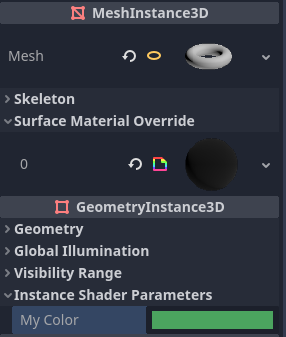
インスペクターの GeometryInstance3D セクションでインスタンス単位のUniformの値 (Instance Shader Parameters) を設定する
Per-instance uniform values can also be set at runtime using set_instance_shader_parameter method on a node that inherits from GeometryInstance3D:
$MeshInstance3D.set_instance_shader_parameter("my_color", Color(0.3, 0.6, 1.0))
インスタンス単位のUniformを使用する場合は、いくつかの制限事項に注意する必要があります:
インスタンス単位のUniformはテクスチャをサポートしません 。通常のスカラー型とベクター型のみをサポートします。回避策としてはテクスチャ配列を通常のUniformとして渡してから、インスタンス単位のUniformを使用して描画されるテクスチャのインデックスを渡すことができます。
実際には1シェーダーあたりのインスタンスUniformの最大数は16までに制限されています。
メッシュが複数のマテリアルを使用している場合、名前、インデックス、型が同じでない限り、最初に見つかったメッシュマテリアルのパラメータが後続のメッシュマテリアルよりも「優先」されます。この場合すべてのパラメータが正しく影響されます。
上記の状況に遭遇した場合は、
instance_indexヒントを使用してインスタンスUniformのインデックス (0~15) を手動で指定することで衝突を回避できます。
instance uniform vec4 my_color : source_color, instance_index(5);
Setting uniforms from code
You can set uniforms from GDScript using the set_shader_parameter() method:
material.set_shader_parameter("some_value", some_value)

material.set_shader_parameter("colors", [Vector3(1, 0, 0), Vector3(0, 1, 0), Vector3(0, 0, 1)])
注釈
The first argument to set_shader_parameter() is the name of the uniform
in the shader. It must match exactly to the name of the uniform in
the shader or else it will not be recognized.
GDScriptはGLSLとは異なる変数タイプを使用するため、GDScriptからシェーダーに変数を渡すと、Godotはタイプを自動的に変換します。以下は、対応するタイプの表です:
GLSL型 |
GDScript型 |
備考 |
|---|---|---|
bool |
bool |
|
bvec2 |
int |
intに各ビットがパックされます。ビット0(LSB) がxに対応。 たとえば、 (bx, by) の bvec2 は次の方法で作成できます。 bvec2_input: int = (int(bx)) | (int(by) << 1)
|
bvec3 |
int |
intに各ビットがパックされます。ビット0(LSB) がxに対応。 |
bvec4 |
int |
intに各ビットがパックされます。ビット0(LSB) がxに対応。 |
int |
int |
|
ivec2 |
Vector2i |
|
ivec3 |
Vector3i |
|
ivec4 |
Vector4i |
|
uint |
int |
|
uvec2 |
Vector2i |
|
uvec3 |
Vector3i |
|
uvec4 |
Vector4i |
|
float |
float |
|
vec2 |
Vector2 |
|
vec3 |
Vector3, Color |
Color が使用される場合、(r, g, b) として解釈されます。 |
vec4 |
Vector4, Color, Rect2, Plane, Quaternion |
Color が使用される場合、(r, g, b, a) として解釈されます。 Rect2 が使用される場合、(position.x, position.y, size.x, size.y) として解釈されます。 Plane が使用される場合、(normal.x, normal.y, normal.z, d) として解釈されます。 |
mat2 |
Transform2D |
|
mat3 |
Basis |
|
mat4 |
Projection, Transform3D |
Transform3D が使用される場合、w Vectorは単位行列になるように設定されます。 |
sampler2D |
Texture2D |
|
isampler2D |
Texture2D |
|
usampler2D |
Texture2D |
|
sampler2DArray |
Texture2DArray |
|
isampler2DArray |
Texture2DArray |
|
usampler2DArray |
Texture2DArray |
|
sampler3D |
Texture3D |
|
isampler3D |
Texture3D |
|
usampler3D |
Texture3D |
|
samplerCube |
Cubemap |
See インポートタイプの変更 for instructions on importing cubemaps for use in Godot. |
samplerCubeArray |
CubemapArray |
Only supported in Forward+ and Mobile, not Compatibility. |
samplerExternalOES |
ExternalTexture |
Only supported in Compatibility/Android platform. |
注釈
Be careful when setting shader uniforms from GDScript, since no error will be thrown if the type does not match. Your shader will just exhibit undefined behavior. Specifically, this includes setting a GDScript int/float (64 bit) into a Godot shader language int/float (32 bit). This may lead to unintended consequences in cases where high precision is required.
Uniform limits
There is a limit to the total size of shader uniforms that you can use
in a single shader. On most desktop platforms, this limit is 65536
bytes, or 4096 vec4 uniforms. On mobile platforms, the limit is
typically 16384 bytes, or 1024 vec4 uniforms. Vector uniforms
smaller than a vec4, such as vec2 or vec3, are padded to
the size of a vec4. Scalar uniforms such as int or float
are not padded, and bool is padded to the size of an int.
Arrays count as the total size of their contents. If you need a uniform array that is larger than this limit, consider packing the data into a texture instead, since the contents of a texture do not count towards this limit, only the size of the sampler uniform.
ビルトイン変数
A large number of built-in variables are available, like UV, COLOR and
VERTEX. What variables are available depends on the type of shader
(spatial, canvas_item, particle, etc) and the
function used (vertex, fragment, light, start, process,
``sky, or fog). For a list of the built-in variables that are available,
please see the corresponding pages:
ビルトイン関数
A large number of built-in functions are supported, conforming to GLSL ES 3.0. See the Built-in functions page for details.
コメント
Godot シェーディング言語は、C# および C++ と同じコメント構文をサポートしており、単一行コメントには
//を使用し、複数行コメントには/* */を使用します:さらに、シェーダーパラメータにマウスを移動したときにインスペクタに表示されるドキュメントコメントを表示することもできます。ドキュメントコメントは現在
uniform宣言のすぐ上に配置した場合にのみサポートされています。これらのドキュメントコメントは 複数行 コメント構文のみをサポートしており、先頭に1つのアスタリスク (/*) ではなく 2 つの アスタリスク (/**) を使用する必要があります。後続の行のアスタリスクは必須ではありませんが、シェーダースタイルガイド に従って推奨されています。これらのアスタリスクはインスペクタによって自動的に削除されるため、ツールチップには表示されません。