Up to date
This page is up to date for Godot 4.3.
If you still find outdated information, please open an issue.
為 Linux, *BSD 進行編譯
也參考
這個頁面描述的是如何從源碼編譯 Linux 編輯器和匯出範本二進位檔案。如果你要找的是匯出專案到 Linux,請閱讀 為 Linux 匯出。
系統需求
若要在 Linux 或其他各種 Unix 下進行編譯,必須滿足下列條件:
GCC 9+ or Clang 6+.
SCons 3.1.2+ build system.
pkg-config (用於偵測下方的相依性套件)。
ALSA 開發函式庫。
X11, Xcursor, Xinerama, Xi 與 XRandR 開發函式庫。
Wayland and wayland-scanner.
Mesa.
ALSA.
音訊
可選 - libudev (使用
udev=yes進行建置)。
用於各個發行版的單行安裝程式
apk add \
  scons \
  pkgconf \
  gcc \
  g++ \
  libx11-dev \
  libxcursor-dev \
  libxinerama-dev \
  libxi-dev \
  libxrandr-dev \
  mesa-dev \
  eudev-dev \
  alsa-lib-dev \
  pulseaudio-dev
pacman -Sy --noconfirm --needed \
  scons \
  pkgconf \
  gcc \
  libxcursor \
  libxinerama \
  libxi \
  libxrandr \
  wayland-utils \
  mesa \
  glu \
  libglvnd \
  alsa-lib \
  pulseaudio
sudo apt-get update
sudo apt-get install -y \
  build-essential \
  scons \
  pkg-config \
  libx11-dev \
  libxcursor-dev \
  libxinerama-dev \
  libgl1-mesa-dev \
  libglu1-mesa-dev \
  libasound2-dev \
  libpulse-dev \
  libudev-dev \
  libxi-dev \
  libxrandr-dev \
  libwayland-dev
sudo dnf install -y \
  scons \
  pkgconfig \
  libX11-devel \
  libXcursor-devel \
  libXrandr-devel \
  libXinerama-devel \
  libXi-devel \
  wayland-devel \
  mesa-libGL-devel \
  mesa-libGLU-devel \
  alsa-lib-devel \
  pulseaudio-libs-devel \
  libudev-devel \
  gcc-c++ \
  libstdc++-static \
  libatomic-static
pkg install \
  py37-scons \
  pkgconf \
  xorg-libraries \
  libXcursor \
  libXrandr \
  libXi \
  xorgproto \
  libGLU \
  alsa-lib \
  pulseaudio
emerge --sync
emerge -an \
  dev-build/scons \
  x11-libs/libX11 \
  x11-libs/libXcursor \
  x11-libs/libXinerama \
  x11-libs/libXi \
  dev-util/wayland-scanner \
  media-libs/mesa \
  media-libs/glu \
  media-libs/alsa-lib \
  media-sound/pulseaudio
sudo urpmi --auto \
  scons \
  task-c++-devel \
  wayland-devel \
  "pkgconfig(alsa)" \
  "pkgconfig(glu)" \
  "pkgconfig(libpulse)" \
  "pkgconfig(udev)" \
  "pkgconfig(x11)" \
  "pkgconfig(xcursor)" \
  "pkgconfig(xinerama)" \
  "pkgconfig(xi)" \
  "pkgconfig(xrandr)"
pkg_add \
  pkg-config \
  py37-scons
提示
若要支援音訊,則可選擇性地安裝 pulseaudio 。
pkg_add \
  python \
  scons \
  llvm
sudo zypper install -y \
  scons \
  pkgconfig \
  libX11-devel \
  libXcursor-devel \
  libXrandr-devel \
  libXinerama-devel \
  libXi-devel \
  wayland-devel \
  Mesa-libGL-devel \
  alsa-devel \
  libpulse-devel \
  libudev-devel \
  gcc-c++ \
  libGLU1
eopkg install -y \
  -c system.devel \
  scons \
  libxcursor-devel \
  libxinerama-devel \
  libxi-devel \
  libxrandr-devel \
  wayland-devel \
  mesalib-devel \
  libglu \
  alsa-lib-devel \
  pulseaudio-devel
編譯
開啟終端機,移至 Godot 原始碼的根目錄然後輸入:
scons platform=linuxbsd
備註
在Godot 4.0之前,Linux/*BSD目標被稱為“x11”而不是“linuxbsd”。如果你想編譯Godot 3.x,請確保使用本文檔的'3.x分支<https://docs.godotengine.org/en/3.6/development/compiling/compiling_for_x11.html>'_。
小訣竅
If you are compiling Godot to make changes or contribute to the engine,
you may want to use the SCons options dev_build=yes or dev_mode=yes.
See 開發
for more info.
若沒有出現什麼問題的話,最終產生的二進位可執行檔會被放在「bin」子資料夾中。該執行檔包含了整個 Godot 遊戲引擎,且可不依賴任何相依性套件執行。執行該檔案會開啟專案管理員。
備註
若想使用 Clang 而不是 GCC 來編譯的話,請使用這個指令:
scons platform=linuxbsd use_llvm=yes
Using Clang appears to be a requirement for OpenBSD, otherwise fonts would not build. For RISC-V architecture devices, use the Clang compiler instead of the GCC compiler.
小訣竅
If you are compiling Godot for production use, you can
make the final executable smaller and faster by adding the
SCons option production=yes. This enables additional compiler
optimizations and link-time optimization.
LTO takes some time to run and requires about 7 GB of available RAM
while compiling. If you're running out of memory with the above option,
use production=yes lto=none or production=yes lto=thin for a
lightweight but less effective form of LTO.
備註
若想在客製化建置上使用與 Godot 官方釋出版本不同的編輯器設定,可以通過在 bin/ 資料夾中建立檔名為 ._sc_ 或 _sc_ 的檔案來開啟 自包含模式 。
編譯無周邊版本與伺服器版本
若要編譯用於以編輯器功能來自動化匯出專案的 無周邊 版本,請使用:
scons platform=linuxbsd target=editor
然後使用“--headless”命令列參數:
./bin/godot.linuxbsd.editor.x86_64 --headless
如果要編譯除錯版本的*伺服器*,支援:ref:遠端除錯工具 <doc_command_line_tutorial>,那麼請使用:
scons platform=linuxbsd target=template_debug
若要編譯可執行專屬遊戲伺服器的 伺服器 版本,請使用:
scons platform=linuxbsd target=template_release production=yes
建置匯出樣板
警告
Linux 二進位執行檔通常無法在比用來建置該執行檔還要舊的發行版上執行。若想提供能在多數發行版上執行的二進位執行檔,請使用較舊的發行版來建置,如 Ubuntu 16.04。可以使用虛擬機或容器來設定一個適合的建置環境。
若要建置 Linux, *BSD 匯出樣板,請使用下列參數來執行建置系統:
(32 位元)
scons platform=linuxbsd target=template_release arch=x86_32
scons platform=linuxbsd target=template_debug arch=x86_32
(64 位元)
scons platform=linuxbsd target=template_release arch=x86_64
scons platform=linuxbsd target=template_debug arch=x86_64
請注意,可能無法為與目前宿主機環境不同的位元 (64/32) 進行交叉編譯時,有可能會需要 Chroot 環境。
要建立標準的匯出樣板,則必須將產生的檔案複製至:
$HOME/.local/share/godot/export_templates/<version>/
並將這些檔案如下命名 (在 Godot 中,*BSD 被視為「Linux X11」):
linux_debug.arm32
linux_debug.arm64
linux_debug.x86_32
linux_debug.x86_64
linux_release.arm32
linux_release.arm64
linux_release.x86_32
linux_release.x86_64
但,若你正在撰寫客製化模組或自定 C++ 程式碼,則可能會需要在此將該二進位執行檔設定為自定匯出樣板:
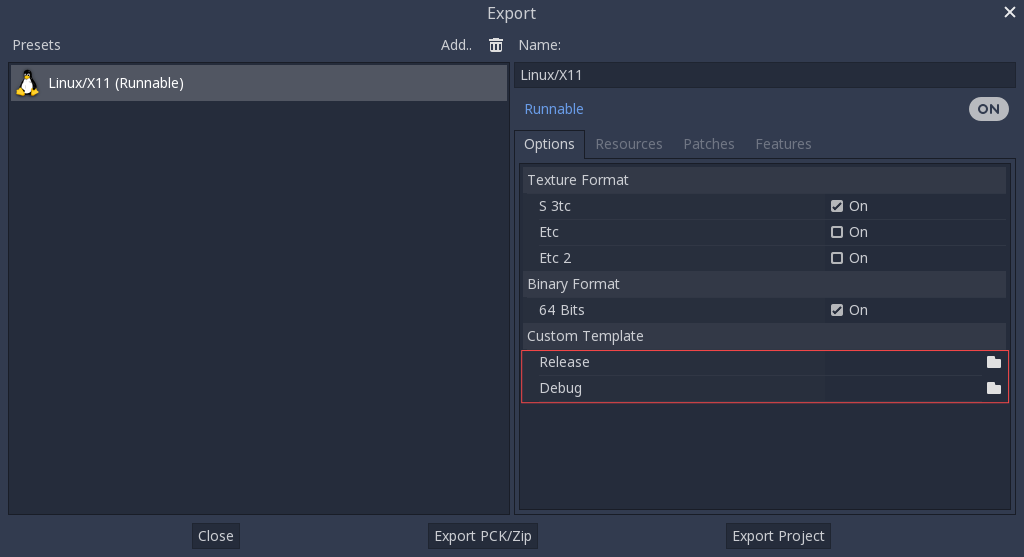
這種情況下甚至不需要複製檔案,只需要將這些檔案參照到 Godot 原始碼目錄的 bin/ 資料夾下即可。這樣下次建置時,就會自動參照到自定樣板。
Cross-compiling for RISC-V devices
To cross-compile Godot for RISC-V devices, we need to setup the following items:
riscv-gnu-toolchain. While we are not going to use this directly, it provides us with a sysroot, as well as header and libraries files that we will need. There are many versions to choose from, however, the older the toolchain, the more compatible our final binaries will be. If in doubt, use this version, and download
riscv64-glibc-ubuntu-18.04-nightly-2021.12.22-nightly.tar.gz. Extract it somewhere and remember its path.Clang. RISC-V GCC has bugs with its atomic operations which prevent it from compiling Godot correctly. Any version of Clang from 16.0.0 upwards will suffice. Download it from the package manager of your distro, and make sure that it can compile to RISC-V. You can verify by executing this command
clang -print-targets, make sure you seeriscv64on the list of targets.mold. This fast linker, is the only one that correctly links the resulting binary. Download it, extract it, and make sure to add its
binfolder to your PATH. Runmold --help | grep supportto check if your version of Mold supports RISC-V. If you don't see RISC-V, your Mold may need to be updated.
To make referencing our toolchain easier, we can set an environment variable like this:
export RISCV_TOOLCHAIN_PATH="path to toolchain here"
This way, we won't have to manually set the directory location each time we want to reference it.
With all the above setup, we are now ready to build Godot.
Go to the root of the source code, and execute the following build command:
scons arch=rv64 use_llvm=yes linker=mold lto=none target=editor \
    ccflags="--sysroot=$RISCV_TOOLCHAIN_PATH/sysroot --gcc-toolchain=$RISCV_TOOLCHAIN_PATH -target riscv64-unknown-linux-gnu" \
    linkflags="--sysroot=$RISCV_TOOLCHAIN_PATH/sysroot --gcc-toolchain=$RISCV_TOOLCHAIN_PATH -target riscv64-unknown-linux-gnu"
The command is similar in nature, but with some key changes. ccflags and
linkflags append additional flags to the build. --sysroot points to
a folder simulating a Linux system, it contains all the headers, libraries,
and .so files Clang will use. --gcc-toolchain tells Clang where
the complete toolchain is, and -target riscv64-unknown-linux-gnu
indicates to Clang the target architecture, and OS we want to build for.
If all went well, you should now see a bin directory, and within it,
a binary similar to the following:
godot.linuxbsd.editor.rv64.llvm
You can now copy this executable to your favorite RISC-V device, then launch it there by double-clicking, which should bring up the project manager.
If you later decide to compile the export templates, copy the above
build command but change the value of target to template_debug for
a debug build, or template_release for a release build.
使用 Clang 與 LLD 來更快速地開發
也可以使用 Clang 與 LLD 來建置 Godot。使用 Clang 與 LLD 比起預設的 GCC + GNU ld 有兩個好處:
LLD 與 GNU ld 或 gold 比起來,連結速度明顯快很多。這樣就可以迭代地更快。
Clang 比起 GCC,提供的錯誤訊息通常更有用。
要使用 Clang 與 LLD,請先使用發行版的套件管理員來安裝 Clang 與 lld 套件,然後使用下列 SCons 指令:
scons platform=linuxbsd use_llvm=yes linker=lld
建構完成後,將在 bin/ 資料夾中建立一個以 .llvm 為後綴的新的二進位檔案。
雖然我們依然建議正式版本使用 GCC 來建置,因為 GCC 可以配合連結時期最佳化來編譯,產生的二進位執行檔也更小更快。
如果出現此錯誤::
/usr/bin/ld: cannot find -l:libatomic.a: No such file or directory
Godot 沒有使用限制
在 SCons 指令中,新增參數``use_static_cpp=no``。
Follow these instructions to configure, build, and install
libatomic_ops. Then, copy/usr/lib/libatomic_ops.ato/usr/lib/libatomic.a, or create a soft link tolibatomic_opsby commandln -s /usr/lib/libatomic_ops.a /usr/lib/libatomic.a. The soft link can ensure the latestlibatomic_opswill be used without the need to copy it every time when it is updated.
使用 Clang 與 LLD 來更快速地開發
為了比 LLD 更快的鏈接,您可以使用 mold。 Mold 可以與 GCC 或 Clang 一起使用。
截至 2023 年 1 月,mold 在 Linux 發行版儲存庫中尚不可用,因此您必須手動安裝其二進位。
在這份文件之外,你可能也會想看看 Godot 的 demo 專案。
Extract the
.tar.gzfile, then move the extracted folder to a location such as.local/share/mold.將
$HOME/.local/share/mold/bin新增到使用者的PATH環境變數中。例如可以在$HOME/.bash_profile檔的末尾加上以下內容:
PATH="$HOME/.local/share/mold/bin:$PATH"
打開新的終端(或者運作
source "$HOME/.bash_profile"),然後使用以下 SCons 命令編譯 Godot::scons platform=linuxbsd linker=mold
使用 Clang 與 LLD 來更快速地開發
Godot 捆綁了各種第三方函式庫的源程式碼。 您可以選擇使用系統版本的第三方函式庫。這使得 Godot 二進位檔案的連結速度更快,因為第三方函式庫是動態連結的。因此,它們不需要在每次建立引擎時靜態連結(即使是小的差異量更改)。
但是,並非所有 Linux 發行版都有可用的第三方函式庫的軟體包(或者它們可能不是最新的)。
遷移到系統庫可以將慢速 CPU 上的連結時間縮短幾秒鐘,但需要手動測試,具體取決於您的 Linux 發行版。此外,由於系統庫包中的錯誤(或建置系統中的錯誤,因為此功能測試較少),您可能無法將系統庫用於所有內容。
To compile Godot with system libraries, install these dependencies on top of the ones listed in the 用於各個發行版的單行安裝程式:
sudo apt-get update
sudo apt-get install -y \
  libembree-dev \
  libenet-dev \
  libfreetype-dev \
  libpng-dev \
  zlib1g-dev \
  libgraphite2-dev \
  libharfbuzz-dev \
  libogg-dev \
  libtheora-dev \
  libvorbis-dev \
  libwebp-dev \
  libmbedtls-dev \
  libminiupnpc-dev \
  libpcre2-dev \
  libzstd-dev \
  libsquish-dev \
  libicu-dev
sudo dnf install -y \
  embree3-devel \
  enet-devel \
  glslang-devel \
  graphite2-devel \
  harfbuzz-devel \
  libicu-devel \
  libsquish-devel \
  libtheora-devel \
  libvorbis-devel \
  libwebp-devel \
  libzstd-devel \
  mbedtls-devel \
  miniupnpc-devel
安裝所有必需的軟體包後,使用以下命令建置 Godot:
scons platform=linuxbsd builtin_embree=no builtin_enet=no builtin_freetype=no builtin_graphite=no builtin_harfbuzz=no builtin_libogg=no builtin_libpng=no builtin_libtheora=no builtin_libvorbis=no builtin_libwebp=no builtin_mbedtls=no builtin_miniupnpc=no builtin_pcre2=no builtin_zlib=no builtin_zstd=no
On Debian stable, you will need to remove builtin_embree=no as the system-provided Embree version is too old to work with Godot's latest master branch (which requires Embree 4).
您可以透過執行「scons -h」來查看具有系統替代方案的所有內建庫的列表,然後尋找以「builtin_」開頭的選項。
警告
使用系統函式庫時,產生的函式庫**不再**可跨 Linux 發行版移植。請勿使用此方法建立要分發給其他人的二進位檔案,除非您正在為 Linux 發行版建立套件。