Up to date
This page is up to date for Godot 4.3.
If you still find outdated information, please open an issue.
高等向量數學
平面
單位向量的點積還有一個有趣的性質。請想像垂直於這個向量(通過原點)經過一個平面。平面將整個空間劃分為正(在平面上)和負(在平面下),而(與普遍的看法相反)您也可以在 2D 中進行這樣的數學運算:
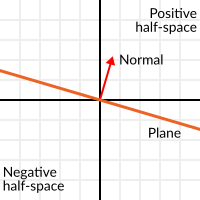
垂直於表面的單位向量稱為**單位法向量**(因此,它們描述的是表面的朝向)。不過,通常會把它們縮寫為*法線*。平面、3D 幾何體等場合中都會用到法線(用來確定各個面或頂點的側邊)。法線**是一種**單位向量,因為用途才被稱為*法線*。(就像我們說座標 (0,0) 是“原點”一樣!)。
The plane passes by the origin and the surface of it is perpendicular to the unit vector (or normal). The side the vector points to is the positive half-space, while the other side is the negative half-space. In 3D this is exactly the same, except that the plane is an infinite surface (imagine an infinite, flat sheet of paper that you can orient and is pinned to the origin) instead of a line.
到平面的距離
現在平面是什麼就很清楚了,讓我們再回到點積上。單位向量**和任何**空間點**之間的點積(是的,這次我們在向量和位置之間進行點乘),將返回**從該點到平面的距離:
var distance = normal.dot(point)
var distance = normal.Dot(point);
但不僅僅是絕對距離, 如果點在負半空間中, 距離也是負的:
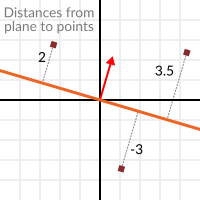
這使我們能夠知道點在平面的哪一側.
遠離原點
我知道您在想什麼!到目前為止, 這還不錯, 但 真正的 平面在空間中無處不在, 而不僅僅是通過原點的平面. 您想要真正的 平面 , 您 現在 就想行動起來.
記住, 平面不僅把空間分成兩半, 而且它們還有 極性 . 這意味著有可能有完全重疊的平面, 但是它們的負半空間和正半空間是相反的.
記住這一點, 讓我們將整個平面描述為 法線 N 和 距原點的距離 標量 D . 因此, 我們的平面將由N和D表示, 例如:
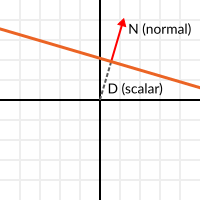
對於3維的情況,Godot提供了一個 Plane 內建型別來處理這個問題.
基本上,N和D可以表示空間中的任何平面, 無論是對於2D還是3D(取決於變數N的維數), 數學上對於兩者都是一樣的. 和以前差不多, 但D是原點沿N方向移動到平面的距離. 例如, 想像一下您想在到達平面上的一個點, 您會這樣做:
var point_in_plane = N*D
var pointInPlane = N * D;
這將拉伸(調整大小)法線向量並使其接觸平面. 這個數學可能看起來很疑惑, 但實際上比看起來簡單得多. 如果我們想再說一遍, 從點到平面的距離, 我們也會這樣做, 但是要調整距離:
var distance = N.dot(point) - D
var distance = N.Dot(point) - D;
使用內建函式做同樣的事情:
var distance = plane.distance_to(point)
var distance = plane.DistanceTo(point);
這將再次返回一個正或負的距離.
翻轉平面的極性可以通過同時對N和D取負來完成. 這將導致平面處於相同的位置, 但是具有反轉的負半空間和正半空間:
N = -N
D = -D
N = -N;
D = -D;
當然,Godot也在 Plane 中實作這個操作, 像這樣:
var inverted_plane = -plane
var invertedPlane = -plane;
所以, 記住, 平面就是這樣, 它的主要用途就是計算到它的距離. 那麼, 為什麼計算一個點到一個平面的距離是有用的呢?非常有用!讓我們來看一些簡單範例.
在二維空間中建構平面
平面顯然不是從哪兒冒出來的, 所以必須建構. 在2D中建構它們很簡單, 這可以從法線(單位向量)和點, 或者用2維空間中的兩個點來完成.
針對法線和點的情況,大部分工作已經完成,因為當法線已經計算出來時,只需從法線和點的點積得到 D。
var N = normal
var D = normal.dot(point)
var N = normal;
var D = normal.Dot(point);
For two points in space, there are actually two planes that pass through them, sharing the same space but with normal pointing to the opposite directions. To compute the normal from the two points, the direction vector must be obtained first, and then it needs to be rotated 90 degrees to either side:
# Calculate vector from `a` to `b`.
var dvec = point_a.direction_to(point_b)
# Rotate 90 degrees.
var normal = Vector2(dvec.y, -dvec.x)
# Alternatively (depending the desired side of the normal):
# var normal = Vector2(-dvec.y, dvec.x)
// Calculate vector from `a` to `b`.
var dvec = pointA.DirectionTo(pointB);
// Rotate 90 degrees.
var normal = new Vector2(dvec.Y, -dvec.X);
// Alternatively (depending the desired side of the normal):
// var normal = new Vector2(-dvec.Y, dvec.X);
其餘的與前面的範例相同,point_a或point_b都可以工作, 因為它們在相同的平面中:
var N = normal
var D = normal.dot(point_a)
# this works the same
# var D = normal.dot(point_b)
var N = normal;
var D = normal.Dot(pointA);
// this works the same
// var D = normal.Dot(pointB);
在3D中做同樣的操作稍微複雜一些, 下面將進一步解釋.
平面的一些範例
這裡有一個簡單的範例, 說明平面的用途. 假設您有一個 凸 多邊形. 例如, 矩形, 梯形, 三角形或任何沒有向內彎曲的多邊形.
對多邊形的每個部分, 我們計算出經過該部分的平面. 一旦我們有了平面的列表, 我們就可以做些分類的事情, 例如檢查一個點是否在多邊形內部.
我們走訪所有平面, 如果我們能找到使得點到平面的距離為正的平面, 那麼點在多邊形之外. 如果我們不能, 那麼這一點就在多邊形內部.
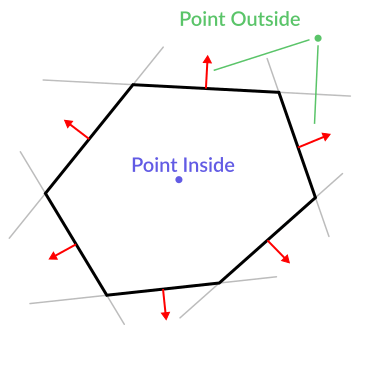
程式碼應該是這樣的:
var inside = true
for p in planes:
    # check if distance to plane is positive
    if (p.distance_to(point) > 0):
        inside = false
        break # with one that fails, it's enough
var inside = true;
foreach (var p in planes)
{
    // check if distance to plane is positive
    if (p.DistanceTo(point) > 0)
    {
        inside = false;
        break; // with one that fails, it's enough
    }
}
很酷, 是吧?但這可以變得更好!稍加努力, 類似的邏輯將讓我們知道兩個凸多邊形是否重疊. 這叫做分離軸定理(或SAT), 大多數物理引擎都用這個來偵測碰撞.
對於一個點, 僅僅檢查一個平面是否返回正距離就足以判斷該點是否在外面. 對於一個多邊形, 我們必須找到一個平面, 使得另一個多邊形上的所有點到它的距離為正. 這種可以用A平面對B點進行檢查, 然後用B平面對A點進行檢查:
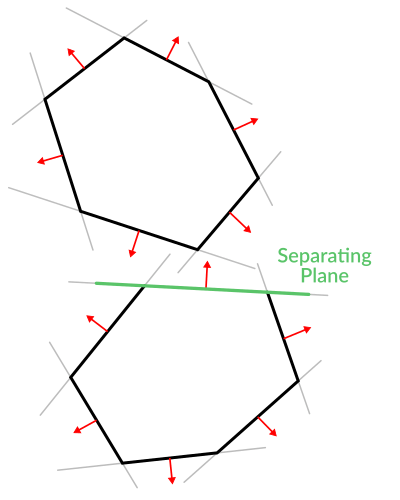
程式碼應該是這樣的:
var overlapping = true

for p in planes_of_A:
    var all_out = true
    for v in points_of_B:
        if (p.distance_to(v) < 0):
            all_out = false
            break

    if (all_out):
        # a separating plane was found
        # do not continue testing
        overlapping = false
        break

if (overlapping):
    # only do this check if no separating plane
    # was found in planes of A
    for p in planes_of_B:
        var all_out = true
        for v in points_of_A:
            if (p.distance_to(v) < 0):
                all_out = false
                break

        if (all_out):
            overlapping = false
            break

if (overlapping):
    print("Polygons Collided!")
var overlapping = true;

foreach (Plane plane in planesOfA)
{
    var allOut = true;
    foreach (Vector3 point in pointsOfB)
    {
        if (plane.DistanceTo(point) < 0)
        {
            allOut = false;
            break;
        }
    }

    if (allOut)
    {
        // a separating plane was found
        // do not continue testing
        overlapping = false;
        break;
    }
}

if (overlapping)
{
    // only do this check if no separating plane
    // was found in planes of A
    foreach (Plane plane in planesOfB)
    {
        var allOut = true;
        foreach (Vector3 point in pointsOfA)
        {
            if (plane.DistanceTo(point) < 0)
            {
                allOut = false;
                break;
            }
        }

        if (allOut)
        {
            overlapping = false;
            break;
        }
    }
}

if (overlapping)
{
    GD.Print("Polygons Collided!");
}
正如您所看到的, 平面是非常有用的, 然而這只是冰山一角. 您可能想知道非凸多邊形會發生什麼. 這通常只是通過將凹多邊形分割成較小的凸多邊形來處理, 或者使用諸如BSP(現在使用得不多)之類的技術.
三維碰撞偵測
這是另一個獎勵, 是對耐心並跟上這個漫長的教學的獎勵. 這是另一條錦囊妙計. 這可能不能直接拿來使用(Godot已經可以進行了相當棒的碰撞偵測了), 但是幾乎所有的物理引擎和碰撞偵測庫都使用它的原理:)
還記得把2D中的凸形轉換成2D平面陣列對碰撞偵測有用嗎?您可以偵測一個點是否在任何凸形狀內, 或者兩個2D凸形狀是否重疊.
嗯, 這在3D中也適用, 如果兩個3D多面體形狀碰撞, 您將無法找到分離平面. 如果發現一個分離平面, 那麼形狀肯定不會發生碰撞.
要得到分離平面意味著多邊形A的所有頂點都在平面的一側, 而多邊形B的所有頂點都在另一側. 該平面始終是多邊形A或多邊形B的面向平面之一.
然而在3D中, 這種方法存在一個問題, 因為在某些情況下可能找不到分離平面. 下面就是這種情況的一個範例:
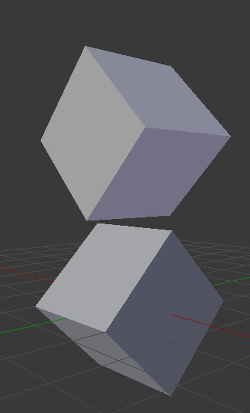
為了避免這種情況,一些額外的平面需要作為分隔器被測試,這些平面是多邊形 A 的邊和多邊形 B 的邊的外積
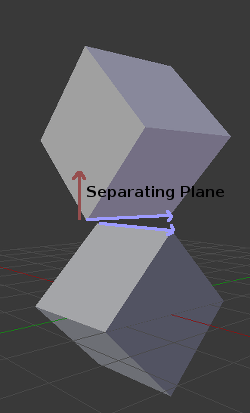
所以最後的演算法是這樣的:
var overlapping = true

for p in planes_of_A:
    var all_out = true
    for v in points_of_B:
        if (p.distance_to(v) < 0):
            all_out = false
            break

    if (all_out):
        # a separating plane was found
        # do not continue testing
        overlapping = false
        break

if (overlapping):
    # only do this check if no separating plane
    # was found in planes of A
    for p in planes_of_B:
        var all_out = true
        for v in points_of_A:
            if (p.distance_to(v) < 0):
                all_out = false
                break

        if (all_out):
            overlapping = false
            break

if (overlapping):
    for ea in edges_of_A:
        for eb in edges_of_B:
            var n = ea.cross(eb)
            if (n.length() == 0):
                continue

            var max_A = -1e20 # tiny number
            var min_A = 1e20 # huge number

            # we are using the dot product directly
            # so we can map a maximum and minimum range
            # for each polygon, then check if they
            # overlap.

            for v in points_of_A:
                var d = n.dot(v)
                max_A = max(max_A, d)
                min_A = min(min_A, d)

            var max_B = -1e20 # tiny number
            var min_B = 1e20 # huge number

            for v in points_of_B:
                var d = n.dot(v)
                max_B = max(max_B, d)
                min_B = min(min_B, d)

            if (min_A > max_B or min_B > max_A):
                # not overlapping!
                overlapping = false
                break

        if (not overlapping):
            break

if (overlapping):
   print("Polygons collided!")
var overlapping = true;

foreach (Plane plane in planesOfA)
{
    var allOut = true;
    foreach (Vector3 point in pointsOfB)
    {
        if (plane.DistanceTo(point) < 0)
        {
            allOut = false;
            break;
        }
    }

    if (allOut)
    {
        // a separating plane was found
        // do not continue testing
        overlapping = false;
        break;
    }
}

if (overlapping)
{
    // only do this check if no separating plane
    // was found in planes of A
    foreach (Plane plane in planesOfB)
    {
        var allOut = true;
        foreach (Vector3 point in pointsOfA)
        {
            if (plane.DistanceTo(point) < 0)
            {
                allOut = false;
                break;
            }
        }

        if (allOut)
        {
            overlapping = false;
            break;
        }
    }
}

if (overlapping)
{
    foreach (Vector3 edgeA in edgesOfA)
    {
        foreach (Vector3 edgeB in edgesOfB)
        {
            var normal = edgeA.Cross(edgeB);
            if (normal.Length() == 0)
            {
                continue;
            }

            var maxA = float.MinValue; // tiny number
            var minA = float.MaxValue; // huge number

            // we are using the dot product directly
            // so we can map a maximum and minimum range
            // for each polygon, then check if they
            // overlap.

            foreach (Vector3 point in pointsOfA)
            {
                var distance = normal.Dot(point);
                maxA = Mathf.Max(maxA, distance);
                minA = Mathf.Min(minA, distance);
            }

            var maxB = float.MinValue; // tiny number
            var minB = float.MaxValue; // huge number

            foreach (Vector3 point in pointsOfB)
            {
                var distance = normal.Dot(point);
                maxB = Mathf.Max(maxB, distance);
                minB = Mathf.Min(minB, distance);
            }

            if (minA > maxB || minB > maxA)
            {
                // not overlapping!
                overlapping = false;
                break;
            }
        }

        if (!overlapping)
        {
            break;
        }

    }
}

if (overlapping)
{
    GD.Print("Polygons Collided!");
}
更多資訊
關於在Godot中使用向量數學的更多資訊, 請參見以下文章:
如果你需要進一步的解釋,你可以看看 3Blue1Brown 的絕佳的系列影片《線性代數的本質》:http://www.bilibili.com/video/BV1ys411472E?p=2