Up to date
This page is up to date for Godot 4.3.
If you still find outdated information, please open an issue.
使用 NavigationObstacle
2D 和 3D 版本的 NavigationObstacles 節點分別可用作:ref:NavigationObstacle2D<class_NavigationObstacle2D> 和:ref:NavigationObstacle3D<class_NavigationObstacle3D>。
Navigation obstacles are dual purpose in that they can affect both the navigation mesh baking, and the agent avoidance.
With
affect_navigation_meshenabled the obstacle will affect navigation mesh when baked.With
avoidance_enabledthe obstacle will affect avoidance agents.
小訣竅
Avoidance is enabled by default. If the obstacle is not used for avoidance disable enabled_avoidance to save performance.
Obstacles and navigation mesh
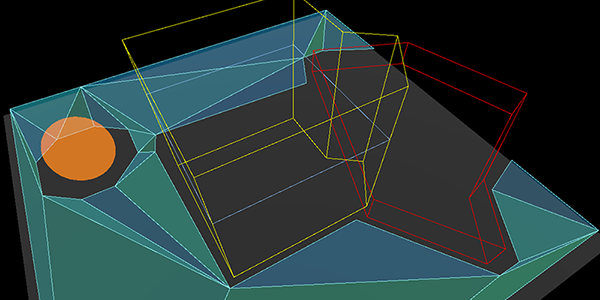
Navigation obstacles affecting navigation mesh baking.
For navigation mesh baking, obstacles can be used to discard parts of all other source geometry inside the obstacle shape.
This can be used to stop navigation meshes being baked in unwanted places, e.g. inside "solid" geometry like thick walls or on top of other geometry that should not be included for gameplay like roofs.
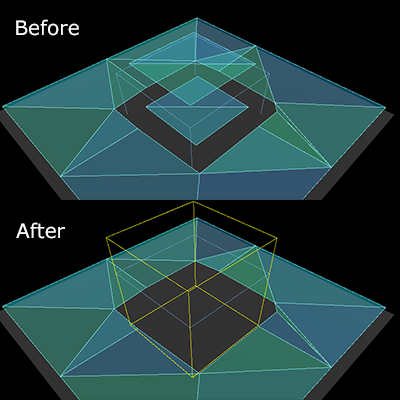
Navigation obstacles discard of unwanted navigation mesh.
An obstacle does not add geometry in the baking process, it only removes geometry. It does so by nullifying all the (voxel) cells with rasterized source geometry that are within the obstacle shape. As such its effect and shape detail is limited to the cell resolution used by the baking process.
For more details on the navigation mesh baking see Using navigation meshes.
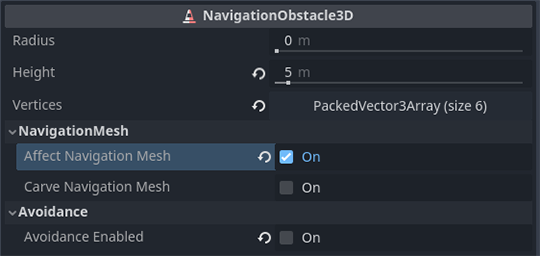
The property affect_navigation_mesh makes the obstacle contribute to the navigation mesh baking.
It will be parsed or unparsed like all other node objects in a navigation mesh baking process.
The carve_navigation_mesh property makes the shape unaffected by offsets of the baking,
e.g. the offset added by the navigation mesh agent_radius.
It will basically act as a stencil and cut into the already offset navigation mesh surface.
It will still be affected by further postprocessing of the baking process like edge simplification.
The obstacle shape and placement is defined with the height and vertices properties, and the global_position of the obstacle.
The y-axis value of any Vector3 used for the vertices is ignored as the obstacle is projected on a flat horizontal plane.
When baking navigation meshes in scripts obstacles can be added procedurally as a projected obstruction. Obstacles are not involved in the source geometry parsing so adding them just before baking is enough.
var obstacle_outline = PackedVector2Array([
    Vector2(-50, -50),
    Vector2(50, -50),
    Vector2(50, 50),
    Vector2(-50, 50)
])

var navigation_mesh = NavigationPolygon.new()
var source_geometry = NavigationMeshSourceGeometryData2D.new()

NavigationServer2D.parse_source_geometry_data(navigation_mesh, source_geometry, $MyTestRootNode)

var obstacle_carve: bool = true

source_geometry.add_projected_obstruction(obstacle_outline, obstacle_carve)

NavigationServer2D.bake_from_source_geometry_data(navigation_mesh, source_geometry)
var obstacle_outline = PackedVector3Array([
    Vector3(-5, 0, -5),
    Vector3(5, 0, -5),
    Vector3(5, 0, 5),
    Vector3(-5, 0, 5)
])

var navigation_mesh = NavigationMesh.new()
var source_geometry = NavigationMeshSourceGeometryData3D.new()

NavigationServer3D.parse_source_geometry_data(navigation_mesh, source_geometry, $MyTestRootNode)

var obstacle_elevation: float = $MyTestObstacleNode.global_position.y
var obstacle_height: float = 50.0
var obstacle_carve: bool = true

source_geometry.add_projected_obstruction(obstacle_outline, obstacle_elevation, obstacle_height, obstacle_carve)

NavigationServer3D.bake_from_source_geometry_data(navigation_mesh, source_geometry)
Obstacles and agent avoidance
For avoidance navigation obstacles can be used either as static or dynamic obstacles to affect avoidance controlled agents.
當靜態使用時,導覽障礙會限制多邊形定義區域外部或內部的迴避控制代理。
當動態使用時,導覽障礙會推開其周圍半徑範圍內的迴避控制代理。
Static avoidance obstacles
An avoidance obstacle is considered static when its vertices property is populated with an outline array of positions to form a polygon.
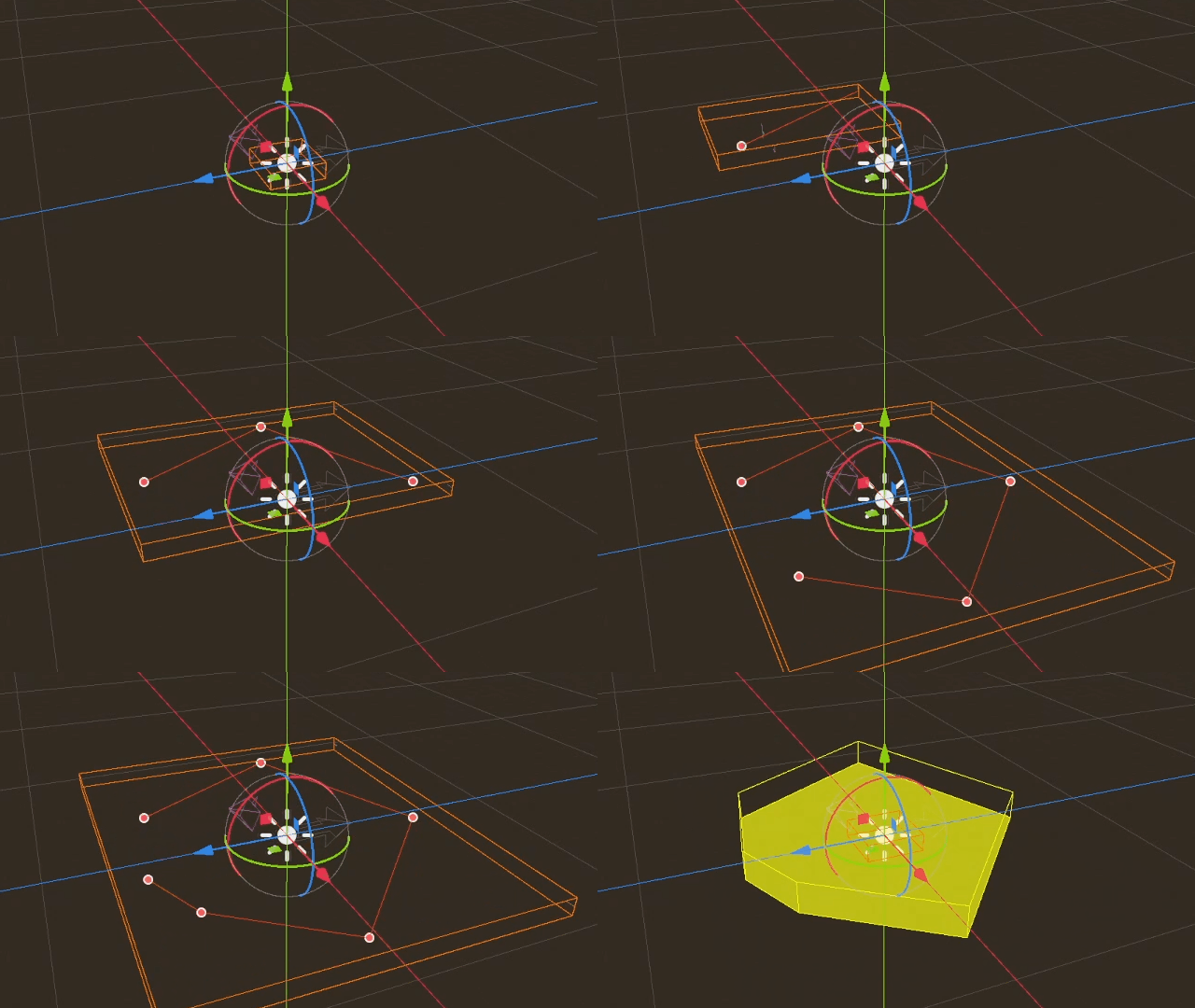
Static obstacle drawn in the editor to block or contain navigation agents.
靜態障礙物充當硬性請勿跨越邊界,以使用代理進行迴避,例如類似於物理碰撞,但用於迴避。
靜態障礙物使用一系列輪廓「頂點」(位置)定義其邊界,如果是 3D,則具有附加的「高度」屬性。
靜態障礙物僅適用於使用 2D 迴避模式的代理。
如果代理人被推出或吸入,靜態障礙物透過頂點的纏繞順序來定義。
Static obstacles can not change their position. They can only be warped to a new position and rebuilt from scratch. Static obstacles as a result are ill-suited for usages where the position is changed every frame, as the constant rebuild has a high performance cost.
代理無法預測扭曲到另一個位置的靜態障礙物。如果靜態障礙物扭曲到代理頂部,這就會產生代理被卡住的風險。
當在 3D 中使用 2D 迴避時,Vector3 頂點的 y 軸將被忽略。相反,障礙物的全局 y 軸位置用作海拔高度。代理將忽略 3D 中低於或高於其的靜態障礙物。這是由障礙物和代理的全局 y 軸位置自動確定為海拔高度以及它們各自的高度屬性。
Dynamic avoidance obstacles
An avoidance obstacle is considered dynamic when its radius property is greater than zero.
對於啟用了避障的代理而言,動態障礙物就是一個“請離我遠點”的物件,類似於它們自己躲避其他代理的行為。
動態障礙物使用
radius半徑來定義邊界,2D 中是圓形,3D 中是球形。動態障礙物每一影格都可以改變位置,不會有額外的性能開銷。
動態障礙物設定速度後,其他代理就能夠預測移動。
動態障礙物不適合用來將代理限制在擁擠、狹窄的空間中。
While both static and dynamic properties can be active at the same time on the same obstacle this is not recommended for performance. Ideally when an obstacle is moving the static vertices are removed and instead the radius activated. When the obstacle reaches the new final position it should gradually enlarge its radius to push all other agents away. With enough created safe space around the obstacle it should add the static vertices again and remove the radius. This helps avoid getting agents stuck in the suddenly appearing static obstacle when the rebuilt static boundary is finished.
和代理類似,障礙物也能夠使用 avoidance_layers 位元遮罩。自身的避障遮罩中與之存在配對位元的代理都會躲避這個障礙物。
Procedural obstacles
New obstacles can be created in a script without a Node by using the NavigationServer directly.
使用腳本建立的障礙物至少需要有一個 map 和一個 position。動態障礙物還需要 radius。靜態障礙物還需要 vertices 屬性。
# create a new "obstacle" and place it on the default navigation map.
var new_obstacle_rid: RID = NavigationServer2D.obstacle_create()
var default_map_rid: RID = get_world_2d().get_navigation_map()

NavigationServer2D.obstacle_set_map(new_obstacle_rid, default_map_rid)
NavigationServer2D.obstacle_set_position(new_obstacle_rid, global_position)

# Use obstacle dynamic by increasing radius above zero.
NavigationServer2D.obstacle_set_radius(new_obstacle_rid, 5.0)

# Use obstacle static by adding a square that pushes agents out.
var outline = PackedVector2Array([Vector2(-100, -100), Vector2(100, -100), Vector2(100, 100), Vector2(-100, 100)])
NavigationServer2D.obstacle_set_vertices(new_obstacle_rid, outline)

# Enable the obstacle.
NavigationServer2D.obstacle_set_avoidance_enabled(new_obstacle_rid, true)
# Create a new "obstacle" and place it on the default navigation map.
var new_obstacle_rid: RID = NavigationServer3D.obstacle_create()
var default_map_rid: RID = get_world_3d().get_navigation_map()

NavigationServer3D.obstacle_set_map(new_obstacle_rid, default_map_rid)
NavigationServer3D.obstacle_set_position(new_obstacle_rid, global_position)

# Use obstacle dynamic by increasing radius above zero.
NavigationServer3D.obstacle_set_radius(new_obstacle_rid, 0.5)

# Use obstacle static by adding a square that pushes agents out.
var outline = PackedVector3Array([Vector3(-5, 0, -5), Vector3(5, 0, -5), Vector3(5, 0, 5), Vector3(-5, 0, 5)])
NavigationServer3D.obstacle_set_vertices(new_obstacle_rid, outline)
# Set the obstacle height on the y-axis.
NavigationServer3D.obstacle_set_height(new_obstacle_rid, 1.0)

# Enable the obstacle.
NavigationServer3D.obstacle_set_avoidance_enabled(new_obstacle_rid, true)