Up to date
This page is up to date for Godot 4.3.
If you still find outdated information, please open an issue.
設計敵人場景
在這一部分中,我們要為怪物編寫程式碼,我們後續會稱之為“mob”(小怪)。在下一節課中,我們會在遊戲區域周圍隨機生成它們。
讓我們在一個新場景中設計這些怪物。節點結構和 player.tscn 場景類似。
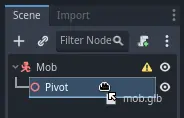
還是用 CharacterBody3D 節點作為根節點來建立場景。命名為 Mob。新增一個 Node3D 節點作為其子項,將其命名為 Pivot。將 mob.glb 檔從*檔案系統*面板拖放到 Pivot 上,這樣就把怪物的 3D 模型新增到了場景之中。
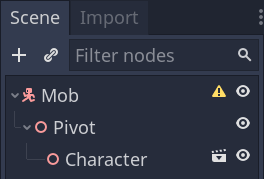
你可以將新建立的 mob 節點重命名成 Character。
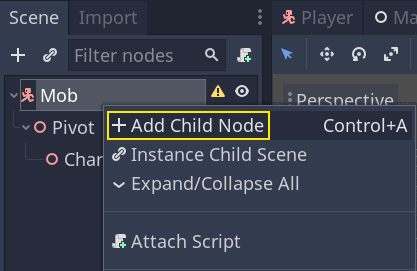
我們的實體要新增碰撞形狀後才能正常工作。按右鍵場景的根節點 Mob,然後按一下*新增子節點*。
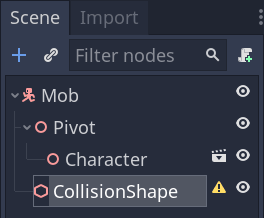
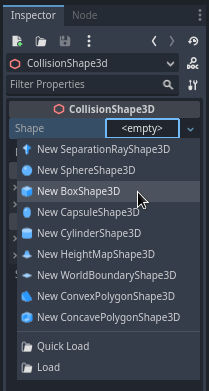
在*屬性面板*中為 Shape*(形狀)屬性分配一個 *BoxShape3D。
我們要調整一下它的大小,來更好地框住 3D 模型。可以按一下並拖動橙色的小點來進行。
碰撞盒應該接觸地面,並且比模型稍微瘦一點點。即便玩家的球體只接觸了這個碰撞盒的角落,物理引擎也會判定發生了碰撞。如果盒子比 3D 模型要大一點,你可能距離怪物還有一定的距離就死了,玩家就會覺得不公平。
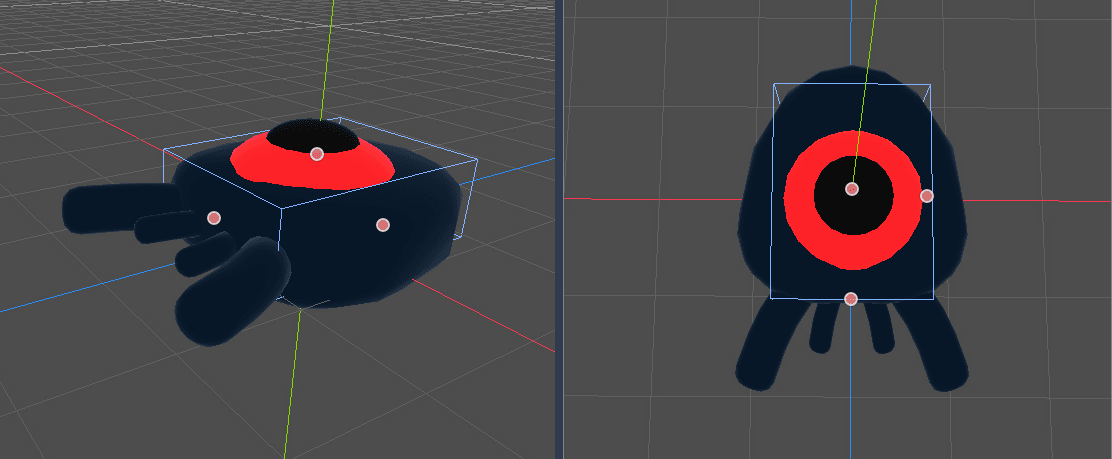
請注意,我的盒子要比怪物稍高。在這個遊戲裡是沒問題的,因為我們是從遊戲場景的上方用固定角度觀察的。碰撞形狀不必精確配對模型。決定碰撞形狀形式和大小的關鍵是你在試玩遊戲時的手感。
刪除舊的怪物
我們要在遊戲關卡中按照一定的時間間隔刷怪。如果你不小心,它們的數量可能就會無限地增長下去,我們可不想那樣。每個小怪實例都需要付出一定的記憶體和處理代價,我們不希望讓螢幕之外的小怪浪費資源。
怪物離開螢幕之後,我們就不再需要它了,所以我們可以把它刪除。Godot 有一個可以偵測物件離開螢幕的節點, VisibleOnScreenNotifier3D ,我們就要用它來銷毀我們的小怪。
備註
如果要在遊戲中不斷產生實體同一種物件,可以通過一種叫“池化”(pooling)的技術來避免持續地建立和銷毀實例。做法是預先建立一個該物件的陣列,然後去不斷地重用裡面的元素。
使用 GDScript 時,你不必擔心這個問題。用物件集區的主要目的是避免 C# 或 Lua 等帶垃圾回收的語言帶來的停滯。GDScript 管理記憶體的技術和它們是不同的,用的是引用計數,不會產生那種問題。你可以在這裡瞭解更多相關內容:記憶體管理。
選中 Mob 節點,並為其新增一個 VisibleOnScreenNotifier3D 作為子項。這回出現的就是一個粉色的框。這個框完全離開螢幕後,該節點就會發出訊號。
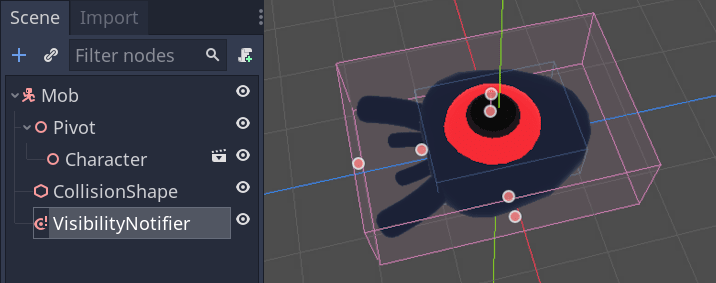
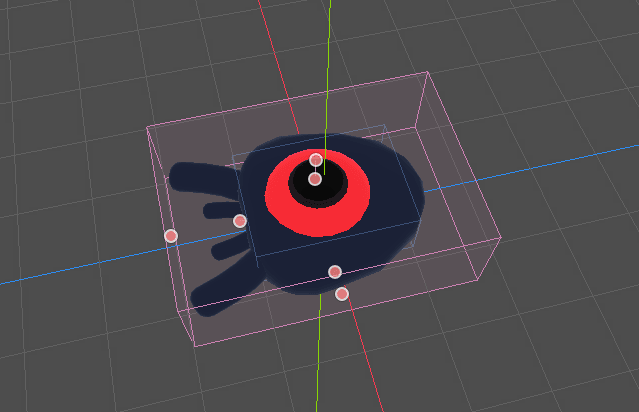
使用橙色的點來調整大小,讓它覆蓋住整個 3D 模型。
為小怪的移動編寫程式碼
讓我們來實作怪物的運動。我們要分兩步來實作。首先,我們要為 Mob 編寫腳本,定義初始化怪物的函式。然後我們會在 main.tscn 場景中編寫隨機刷怪的機制並進行呼叫。
將腳本附加到節點。
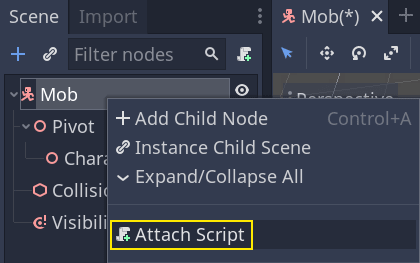
這是最初的移動程式碼。我們定義了兩個屬性 min_speed 和 max_speed``(最小速度和最大速度)來定義隨機速度的範圍,後面我們會用這兩個屬性來定義 ``CharacterBody3D.velocity。
extends CharacterBody3D

# Minimum speed of the mob in meters per second.
@export var min_speed = 10
# Maximum speed of the mob in meters per second.
@export var max_speed = 18


func _physics_process(_delta):
    move_and_slide()
using Godot;

public partial class Mob : CharacterBody3D
{
    // Don't forget to rebuild the project so the editor knows about the new export variable.

    // Minimum speed of the mob in meters per second
    [Export]
    public int MinSpeed { get; set; } = 10;
    // Maximum speed of the mob in meters per second
    [Export]
    public int MaxSpeed { get; set; } = 18;

    public override void _PhysicsProcess(double delta)
    {
        MoveAndSlide();
    }
}
與玩家類似,在每一影格我們都會通過呼叫 CharacterBody3D.move_and_slide() 方法來移動小怪。這一回,我們不會再每影格更新 velocity 了:我們希望怪物勻速移動,然後離開螢幕,即便碰到障礙物也一樣。
我們需要再定義一個函式來計算初始的速度。這個函式會讓怪物面朝玩家,並將其運動角度和速度隨機化。
這個函式接受小怪的生成位置 start_position 以及玩家的位置 player_position 作為參數。
我們首先將小怪定位在 start_position 並用 look_at_from_position() 方法將它轉向玩家,並通過圍繞 Y 軸旋轉隨機量來隨機化角度。下面,rand_range() 輸出一個介於 -PI / 4 弧度和 PI / 4 弧度的隨機值。
# This function will be called from the Main scene.
func initialize(start_position, player_position):
    # We position the mob by placing it at start_position
    # and rotate it towards player_position, so it looks at the player.
    look_at_from_position(start_position, player_position, Vector3.UP)
    # Rotate this mob randomly within range of -45 and +45 degrees,
    # so that it doesn't move directly towards the player.
    rotate_y(randf_range(-PI / 4, PI / 4))
// This function will be called from the Main scene.
public void Initialize(Vector3 startPosition, Vector3 playerPosition)
{
    // We position the mob by placing it at startPosition
    // and rotate it towards playerPosition, so it looks at the player.
    LookAtFromPosition(startPosition, playerPosition, Vector3.Up);
    // Rotate this mob randomly within range of -45 and +45 degrees,
    // so that it doesn't move directly towards the player.
    RotateY((float)GD.RandRange(-Mathf.Pi / 4.0, Mathf.Pi / 4.0));
}
我們已經獲取到了一個隨機的位置,現在我們需要一個 random_speed。randi_range() 可以給我們需要的隨機整數,並且我們要使用 min_speed 和 max_speed。random_speed 是一個整數,我們只是使用它與我們的 CharacterBody3D.velocity 相乘。在乘完 random_speed 之後,我們將 random_speed 旋轉至朝向玩家的方向。
func initialize(start_position, player_position):
    # ...

    # We calculate a random speed (integer)
    var random_speed = randi_range(min_speed, max_speed)
    # We calculate a forward velocity that represents the speed.
    velocity = Vector3.FORWARD * random_speed
    # We then rotate the velocity vector based on the mob's Y rotation
    # in order to move in the direction the mob is looking.
    velocity = velocity.rotated(Vector3.UP, rotation.y)
public void Initialize(Vector3 startPosition, Vector3 playerPosition)
{
    // ...

    // We calculate a random speed (integer).
    int randomSpeed = GD.RandRange(MinSpeed, MaxSpeed);
    // We calculate a forward velocity that represents the speed.
    Velocity = Vector3.Forward * randomSpeed;
    // We then rotate the velocity vector based on the mob's Y rotation
    // in order to move in the direction the mob is looking.
    Velocity = Velocity.Rotated(Vector3.Up, Rotation.Y);
}
測試場景
我們還需要在小怪離開螢幕後將其銷毀。實作方法是將 VisibleOnScreenNotifier3D 節點的 screen_exited 訊號連接到 Mob 上。
Head back to the 3D viewport by clicking on the 3D label at the top of the editor. You can also press Ctrl + F2 (Opt + 2 on macOS).

選中 VisibleOnScreenNotifier3D 節點,然後在介面右側打開*節點*面板。按兩下 screen_exited() 訊號。
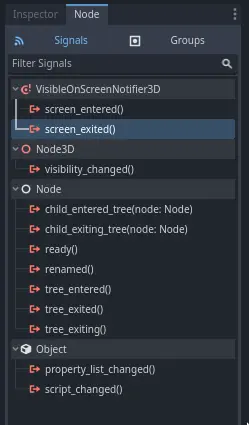
連接訊號至方法
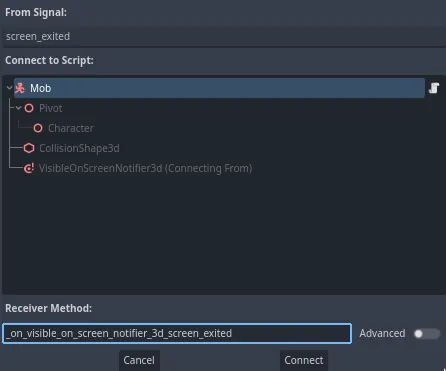
This will add a new function for you in your mob script,
_on_visible_on_screen_notifier_3d_screen_exited(). From it, call the queue_free()
method. This function destroys the instance it's called on.
func _on_visible_on_screen_notifier_3d_screen_exited():
    queue_free()
// We also specified this function name in PascalCase in the editor's connection window.
private void OnVisibilityNotifierScreenExited()
{
    QueueFree();
}
我們的怪物已經準備好進入遊戲了!在下一部分,你將在遊戲關卡中生成怪物。
Here is the complete mob.gd script for reference.
extends CharacterBody3D

# Minimum speed of the mob in meters per second.
@export var min_speed = 10
# Maximum speed of the mob in meters per second.
@export var max_speed = 18

func _physics_process(_delta):
    move_and_slide()

# This function will be called from the Main scene.
func initialize(start_position, player_position):
    # We position the mob by placing it at start_position
    # and rotate it towards player_position, so it looks at the player.
    look_at_from_position(start_position, player_position, Vector3.UP)
    # Rotate this mob randomly within range of -45 and +45 degrees,
    # so that it doesn't move directly towards the player.
    rotate_y(randf_range(-PI / 4, PI / 4))

    # We calculate a random speed (integer)
    var random_speed = randi_range(min_speed, max_speed)
    # We calculate a forward velocity that represents the speed.
    velocity = Vector3.FORWARD * random_speed
    # We then rotate the velocity vector based on the mob's Y rotation
    # in order to move in the direction the mob is looking.
    velocity = velocity.rotated(Vector3.UP, rotation.y)

func _on_visible_on_screen_notifier_3d_screen_exited():
    queue_free()
using Godot;

public partial class Mob : CharacterBody3D
{
    // Minimum speed of the mob in meters per second.
    [Export]
    public int MinSpeed { get; set; } = 10;
    // Maximum speed of the mob in meters per second.
    [Export]
    public int MaxSpeed { get; set; } = 18;

    public override void _PhysicsProcess(double delta)
    {
        MoveAndSlide();
    }

    // This function will be called from the Main scene.
    public void Initialize(Vector3 startPosition, Vector3 playerPosition)
    {
        // We position the mob by placing it at startPosition
        // and rotate it towards playerPosition, so it looks at the player.
        LookAtFromPosition(startPosition, playerPosition, Vector3.Up);
        // Rotate this mob randomly within range of -45 and +45 degrees,
        // so that it doesn't move directly towards the player.
        RotateY((float)GD.RandRange(-Mathf.Pi / 4.0, Mathf.Pi / 4.0));

        // We calculate a random speed (integer).
        int randomSpeed = GD.RandRange(MinSpeed, MaxSpeed);
        // We calculate a forward velocity that represents the speed.
        Velocity = Vector3.Forward * randomSpeed;
        // We then rotate the velocity vector based on the mob's Y rotation
        // in order to move in the direction the mob is looking.
        Velocity = Velocity.Rotated(Vector3.Up, Rotation.Y);
    }

    // We also specified this function name in PascalCase in the editor's connection window.
    private void OnVisibilityNotifierScreenExited()
    {
        QueueFree();
    }
}