Up to date
This page is up to date for Godot 4.3.
If you still find outdated information, please open an issue.
建立腳本樣板
Godot 中能使用腳本樣板,該功能可以在建立新腳本的 [腳本建立視窗] 中看到:
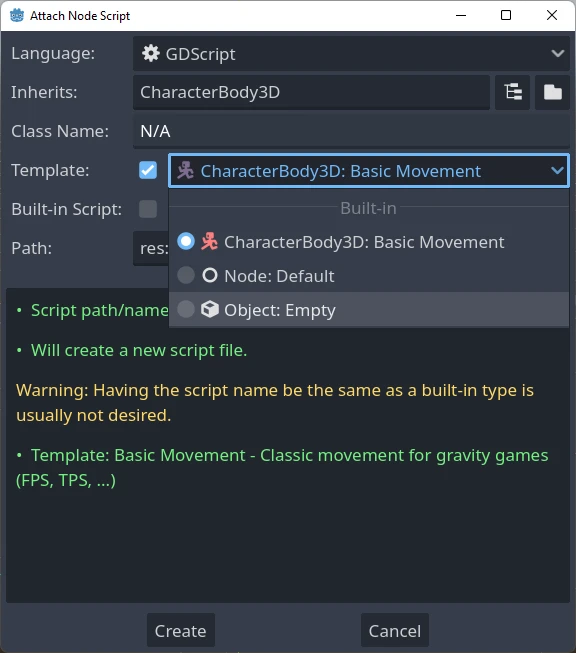
預設有提供一系列的預設腳本樣板,但也可以修改現有樣板或建立新的樣板。設定樣板時可以只為單一專案設定或為編輯器設定。
範本連結到特定的節點型別,因此當您建立腳本時,您只會看到與該特定節點或其父型別之一對應的範本。例如,如果您正在為CharacterBody3D 建立腳本,您將只能看到為CharacterBody3D、Node3D 或節點定義的範本。
放置樣板
有兩個地方可以管理樣板。
編輯器中定義的樣板
這些樣板可以在所有專案中使用。樣板的位置根據各個作業系統而不同:
Windows:
%APPDATA%\Godot\script_templates\Linux:
$HOME/.local/share/godot/script_templates/macOS:
$HOME/Library/Application Support/Godot/script_templates/
If you're getting Godot from somewhere other than the official website, such
as Steam, the folder might be in a different location. You can find it using
the Godot editor. Go to Editor > Open Editor Data/Settings Folder and it
will open a folder in your file browser, inside that folder is the
script_templates folder.
各專案定義的樣板
The default path to search for templates is the
res://script_templates/ directory. The path can be changed by configuring the project setting
Editor > Script > Templates Search Path,
both via code and the editor.
若在專案中未找到 script_templates 資料夾,則會直接忽略。
型別轉換
編輯器和專案定義的範本都以以下方式組織:
template_path/node_type/file.extension
位置:
template_pathis one of the 2 locations discussed in the previous two sections.node_typeis the node it will apply to (for example, Node, or CharacterBody3D), This is case-sensitive. If a script isn't in the propernode_typefolder, it won't be detected.fileis the custom name you can chose for the template (for example,platformer_movementorsmooth_camera).extensionindicates which language the template will apply to (it should begdfor GDScript orcsfor C#).
如:
template_scripts/Node/smooth_camera.gdtemplate_scripts/CharacterBody3D/platformer_movement.gd
預設行為與覆蓋
預設
模板的名稱與檔案名稱相同(減去副檔名,prettyfied)
下面是這些選項的說明
空格縮排設定為 4
在本示範專案中,可將所有選項保留為預設值。
可以透過在檔案開頭新增元標頭來自訂此行為,如下所示:
# meta-name: Platformer movement
# meta-description: Predefined movement for classical platformers
# meta-default: true
# meta-space-indent: 4
// meta-name: Platformer movement
// meta-description: Predefined movement for classical platformers
// meta-default: true
// meta-space-indent: 4
在這種情況下,名稱將設定為“平台移動”,並帶有給定的自訂描述,並且它將設定為保存該節點的目錄的預設範本。
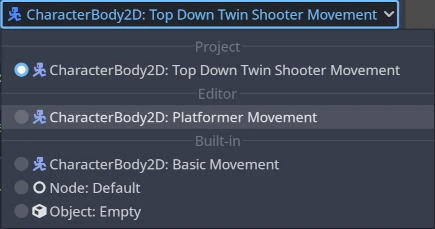
這是在編輯器和專案層級使用自訂範本的範例:
備註
腳本樣板與一般腳本檔的副檔名相同。這可能會讓腳本解析器把專案中的腳本當成是實際腳本。為了避免這種情況,請確保在包含樣板腳本的資料夾內建立一個 .gdignore 檔案。該資料夾將不再顯示於專案的檔案系統中,但樣板依然可以使用外部文字編輯器來開啟。
小訣竅
預設情況下,專案目錄中的每個 C# 檔案都會包含在編譯中。必須從 C# 專案中手動排除腳本範本以避免產生錯誤。請參閱 Microsoft 檔案中的「從建置中排除檔案 <https://learn.microsoft.com/en-us/visualstudio/msbuild/how-to-exclude-files-from-the-build>」。
可以建立與專案特定模板具有相同等級的編輯器級模板,並且也可以與內建模板具有相同的名稱,所有這些都會顯示在新腳本對話方塊中。
預設樣板
若要覆寫預設模板,請在「Node」目錄(或更具體的型別,如果只想覆寫子型別)內的編輯器或專案層級建立自訂模板,並使用「meta-default」啟動檔案: true``標題。
同一節點型別只能同時設定一個預設模板。
Default 預設樣板會依各語言自動產生,且無法設定或覆寫。但這些樣板可以用來當作建立其他樣板的基底。
# meta-description: Base template for Node with default Godot cycle methods

extends _BASE_


# Called when the node enters the scene tree for the first time.
func _ready() -> void:
    pass # Replace with function body.


# Called every frame. 'delta' is the elapsed time since the previous frame.
func _process(delta: float) -> void:
    pass
// meta-description: Base template for Node with default Godot cycle methods

using _BINDINGS_NAMESPACE_;
using System;

public partial class _CLASS_ : _BASE_
{
    // Called when the node enters the scene tree for the first time.
    public override void _Ready()
    {
    }

    // Called every frame. 'delta' is the elapsed time since the previous frame.
    public override void _Process(double delta)
    {
    }
}
Godot 編輯器提供了一組有用的內建節點特定模板,例如用於 CharacterBody2D <class_CharacterBody2D> 和 CharacterBody3D <class_CharacterBody3D> 的 basic_movement 和 ``plugin``對於:ref:`itorPlugin <class_itor。
樣板預留位置列表
下表列出了所有目前有實作的內建樣板預留位置。
基礎預留位置
預留位置 |
說明 |
|---|---|
|
新類別的名稱 (僅於 C# 中使用)。 |
|
The name of the new class. |
|
新腳本所繼承的基礎型別。 |
|
縮排預留位置。依據 編輯器設定 中 |
型別預留位置
在Godot 3.x 中,曾經有GDScript 型別提示的佔位符,每當使用模板建立新腳本時,這些佔位符就會被替換,例如:%INT_TYPE%、%STRING_TYPE% ``、 ``%FLOAT_TYPE% 或 %VOID_RETURN%。
佔位符不再適用於 Godot 4.x,但如果停用 EditorSettings <class_EditorSettings> 中的設定 text_editor/completion/add_type_hints ,參數和傳回型別的型別提示將自動刪除幾種基本型別:
inString[]String[]float[]-> void:=將被轉換為=