Up to date
This page is up to date for Godot 4.3.
If you still find outdated information, please open an issue.
使用 NavigationLink
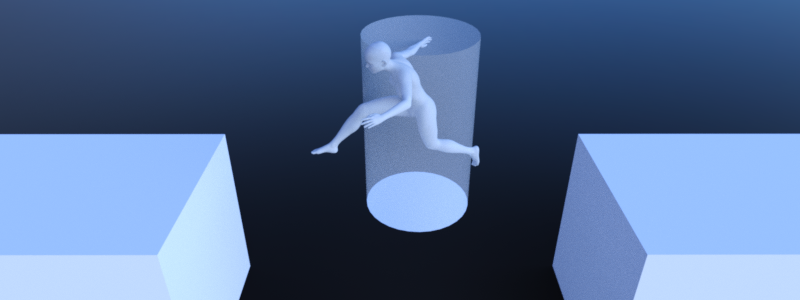
NavigationLink 可以將相隔任意距離的導覽網格多邊形連接起來,參與尋路,多邊形來自 NavigationRegion2D 和 NavigationRegion3D。
NavigationLink 也可以用來實作尋路過程中需要與遊戲中的物件互動才能使用的捷徑,例如梯子、跳板、傳送門等。
2D 和 3D 版本的 NavigationJumplinks 節點分別可用作:ref:NavigationLink2D<class_NavigationLink2D> 和:ref:NavigationLink3D<class_NavigationLink3D>。
Different NavigationRegions can connect their navigation meshes without the need for a NavigationLink
as long as they have overlapping edges or edges that are within navigation map edge_connection_margin.
As soon as the distance becomes too large, building valid connections becomes a problem - a problem that NavigationLinks can solve.
請參閱 doc_navigation_using_navigationregions 以了解更多有關導覽區域使用的資訊。請參閱 doc_navigation_connecting_navmesh 以了解有關如何連接導覽網格的更多資訊。
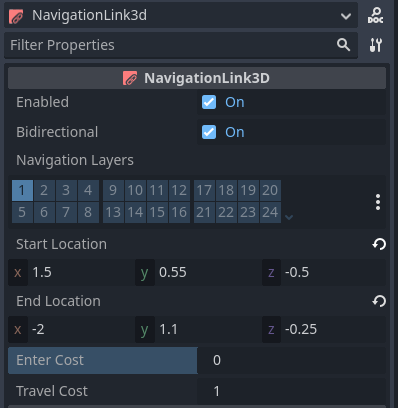
NavigationLinks 與 NavigationRegions 共享許多屬性,例如「navigation_layers」。與使用導覽網格資源新增更多本地可走訪區域的 NavigationRegions 相比,NavigationLink 在任意距離的兩個位置之間新增單一連線。
NavigationLinks 有一個“start_position”和“end_position”,並且當啟用“雙向”時可以雙向移動。放置時,導覽連結會連接搜尋半徑內最接近其「start_position」和「end_position」的導覽網格多邊形以進行尋路。
The polygon search radius can be configured globally in the ProjectSettings under navigation/2d_or_3d/default_link_connection_radius
or set for each navigation map individually using the NavigationServer.map_set_link_connection_radius() function.
“start_position”和“end_position”在編輯器中都有偵錯標記。位置的可見半徑顯示多邊形搜尋半徑。比較內部的所有導覽網格多邊形,並選擇最接近的作為邊緣連接。如果在搜尋半徑內找不到有效的多邊形,導覽連結將被停用。
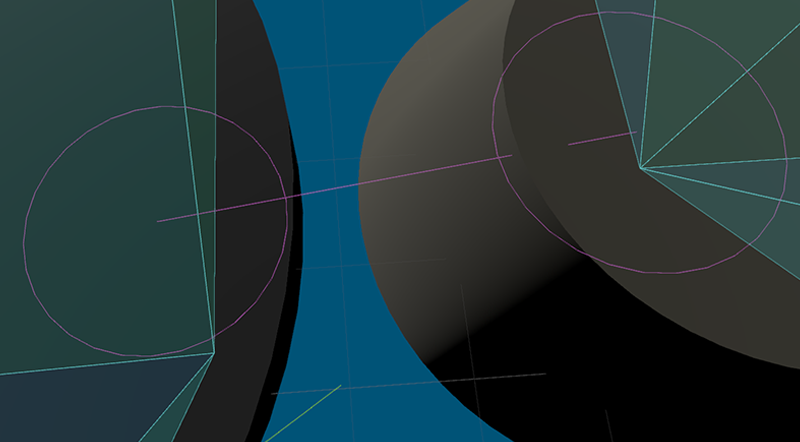
可以在「debug/shapes/navigation」下的編輯器中更改連結除錯視覺效果:ref:ProjectSettings<class_ProjectSettings>。除錯的可見性也可以在編輯器 3D 視口小控制功能表中控制。
A navigation link does not provide any specialized movement through the link. Instead, when an agent reaches the position of a link, game code needs to react (e.g. through area triggers) and provide means for the agent to move through the link to end up at the links other position (e.g. through teleport or animation). Without that an agent will attempt to move itself along the path of the link. You could end up with an agent walking over a bottomless pit instead of waiting for a moving platform, or walking through a teleporter and proceeding through a wall.
Navigation link script templates
The following script uses the NavigationServer to create a new navigation link.
extends Node2D
var link_rid: RID
var link_start_position: Vector2
var link_end_position: Vector2
func _ready() -> void:
link_rid = NavigationServer2D.link_create()
var link_owner_id: int = get_instance_id()
var link_enter_cost: float = 1.0
var link_travel_cost: float = 1.0
var link_navigation_layers: int = 1
var link_bidirectional: bool = true
NavigationServer2D.link_set_owner_id(link_rid, link_owner_id)
NavigationServer2D.link_set_enter_cost(link_rid, link_enter_cost)
NavigationServer2D.link_set_travel_cost(link_rid, link_travel_cost)
NavigationServer2D.link_set_navigation_layers(link_rid, link_navigation_layers)
NavigationServer2D.link_set_bidirectional(link_rid, link_bidirectional)
# Enable the link and set it to the default navigation map.
NavigationServer2D.link_set_enabled(link_rid, true)
NavigationServer2D.link_set_map(link_rid, get_world_2d().get_navigation_map())
# Move the 2 link positions to their intended global positions.
NavigationServer2D.link_set_start_position(link_rid, link_start_position)
NavigationServer2D.link_set_end_position(link_rid, link_end_position)
extends Node3D
var link_rid: RID
var link_start_position: Vector3
var link_end_position: Vector3
func _ready() -> void:
link_rid = NavigationServer3D.link_create()
var link_owner_id: int = get_instance_id()
var link_enter_cost: float = 1.0
var link_travel_cost: float = 1.0
var link_navigation_layers: int = 1
var link_bidirectional: bool = true
NavigationServer3D.link_set_owner_id(link_rid, link_owner_id)
NavigationServer3D.link_set_enter_cost(link_rid, link_enter_cost)
NavigationServer3D.link_set_travel_cost(link_rid, link_travel_cost)
NavigationServer3D.link_set_navigation_layers(link_rid, link_navigation_layers)
NavigationServer3D.link_set_bidirectional(link_rid, link_bidirectional)
# Enable the link and set it to the default navigation map.
NavigationServer3D.link_set_enabled(link_rid, true)
NavigationServer3D.link_set_map(link_rid, get_world_3d().get_navigation_map())
# Move the 2 link positions to their intended global positions.
NavigationServer3D.link_set_start_position(link_rid, link_start_position)
NavigationServer3D.link_set_end_position(link_rid, link_end_position)