Work in progress
The content of this page was not yet updated for Godot
4.3
and may be outdated. If you know how to improve this page or you can confirm
that it's up to date, feel free to open a pull request.
音訊流
前言
正如你可能已經在 音訊匯流排 中讀到的一樣, 聲音通過AudioStreamPlayer節點發送到每個匯流排.AudioStreamPlayer有很多種. 每一個都會載入一個AudioStream並進行播放.
AudioStream
音訊流(audio stream)是一種發出聲音的抽象物件. 聲音可以來自許多地方, 最常見的是從檔案系統載入. 音訊檔可以作為AudioStreams載入並放置在AudioStreamPlayer中. 你可以在 匯入音訊樣本 中找到有關支援的格式和格式差異的資訊.
There are other types of AudioStreams, such as AudioStreamRandomizer. This one picks a different audio stream from a list of streams each time it's played back, and applies random pitch and volume shifting. This can be helpful for adding variation to sounds that are played back often.
AudioStreamPlayer
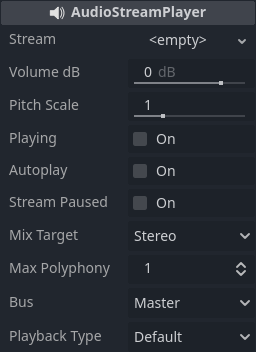
這是一個標準的, 非位置型的流播放機, 可以播放到任意匯流排. 在5.1身歷聲中, 它可以將音訊發送到身歷聲混音或前置揚聲器.
Playback Type is an experimental setting, and could change in future versions of Godot. It exists so Web exports use Web Audio-API based samples instead of streaming all sounds to the browser, unlike most platforms. This prevents the audio from being garbled in single-threaded Web exports. By default, only the Web platform will use samples. Changing this setting is not recommended, unless you have an explicit reason to. You can change the default playback type for the web and other platforms in the project settings under Audio > General (advanced settings must be turned on to see the setting).
AudioStreamPlayer2D
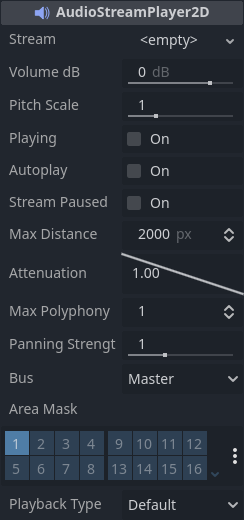
這是AudioStreamPlayer的一種變體, 它將聲音發散到2D位置環境中. 當靠近螢幕左側時, 聲像將向左偏移. 靠近右側時, 則向右偏移.
備註
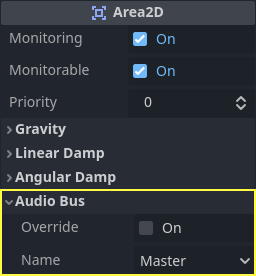
Area2D可以將它們包含的AudioStreamPlayer2D的聲音轉移到特定的匯流排上. 這樣就可以創造具有不同混響或聲音品質的匯流排, 從而處理在遊戲世界的特定區域中發生的動作.
AudioStreamPlayer3D
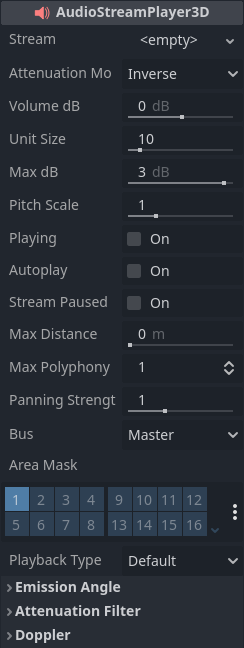
這是AudioStreamPlayer的一種變體, 它將聲音發散到3D位置環境中. 根據播放機相對於螢幕的位置, 它可以將聲音定位在身歷聲(5.1或7.1)中, 具體取決於所選的音訊設定.
Similar to AudioStreamPlayer2D, an Area3D can divert the sound to an audio bus.
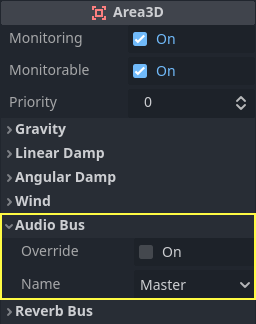
與2D不同,AudioStreamPlayer的3D版本有一些更高級的選項:
混響匯流排
警告
This feature is not supported on the web platform if the AudioStreamPlayer's playback mode is set to Sample, which is the default. It will only work if the playback mode is set to Stream, at the cost of increased latency if threads are not enabled.
See Audio playback in the Exporting for the Web documentation for details.
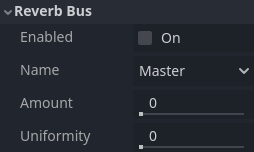
Godot allows for 3D audio streams that enter a specific Area3D node to send dry and wet audio to separate buses. This is useful when you have several reverb configurations for different types of rooms. This is done by enabling this type of reverb in the Reverb Bus section of the Area3D's properties:
At the same time, a special bus layout is created where each Area3D receives the reverb info from each Area3D. A Reverb effect needs to be created and configured in each reverb bus to complete the setup for the desired effect:
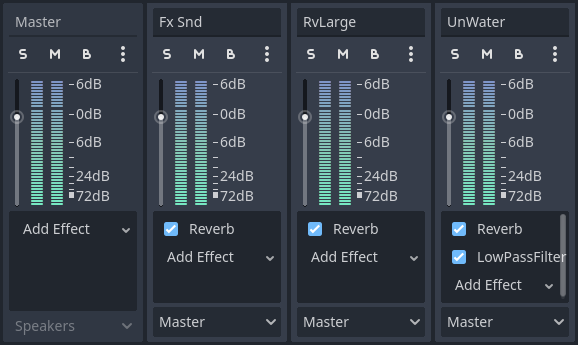
The Area3D's Reverb Bus section also has a parameter named Uniformity. Some types of rooms bounce sounds more than others (like a warehouse), so reverberation can be heard almost uniformly across the room even though the source may be far away. Playing around with this parameter can simulate that effect.
多普勒
警告
This feature is not supported on the web platform if the AudioStreamPlayer's playback mode is set to Sample, which is the default. It will only work if the playback mode is set to Stream, at the cost of increased latency if threads are not enabled.
See Audio playback in the Exporting for the Web documentation for details.
當發射源和接收者之間的相對速度發生變化時, 發出聲音的音高會隨之升高/降低.Godot可以追蹤AudioStreamPlayer3D和Camera節點的速度變化. 這兩個節點都有這個屬性, 需要手動啟用:
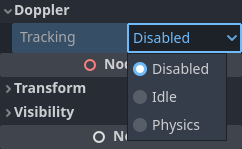
根據物件的移動方法選擇啟用設定: 如果用 _process 來移動, 選擇 Idle ;如果使用 _physics_process 來移動, 選擇 Physics . 追蹤將自動進行.