Up to date
This page is up to date for Godot 4.3.
If you still find outdated information, please open an issue.
Available 3D formats
Godot 有靈活可設定的 3D 資源匯入工具。
Godot 以 場景 來作業。這表示,可以將您慣用的 3D DCC 中整個場景匯入轉換為非常相近的結果。
Godot 支援下列 3D 場景檔案格式 :
glTF 2.0 (recommended). Godot has support for both text (
.gltf) and binary (.glb) formats.``.blend``(攪拌機)。這是透過呼叫 Blender 以透明方式匯出到 glTF 來實作的(需要安裝 Blender)。
DAE (COLLADA), an older format that is supported.
OBJ (Wavefront) format + their MTL material files. This is also supported, but pretty limited given the format's limitations (no support for pivots, skeletons, animations, UV2, PBR materials, ...).
FBX, supported via the ufbx library. The previous import workflow used FBX2glTF integration. This requires installing an external program that links against the proprietary FBX SDK, so we recommend using the default ubfx method or other formats listed above (if suitable for your workflow).
只需要將場景檔與紋理一起複製到專案儲存庫中,Godot 就會完整匯入。
在 Blender 中匯出 glTF 2.0 檔案
有兩種方法可以為伺服器匯出專案:
作為 glTF 二進位檔案(
.glb)。作為 glTF 文字檔,內嵌二進位資料(
.gltf檔案)作為 glTF 文字檔,二進位資料和紋理獨立(
.gltf檔案 +.bin檔案 + 紋理)。
glTF 二進位檔是三種方法中最小的一種。glTF 二進位檔包含 Blender 中設定的網格與紋理。將 glTF 放入 Godot 後,紋理會變成物件材質檔的一部分。
glTF 嵌入式檔案可以獲得與二進位檔案相同的結果。但在 Godot 中沒有提供額外的功能,而且因為檔案大小比較大,所以也不建議使用。
有兩種情況會需要將 glTF 與紋理分別匯入。其中一種情況是需要讓場景由純文字檔來描述、讓二進位資料保存在獨立的二進位檔案中,這樣子便適用於版本控制系統,可以用基於文字的格式來審閱改動。第二種情況是檔需要將紋理與材質檔分開的時候。若沒有需要這兩種情況的話,則用 glTF 二進位檔即可。
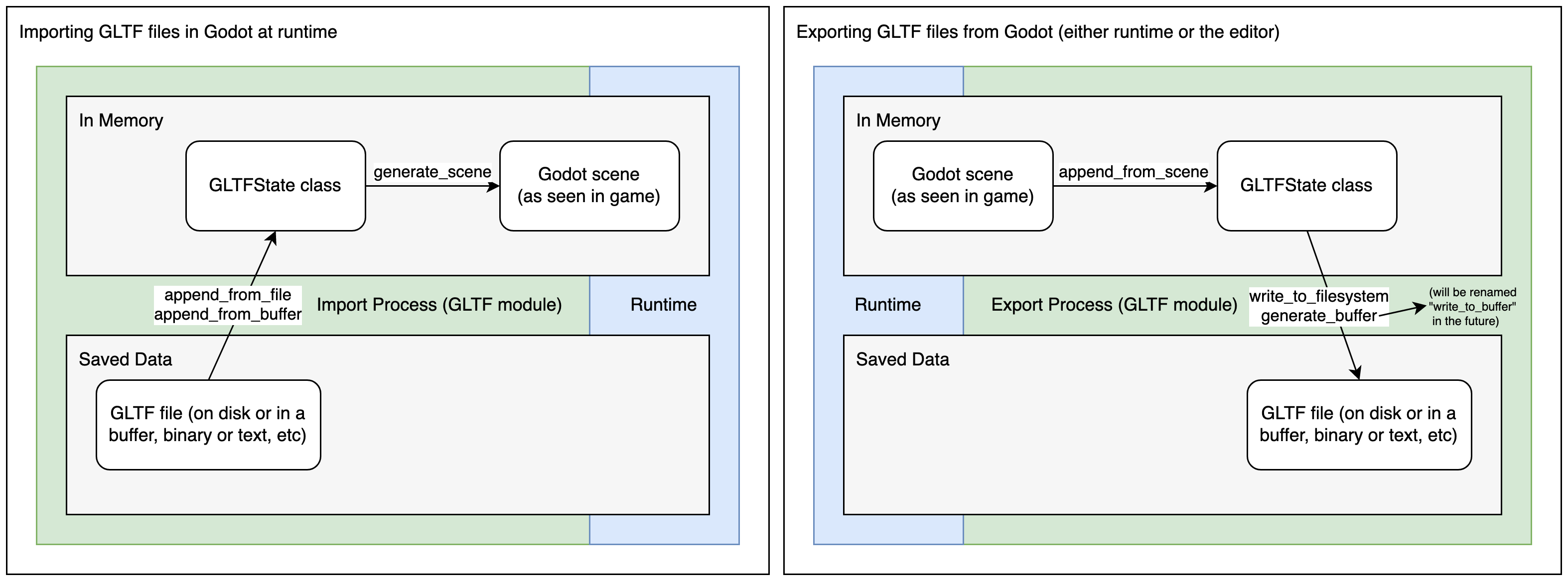
The glTF import process first loads the glTF file's data into an in-memory GLTFState class. This data is then used to generate a Godot scene. When importing files at runtime, this scene can be directly added to the tree. The export process is the reverse of this, a Godot scene is converted to a GLTFState class, then the glTF file is generated from that.
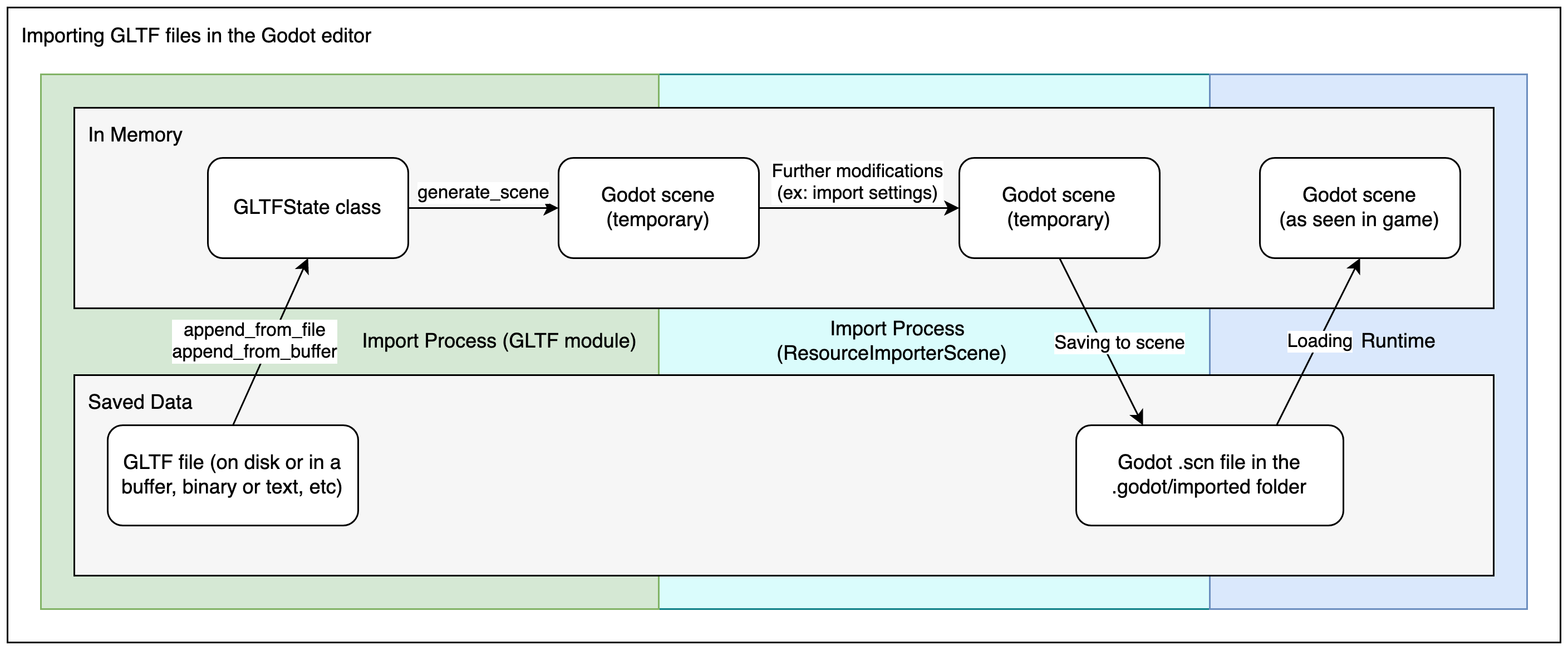
When importing glTF files in the editor, there are two more steps. After generating the Godot scene, the ResourceImporterScene class is used to apply additional import settings, including settings you set through the Import dock and the Advanced Import Settings dialog. This is then saved as a Godot scene file, which is what gets used when you run/export your game.
警告
如果您的模型包含混合形狀(也稱為「形狀鍵」和「變形目標」),則您的 glTF 匯出設定 僅匯出變形骨骼 需要在動畫匯出配置下配置為 啟用。
無論如何匯出不變形的骨骼都會導致不正確的著色。
備註
Blender 匯出的 glTF 檔不包含放射紋理 (Emissive Texture)。若模型使用放射紋理,則必須分開匯入。
預設情況下,Blender 在材質上禁用背面剔除,匯出材質時配對其在 Blender 中的算繪方式。這意味著 Godot 中的材質會將其剔除模式設定為 Disabled。這會降低性能,因為背面將被算繪,即使它們不可見。要解決此問題,請在 Blender 的材質分頁中啟用 Backface Culling ,然後再次將場景匯出為 glTF。
直接在 Godot 中匯入 .blend 檔案
備註
此功能需要 Blender 3.0 或更高版本。為了獲得最佳結果,我們建議使用 Blender 3.5 或更高版本,因為它包含對 glTF 匯出器的許多修復。
**強烈**建議使用從 Blender.org 下載的官方 Blender 版本,而不是 Linux 發行包或 Flatpak。這可以避免與打包相關的任何問題,例如可能導致不相容或沙盒限制的不同庫版本。
從Godot 4.0開始,編輯器可以透過透明方式呼叫`Blender <https://www.blender.org/>`__的glTF匯出功能來直接匯入``.blend`檔案。
這可讓您更快地迭代 3D 場景,因為您可以將場景儲存在 Blender 中,按 alt-tab 返回 Godot,然後立即查看您的變更。使用版本控制時,這也更有效,因為您不再需要將匯出的 glTF 檔案的副本提交到版本控制。
若要使用``.blend``匯入,您必須在開啟Godot編輯器之前安裝Blender(如果開啟已包含``.blend``檔案的專案)。如果您將 Blender 安裝在預設位置,Godot 應該能夠自動偵測其路徑。如果不是這種情況,請在編輯器設定中設定包含 Blender 執行檔的目錄的路徑(檔案系統 > 匯入 > Blender > Blender 3 路徑)。
如果您將 .blend 檔案保留在專案資料夾中,但不希望 Godot 匯入它們,請在進階專案設定中停用 檔案系統 > 匯入 > Blender > 啟用。
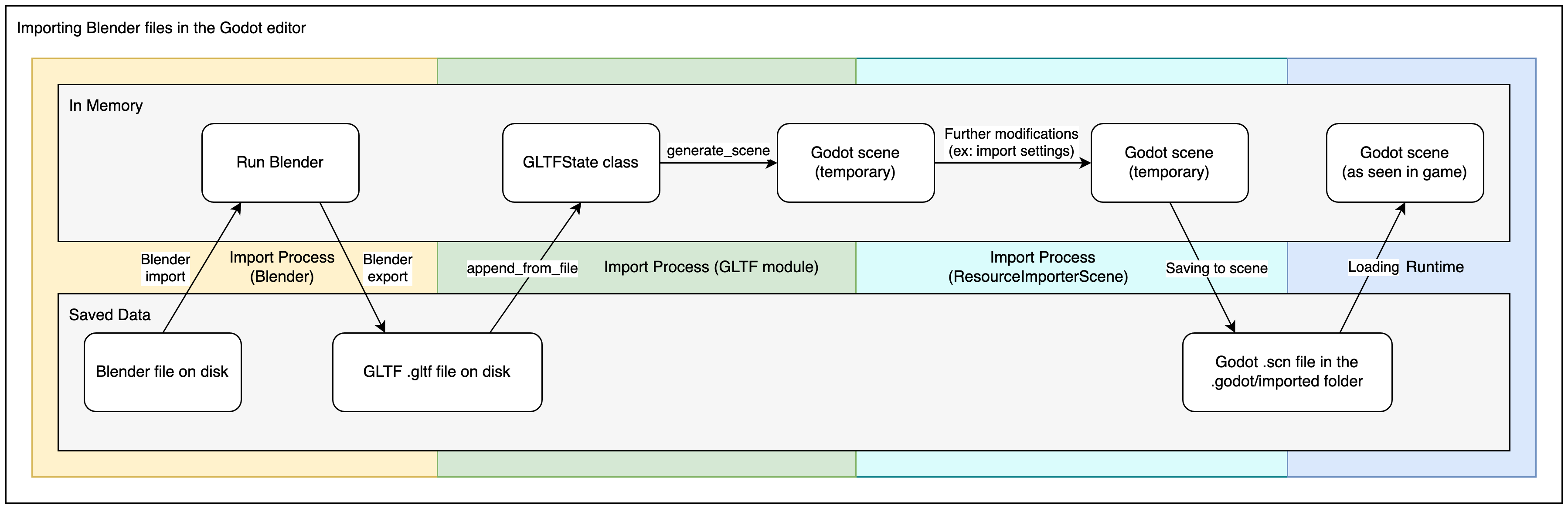
The .blend import process converts to glTF first, so it still uses
Godot's glTF import code. Therefore, the .blend import process is the same
as the glTF import process, but with an extra step at the beginning.
備註
在團隊中工作時,請記住在專案中使用「.blend」檔案將要求「所有」團隊成員安裝 Blender。雖然 Blender 是免費下載的,但這可能會增加專案工作時的摩擦。 .blend 匯入在 Android 和 Web 編輯器上也不可用,因為這些平台無法呼叫外部程式。
如果這有問題,請考慮使用從 Blender 匯出的 glTF 場景。
在 Blender 中匯出 DAE 檔
Blender 內建 COLLADA 支援,但用起來不是很適合遊戲引擎,所以也不建議直接拿來用。
For complex scenes or scenes that contain animations, Godot provides a Blender plugin that will correctly export COLLADA scenes for use in Godot. This plugin is not maintained or supported in Godot 4.x, but may still work depending on your Godot and Blender versions.
於 Godot 3.0+ 匯入素材
OBJ 是最簡單的 3D 格式之一,因此 Godot 應該能夠成功匯入大多數 OBJ 檔案。然而,OBJ 也是一種非常有限的格式:它不支援蒙皮、動畫、UV2 或 PBR 材質。
There are 2 ways to use OBJ meshes in Godot:
直接將它們載入到 MeshInstance3D 節點或任何其他需要網格的屬性(例如 GPUParticles3D)中。這是預設模式。
在匯入塢中將其匯入模式變更為 OBJ 作為場景,然後重新啟動編輯器。這允許您使用與 glTF 或 Collada 場景相同的匯入選項,例如在匯入時展開 UV2(對於 使用光照貼圖全域光照)。
備註
Blender 3.4 及更高版本可以匯出 OBJ 檔案中的 RGB 頂點顏色(這是 OBJ 格式的非標準擴充)。自 Godot 4.0 起,Godot 就能夠匯入這些頂點顏色,但除非您在材質上啟用 Vertex Color > Use As Albedo,否則它們不會顯示在材質上。
OBJ 網格的頂點顏色在匯入後會保留其原始色彩空間(sRGB/線性),但其亮度被限制為 1.0(它們不能過亮)。
於 Godot 3.0+ 匯入素材
By default any FBX file added to a Godot project in Godot 4.3 or later will
use the ufbx import method. Any file that was was added to a project in a
previous version, such as 4.2, will continue to be imported via the FBX2glTF
method unless you go into that files import settings, and change the importer
to ufbx.
如果您將 .fbx 檔案保留在專案資料夾中,但不希望 Godot 匯入它們,請在進階專案設定中停用 檔案系統 > 匯入 > FBX > 啟用。
If you want to setup the FBX2glTF workflow, which is generally not recommend unless you have a specific reason to use it, you need to download the FBX2glTF executable, then specify the path to that executable in the editor settings under Filesystem > Import > FBX > FBX2glTFPath
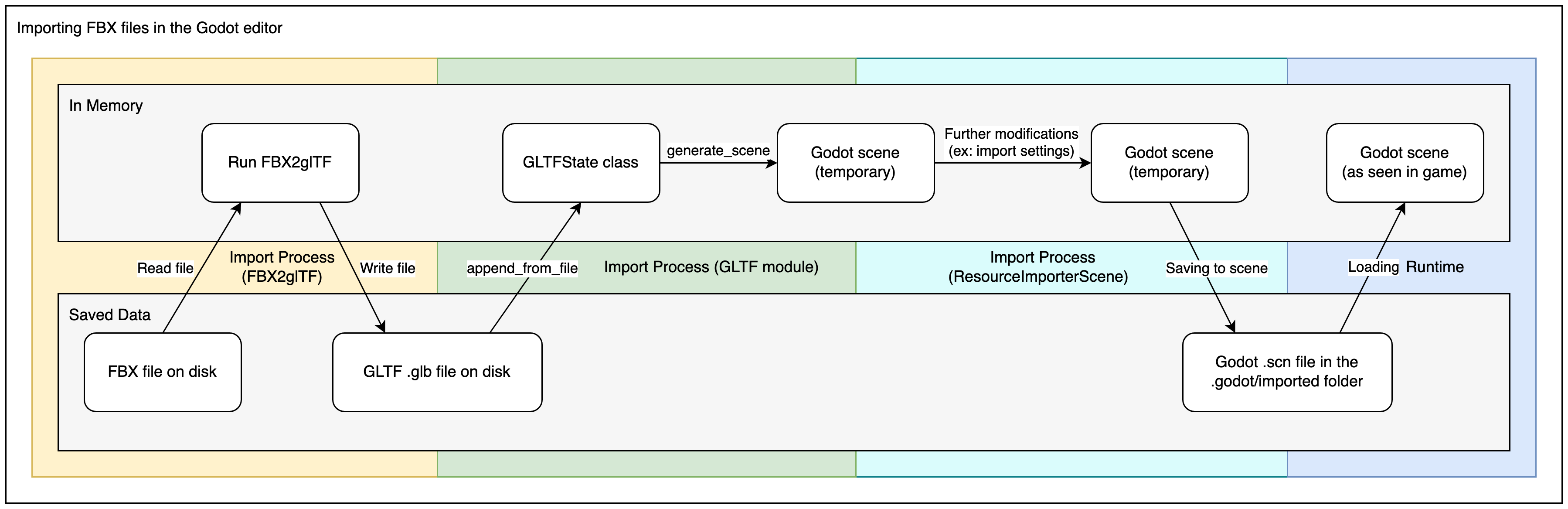
The FBX2glTF import process converts to glTF first, so it still uses Godot's glTF import code. Therefore, the FBX import process is the same as the glTF import process, but with an extra step at the beginning.
也參考
The full installation process for using FBX2glTF in Godot is described on the FBX import page of the Godot website.