Exporter des packs, des patchs, et des mods
Cas d'utilisations
Oftentimes, one would like to add functionality to one's game after it has been deployed.
En voici quelques exemples...
Contenu téléchargeable : la possibilité d'ajouter des fonctionnalités et du contenu à son jeu.
Patchs : la possibilité de corriger un bug présent dans un produit livré.
Mods : permettre à d'autres personnes de créer du contenu pour son jeu.
Ces outils aident les développeurs à étendre le développement de leur jeu au-delà de la sortie initiale.
Overview of PCK/ZIP files
Godot enables this via a feature called resource packs (PCK files,
with the .pck extension, or ZIP files).
Avantages :
mises à jour et correctifs incrémentiels
proposer des DLCs
offrir la prise en charge de mods
aucune divulgation du code source nécessaire pour les mods
une structure de projet plus modulaire
les utilisateurs n'ont pas à remplacer tout le jeu
The first part of using them involves exporting and delivering the project to players. Then, when one wants to add functionality or content later on, they just deliver the updates via PCK/ZIP files to the users.
PCK/ZIP files usually contain, but are not limited to:
des scripts
des scènes
shaders
des modèles
des textures
des effets sonores
de la musique
tout autre ressource susceptible d'être importée dans le jeu
The PCK/ZIP files can even be an entirely different Godot project, which the original game loads in at runtime.
It is possible to load both PCK and ZIP files as additional packs at the same time. See Formats de fichiers PCK contre ZIP pack for a comparison of the two formats.
Voir aussi
If you want to load loose files at runtime (not packed in a PCK or ZIP by Godot), consider using Chargement et sauvegarde d'un fichier durant l'exécution instead. This is useful for loading user-generated content that is not made with Godot, without requiring users to pack their mods into a specific file format.
The downside of this approach is that it's less transparent to the game logic, as it will not benefit from the same resource management as PCK/ZIP files.
Générer des fichiers PCK
In order to pack all resources of a project into a PCK file, open the project and go to Project > Export and click on Export PCK/ZIP. Also, make sure to have an export preset selected while doing so.
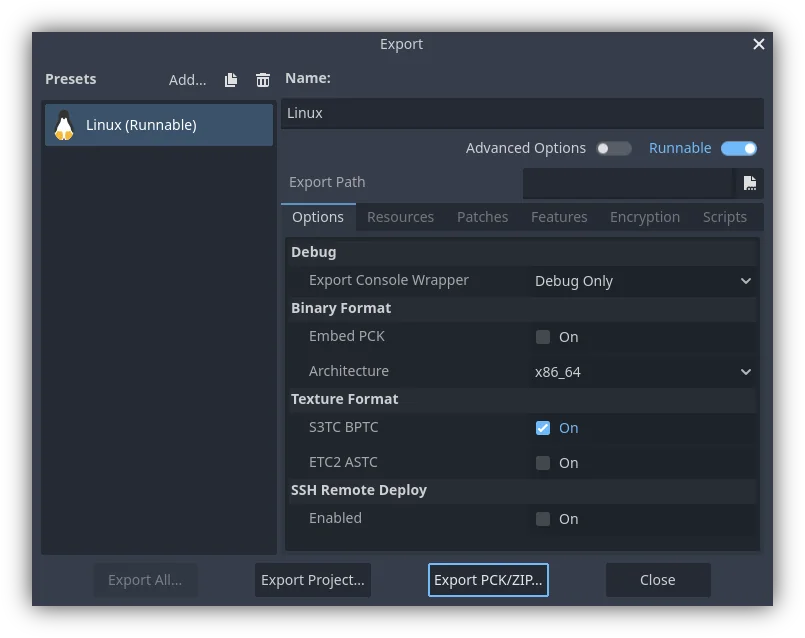
Another method would be to export from the command line
with --export-pack. The output file must with a .pck or .zip
file extension. The export process will build that type of file for the
chosen platform.
Note
Si l'on souhaite supporter les mods pour son jeu, il faut que ses utilisateurs créent des fichiers exportés similairement. En supposant que le jeu original s'attend à une certaine structure pour les ressources PCK et/ou une certaine interface pour ses scripts, alors ou bien...
Le développeur doit publier la documentation de ces structures/ interfaces attendues, demander aux moddeurs d'installer Godot Engine, et ces moddeurs devront se conformer à l'API définie dans la documentation lorsqu'ils construiront du contenu moddé pour le jeu (pour qu'il fonctionne). Ils utiliseront alors les outils d'exportations intégrés à Godot pour créer un fichier PCK, comme décrit plus haut.
The developer uses Godot to build a GUI tool for adding their exact API content to a project. This Godot tool must either run on a tools-enabled build of the engine or have access to one (distributed alongside or perhaps in the original game's files). The tool can then use the Godot executable to export a PCK file from the command line with OS.execute(). The game itself shouldn't use a tool-build of the engine (for security), so it's best to keep the modding tool and game separate.
Opening PCK or ZIP files at runtime
To load a PCK or ZIP file, one uses the ProjectSettings singleton. The following
example expects a mod.pck file in the directory of the game's executable.
The PCK or ZIP file contains a mod_scene.tscn test scene in its root.
func _your_function():
    # This could fail if, for example, mod.pck cannot be found.
    var success = ProjectSettings.load_resource_pack(OS.get_executable_path().get_base_dir().path_join("mod.pck"))

    if success:
        # Now one can use the assets as if they had them in the project from the start.
        var imported_scene = load("res://mod_scene.tscn")
private void YourFunction()
{
    // This could fail if, for example, mod.pck cannot be found.
    var success = ProjectSettings.LoadResourcePack(OS.get_executable_path().get_base_dir().path_join("mod.pck));

    if (success)
    {
        // Now one can use the assets as if they had them in the project from the start.
        var importedScene = (PackedScene)ResourceLoader.Load("res://mod_scene.tscn");
    }
}
Avertissement
By default, if you import a file with the same file path/name as one you already have in your project, the imported one will replace it. This is something to watch out for when creating DLC or mods. You can solve this problem by using a tool that isolates mods to a specific mods subfolder.
However, it is also a way of creating patches for one's own game. A PCK/ZIP file of this kind can fix the content of a previously loaded PCK/ZIP (therefore, the order in which packs are loaded matters).
Pour éviter ce comportement, passez false comme deuxième argument à ProjectSettings.load_resource_pack().
Note
Pour un projet C#, vous devez compiler la DLL et la placer dans le répertoire de projet d'abord. Ensuite, avant de charger le paquet de ressource, vous devez charger sa DLL comme suit : Assembly.LoadFile("mod.dll")
Dépannage
If you are loading a resource pack and are not noticing any changes, it may be due to the pack being loaded too late. This is particularly the case with menu scenes that may preload other scenes using preload(). This means that loading a pack in the menu will not affect the other scene that was already preloaded.
To avoid this, you need to load the pack as early as possible.
To do so, create a new autoload script and
call ProjectSettings.load_resource_pack()
in the autoload script's _init() function, rather than _enter_tree()
or _ready().
Résumé
This tutorial explains how to add mods, patches, or DLC to a game. The most important thing is to identify how one plans to distribute future content for their game and develop a workflow that is customized for that purpose. Godot should make that process smooth regardless of which route a developer pursues.