XR 工具簡介
Godot 開箱即用地提供了設定 XR 專案所需的所有基本支援。不過,XR 特有的遊戲機制還需要在這個基礎上自行實作。雖然 Godot 有助於簡化這個過程,但這依然可能是一項艱鉅的任務。
因此,Godot 開發了一套名為 Godot XR Tools 的工具包,實作了許多 XR 遊戲常見的基本機制,從移動、物件互動到 UI 操作等一應俱全。
這個工具包設計上同時支援 OpenXR 與 WebXR 執行環境。我們將以此為本章文件的基礎。它能協助開發者快速上手,但若有更特殊需求,自行撰寫邏輯也完全可行。此時 XR 工具也能作為設計靈感的來源。
備註
目前 Godot XR Tools 在素材庫上提供的穩定版本為 Godot 3 的版本。Godot 4 版本的 XR Tools 可於 GitHub 網站下載。本章將說明下載與安裝的詳細步驟。待 Godot 4 版本於素材庫上架後,將會同步更新此文件。
安裝 XR 工具
延續我們在 設定 XR 中建立的專案,接下來要加入 Godot XR Tools 資源庫。可前往 Godot XR Tools 發行頁面 下載 Godot 4 最新版本,並於 Assets 區塊中下載 godot-xr-tools.zip 檔案。
Once downloaded unzip the file.
You will notice the files are held within a godot-xr-tools subfolder.
Inside of this folder you will find an addons folder.
It is this folder that you want to copy in its entirety to your Godot project folder. Your project should now look something like this:
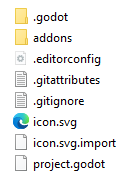
Now open up your project in Godot, if you haven't already, and give it a minute or so to import all the resources of the plugin. If it asks for a path to Blender to be set you can just click the option to disable blender import and restart the editor.
After the import finishes you may notice that several "failed to load script" messages popped up, that's normal, the plugin just needs to be enabled in the project settings.
然後,開啟 專案 功能表並選擇 專案設定...,再切換到 外掛程式 分頁並啟用該插件。
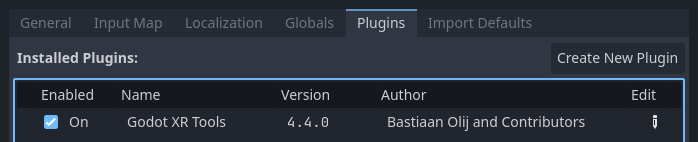
After doing that you need to close and re-open your project so everything is properly enabled.
基本手部模型
為了讓你熟悉操作,我們將從為玩家加入手部模型開始,新增幾個標準組件來美化場景。
OpenXR 支援完整的手部追蹤,但目前各 XR 執行環境在功能上仍有顯著差異。
作為可靠的替代方案,Godot XR Tools 提供多種已綁定骨架的手部場景,可對控制器的扳機與握把輸入做出反應。這些手模型分為低多邊形與高多邊形版本,並有多種組合、控制手指位置的動畫檔案,以及不同的材質紋理。
In your scene tree select your left hand XRController3D node.
Now click on the instantiate Child Scene button to add a child scene. Click the
addons toggle so the addons folder can be searched. Then search for left_hand_low.tscn,
and select it.
如從路徑所見,低多邊形模型位於 lowpoly 子資料夾,高多邊形則在 highpoly 子資料夾。若你打算將遊戲發佈至行動裝置,建議使用低多邊形版本。
預設選用的僅為普通手部模型,其他選項還有:
tac_glove —— 帶指頭外露的手套
full_glove —— 覆蓋整隻手的手套
此外,每種手部模型都提供 physics 版本,可顯示全部骨架。詳細用法將於其他教學介紹。
右手亦重複相同步驟。
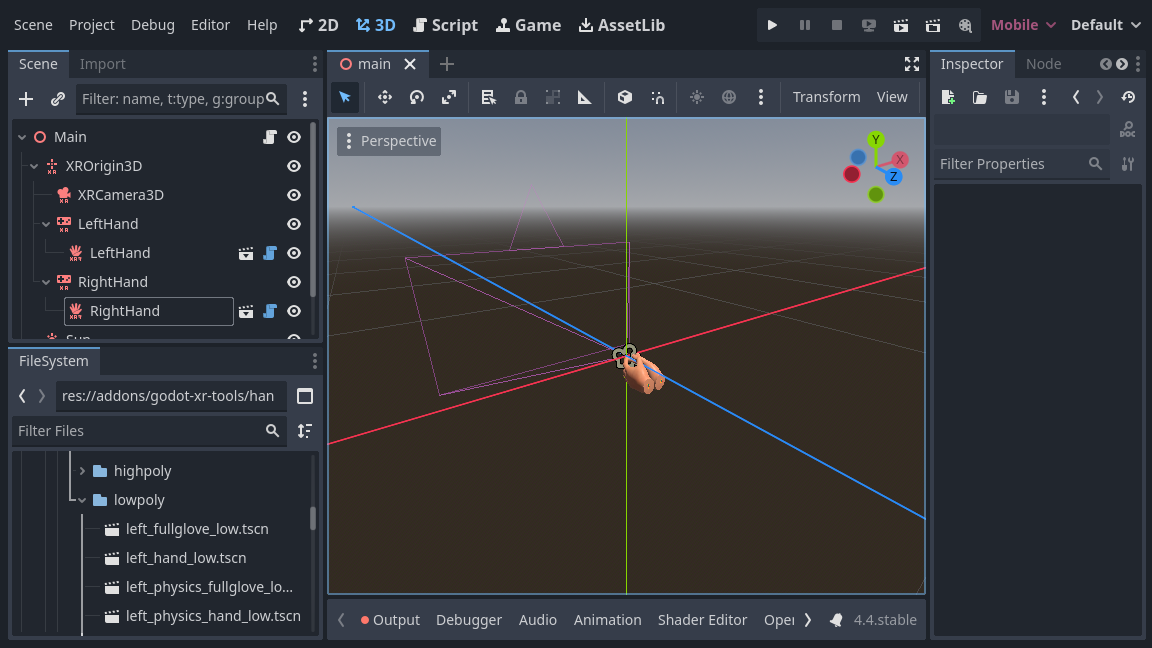
更多資訊
接下來的幾頁,將持續示範如何利用 Godot XR 工具為教學專案新增功能。若需進一步了解,請參考 工具包的說明頁面 。