Убийство игрока
Мы можем убивать врагов, прыгая на них, но игрок всё равно не может умереть. Давайте это исправим.
Мы хотим, чтобы определение попадания врага отличалось от его раздавливания. Мы хотим, чтобы игрок умирал, если он движется по полу, но не умирал, если он находится в воздухе. Мы могли бы использовать векторную математику для различия этих двух видов столкновений. Однако вместо этого мы воспользуемся узлом Area3D, который хорошо подходит для хитбоксов.
Хитбокс с помощью узла Area
Вернитесь к сцене player.tscn и добавьте к нему новый узел Area3D. Назовите его MobDetector. Добавьте узел CollisionShape3D в качестве его дочернего узла.
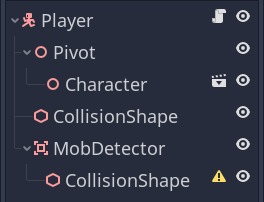
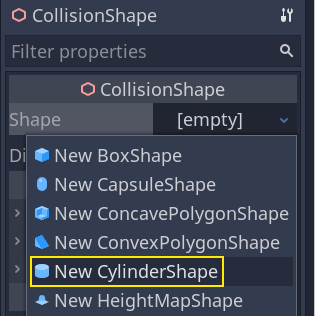
В инспекторе назначьте ему форму цилиндра.
Вот трюк, который можно использовать, чтобы столкновения происходили только тогда, когда игрок находится на земле или близко к ней. Вы можете уменьшить высоту цилиндра и переместить его в верхнюю часть персонажа. Таким образом, когда игрок прыгнет, форма окажется слишком высоко, чтобы враги могли столкнуться с ней.
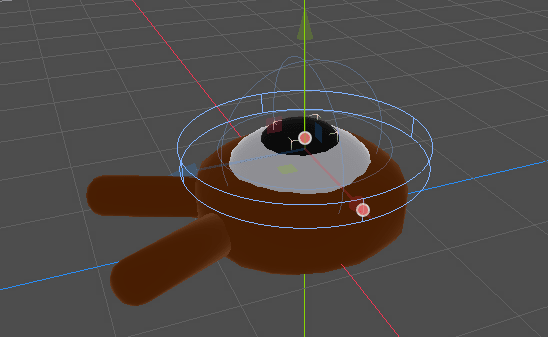
Вы также хотите, чтобы цилиндр был шире сферы. Таким образом, игрок получит удар до столкновения и будет отброшен на верхнюю часть формы столкновения монстра.
Чем шире цилиндр, тем легче будет убить игрока.
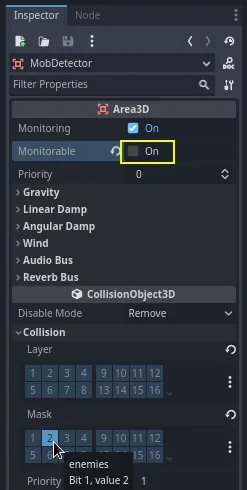
Затем снова выберите узел MobDetector и в инспекторе отключите его свойство Monitorable. Это свойство сделает так, что другие физические узлы не смогут обнаружить эту область. Дополнительное свойство Monitoring позволяет ему обнаруживать столкновения. Затем удалите Collision -> Layer и установите маску на слой "enemies".
Когда области обнаруживают столкновение, они отправляют сигналы. Мы подключим один из них к узлу Player. Выберите MobDetector и зайдите в инспекторе во вкладку Узел, дважды щелкните на сигнал body_entered и присоедините его к Player
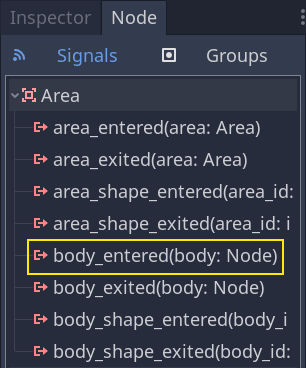
MobDetector будет излучать body_entered, когда в него попадает узел CharacterBody3D или RigidBody3D. Поскольку он имеет только физический слой "enemies", он будет обнаруживать только узлы Mob.
В коде мы собираемся сделать две вещи: отправлять сигнал, который мы позже используем для завершения игры, и уничтожать игрока. Мы можем обернуть эти операции в функцию die(), которая поможет нам описать код.
# Emitted when the player was hit by a mob.
# Put this at the top of the script.
signal hit


# And this function at the bottom.
func die():
    hit.emit()
    queue_free()


func _on_mob_detector_body_entered(body):
    die()
// Don't forget to rebuild the project so the editor knows about the new signal.

// Emitted when the player was hit by a mob.
[Signal]
public delegate void HitEventHandler();

// ...

private void Die()
{
    EmitSignal(SignalName.Hit);
    QueueFree();
}

// We also specified this function name in PascalCase in the editor's connection window.
private void OnMobDetectorBodyEntered(Node3D body)
{
    Die();
}
Завершение игры
Мы можем использовать сигнал hit узла Player для завершения игры. Все, что нам нужно сделать, это подключить его к узлу Main и остановить MobTimer.
Откройте main.tscn, выберите узел Player, и в панели Узел подключите его сигнал hit к узлу Main.
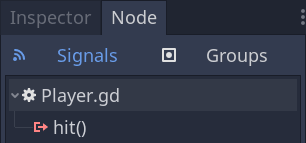
Получите таймер и остановите его в функции _on_player_hit().
func _on_player_hit():
    $MobTimer.stop()
// We also specified this function name in PascalCase in the editor's connection window.
private void OnPlayerHit()
{
    GetNode<Timer>("MobTimer").Stop();
}
Если вы попробуете игру сейчас, монстры перестанут появляться, когда вы умрёте, а оставшиеся покинут экран.
Также обратите внимание, что игра больше не вылетает и не отображает ошибку, когда игрок умирает. Поскольку мы останавливаем MobTimer, он больше не запускает функцию _on_mob_timer_timeout().
Однако, обратите внимание, что столкновение и смерть с игроком полностью зависит от размера и положения форм столкновения Player и Mob. Вам может понадобиться переместить их и изменить их размер, чтобы добиться полноценного ощущения игры.
Вы можете похвалить себя: вы создали прототип полноценной 3D-игры, даже если он еще немного не доработан.
Далее мы добавим счёт, возможность повторного прохождения игры, и вы увидите, как можно сделать игру более живой с помощью минималистичных анимаций.
Кодовая контрольная точка
Для справки, здесь приведены полные скрипты для узлов Main, Mob, и Player. Вы можете использовать их для сравнения и проверки своего кода.
Начиная с main.gd.
extends Node

@export var mob_scene: PackedScene


func _on_mob_timer_timeout():
    # Create a new instance of the Mob scene.
    var mob = mob_scene.instantiate()

    # Choose a random location on the SpawnPath.
    # We store the reference to the SpawnLocation node.
    var mob_spawn_location = get_node("SpawnPath/SpawnLocation")
    # And give it a random offset.
    mob_spawn_location.progress_ratio = randf()

    var player_position = $Player.position
    mob.initialize(mob_spawn_location.position, player_position)

    # Spawn the mob by adding it to the Main scene.
    add_child(mob)

func _on_player_hit():
    $MobTimer.stop()
using Godot;

public partial class Main : Node
{
    [Export]
    public PackedScene MobScene { get; set; }

    private void OnMobTimerTimeout()
    {
        // Create a new instance of the Mob scene.
        Mob mob = MobScene.Instantiate<Mob>();

        // Choose a random location on the SpawnPath.
        // We store the reference to the SpawnLocation node.
        var mobSpawnLocation = GetNode<PathFollow3D>("SpawnPath/SpawnLocation");
        // And give it a random offset.
        mobSpawnLocation.ProgressRatio = GD.Randf();

        Vector3 playerPosition = GetNode<Player>("Player").Position;
        mob.Initialize(mobSpawnLocation.Position, playerPosition);

        // Spawn the mob by adding it to the Main scene.
        AddChild(mob);
    }

    private void OnPlayerHit()
    {
        GetNode<Timer>("MobTimer").Stop();
    }
}
Далее mob.gd.
extends CharacterBody3D

# Minimum speed of the mob in meters per second.
@export var min_speed = 10
# Maximum speed of the mob in meters per second.
@export var max_speed = 18

# Emitted when the player jumped on the mob
signal squashed

func _physics_process(_delta):
    move_and_slide()

# This function will be called from the Main scene.
func initialize(start_position, player_position):
    # We position the mob by placing it at start_position
    # and rotate it towards player_position, so it looks at the player.
    look_at_from_position(start_position, player_position, Vector3.UP)
    # Rotate this mob randomly within range of -45 and +45 degrees,
    # so that it doesn't move directly towards the player.
    rotate_y(randf_range(-PI / 4, PI / 4))

    # We calculate a random speed (integer)
    var random_speed = randi_range(min_speed, max_speed)
    # We calculate a forward velocity that represents the speed.
    velocity = Vector3.FORWARD * random_speed
    # We then rotate the velocity vector based on the mob's Y rotation
    # in order to move in the direction the mob is looking.
    velocity = velocity.rotated(Vector3.UP, rotation.y)

func _on_visible_on_screen_notifier_3d_screen_exited():
    queue_free()

func squash():
    squashed.emit()
    queue_free() # Destroy this node
using Godot;

public partial class Mob : CharacterBody3D
{
    // Emitted when the played jumped on the mob.
    [Signal]
    public delegate void SquashedEventHandler();

    // Minimum speed of the mob in meters per second
    [Export]
    public int MinSpeed { get; set; } = 10;
    // Maximum speed of the mob in meters per second
    [Export]
    public int MaxSpeed { get; set; } = 18;

    public override void _PhysicsProcess(double delta)
    {
        MoveAndSlide();
    }

    // This function will be called from the Main scene.
    public void Initialize(Vector3 startPosition, Vector3 playerPosition)
    {
        // We position the mob by placing it at startPosition
        // and rotate it towards playerPosition, so it looks at the player.
        LookAtFromPosition(startPosition, playerPosition, Vector3.Up);
        // Rotate this mob randomly within range of -45 and +45 degrees,
        // so that it doesn't move directly towards the player.
        RotateY((float)GD.RandRange(-Mathf.Pi / 4.0, Mathf.Pi / 4.0));

        // We calculate a random speed (integer)
        int randomSpeed = GD.RandRange(MinSpeed, MaxSpeed);
        // We calculate a forward velocity that represents the speed.
        Velocity = Vector3.Forward * randomSpeed;
        // We then rotate the velocity vector based on the mob's Y rotation
        // in order to move in the direction the mob is looking.
        Velocity = Velocity.Rotated(Vector3.Up, Rotation.Y);
    }

    public void Squash()
    {
        EmitSignal(SignalName.Squashed);
        QueueFree(); // Destroy this node
    }

    private void OnVisibilityNotifierScreenExited()
    {
        QueueFree();
    }
}
Наконец, самый длинный скрипт, player.gd:
extends CharacterBody3D

signal hit

# How fast the player moves in meters per second
@export var speed = 14
# The downward acceleration while in the air, in meters per second squared.
@export var fall_acceleration = 75
# Vertical impulse applied to the character upon jumping in meters per second.
@export var jump_impulse = 20
# Vertical impulse applied to the character upon bouncing over a mob
# in meters per second.
@export var bounce_impulse = 16

var target_velocity = Vector3.ZERO


func _physics_process(delta):
    # We create a local variable to store the input direction
    var direction = Vector3.ZERO

    # We check for each move input and update the direction accordingly
    if Input.is_action_pressed("move_right"):
        direction.x = direction.x + 1
    if Input.is_action_pressed("move_left"):
        direction.x = direction.x - 1
    if Input.is_action_pressed("move_back"):
        # Notice how we are working with the vector's x and z axes.
        # In 3D, the XZ plane is the ground plane.
        direction.z = direction.z + 1
    if Input.is_action_pressed("move_forward"):
        direction.z = direction.z - 1

    # Prevent diagonal moving fast af
    if direction != Vector3.ZERO:
        direction = direction.normalized()
        # Setting the basis property will affect the rotation of the node.
        $Pivot.basis = Basis.looking_at(direction)

    # Ground Velocity
    target_velocity.x = direction.x * speed
    target_velocity.z = direction.z * speed

    # Vertical Velocity
    if not is_on_floor(): # If in the air, fall towards the floor. Literally gravity
        target_velocity.y = target_velocity.y - (fall_acceleration * delta)

    # Jumping.
    if is_on_floor() and Input.is_action_just_pressed("jump"):
        target_velocity.y = jump_impulse

    # Iterate through all collisions that occurred this frame
    # in C this would be for(int i = 0; i < collisions.Count; i++)
    for index in range(get_slide_collision_count()):
        # We get one of the collisions with the player
        var collision = get_slide_collision(index)

        # If the collision is with ground
        if collision.get_collider() == null:
            continue

        # If the collider is with a mob
        if collision.get_collider().is_in_group("mob"):
            var mob = collision.get_collider()
            # we check that we are hitting it from above.
            if Vector3.UP.dot(collision.get_normal()) > 0.1:
                # If so, we squash it and bounce.
                mob.squash()
                target_velocity.y = bounce_impulse
                # Prevent further duplicate calls.
                break

    # Moving the Character
    velocity = target_velocity
    move_and_slide()

# And this function at the bottom.
func die():
    hit.emit()
    queue_free()

func _on_mob_detector_body_entered(body):
    die()
using Godot;

public partial class Player : CharacterBody3D
{
    // Emitted when the player was hit by a mob.
    [Signal]
    public delegate void HitEventHandler();

    // How fast the player moves in meters per second.
    [Export]
    public int Speed { get; set; } = 14;
    // The downward acceleration when in the air, in meters per second squared.
    [Export]
    public int FallAcceleration { get; set; } = 75;
    // Vertical impulse applied to the character upon jumping in meters per second.
    [Export]
    public int JumpImpulse { get; set; } = 20;
    // Vertical impulse applied to the character upon bouncing over a mob in meters per second.
    [Export]
    public int BounceImpulse { get; set; } = 16;

    private Vector3 _targetVelocity = Vector3.Zero;

    public override void _PhysicsProcess(double delta)
    {
        // We create a local variable to store the input direction.
        var direction = Vector3.Zero;

        // We check for each move input and update the direction accordingly.
        if (Input.IsActionPressed("move_right"))
        {
            direction.X += 1.0f;
        }
        if (Input.IsActionPressed("move_left"))
        {
            direction.X -= 1.0f;
        }
        if (Input.IsActionPressed("move_back"))
        {
            // Notice how we are working with the vector's X and Z axes.
            // In 3D, the XZ plane is the ground plane.
            direction.Z += 1.0f;
        }
        if (Input.IsActionPressed("move_forward"))
        {
            direction.Z -= 1.0f;
        }

        // Prevent diagonal moving fast af
        if (direction != Vector3.Zero)
        {
            direction = direction.Normalized();
            // Setting the basis property will affect the rotation of the node.
            GetNode<Node3D>("Pivot").Basis = Basis.LookingAt(direction);
        }

        // Ground Velocity
        _targetVelocity.X = direction.X * Speed;
        _targetVelocity.Z = direction.Z * Speed;

        // Vertical Velocity
        if (!IsOnFloor()) // If in the air, fall towards the floor. Literally gravity
        {
            _targetVelocity.Y -= FallAcceleration * (float)delta;
        }

        // Jumping.
        if (IsOnFloor() && Input.IsActionJustPressed("jump"))
        {
            _targetVelocity.Y = JumpImpulse;
        }

        // Iterate through all collisions that occurred this frame.
        for (int index = 0; index < GetSlideCollisionCount(); index++)
        {
            // We get one of the collisions with the player.
            KinematicCollision3D collision = GetSlideCollision(index);

            // If the collision is with a mob.
            if (collision.GetCollider() is Mob mob)
            {
                // We check that we are hitting it from above.
                if (Vector3.Up.Dot(collision.GetNormal()) > 0.1f)
                {
                    // If so, we squash it and bounce.
                    mob.Squash();
                    _targetVelocity.Y = BounceImpulse;
                    // Prevent further duplicate calls.
                    break;
                }
            }
        }

        // Moving the Character
        Velocity = _targetVelocity;
        MoveAndSlide();
    }

    private void Die()
    {
        EmitSignal(SignalName.Hit);
        QueueFree();
    }

    private void OnMobDetectorBodyEntered(Node3D body)
    {
        Die();
    }
}
До встречи в следующем уроке, где вы добавите счёт и возможность повторной попытки.