Создание сценарных шаблонов
Godot предоставляет способ использования сценарных шаблонов, как показано в Script Create Dialog, при создании нового скрипта:
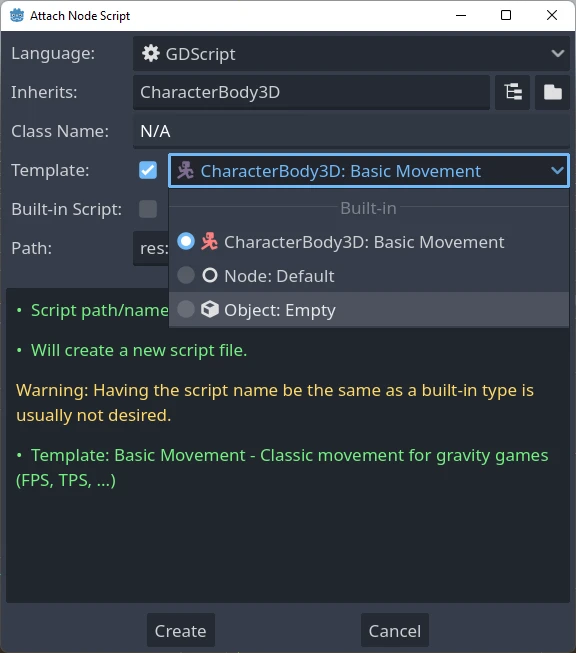
A set of built-in script templates are provided with the editor, but it is also possible to create new ones and set them by default, both per project and at editor scope.
Templates are linked to a specific node type, so when you create a script you will only see the templates corresponding to that particular node, or one of its parent types. For example, if you are creating a script for a CharacterBody3D, you will only see templates defined for CharacterBody3Ds, Node3Ds or Nodes.
Расположение шаблонов
Есть два места, где можно управлять шаблонами.
Шаблоны, определенные редактором
Они доступны глобально в рамках любого проекта. Расположение этих шаблонов определяется для каждой ОС:
Windows:
%APPDATA%\Godot\script_templates\Linux:
$HOME/.config/godot/script_templates/macOS:
$HOME/Library/Application Support/Godot/script_templates/
If you're getting Godot from somewhere other than the official website, such
as Steam, the folder might be in a different location. You can find it using
the Godot editor. Go to Editor > Open Editor Data/Settings Folder and it
will open a folder in your file browser, inside that folder is the
script_templates folder.
Шаблоны, определенные проектом
The default path to search for templates is the
res://script_templates/ directory. The path can be changed by configuring the project setting
Editor > Script > Templates Search Path,
both via code and the editor.
Если в проекте не найден каталог script_templates, он просто игнорируется.
Template organization and naming
Both editor and project defined templates are organized in the following way:
template_path/node_type/file.extension
where:
template_pathis one of the 2 locations discussed in the previous two sections.node_typeis the node it will apply to (for example, Node, or CharacterBody3D), This is case-sensitive. If a script isn't in the propernode_typefolder, it won't be detected.fileis the custom name you can chose for the template (for example,platformer_movementorsmooth_camera).extensionindicates which language the template will apply to (it should begdfor GDScript orcsfor C#).
Например:
template_scripts/Node/smooth_camera.gdtemplate_scripts/CharacterBody3D/platformer_movement.gd
Default behaviour and overriding it
По умолчанию:
the template's name is the same as the file name (minus the extension, prettyfied)
the description is empty
the space indent is set to 4
the template will not be set as the default for the given node
It is possible to customize this behaviour by adding meta headers at the start of your file, like this:
# meta-name: Platformer movement
# meta-description: Predefined movement for classical platformers
# meta-default: true
# meta-space-indent: 4
// meta-name: Platformer movement
// meta-description: Predefined movement for classical platformers
// meta-default: true
// meta-space-indent: 4
In this case, the name will be set to "Platformer movement", with the given custom description, and it will be set as the default template for the node in which directory it has been saved.
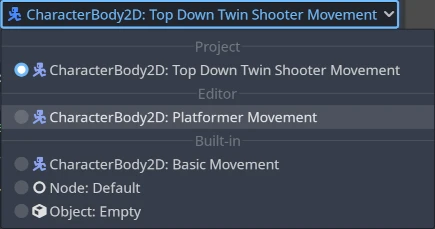
This is an example of utilizing custom templates at editor and project level:
Примечание
Шаблоны сценариев имеют то же расширение, что и обычные файлы сценариев. Это может привести к тому, что парсер скриптов будет воспринимать эти шаблоны как реальные скрипты в проекте. Чтобы избежать этого, убедитесь, что игнорируете каталог, содержащий их, создав пустой .gdignore файл. Директория больше не будет видна в файловой системе проекта, но шаблоны могут быть изменены внешним текстовым редактором в любое время.
Совет
By default, every C# file inside the project directory is included in the compilation. Script templates must be manually excluded from the C# project to avoid build errors. See Exclude files from the build in the Microsoft documentation.
It is possible to create editor-level templates that have the same level as a project-specific templates, and also that have the same name as a built-in one, all will be shown on the new script dialog.
Шаблон по умолчанию
To override the default template, create a custom template at editor or project level inside a
Node directory (or a more specific type, if only a subtype wants to be overridden) and start
the file with the meta-default: true header.
Only one template can be set as default at the same time for the same node type.
Здесь показаны шаблоны Default для базовых узлов, как для GDScript, так и для C#, поэтому вы можете использовать их в качестве основы для создания других шаблонов:
# meta-description: Base template for Node with default Godot cycle methods

extends _BASE_


# Called when the node enters the scene tree for the first time.
func _ready() -> void:
    pass # Replace with function body.


# Called every frame. 'delta' is the elapsed time since the previous frame.
func _process(delta: float) -> void:
    pass
// meta-description: Base template for Node with default Godot cycle methods

using _BINDINGS_NAMESPACE_;
using System;

public partial class _CLASS_ : _BASE_
{
    // Called when the node enters the scene tree for the first time.
    public override void _Ready()
    {
    }

    // Called every frame. 'delta' is the elapsed time since the previous frame.
    public override void _Process(double delta)
    {
    }
}
The Godot editor provides a set of useful built-in node-specific templates, such as
basic_movement for both CharacterBody2D and
CharacterBody3D and plugin for
EditorPlugin.
Список заполнителей шаблонов
Ниже приведен полный список встроенных заполнителей шаблонов, которые в настоящее время реализованы.
Базовые заполнители
Заполнитель |
Описание |
|---|---|
|
The name of the Godot namespace (used in C# only). |
|
The name of the new class. |
|
Базовый тип, от которого наследуется новый сценарий. |
|
Indentation placeholder. The exact type and number
of whitespace characters used for indentation is
determined by the |
Типы заполнителей
There used to be, in Godot 3.x, placeholders for GDScript type hints that
would get replaced whenever a template was used to create a new script, such as:
%INT_TYPE%, %STRING_TYPE%, %FLOAT_TYPE% or %VOID_RETURN%.
The placeholders no longer work for Godot 4.x, but if the setting
text_editor/completion/add_type_hints from
EditorSettings is disabled, type hints
for parameters and return types will be automatically removed for a few
base types:
intStringArray[String]floatvoid:=will be transformed into=