Безье, кривые и пути
Bezier curves are a mathematical approximation of natural geometric shapes. We use them to represent a curve with as little information as possible and with a high level of flexibility.
Unlike more abstract mathematical concepts, Bezier curves were created for industrial design. They are a popular tool in the graphics software industry.
They rely on interpolation, which we saw in the previous article, combining multiple steps to create smooth curves. To better understand how Bezier curves work, let's start from its simplest form: Quadratic Bezier.
Квадратичная кривая Безье
Возьмем три минимальные точки, необходимые для того, чтобы квадратичная функция Безье сработала:
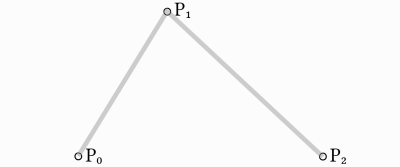
To draw a curve between them, we first interpolate gradually over the two
vertices of each of the two segments formed by the three points, using values
ranging from 0 to 1. This gives us two points that move along the segments as we
change the value of t from 0 to 1.
func _quadratic_bezier(p0: Vector2, p1: Vector2, p2: Vector2, t: float):
    var q0 = p0.lerp(p1, t)
    var q1 = p1.lerp(p2, t)
private Vector2 QuadraticBezier(Vector2 p0, Vector2 p1, Vector2 p2, float t)
{
    Vector2 q0 = p0.Lerp(p1, t);
    Vector2 q1 = p1.Lerp(p2, t);
}
Затем мы интерполируем q0 и q1, чтобы получить единственную точку r, которая движется вдоль кривой.
var r = q0.lerp(q1, t)
return r
Vector2 r = q0.Lerp(q1, t);
return r;
This type of curve is called a Quadratic Bezier curve.
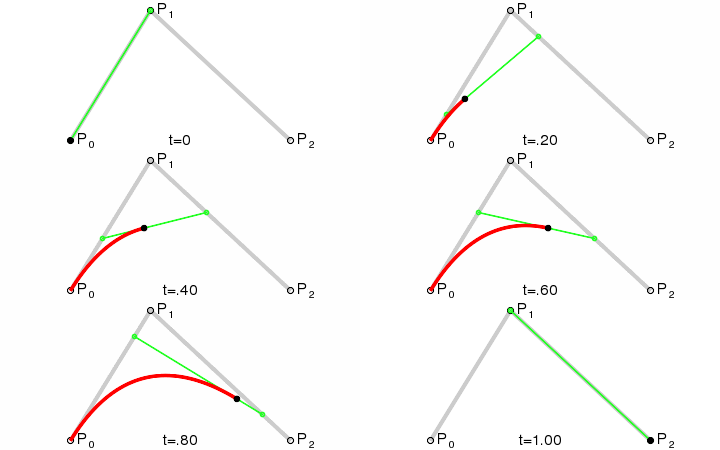
(Image credit: Wikipedia)
Кубическая кривая Безье
Основываясь на предыдущем примере, мы можем получить больший контроль, выполнив интерполяцию между четырьмя точками.
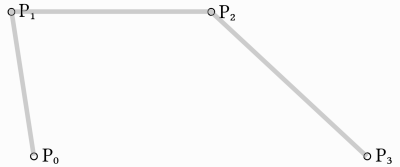
Сначала мы используем функцию с четырьмя параметрами, чтобы принять на вводе четыре точки, p0, p1, p2 и p3:
func _cubic_bezier(p0: Vector2, p1: Vector2, p2: Vector2, p3: Vector2, t: float):
public Vector2 CubicBezier(Vector2 p0, Vector2 p1, Vector2 p2, Vector2 p3, float t)
{

}
Мы применяем линейную интерполяцию к каждой паре точек, чтобы уменьшить их количество до трех:
var q0 = p0.lerp(p1, t)
var q1 = p1.lerp(p2, t)
var q2 = p2.lerp(p3, t)
Vector2 q0 = p0.Lerp(p1, t);
Vector2 q1 = p1.Lerp(p2, t);
Vector2 q2 = p2.Lerp(p3, t);
Затем мы берем наши три точки и сокращаем их до двух:
var r0 = q0.lerp(q1, t)
var r1 = q1.lerp(q2, t)
Vector2 r0 = q0.Lerp(q1, t);
Vector2 r1 = q1.Lerp(q2, t);
And to one:
var s = r0.lerp(r1, t)
return s
Vector2 s = r0.Lerp(r1, t);
return s;
Here is the full function:
func _cubic_bezier(p0: Vector2, p1: Vector2, p2: Vector2, p3: Vector2, t: float):
    var q0 = p0.lerp(p1, t)
    var q1 = p1.lerp(p2, t)
    var q2 = p2.lerp(p3, t)

    var r0 = q0.lerp(q1, t)
    var r1 = q1.lerp(q2, t)

    var s = r0.lerp(r1, t)
    return s
private Vector2 CubicBezier(Vector2 p0, Vector2 p1, Vector2 p2, Vector2 p3, float t)
{
    Vector2 q0 = p0.Lerp(p1, t);
    Vector2 q1 = p1.Lerp(p2, t);
    Vector2 q2 = p2.Lerp(p3, t);

    Vector2 r0 = q0.Lerp(q1, t);
    Vector2 r1 = q1.Lerp(q2, t);

    Vector2 s = r0.Lerp(r1, t);
    return s;
}
Результатом будет плавная кривая, интерполируемая между всеми четырьмя точками:
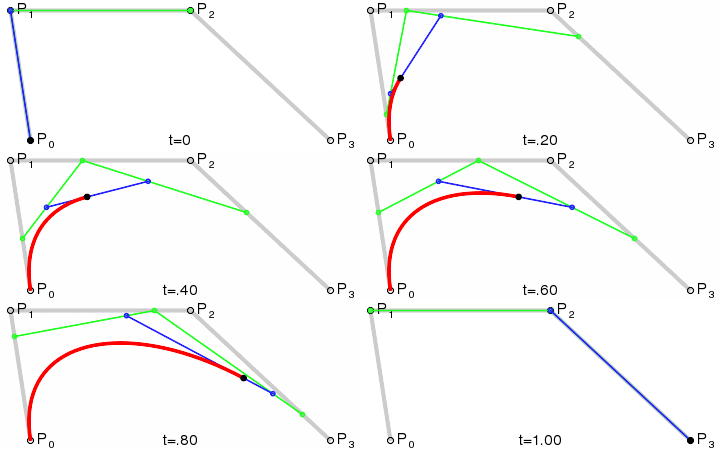
(Image credit: Wikipedia)
Примечание
Кубическая интерполяция Безье работает так же и в 3D, просто используйте Vector3 вместо Vector2.
Adding control points
Основываясь на кубической кривой Безье, мы можем изменить способ работы двух точек, чтобы свободно управлять формой нашей кривой. Вместо p0, p1, p2 и p3 мы сохраним их как:
point0 = p0: Это первая точка, источник
control0 = p1 - p0: Это вектор относительно первой контрольной точки
control1 = p3 - p2: Это вектор относительно второй контрольной точки
point1 = p3: Это вторая точка, пункт назначения
Таким образом, у нас есть две точки и две контрольные точки, которые являются относительными векторами к соответствующим точкам. Если вы раньше использовали графические или анимационные программы, это может показаться знакомым:
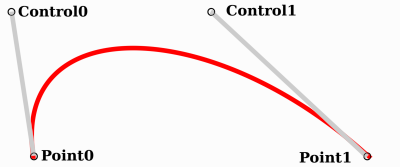
Именно так графическое программное обеспечение представляет пользователям кривые Безье, а также то, как они работают и выглядят в Godot.
Curve2D, Curve3D, Path and Path2D
Существует два объекта, содержащих кривые: Curve3D и Curve2D (для 3D и 2D соответственно).
Они могут содержать несколько точек, что позволяет использовать более длинные пути. Также их можно задать узлам: Path3D и Path2D (также для 3D и 2D соответственно):
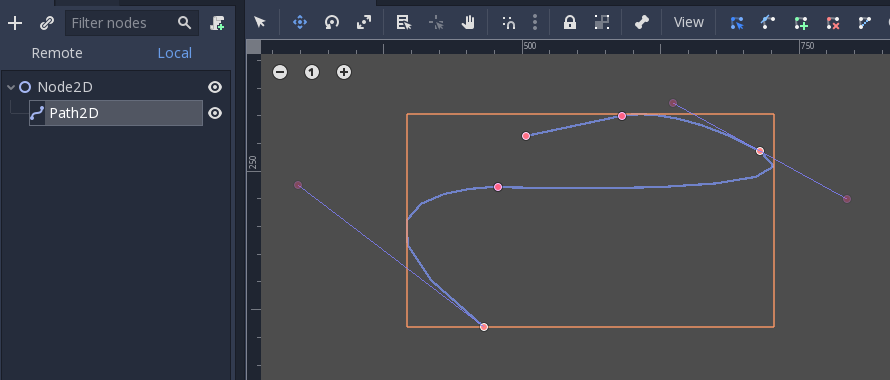
Однако их использование может быть не совсем очевидным, поэтому ниже приведено описание наиболее распространенных вариантов использования кривых Безье.
Оценка
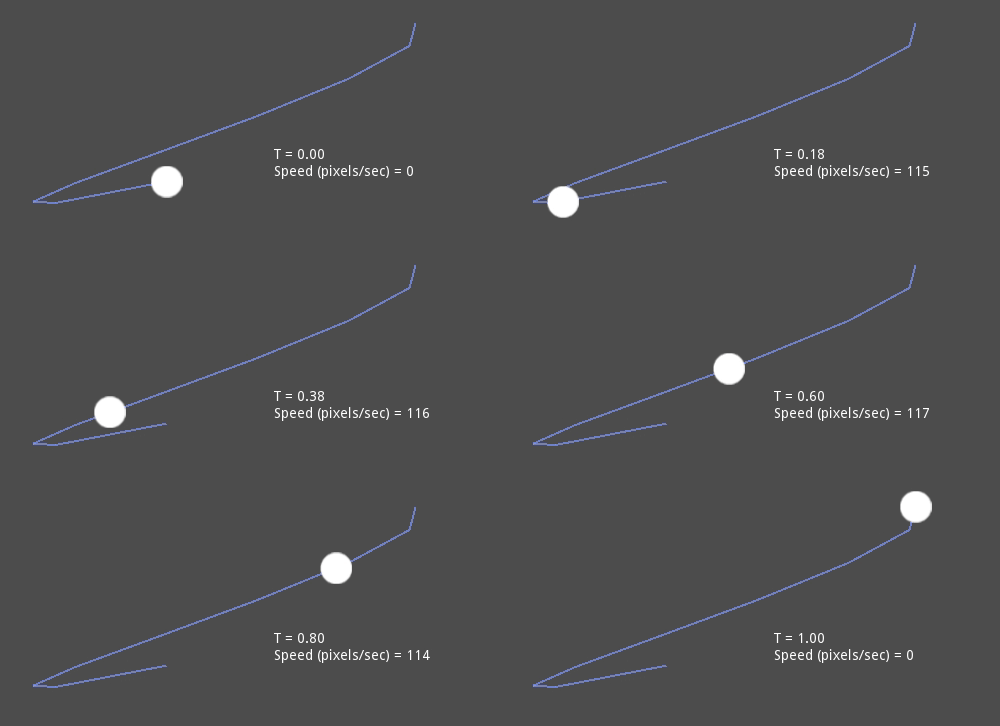
Only evaluating them may be an option, but in most cases it's not very useful. The big drawback with Bezier curves is that if you traverse them at constant speed, from t = 0 to t = 1, the actual interpolation will not move at constant speed. The speed is also an interpolation between the distances between points p0, p1, p2 and p3 and there is not a mathematically simple way to traverse the curve at constant speed.
Let's do an example with the following pseudocode:
var t = 0.0

func _process(delta):
    t += delta
    position = _cubic_bezier(p0, p1, p2, p3, t)
private float _t = 0.0f;

public override void _Process(double delta)
{
    _t += (float)delta;
    Position = CubicBezier(p0, p1, p2, p3, _t);
}
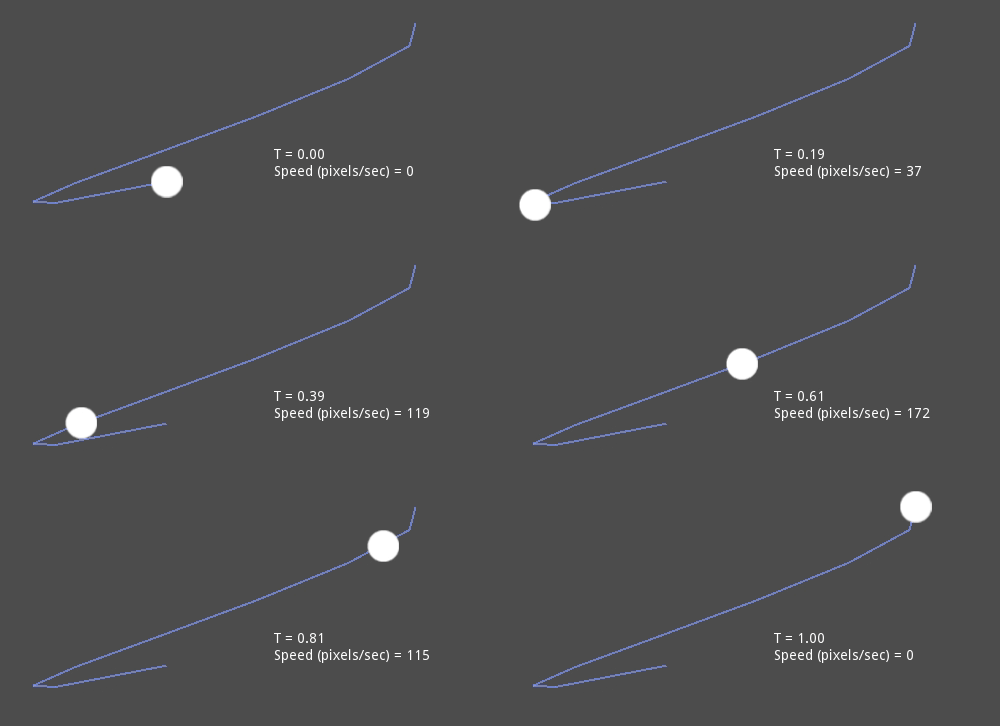
As you can see, the speed (in pixels per second) of the circle varies, even though t is increased at constant speed. This makes beziers difficult to use for anything practical out of the box.
Отрисовка
Drawing beziers (or objects based on the curve) is a very common use case, but it's also not easy. For pretty much any case, Bezier curves need to be converted to some sort of segments. This is normally difficult, however, without creating a very high amount of them.
The reason is that some sections of a curve (specifically, corners) may require considerable amounts of points, while other sections may not:
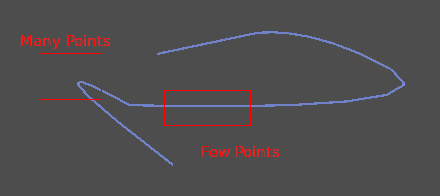
Additionally, if both control points were 0, 0 (remember they are relative vectors), the Bezier curve would just be a straight line (so drawing a high amount of points would be wasteful).
Before drawing Bezier curves, tessellation is required. This is often done with a recursive or divide and conquer function that splits the curve until the curvature amount becomes less than a certain threshold.
The Curve classes provide this via the
Curve2D.tessellate() function (which receives optional stages of recursion and angle tolerance arguments). This way, drawing something based on a curve is easier.
Траверс
The last common use case for the curves is to traverse them. Because of what was mentioned before regarding constant speed, this is also difficult.
To make this easier, the curves need to be baked into equidistant points. This way, they can be approximated with regular interpolation (which can be improved further with a cubic option). To do this, just use the Curve3D.sample_baked() method together with Curve2D.get_baked_length(). The first call to either of them will bake the curve internally.
Traversal at constant speed, then, can be done with the following pseudo-code:
var t = 0.0

func _process(delta):
    t += delta
    position = curve.sample_baked(t * curve.get_baked_length(), true)
private float _t = 0.0f;

public override void _Process(double delta)
{
    _t += (float)delta;
    Position = curve.SampleBaked(_t * curve.GetBakedLength(), true);
}
And the output will, then, move at constant speed: