Renderers
См. также
This page gives an overview of Godot's renderers, focusing on the differences between their rendering features. For more technical details on the renderers, see Internal rendering architecture.
Введение
Godot 4 включает в себя три рендера:
Forward+. Самый продвинутый рендерер, подходящий только для настольных платформ. Используется по умолчанию на настольных платформах. Этот рендерер использует Vulkan, Direct3D 12, или Metal в качестве драйвера рендеринга, и использует бэкенд RenderingDevice.
Mobile. Меньше возможностей, однако рендерит простые сцены быстрее. Предназначен для мобильных и настольных платформ. Используется по умолчанию на мобильных платформах. Этот рендерер использует Vulkan, Direct3D 12, или Metal в качестве драйвера рендеринга, и RenderingDevice как бэкенд.
Compatibility, работает на OpenGL 3.3/OpenGL ES 3.0/WebGL 2.0. Наименее продвинутый графический отрисовщик, подходящий для бюджетных настольных и мобильных устройств. Используется по умолчанию на веб-платформе.
Renderers, rendering drivers, and RenderingDevice
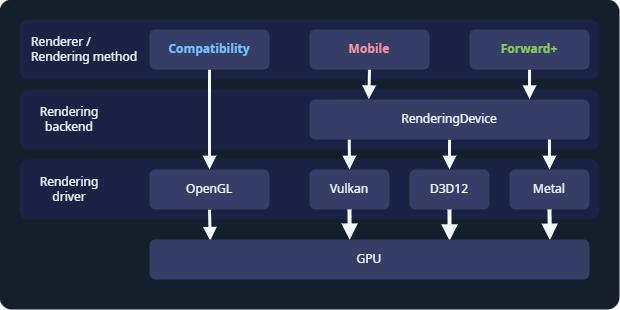
Godot's rendering abstraction layers.
The renderer, or rendering method, determines which features are available. Most of the time, this is the only thing you need to think about. Godot's renderers are Forward+, Mobile, and Compatibility.
The rendering driver tells the GPU what to do, using a graphics API. Godot can use the OpenGL, Vulkan, Direct3D 12, and Metal rendering drivers. Not every GPU supports every rendering driver, and therefore not every GPU supports all renderers. Vulkan, Direct3D 12, and Metal are modern, low-level graphics APIs, and requires newer hardware. OpenGL is an older graphics API that runs on most hardware.
RenderingDevice is a rendering backend, an abstraction layer between the renderer and the rendering driver. It is used by the Forward+ and Mobile renderers, and these renderers are sometimes called "RenderingDevice-based renderers".
Выбор рендерера
Choosing a renderer is a complex question, and depends on your hardware and the which platforms you are developing for. As a starting point:
Choose Forward+ if:
You are developing for desktop.
You have relatively new hardware which supports Vulkan, Direct3D 12, or Metal.
You are developing a 3D game.
You want to use the most advanced rendering features.
Choose Mobile if:
You are developing for newer mobile devices, desktop XR, or desktop.
You have relatively new hardware which supports Vulkan, Direct3D 12, or Metal.
You are developing a 3D game.
You want to use advanced rendering features, subject to the limitations of mobile hardware.
Выберите Compatibility, если:
You are developing for older mobile devices, older desktop devices, or standalone XR. The Compatibility renderer supports the widest range of hardware.
You are developing for web. In this case, Compatibility is the only choice.
You have older hardware which does not support Vulkan. In this case, Compatibility is the only choice.
You are developing a 2D game, or a 3D game which does not need advanced rendering features.
You want the best performance possible on all devices and don't need advanced rendering features.
Keep in mind every game is unique, and this is only a starting point. For example, you might choose to use the Compatibility renderer even though you have the latest GPU, so you can support the widest range of hardware. Or you might want to use the Forward+ renderer for a 2D game, so you can advanced features like compute shaders.
Switching between renderers
В редакторе вы всегда можете переключаться между рендерерами, нажимая на имя рендерера в правом верхнем углу редактора.
Switching between renderers may require some manual tweaks to your scene, lighting, and environment, since each renderer is different. In general, switching between the Mobile and Forward+ renderers will require fewer adjustments than switching between the Compatibility renderer and the Forward+ or Mobile renderers.
Since Godot 4.4, when using Forward+ or Mobile, if Vulkan is not supported, the engine will fall back to Direct3D 12 and vice versa. If the attempted fallback driver is not supported either, the engine will then fall back to Compatibility when the RenderingDevice backend is not supported. This allows the project to run anyway, but it may look different than the intended appearance due to the more limited renderer. This behavior can be disabled in the project settings by unchecking Rendering > Rendering Device > Fallback to OpenGL 3.
Feature comparison
This is not a complete list of the features of each renderer. If a feature is not listed here, it is available in all renderers, though it may be much faster on some renderers. For a list of all features in Godot, see Список функций.
Hardware with RenderingDevice support is hardware which can run Vulkan, Direct3D 12, or Metal.
Overall comparison
Особенность |
Совместимость |
Мобильные устройства |
Forward+ |
|---|---|---|---|
Required hardware |
Older or low-end. |
Newer or high-end. Requires Vulkan, Direct3D 12, or Metal support. |
Newer or high-end. Requires Vulkan, Direct3D 12, or Metal support. |
Runs on new hardware |
✔️ Yes. |
✔️ Yes. |
✔️ Yes. |
Runs on old and low-end hardware |
✔️ Yes. |
✔️ Yes, but slower than Compatibility. |
✔️ Yes, but slowest of all renderers. |
Runs on hardware without RenderingDevice support |
✔️ Yes. |
❌ No. |
❌ No. |
Target platforms |
Mobile, low-end desktop, web. |
Mobile, desktop. |
Desktop. |
Desktop |
✔️ Yes. |
✔️ Yes. |
✔️ Yes. |
Мобильные устройства |
✔️ Yes (low-end). |
✔️ Yes (high-end). |
⚠️ Supported, but poorly optimized. Use Mobile or Compatibility instead. |
XR |
✔️ Yes. Recommended for standalone headsets. |
|
⚠️ Supported, but poorly optimized. Use Mobile or Compatibility instead. |
Web |
✔️ Yes. |
❌ No. |
❌ No. |
2D Games |
✔️ Yes. |
✔️ Yes, but Compatibility is usually good enough for 2D. |
✔️ Yes, but Compatibility is usually good enough for 2D. |
3D Games |
✔️ Yes. |
✔️ Yes. |
✔️ Yes. |
Feature set |
2D and core 3D features. |
Most rendering features. |
All rendering features. |
2D rendering features |
✔️ Yes. |
✔️ Yes. |
✔️ Yes. |
Core 3D rendering features |
✔️ Yes. |
✔️ Yes. |
✔️ Yes. |
Advanced rendering features |
❌ No. |
⚠️ Yes, limited by mobile hardware. |
✔️ Yes. All rendering features are supported. |
New features |
⚠️ Some new rendering features are added to Compatibility. Features are added after Mobile and Forward+. |
✔️ Most new rendering features are added to Mobile. Mobile usually gets new features as Forward+ does. |
✔️ All new features are added to Forward+. As the focus of new development, Forward+ gets features first. |
Rendering cost |
Low base cost, but high scaling cost. |
Medium base cost, and medium scaling cost. |
Highest base cost, and low scaling cost. |
Rendering driver |
OpenGL. |
Vulkan, Direct3D 12, or Metal. |
Vulkan, Direct3D 12, or Metal. |
Lights and shadows
See 3D свет и тени for more information.
Особенность |
Совместимость |
Мобильные устройства |
Forward+ |
|---|---|---|---|
Lighting approach |
Forward |
Forward |
Clustered Forward |
Maximum OmniLights |
8 per mesh. Can be increased. |
8 per mesh, 256 per view. |
512 per cluster. Can be increased. |
Maximum SpotLights |
8 per mesh. Can be increased. |
8 per mesh, 256 per view. |
512 per cluster. Can be increased. |
Maximum DirectionalLights |
8 |
8 |
8 |
PCSS for OmniLight and SpotLight |
❌ Not supported. |
✔️ Supported. |
✔️ Supported. |
PCSS for DirectionalLight |
❌ Not supported. |
❌ Not supported. |
✔️ Supported. |
Light projector textures |
❌ Not supported. |
✔️ Supported. |
✔️ Supported. |
Global Illumination
See Введение в глобальное освещение for more information.
Особенность |
Совместимость |
Мобильные устройства |
Forward+ |
|---|---|---|---|
ReflectionProbe |
✔️ Supported, 2 per mesh. |
✔️ Supported, 8 per mesh. |
✔️ Supported, unlimited. |
LightmapGI |
⚠️ Rendering of baked lightmaps is supported. Baking requires hardware with RenderingDevice support. |
✔️ Supported. |
✔️ Supported. |
VoxelGI |
❌ Not supported. |
❌ Not supported. |
✔️ Supported. |
Screen-Space Indirect Lighting (SSIL) (непрямое освещение в экранном пространстве) |
❌ Not supported. |
❌ Not supported. |
✔️ Supported. |
Глобальное освещение на основе полей знаковых расстояний (SDFGI) |
❌ Not supported. |
❌ Not supported. |
✔️ Supported. |
Окружающая среда и постобработка
See Окружающая среда и постобработка for more information.
Особенность |
Совместимость |
Мобильные устройства |
Forward+ |
|---|---|---|---|
Fog (Depth and Height) |
✔️ Supported. |
✔️ Supported. |
✔️ Supported. |
Объемный туман |
❌ Not supported. |
❌ Not supported. |
✔️ Supported. |
Tonemapping |
✔️ Supported. |
✔️ Supported. |
✔️ Supported. |
Screen-Space Reflections |
❌ Not supported. |
❌ Not supported. |
✔️ Supported. |
Затенение окружающего пространства экрана (SSAO) |
❌ Not supported. |
❌ Not supported. |
✔️ Supported. |
Screen-Space Indirect Lighting (SSIL) (непрямое освещение в экранном пространстве) |
❌ Not supported. |
❌ Not supported. |
✔️ Supported. |
Глобальное освещение на основе полей знаковых расстояний (SDFGI) |
❌ Not supported. |
❌ Not supported. |
✔️ Supported. |
Свечение |
✔️ Supported. |
✔️ Supported. |
✔️ Supported. |
Adjustments (настройки) |
✔️ Supported. |
✔️ Supported. |
✔️ Supported. |
Custom post-processing with fullscreen quad |
✔️ Supported. |
✔️ Supported. |
✔️ Supported. |
Custom post-processing with CompositorEffects |
❌ Not supported. |
✔️ Supported. |
✔️ Supported. |
Antialiasing
See 3D сглаживание for more information.
Особенность |
Совместимость |
Мобильные устройства |
Forward+ |
|---|---|---|---|
MSAA 3D |
✔️ Supported. |
✔️ Supported. |
✔️ Supported. |
MSAA 2D |
❌ Not supported. |
✔️ Supported. |
✔️ Supported. |
TAA |
❌ Not supported. |
❌ Not supported. |
✔️ Supported. |
FSR2 |
❌ Not supported. |
❌ Not supported. |
✔️ Supported. |
FXAA |
❌ Not supported. |
✔️ Supported. |
✔️ Supported. |
SSAA |
✔️ Supported. |
✔️ Supported. |
✔️ Supported. |
Ограничитель шероховатости в экранном пространстве |
❌ Not supported. |
✔️ Supported. |
✔️ Supported. |
StandardMaterial features
See Стандартный материал 3D и материал ORM 3D for more information.
Особенность |
Совместимость |
Мобильные устройства |
Forward+ |
|---|---|---|---|
Sub-surface scattering |
❌ Not supported. |
❌ Not supported. |
✔️ Supported. |
Shader features
See Ссылки на шейдеры for more information.
Особенность |
Совместимость |
Мобильные устройства |
Forward+ |
|---|---|---|---|
Screen texture |
✔️ Supported. |
✔️ Supported. |
✔️ Supported. |
Depth texture |
✔️ Supported. |
✔️ Supported. |
✔️ Supported. |
Normal/Roughness texture |
❌ Not supported. |
❌ Not supported. |
✔️ Supported. |
Compute shaders |
❌ Not supported. |
⚠️ Supported, but comes with a performance penalty on older devices. |
✔️ Supported. |
Other features
Особенность |
Совместимость |
Мобильные устройства |
Forward+ |
|---|---|---|---|
Затенение с переменной скоростью |
❌ Not supported. |
✔️ Supported. |
✔️ Supported. |
Decals |
❌ Not supported. |
✔️ Supported. |
✔️ Supported. |
Depth of field blur |
❌ Not supported. |
✔️ Supported. |
✔️ Supported. |
Adaptive and Mailbox VSync modes |
❌ Not supported. |
✔️ Supported. |
✔️ Supported. |
2D HDR Viewport |
❌ Not supported. |
✔️ Supported. |
✔️ Supported. |
RenderingDevice access |
❌ Not supported. |
✔️ Supported. |
✔️ Supported. |