Exportieren von Packs, Patches und Mods
Anwendungsfälle
Oftentimes, one would like to add functionality to one's game after it has been deployed.
Beispiele hierfür sind...
Herunterladbare Inhalte: die Möglichkeit, Features und Inhalte zu seinem Spiel hinzuzufügen.
Patches: die Fähigkeit, einen Bug zu beheben, der in einem ausgelieferten Produkt vorhanden ist.
Mods: anderen Personen die Möglichkeit geben, Inhalte für das eigene Spiel zu erstellen.
Diese Tools helfen Entwicklern, ihre Entwicklung über das ursprüngliche Release hinaus zu erweitern.
Overview of PCK/ZIP files
Godot enables this via a feature called resource packs (PCK files,
with the .pck extension, or ZIP files).
Vorteile:
inkrementelle Aktualisierungen/Patches
Anbieten von DLCs
Anbieten von Mod-Unterstützung
keine Quellcode-Offenlegung für Mods erforderlich
modularere Projektstruktur
Benutzer müssen nicht das gesamte Spiel ersetzen
The first part of using them involves exporting and delivering the project to players. Then, when one wants to add functionality or content later on, they just deliver the updates via PCK/ZIP files to the users.
PCK/ZIP files usually contain, but are not limited to:
Skripte
Szenen
Shader
Modelle
Texturen
Sound-Effekte
Musik
jedes andere Asset, das sich für den Import in das Spiel eignet
The PCK/ZIP files can even be an entirely different Godot project, which the original game loads in at runtime.
It is possible to load both PCK and ZIP files as additional packs at the same time. See PCK vs. ZIP Pack-Dateiformat for a comparison of the two formats.
Siehe auch
If you want to load loose files at runtime (not packed in a PCK or ZIP by Godot), consider using Laden und Speichern von Dateien zur Laufzeit instead. This is useful for loading user-generated content that is not made with Godot, without requiring users to pack their mods into a specific file format.
The downside of this approach is that it's less transparent to the game logic, as it will not benefit from the same resource management as PCK/ZIP files.
Erzeugen von PCK-Dateien
In order to pack all resources of a project into a PCK file, open the project and go to Project > Export and click on Export PCK/ZIP. Also, make sure to have an export preset selected while doing so.
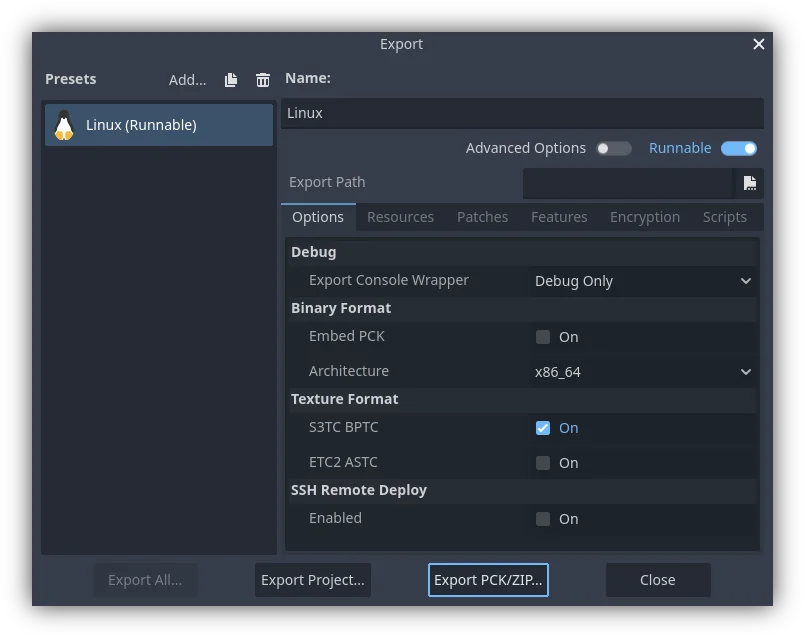
Another method would be to export from the command line
with --export-pack. The output file must with a .pck or .zip
file extension. The export process will build that type of file for the
chosen platform.
Bemerkung
Wenn das eigene Spiel eine Mod-Unterstützung erhalten soll, müssen die Nutzer ähnlich exportierte Dateien erstellen. Angenommen, das ursprüngliche Spiel erwartet eine bestimmte Struktur für die Ressourcen des PCK und/oder eine bestimmte Schnittstelle für seine Skripte, dann...
muss der Entwickler die Dokumentation dieser erwarteten Strukturen/Schnittstellen veröffentlichen, von den Moddern erwarten, dass sie die Godot Engine installieren, und dann auch erwarten, dass diese Modder sich an die in der Dokumentation definierte API halten, wenn sie Mod-Inhalte für das Spiel erstellen (damit es funktioniert). Die Benutzer würden dann die in Godot eingebauten Export-Tools verwenden, um wie oben beschrieben eine PCK-Datei zu erstellen.
verwendet der Entwickler Godot und erstellt ein GUI-Tool zum Hinzufügen des genauen API-Inhalts zu einem Projekt. Dieses Godot-Tool muss entweder auf einem für Tools konfigurierten Build der Engine ausgeführt werden oder Zugriff auf eines haben (das neben oder möglicherweise in den Originaldateien des Spiels veröffentlicht ist). Das Tool kann dann die ausführbare Godot-Datei verwenden, um eine PCK-Datei von der Kommandozeile zu exportieren, etwa mit OS.execute (). Da das Spiel (aus Sicherheitsgründen) keinen Tool-Build der Engine benutzen sollte, ist es am besten, das Modding-Tool und das Spiel seperat zu halten.
Opening PCK or ZIP files at runtime
To load a PCK or ZIP file, one uses the ProjectSettings singleton. The following
example expects a mod.pck file in the directory of the game's executable.
The PCK or ZIP file contains a mod_scene.tscn test scene in its root.
func _your_function():
    # This could fail if, for example, mod.pck cannot be found.
    var success = ProjectSettings.load_resource_pack(OS.get_executable_path().get_base_dir().path_join("mod.pck"))

    if success:
        # Now one can use the assets as if they had them in the project from the start.
        var imported_scene = load("res://mod_scene.tscn")
private void YourFunction()
{
    // This could fail if, for example, mod.pck cannot be found.
    var success = ProjectSettings.LoadResourcePack(OS.get_executable_path().get_base_dir().path_join("mod.pck));

    if (success)
    {
        // Now one can use the assets as if they had them in the project from the start.
        var importedScene = (PackedScene)ResourceLoader.Load("res://mod_scene.tscn");
    }
}
Warnung
By default, if you import a file with the same file path/name as one you already have in your project, the imported one will replace it. This is something to watch out for when creating DLC or mods. You can solve this problem by using a tool that isolates mods to a specific mods subfolder.
However, it is also a way of creating patches for one's own game. A PCK/ZIP file of this kind can fix the content of a previously loaded PCK/ZIP (therefore, the order in which packs are loaded matters).
Um dieses Verhalten auszuschalten, übergeben Sie als zweites Argument false an ProjectSettings.load_resource_pack().
Bemerkung
Für ein C#-Projekt müssen Sie zuerst eine DLL erstellen und sie in den Projektordner legen. Vor dem Laden des Ressourcenpaketes muss die DLL dann wie folgt geladen werden: Assembly.LoadFile(mod.dll)
Fehlersuche
If you are loading a resource pack and are not noticing any changes, it may be due to the pack being loaded too late. This is particularly the case with menu scenes that may preload other scenes using preload(). This means that loading a pack in the menu will not affect the other scene that was already preloaded.
To avoid this, you need to load the pack as early as possible.
To do so, create a new autoload script and
call ProjectSettings.load_resource_pack()
in the autoload script's _init() function, rather than _enter_tree()
or _ready().
Zusammenfassung
Dieses Tutorial erklärt, wie man Mods, Patches oder DLC zu einem Spiel hinzufügt. Das Wichtigste ist, herauszufinden, wie man zukünftige Inhalte für sein Spiel verteilen will, und einen Workflow zu entwickeln, der auf diesen Zweck zugeschnitten ist. Godot sollte diesen Prozess reibungslos gestalten, unabhängig davon, welchen Weg ein Entwickler wählt.