Attention: Here be dragons
This is the latest
(unstable) version of this documentation, which may document features
not available in or compatible with released stable versions of Godot.
Checking the stable version of the documentation...
Проектування сцени монстра
У цій частині ви збираєтеся кодувати монстрів, яких будемо називати мобами. На наступному уроці ми будемо розміщувати їх випадковим чином навколо ігрової області.
Давайте створимо самих монстрів у новій сцені. Структура вузла буде схожа на сцену player.tscn.
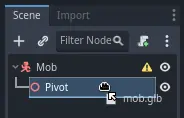
Знову створіть сцену з кореневим вузлом CharacterBody3D. Назвіть його Mob. Додайте дочірній вузол Node3D, назвіть його Pivot. Перетягніть файл mob.glb із док-станції FileSystem на Pivot, щоб додати 3D-модель монстра до сцени.
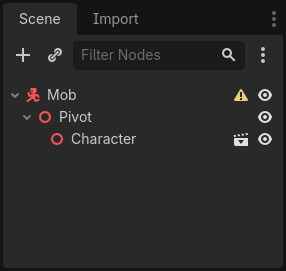
Ви можете перейменувати новостворений вузол mob в Character.
Нам потрібна форма зіткнення, щоб наше тіло працювало. Клацніть правою кнопкою миші вузол Mob, корінь сцени, і натисніть Додати дочірній вузол.
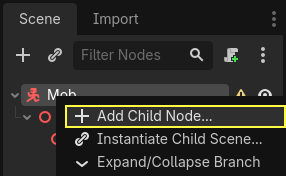
Додати CollisionShape3D.
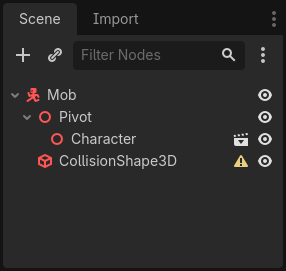
В Інспекторі призначте BoxShape3D властивості Shape.

Ми повинні змінити його розмір, щоб краще відповідати розміру 3D-моделі. Ви можете зробити це інтерактивно, натиснувши та перетягнувши помаранчеві точки.
Коробка повинна торкатися підлоги і бути трохи тонше моделі. Фізичні рушії працюють таким чином, що якщо сфера гравця торкнеться навіть кута коробки, відбудеться зіткнення. Якщо коробка трохи завелика в порівнянні з 3D-моделлю, ви можете померти на відстані від монстра, і гра буде несправедливою по відношенню до гравців.
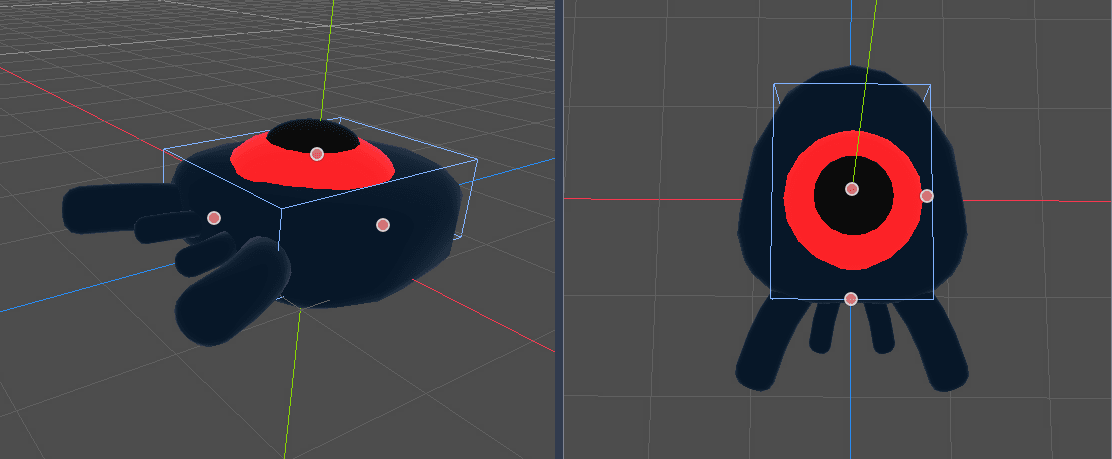
Зверніть увагу, що моя коробка вище, ніж монстр. Це нормально в цій грі, тому що ми дивимося на сцену зверху і використовуємо фіксовану перспективу. Форми зіткнення не повинні точно відповідати моделі. Це та форма та розмір, які гра відчуває, коли ви тестуєте її.
Видалення монстрів поза екраном
Ми будемо породжувати монстрів через рівні проміжки часу на рівні гри. Якщо ми не будемо обережні, їх кількість може зрости до нескінченності, а ми цього не хочемо. Кожен екземпляр мобу має як пам’ять, так і вартість обробки, і ми не хочемо платити за це, коли моб знаходиться поза екраном.
Як тільки монстр покидає екран, він нам більше не потрібен, тому ми повинні його видалити. У Godot є вузол, який визначає, коли об’єкти залишають екран, VisibleOnScreenNotifier3D, і ми збираємося використовувати його, щоб знищувати наших мобів.
Примітка
Коли ви продовжуєте створювати екземпляри об’єкта, існує техніка, яку можна використовувати, щоб уникнути витрат на постійне створення та знищення екземплярів, що називається об’єднанням. Він складається з попереднього створення масиву об’єктів і повторного їх використання знову і знову.
When working with GDScript, this usually isn't needed. The main reason to use pools is to avoid freezes with garbage-collected languages like C# or Lua. GDScript uses a different technique to manage memory, reference counting, which doesn't have that caveat. You can learn more about that here: Управління пам'яттю.
Виберіть вузол Mob і додайте дочірній вузол VisibleOnScreenNotifier3D. З’являється інша коробка, цього разу рожева. Коли це вікно повністю залишить екран, вузол випустить сигнал.
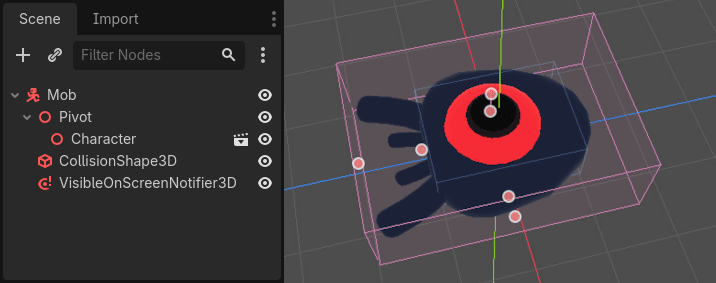
Змініть коробку за допомогою помаранчевих точок, щоб вона охопила всю 3D-модель.
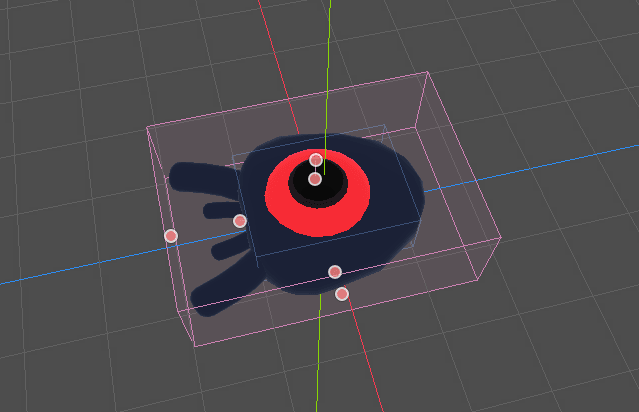
Кодування руху монстра
Здійснюємо рух монстра. Ми зробимо це в два кроки. Спочатку ми напишемо скрипт для Mob, який визначає функцію для ініціалізації монстра. Потім ми закодуємо рандомізований механізм породження в сцені main.tscn і викличемо функцію звідти.
Додайте скрипт до Mob.
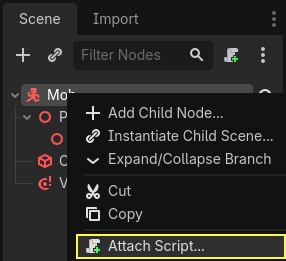
Ось код руху для початку. Ми визначаємо дві властивості, min_speed і max_speed, щоб визначити випадковий діапазон швидкості, який ми пізніше використаємо для визначення CharacterBody3D.velocity.
extends CharacterBody3D

# Minimum speed of the mob in meters per second.
@export var min_speed = 10
# Maximum speed of the mob in meters per second.
@export var max_speed = 18


func _physics_process(_delta):
    move_and_slide()
using Godot;

public partial class Mob : CharacterBody3D
{
    // Don't forget to rebuild the project so the editor knows about the new export variable.

    // Minimum speed of the mob in meters per second
    [Export]
    public int MinSpeed { get; set; } = 10;
    // Maximum speed of the mob in meters per second
    [Export]
    public int MaxSpeed { get; set; } = 18;

    public override void _PhysicsProcess(double delta)
    {
        MoveAndSlide();
    }
}
Подібно до гравця, ми переміщуємо моба кожного кадру, викликаючи функцію CharacterBody3D.move_and_slide(). Цього разу ми не оновлюємо velocity кожного кадру; ми хочемо, щоб монстр рухався з постійною швидкістю та залишав екран, навіть якщо він зіткнеться з перешкодою.
Нам потрібно визначити іншу функцію для обчислення CharacterBody3D.velocity. Ця функція повертатиме монстра до гравця та рандомізує як кут його руху, так і швидкість.
Функція прийматиме start_position, позицію появи мобу та player_position як свої аргументи.
Ми розміщуємо моба в start_position і повертаємо його до гравця за допомогою методу look_at_from_position(), і рандомізуємо кут, обертаючи випадкову величину навколо осі Y. Нижче randf_range() виводить випадкове значення між -PI / 4 радіан і PI / 4 радіан.
# This function will be called from the Main scene.
func initialize(start_position, player_position):
    # We position the mob by placing it at start_position
    # and rotate it towards player_position, so it looks at the player.
    look_at_from_position(start_position, player_position, Vector3.UP)
    # Rotate this mob randomly within range of -45 and +45 degrees,
    # so that it doesn't move directly towards the player.
    rotate_y(randf_range(-PI / 4, PI / 4))
// This function will be called from the Main scene.
public void Initialize(Vector3 startPosition, Vector3 playerPosition)
{
    // We position the mob by placing it at startPosition
    // and rotate it towards playerPosition, so it looks at the player.
    LookAtFromPosition(startPosition, playerPosition, Vector3.Up);
    // Rotate this mob randomly within range of -45 and +45 degrees,
    // so that it doesn't move directly towards the player.
    RotateY((float)GD.RandRange(-Mathf.Pi / 4.0, Mathf.Pi / 4.0));
}
Ми отримали випадкову позицію, тепер нам потрібна random_speed. randi_range() буде корисним, оскільки він дає випадкові значення int, і ми будемо використовувати min_speed і max_speed. випадкова_швидкість — це просто ціле число, і ми просто використовуємо його для множення нашого CharacterBody3D.velocity. Після застосування random_speed ми повертаємо CharacterBody3D.velocity Vector3 до гравця.
func initialize(start_position, player_position):
    # ...

    # We calculate a random speed (integer)
    var random_speed = randi_range(min_speed, max_speed)
    # We calculate a forward velocity that represents the speed.
    velocity = Vector3.FORWARD * random_speed
    # We then rotate the velocity vector based on the mob's Y rotation
    # in order to move in the direction the mob is looking.
    velocity = velocity.rotated(Vector3.UP, rotation.y)
public void Initialize(Vector3 startPosition, Vector3 playerPosition)
{
    // ...

    // We calculate a random speed (integer).
    int randomSpeed = GD.RandRange(MinSpeed, MaxSpeed);
    // We calculate a forward velocity that represents the speed.
    Velocity = Vector3.Forward * randomSpeed;
    // We then rotate the velocity vector based on the mob's Y rotation
    // in order to move in the direction the mob is looking.
    Velocity = Velocity.Rotated(Vector3.Up, Rotation.Y);
}
Залишання екрану
Нам все ще потрібно знищувати мобів, коли вони залишають екран. Для цього ми підключимо сигнал screen_exited нашого вузла VisibleOnScreenNotifier3D до Mob.
Виберіть вузол VisibleOnScreenNotifier3D та у правій частині інтерфейсу перейдіть до панелі Сигнали. Двічі клацніть сигнал screen_exited().
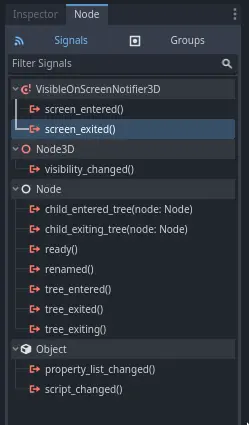
Підключіть сигнал до Mob
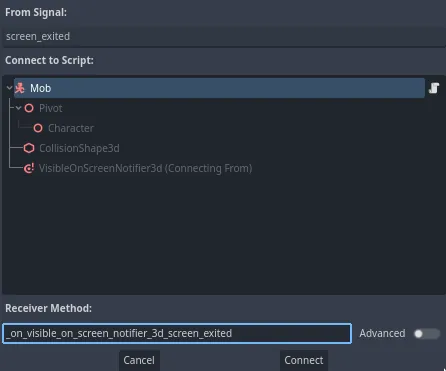
Це додасть нову функцію для вас у ваш моб-скрипт, _on_visible_on_screen_notifier_3d_screen_exited(). З нього викличте метод queue_free(). Ця функція знищує екземпляр, який вона викликала.
func _on_visible_on_screen_notifier_3d_screen_exited():
    queue_free()
// We also specified this function name in PascalCase in the editor's connection window.
private void OnVisibilityNotifierScreenExited()
{
    QueueFree();
}
Наш монстр готовий появитися в грі! У наступній частині ви будете породжувати монстрів на ігровому рівні.
Ось повний скрипт mob.gd для довідки.
extends CharacterBody3D

# Minimum speed of the mob in meters per second.
@export var min_speed = 10
# Maximum speed of the mob in meters per second.
@export var max_speed = 18

func _physics_process(_delta):
    move_and_slide()

# This function will be called from the Main scene.
func initialize(start_position, player_position):
    # We position the mob by placing it at start_position
    # and rotate it towards player_position, so it looks at the player.
    look_at_from_position(start_position, player_position, Vector3.UP)
    # Rotate this mob randomly within range of -45 and +45 degrees,
    # so that it doesn't move directly towards the player.
    rotate_y(randf_range(-PI / 4, PI / 4))

    # We calculate a random speed (integer)
    var random_speed = randi_range(min_speed, max_speed)
    # We calculate a forward velocity that represents the speed.
    velocity = Vector3.FORWARD * random_speed
    # We then rotate the velocity vector based on the mob's Y rotation
    # in order to move in the direction the mob is looking.
    velocity = velocity.rotated(Vector3.UP, rotation.y)

func _on_visible_on_screen_notifier_3d_screen_exited():
    queue_free()
using Godot;

public partial class Mob : CharacterBody3D
{
    // Minimum speed of the mob in meters per second.
    [Export]
    public int MinSpeed { get; set; } = 10;
    // Maximum speed of the mob in meters per second.
    [Export]
    public int MaxSpeed { get; set; } = 18;

    public override void _PhysicsProcess(double delta)
    {
        MoveAndSlide();
    }

    // This function will be called from the Main scene.
    public void Initialize(Vector3 startPosition, Vector3 playerPosition)
    {
        // We position the mob by placing it at startPosition
        // and rotate it towards playerPosition, so it looks at the player.
        LookAtFromPosition(startPosition, playerPosition, Vector3.Up);
        // Rotate this mob randomly within range of -45 and +45 degrees,
        // so that it doesn't move directly towards the player.
        RotateY((float)GD.RandRange(-Mathf.Pi / 4.0, Mathf.Pi / 4.0));

        // We calculate a random speed (integer).
        int randomSpeed = GD.RandRange(MinSpeed, MaxSpeed);
        // We calculate a forward velocity that represents the speed.
        Velocity = Vector3.Forward * randomSpeed;
        // We then rotate the velocity vector based on the mob's Y rotation
        // in order to move in the direction the mob is looking.
        Velocity = Velocity.Rotated(Vector3.Up, Rotation.Y);
    }

    // We also specified this function name in PascalCase in the editor's connection window.
    private void OnVisibilityNotifierScreenExited()
    {
        QueueFree();
    }
}