Attention: Here be dragons
This is the latest
(unstable) version of this documentation, which may document features
not available in or compatible with released stable versions of Godot.
Checking the stable version of the documentation...
Убивство гравця
Ми можемо убивати ворогів просто стрибнувши на них, проте гравець залишається безсмертним. Давайте пофіксимо це.
Ми хочемо не розчавлювати ворога, а виявляти його удари. Ми хочемо, щоб гравець помер, коли він рухається по підлозі, але не якщо він у повітрі. Ми могли б використовувати векторну математику, щоб розрізняти два типи зіткнень. Замість цього ми будемо використовувати вузол Area3D, який добре працює для хітбоксів.
Хітбокс з вузла Area
Поверніться до сцени player.tscn і додайте новий дочірній вузол Area3D. Назвіть його MobDetector Додайте вузол CollisionShape3D як дочірній для нього вузол.
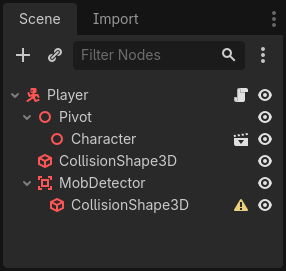
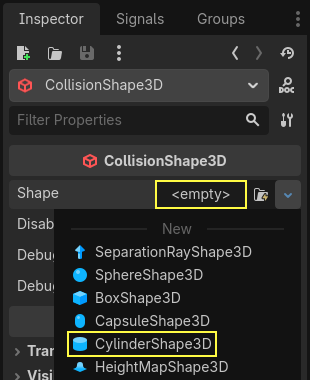
В Інспекторі призначте йому форму циліндра.
Ось трюк, який ви можете використовувати, щоб відбирати тільки ті зіткнення, що коли гравець знаходиться на землі, або близько до неї. Ви можете зменшити висоту циліндра і перемістити його до верхньої частини персонажа. Таким чином, коли гравець стрибає, форма буде занадто високо, щоб вороги зіткнулися з нею.
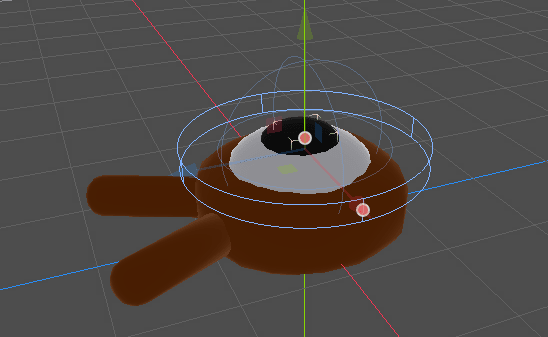
Окрім цього циліндр має бути ширше сфери. Таким чином, гравець буде отримувати удар до того як сам нанесе його монстру.
Чим ширше циліндр, тим легше буде убивати гравця.
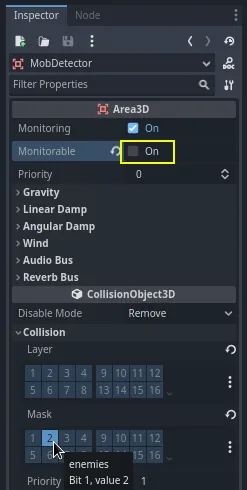
Далі знову виберіть вузол MobDetector і в Інспекторі вимкніть його властивість Monitorable. Це робить так, що інші фізичні вузли не можуть виявити область. Додаткова властивість Monitoring дозволяє виявляти зіткнення. Потім видаліть Зіткнення -> Шар і встановіть маску на шар «вороги».
Коли області виявляють зіткнення, вони випромінюють сигнали. Ми підключимо один із них до вузла Player. Виберіть MobDetector та перейдіть до панелі Signals, двічі клацніть сигнал body_entered та підключіть його до Player
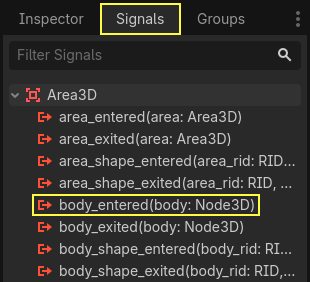
MobDetector видасть body_entered, коли вузол CharacterBody3D або RigidBody3D входить до нього. Оскільки він маскує лише фізичні шари «ворогів», він виявить лише вузли Mob.
З точки зору коду, ми збираємося зробити дві речі: випромінюваний сигнал ми пізніше будемо використовувати для завершення гри і знищення гравця. Ми можемо обернути ці операції в функцію die(), яка допоможе нам поставити описову мітку на коді.
# Emitted when the player was hit by a mob.
# Put this at the top of the script.
signal hit


# And this function at the bottom.
func die():
    hit.emit()
    queue_free()


func _on_mob_detector_body_entered(body):
    die()
// Don't forget to rebuild the project so the editor knows about the new signal.

// Emitted when the player was hit by a mob.
[Signal]
public delegate void HitEventHandler();

// ...

private void Die()
{
    EmitSignal(SignalName.Hit);
    QueueFree();
}

// We also specified this function name in PascalCase in the editor's connection window.
private void OnMobDetectorBodyEntered(Node3D body)
{
    Die();
}
Завершення гри
Ми можемо використати сигнал hit гравця Playerдля завершення гри. Все, що нам потрібно зробити, це підключити його до вузла Main та зупинити MobTimer у відповідь.
Відкрийте файл main.tscn, виберіть вузол Player та в доці Signals підключіть його сигнал hit до вузла Main.
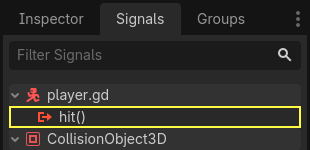
Отримайте таймер і зупиніть його за допомогою функції _on_player_hit().
func _on_player_hit():
    $MobTimer.stop()
// We also specified this function name in PascalCase in the editor's connection window.
private void OnPlayerHit()
{
    GetNode<Timer>("MobTimer").Stop();
}
Якщо ви спробуєте гру зараз, монстри перестануть появлятися, коли ви помрете, а інші залишать екран.
Також зверніть увагу, що гра більше не аварійно завершує роботу та не відображає помилку після смерті гравця. Оскільки ми зупиняємо MobTimer, він більше не запускає функцію _on_mob_timer_timeout().
Також зауважте, що ворог, який зіткнеться з гравцем і загине, залежить від розміру та позиції Гравця і форми зіткнення Мобу. Можливо, вам знадобиться перемістити їх і змінити розмір, щоб досягти щільного відчуття гри.
Ви можете погладити себе по плечу: ви створили прототип повної 3D-гри, навіть якщо вона все ще трохи грубувата.
Звідси ми додамо рахунок, можливість повторити гру, і ви побачите, як можна трохи оживити гру за допомогою мінімалістичних анімацій.
Перевірка коду
Ось повні сценарії для вузлів Main, Mob і Player для довідки. Ви можете використовувати їх для порівняння та перевірки свого коду.
Починаючи з main.gd.
extends Node

@export var mob_scene: PackedScene


func _on_mob_timer_timeout():
    # Create a new instance of the Mob scene.
    var mob = mob_scene.instantiate()

    # Choose a random location on the SpawnPath.
    # We store the reference to the SpawnLocation node.
    var mob_spawn_location = get_node("SpawnPath/SpawnLocation")
    # And give it a random offset.
    mob_spawn_location.progress_ratio = randf()

    var player_position = $Player.position
    mob.initialize(mob_spawn_location.position, player_position)

    # Spawn the mob by adding it to the Main scene.
    add_child(mob)

func _on_player_hit():
    $MobTimer.stop()
using Godot;

public partial class Main : Node
{
    [Export]
    public PackedScene MobScene { get; set; }

    private void OnMobTimerTimeout()
    {
        // Create a new instance of the Mob scene.
        Mob mob = MobScene.Instantiate<Mob>();

        // Choose a random location on the SpawnPath.
        // We store the reference to the SpawnLocation node.
        var mobSpawnLocation = GetNode<PathFollow3D>("SpawnPath/SpawnLocation");
        // And give it a random offset.
        mobSpawnLocation.ProgressRatio = GD.Randf();

        Vector3 playerPosition = GetNode<Player>("Player").Position;
        mob.Initialize(mobSpawnLocation.Position, playerPosition);

        // Spawn the mob by adding it to the Main scene.
        AddChild(mob);
    }

    private void OnPlayerHit()
    {
        GetNode<Timer>("MobTimer").Stop();
    }
}
Далі йде mob.gd.
extends CharacterBody3D

# Minimum speed of the mob in meters per second.
@export var min_speed = 10
# Maximum speed of the mob in meters per second.
@export var max_speed = 18

# Emitted when the player jumped on the mob
signal squashed

func _physics_process(_delta):
    move_and_slide()

# This function will be called from the Main scene.
func initialize(start_position, player_position):
    # We position the mob by placing it at start_position
    # and rotate it towards player_position, so it looks at the player.
    look_at_from_position(start_position, player_position, Vector3.UP)
    # Rotate this mob randomly within range of -45 and +45 degrees,
    # so that it doesn't move directly towards the player.
    rotate_y(randf_range(-PI / 4, PI / 4))

    # We calculate a random speed (integer)
    var random_speed = randi_range(min_speed, max_speed)
    # We calculate a forward velocity that represents the speed.
    velocity = Vector3.FORWARD * random_speed
    # We then rotate the velocity vector based on the mob's Y rotation
    # in order to move in the direction the mob is looking.
    velocity = velocity.rotated(Vector3.UP, rotation.y)

func _on_visible_on_screen_notifier_3d_screen_exited():
    queue_free()

func squash():
    squashed.emit()
    queue_free() # Destroy this node
using Godot;

public partial class Mob : CharacterBody3D
{
    // Emitted when the played jumped on the mob.
    [Signal]
    public delegate void SquashedEventHandler();

    // Minimum speed of the mob in meters per second
    [Export]
    public int MinSpeed { get; set; } = 10;
    // Maximum speed of the mob in meters per second
    [Export]
    public int MaxSpeed { get; set; } = 18;

    public override void _PhysicsProcess(double delta)
    {
        MoveAndSlide();
    }

    // This function will be called from the Main scene.
    public void Initialize(Vector3 startPosition, Vector3 playerPosition)
    {
        // We position the mob by placing it at startPosition
        // and rotate it towards playerPosition, so it looks at the player.
        LookAtFromPosition(startPosition, playerPosition, Vector3.Up);
        // Rotate this mob randomly within range of -45 and +45 degrees,
        // so that it doesn't move directly towards the player.
        RotateY((float)GD.RandRange(-Mathf.Pi / 4.0, Mathf.Pi / 4.0));

        // We calculate a random speed (integer)
        int randomSpeed = GD.RandRange(MinSpeed, MaxSpeed);
        // We calculate a forward velocity that represents the speed.
        Velocity = Vector3.Forward * randomSpeed;
        // We then rotate the velocity vector based on the mob's Y rotation
        // in order to move in the direction the mob is looking.
        Velocity = Velocity.Rotated(Vector3.Up, Rotation.Y);
    }

    public void Squash()
    {
        EmitSignal(SignalName.Squashed);
        QueueFree(); // Destroy this node
    }

    private void OnVisibilityNotifierScreenExited()
    {
        QueueFree();
    }
}
Нарешті, найдовший скрипт, player.gd:
extends CharacterBody3D

signal hit

# How fast the player moves in meters per second
@export var speed = 14
# The downward acceleration while in the air, in meters per second squared.
@export var fall_acceleration = 75
# Vertical impulse applied to the character upon jumping in meters per second.
@export var jump_impulse = 20
# Vertical impulse applied to the character upon bouncing over a mob
# in meters per second.
@export var bounce_impulse = 16

var target_velocity = Vector3.ZERO


func _physics_process(delta):
    # We create a local variable to store the input direction
    var direction = Vector3.ZERO

    # We check for each move input and update the direction accordingly
    if Input.is_action_pressed("move_right"):
        direction.x = direction.x + 1
    if Input.is_action_pressed("move_left"):
        direction.x = direction.x - 1
    if Input.is_action_pressed("move_back"):
        # Notice how we are working with the vector's x and z axes.
        # In 3D, the XZ plane is the ground plane.
        direction.z = direction.z + 1
    if Input.is_action_pressed("move_forward"):
        direction.z = direction.z - 1

    # Prevent diagonal moving fast af
    if direction != Vector3.ZERO:
        direction = direction.normalized()
        # Setting the basis property will affect the rotation of the node.
        $Pivot.basis = Basis.looking_at(direction)

    # Ground Velocity
    target_velocity.x = direction.x * speed
    target_velocity.z = direction.z * speed

    # Vertical Velocity
    if not is_on_floor(): # If in the air, fall towards the floor. Literally gravity
        target_velocity.y = target_velocity.y - (fall_acceleration * delta)

    # Jumping.
    if is_on_floor() and Input.is_action_just_pressed("jump"):
        target_velocity.y = jump_impulse

    # Iterate through all collisions that occurred this frame
    # in C this would be for(int i = 0; i < collisions.Count; i++)
    for index in range(get_slide_collision_count()):
        # We get one of the collisions with the player
        var collision = get_slide_collision(index)

        # If the collision is with ground
        if collision.get_collider() == null:
            continue

        # If the collider is with a mob
        if collision.get_collider().is_in_group("mob"):
            var mob = collision.get_collider()
            # we check that we are hitting it from above.
            if Vector3.UP.dot(collision.get_normal()) > 0.1:
                # If so, we squash it and bounce.
                mob.squash()
                target_velocity.y = bounce_impulse
                # Prevent further duplicate calls.
                break

    # Moving the Character
    velocity = target_velocity
    move_and_slide()

# And this function at the bottom.
func die():
    hit.emit()
    queue_free()

func _on_mob_detector_body_entered(body):
    die()
using Godot;

public partial class Player : CharacterBody3D
{
    // Emitted when the player was hit by a mob.
    [Signal]
    public delegate void HitEventHandler();

    // How fast the player moves in meters per second.
    [Export]
    public int Speed { get; set; } = 14;
    // The downward acceleration when in the air, in meters per second squared.
    [Export]
    public int FallAcceleration { get; set; } = 75;
    // Vertical impulse applied to the character upon jumping in meters per second.
    [Export]
    public int JumpImpulse { get; set; } = 20;
    // Vertical impulse applied to the character upon bouncing over a mob in meters per second.
    [Export]
    public int BounceImpulse { get; set; } = 16;

    private Vector3 _targetVelocity = Vector3.Zero;

    public override void _PhysicsProcess(double delta)
    {
        // We create a local variable to store the input direction.
        var direction = Vector3.Zero;

        // We check for each move input and update the direction accordingly.
        if (Input.IsActionPressed("move_right"))
        {
            direction.X += 1.0f;
        }
        if (Input.IsActionPressed("move_left"))
        {
            direction.X -= 1.0f;
        }
        if (Input.IsActionPressed("move_back"))
        {
            // Notice how we are working with the vector's X and Z axes.
            // In 3D, the XZ plane is the ground plane.
            direction.Z += 1.0f;
        }
        if (Input.IsActionPressed("move_forward"))
        {
            direction.Z -= 1.0f;
        }

        // Prevent diagonal moving fast af
        if (direction != Vector3.Zero)
        {
            direction = direction.Normalized();
            // Setting the basis property will affect the rotation of the node.
            GetNode<Node3D>("Pivot").Basis = Basis.LookingAt(direction);
        }

        // Ground Velocity
        _targetVelocity.X = direction.X * Speed;
        _targetVelocity.Z = direction.Z * Speed;

        // Vertical Velocity
        if (!IsOnFloor()) // If in the air, fall towards the floor. Literally gravity
        {
            _targetVelocity.Y -= FallAcceleration * (float)delta;
        }

        // Jumping.
        if (IsOnFloor() && Input.IsActionJustPressed("jump"))
        {
            _targetVelocity.Y = JumpImpulse;
        }

        // Iterate through all collisions that occurred this frame.
        for (int index = 0; index < GetSlideCollisionCount(); index++)
        {
            // We get one of the collisions with the player.
            KinematicCollision3D collision = GetSlideCollision(index);

            // If the collision is with a mob.
            if (collision.GetCollider() is Mob mob)
            {
                // We check that we are hitting it from above.
                if (Vector3.Up.Dot(collision.GetNormal()) > 0.1f)
                {
                    // If so, we squash it and bounce.
                    mob.Squash();
                    _targetVelocity.Y = BounceImpulse;
                    // Prevent further duplicate calls.
                    break;
                }
            }
        }

        // Moving the Character
        Velocity = _targetVelocity;
        MoveAndSlide();
    }

    private void Die()
    {
        EmitSignal(SignalName.Hit);
        QueueFree();
    }

    private void OnMobDetectorBodyEntered(Node3D body)
    {
        Die();
    }
}
До зустрічі на наступному уроці, щоб додати рахунок та можливість повторити спробу.