Attention: Here be dragons
This is the latest
(unstable) version of this documentation, which may document features
not available in or compatible with released stable versions of Godot.
Checking the stable version of the documentation...
Localization using spreadsheets
Spreadsheets are one of the most common formats for localizing games. In Godot, spreadsheets are supported through the CSV format. This guide explains how to work with CSVs.
The CSV files must be saved with UTF-8 encoding without a byte order mark.
Varování
By default, Microsoft Excel will always save CSV files with ANSI encoding rather than UTF-8. There is no built-in way to do this, but there are workarounds as described here.
We recommend using LibreOffice or Google Sheets instead.
Formátování
Soubory CSV musí být naformátovány následujícím způsobem:
keys |
<lang1> |
<lang2> |
<langN> |
|---|---|---|---|
KEY1 |
string |
string |
string |
KEY2 |
string |
string |
string |
KEYN |
string |
string |
string |
The "lang" tags must represent a language, which must be one of the valid
locales supported by the engine, or they must start with an underscore (_),
which means the related column is served as comment and won't be imported.
The KEY tags must be unique and represent a string universally. By convention, these are
usually in uppercase to differentiate them from other strings. These keys will be replaced at
runtime by the matching translated string. Note that the case is important:
KEY1 and Key1 will be different keys.
The top-left cell is ignored and can be left empty or having any content.
Here's an example:
keys |
en |
es |
ja |
|---|---|---|---|
GREET |
Hello, friend! |
Hola, amigo! |
こんにちは |
ASK |
How are you? |
Cómo está? |
元気ですか |
BYE |
Goodbye |
Adiós |
さようなら |
QUOTE |
"Hello" said the man. |
"Hola" dijo el hombre. |
「こんにちは」男は言いました |
Stejný příklad je uveden níže jako soubor prostého textu oddělený čárkami, který by měl být výsledkem úpravy výše uvedeného v tabulce. Při editaci verze ve formátu prostého textu nezapomeňte přikládat dvojité uvozovky jakékoli zprávě, která obsahuje čárky, konce řádků nebo dvojité uvozovky, aby čárky nebyly analyzovány jako oddělovače, konce řádků nevytvářely nové položky a dvojité uvozovky nebyly analyzovány jako ohraničující znaky. Ujistěte se, že escapujete libovolné dvojité uvozovky ve zprávě tím, že jim přeřadíte další dvojitou uvozovku. Případně můžete v možnostech importu vybrat jiný oddělovač než čárku.
keys,en,es,ja
GREET,"Hello, friend!","Hola, amigo!",こんにちは
ASK,How are you?,Cómo está?,元気ですか
BYE,Goodbye,Adiós,さようなら
QUOTE,"""Hello"" said the man.","""Hola"" dijo el hombre.",「こんにちは」男は言いました
Specifying plural forms
Since Godot 4.6, it is possible to specify plural forms in CSV files.
This is done by adding a column named ?plural anywhere in the table
(except on the first column, which is reserved for translation keys).
By convention, it's recommended to place it on the second column.
Note that in the example below, the key column is the one that contains English
localization.
en,?plural,fr,ru,ja,zh
?pluralrule,,nplurals=2; plural=(n >= 2);,,
There is %d apple,There are %d apples,Il y a %d pomme,Есть %d яблоко,リンゴが%d個あります,那里有%d个苹果
,,Il y a %d pommes,Есть %d яблока,,
,,,Есть %d яблок,,
Poznámka
Automatic Control translation is not supported when using plural forms. You must translate the string manually using tr_n().
Specifying translation contexts
Since Godot 4.6, it is possible to specify
translation contexts
in CSV files. This can be used to disambiguate identical source strings that
have different meanings. While this is generally not needed when using translation
keys LIKE_THIS, it's useful when using plain English text as translation keys.
This is done by adding a column named ?context column anywhere in the table
(except on the first column, which is reserved for translation keys).
By convention, it's recommended to place it on the second column, or after
?plural if it's also used. Note that in the example below, the key column
is the one that contains English localization.
en,?context,fr,ru,ja,zh
Letter,Alphabet,Lettre,Буква,字母,字母
Letter,Message,Courrier,Письмо,手紙,信件
Importér CSV
Godot ve výchozím nastavení zpracovává soubory CSV jako překlady. Naimportuje je a k nim vygeneruje jeden nebo více komprimovaných souborů s přeloženými zdroji.
Importem se překlad také přidá do seznamu překladů, které se mají načíst při spuštění hry. Tento seznam je uvedený v souboru project.godot (nebo v nastavení projektu). Godot umožňuje také načítání a odebírání překladů za běhu.
Select the .csv file and access the Import dock to define import
options. You can toggle the compression of the imported translations, and
select the delimiter to use when parsing the CSV file.
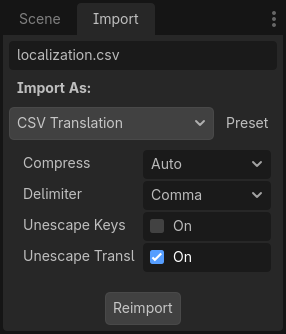
Be sure to click after any change to these options.
Loading the CSV file as a translation
Once a CSV file is imported, it is not automatically registered as a translation source for the project. Remember to follow the steps described in Configuring the imported translation so that the translation is actually used when running the project.