Attention: Here be dragons
This is the latest
(unstable) version of this documentation, which may document features
not available in or compatible with released stable versions of Godot.
Checking the stable version of the documentation...
静的型付けGDScript
このガイドでは、次の内容について学習します:
GDScriptでの静的型付けの使い方;
静的型がバグの回避に役立つこと;
静的型付けにより、エディタのエクスペリエンスが向上します。
この言語機能をどこでどのように使用するかは完全にあなた次第です。一部の機密性の高いGDScriptファイルでのみ使用することも、あらゆる場所で使用することも、まったく使用しないこともできます。
静的型は、変数、定数、関数、パラメーター、戻り値の型に使用できます。
静的型付けの概要
静的型付けのGDScriptを使うことで、Godotはさらに多くのエラーを、あなたの書いたコードから検出することができます。メソッドを呼び出すと引数の型が表示されるため、あなたとチームメイトは作業中により多くの情報が得られます。静的型付けにより、エディタのオートコンプリートとスクリプトの documentation が改善されます。
Imagine you're programming an inventory system. You code an Item class,
then an Inventory. To add items to the inventory, the people who work with
your code should always pass an Item to the Inventory.add() method.
With types, you can enforce this:
class_name Inventory


func add(reference: Item, amount: int = 1):
    var item := find_item(reference)
    if not item:
        item = _instance_item_from_db(reference)
    item.amount += amount
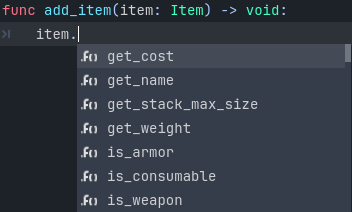
静的型を使用するとコード補完機能も改善されます。以下に動的型のコードと静的型付きのコードの違いを示します。
あなたはドットを打った後に表示されるオートコンプリート候補が足りないことに遭遇したことがあるでしょう。
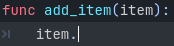
これは動的型のコードではGodotエディタは関数にどのような型の値を渡されてくるのかを知ることができません。ただし型を明示的に記述すると、型からすべてのメソッド、プロパティ、定数などを取得することができます。
Tip
静的な型付けを希望する場合は、エディタ設定の テキスト エディター > 自動補完 > 型ヒントの追加 を有効にすることをお勧めします。またデフォルトでは無効になっている いくつかの警告 を有効にすることも検討してください。
また型が指定されたGDScriptは、コンパイル時にオペランドと引数の型がわかっている場合、最適化されたオペコードを使用することでパフォーマンスが向上します。将来的にはJIT/AOTコンパイルなど、さらに多くのGDScriptの最適化が計画されています。
全体として型付きプログラミングはより構造化された経験をあなたに与えます。それはエラーを防いだり、スクリプトをドキュメント化するときに助けになります。これはチームや長期的なプロジェクトで作業している場合に特に効果を発揮します。調査によると他の人が書いたコードを読んだり、過去に自分が書いたスクリプトの内容を思い出すことに、開発者が大半の時間を費やしています。コードが明確で構造化されているほど、素早く理解ができ、素早く前に進むことができます。
静的型付けの使用方法
To define the type of a variable, parameter, or constant, write a colon after the name,
followed by its type. E.g. var health: int. This forces the variable's type
to always stay the same:
var damage: float = 10.5
const MOVE_SPEED: float = 50.0
func sum(a: float = 0.0, b: float = 0.0) -> float:
    return a + b
Godot will try to infer the type when you write a colon, but omit the type:
var damage := 10.5
const MOVE_SPEED := 50.0
func sum(a := 0.0, b := 0.0) -> float:
    return a + b
注釈
定数の場合、
=と:=に違いはありません。Godotは代入された値から自動的に型を設定するため、定数の型ヒントを書く必要はありません。ただしコードの意図をより明確にするために、これを明示的に行うこともできます。また型なし配列がデフォルトで使用されるため、型付き配列 (
const A: Array[int] = [1, 2, 3]など) を使う場合にも役立ちます。
型ヒント(Type Hint)として使用できるもの
型ヒントとして使用できるものは次のとおりです。
VariantはAny型。これはほとんどのケースで、型なしの宣言とあまり変わりませんが、可読性は向上します。戻り値の型として使用すると、関数が何らかの値を明示的に返すことを強制できます。(戻り値の型のみ)
voidは関数が値を返さないことを示します。ネイティブクラス (
Object、Node、Area2D、Camera2Dなど)。グローバル、ネイティブ、およびカスタムの名前付き列挙型。 列挙型は単なる
intであり、値が列挙型のセットに属するという保証はないことに注意してください。定数 (ローカルのものを含む)。プリロードされたクラスまたは列挙型が含まれている場合。
You can use any class, including your custom classes, as types. There are two ways to use them in scripts. The first method is to preload the script you want to use as a type in a constant:
const Rifle = preload("res://player/weapons/rifle.gd")
var my_rifle: Rifle
The second method is to use the class_name keyword when you create the script.
For the example above, your rifle.gd would look like this:
class_name Rifle
extends Node2D
If you use class_name, Godot registers the Rifle type globally in the editor,
and you can use it anywhere, without having to preload it into a constant:
var my_rifle: Rifle
アロー(->)による関数の戻り値の定義
To define the return type of a function, write a dash and a right angle bracket ->
after its declaration, followed by the return type:
func _process(delta: float) -> void:
    pass
The type void means the function does not return anything. You can use any type,
as with variables:
func hit(damage: float) -> bool:
    health_points -= damage
    return health_points <= 0
You can also use your own classes as return types:
# Adds an item to the inventory and returns it.
func add(reference: Item, amount: int) -> Item:
    var item: Item = find_item(reference)
    if not item:
        item = ItemDatabase.get_instance(reference)

    item.amount += amount
    return item
共分散と反分散
基本クラスのメソッドを継承するときは、リスコフの置換原則 に従う必要があります。
共分散: メソッドを継承する場合、親メソッドよりも具体的な戻り値の型 (サブタイプ) を指定できます。
反変性: メソッドを継承する場合、親メソッドよりも限定性の低い引数の型 (スーパータイプ) を指定できます。
例:
class_name Parent


func get_property(param: Label) -> Node:
    # ...
class_name Child extends Parent


# `Control` is a supertype of `Label`.
# `Node2D` is a subtype of `Node`.
func get_property(param: Control) -> Node2D:
    # ...
Array 要素の型の指定
Array の型を定義するには、型名を [] で囲みます。
An array's type applies to for loop variables, as well as some operators like
[], [...] = (assignment), and +. Array methods
(such as push_back) and other operators (such as ==)
are still untyped. Built-in types, native and custom classes,
and enums may be used as element types. Nested array types (like Array[Array[int]])
are not supported.
var scores: Array[int] = [10, 20, 30]
var vehicles: Array[Node] = [$Car, $Plane]
var items: Array[Item] = [Item.new()]
var array_of_arrays: Array[Array] = [[], []]
# var arrays: Array[Array[int]] -- disallowed

for score in scores:
    # score has type `int`

# The following would be errors:
scores += vehicles
var s: String = scores[0]
scores[0] = "lots"
Since Godot 4.2, you can also specify a type for the loop variable in a for loop.
For instance, you can write:
var names = ["John", "Marta", "Samantha", "Jimmy"]
for name: String in names:
    pass
配列は型なしですが、 for ループ内の name 変数は常に String 型になります。
Specify the element type of a Dictionary
To define the type of a Dictionary's keys and values, enclose the type name in []
and separate the key and value type with a comma.
A dictionary's value type applies to for loop variables, as well as some operators like
[] and [...] = (assignment). Dictionary methods that return values
and other operators (such as ==) are still untyped. Built-in types, native
and custom classes, and enums may be used as element types. Nested typed collections
(like Dictionary[String, Dictionary[String, int]]) are not supported.
var fruit_costs: Dictionary[String, int] = { "apple": 5, "orange": 10 }
var vehicles: Dictionary[String, Node] = { "car": $Car, "plane": $Plane }
var item_tiles: Dictionary[Vector2i, Item] = { Vector2i(0, 0): Item.new(), Vector2i(0, 1): Item.new() }
var dictionary_of_dictionaries: Dictionary[String, Dictionary] = { { } }
# var dicts: Dictionary[String, Dictionary[String, int]] -- disallowed

for fruit in fruit_costs:
    # `fruit` has type `String`

# The following would be errors:
fruit_costs["pear"] += vehicles
var s: String = fruit_costs["apple"]
fruit_costs["orange"] = "lots"
型キャスト
型キャストは型付き言語の重要な概念です。キャストは、ある型の値を別の型へ変換することです。
ゲーム内に extends Area2D した敵がいると仮定してください。あなたはそれを PlayerController と呼ばれるスクリプトが付いている CharacterBody2D と衝突させたいのです。衝突を検出するには body_entered シグナルを使用します。型付きコードの _on_body_entered コールバックでは、検出したボディは一般的な PhysicsBody2D になり、 PlayerController にはなりません。
You can check if this PhysicsBody2D is your Player with the as keyword,
and using the colon : again to force the variable to use this type.
This forces the variable to stick to the PlayerController type:
func _on_body_entered(body: PhysicsBody2D) -> void:
    var player := body as PlayerController
    if not player:
        return

    player.damage()
ここではカスタムされた型を扱っているため、 body が PlayerController を継承しない場合、 player 変数は null に設定されます。これを使ってbodyがPlayerControllerかどうかをチェックできます。このキャストのおかげで、player変数のオートコンプリートもできるようになります。
注釈
The as keyword silently casts the variable to null in case of a type
mismatch at runtime, without an error/warning. While this may be convenient
in some cases, it can also lead to bugs. Use the as keyword only if this
behavior is intended. A safer alternative is to use the is keyword:
if not (body is PlayerController):
    push_error("Bug: body is not PlayerController.")

var player: PlayerController = body
if not player:
    return

player.damage()
You can also simplify the code by using the is not operator:
if body is not PlayerController:
    push_error("Bug: body is not PlayerController")
Alternatively, you can use the assert() statement:
assert(body is PlayerController, "Bug: body is not PlayerController.")

var player: PlayerController = body
if not player:
    return

player.damage()
注釈
組み込み型でキャストしようとして失敗すると、Godotはエラーをスローします。
セーフ・ライン
セーフ・ラインを確保するためにキャストを使用することもできます。セーフ・ラインはあいまいなコード行(ライン)が安全(セーフ)な型であることを教えてくれます。型指定されたコードと動的なコードを混在させると、Godotは実行時に命令がエラーを引き起こすかどうかを知るための十分な情報が得られない場合があります。
これは子ノードを取得したときに起こります。たとえばタイマーを考えてみましょう。動的コードでは、$Timer でノードを取得できます。GDScriptは ダック・タイピング をサポートしているので、あなたのタイマーが Timer 型であっても、それは Node であり Object でもあり、その2つのクラスを継承しています。動的GDScriptでは、ノードが呼び出す必要のあるメソッドを持っている場合、その型については気にする必要はありません。
ノードを取得したときに期待される型をGodotに伝えるためにキャストを使用できます: ($Timer as Timer) 、 ($Player as CharacterBody2D) など。Godotは、そのタイプが機能することを確認し、機能する場合は、行番号がスクリプトエディタの左側で緑に変わります。

セーフ・ラインではない行(line 7)とセーフ・ライン (line 6 とline 8)
注釈
Safe lines do not always mean better or more reliable code. See the note above
about the as keyword. For example:
@onready var node_1 := $Node1 as Type1 # Safe line.
@onready var node_2: Type2 = $Node2 # Unsafe line.
node_2 宣言はセーフでない行としてマークされていますが、 node_1 宣言よりも信頼性が高くなります。シーン内のノード型を変更し、誤ってスクリプト内で変更するのを忘れた場合でも、シーンがロードされるとすぐにエラーが検出されるためです。 node_1 でそれが発生すると、変数は暗黙的に null にキャストされ、後でエラーが検出されます。
注釈
セーフ・ラインの色分けをオフにしたり、エディタ設定でカラーを変更することができます。
静的と動的: どちらかのみを利用する
型付きGDScriptと動的GDScriptは、同じプロジェクト内に共存できます。しかし、コードベースの一貫性のためにも、仲間のためにも、どちらかスタイルに統一することをお勧めします。同じガイドラインに従うことで全員が協力しやすくなり、他の人が書いたコードを素早く読んで理解できるようになります。
Typed code takes a little more writing, but you get the benefits we discussed above. Here's an example of the same, empty script, in a dynamic style:
extends Node


func _ready():
    pass


func _process(delta):
    pass
And with static typing:
extends Node


func _ready() -> void:
    pass


func _process(delta: float) -> void:
    pass
As you can see, you can also use types with the engine's virtual methods.
Signal callbacks, like any methods, can also use types. Here's a body_entered
signal in a dynamic style:
func _on_area_2d_body_entered(body):
    pass
And the same callback, with type hints:
func _on_area_2d_body_entered(body: PhysicsBody2D) -> void:
    pass
警告システム
注釈
GDScriptの警告システムに関する詳細なドキュメントは GDScript警告システム に移動しました。
Godot gives you warnings about your code as you write it. The engine identifies sections of your code that may lead to issues at runtime, but lets you decide whether or not you want to leave the code as it is.
特に型が指定されたGDScriptのユーザーを対象とした警告が多数あります。デフォルトではこれらの警告は無効になっていますが、プロジェクト設定で有効にすることができます (デバッグ > GDScript と 高度な設定 が有効になっていることを確認してください)。
常に静的型を使用したい場合は UNTYPED_DECLARATION 警告を有効にできます。さらに、より読みやすく信頼性が高く、より冗長な構文を希望する場合は、 INFERRED_DECLARATION 警告を有効にすることができます。
UNSAFE_* 警告は、アンセーフな行よりもアンセーフな操作をより顕著にします。現在 UNSAFE_* 警告は、アンセーフ・ラインがカバーするすべてのケースをカバーしているわけではありません。
一般的なアンセーフな操作とセーフな操作
Global scope methods
The following global scope methods are not statically typed, but they have typed counterparts available. These methods return statically typed values:
Method |
Statically typed equivalents |
|---|---|
(untyped
clamp() does not work on Color) |
|
When using static typing, use the typed global scope methods whenever possible. This ensures you have safe lines and benefit from typed instructions for better performance.
UNSAFE_PROPERTY_ACCESS と UNSAFE_METHOD_ACCESS 警告
In this example, we aim to set a property and call a method on an object
that has a script attached with class_name MyScript and that extends
Node2D. If we have a reference to the object as a Node2D (for instance,
as it was passed to us by the physics system), we can first check if the
property and method exist and then set and call them if they do:
if "some_property" in node_2d:
    node_2d.some_property = 20  # Produces UNSAFE_PROPERTY_ACCESS warning.

if node_2d.has_method("some_function"):
    node_2d.some_function()  # Produces UNSAFE_METHOD_ACCESS warning.
However, this code will produce UNSAFE_PROPERTY_ACCESS and
UNSAFE_METHOD_ACCESS warnings as the property and method are not present
in the referenced type - in this case a Node2D. To make these operations
safe, you can first check if the object is of type MyScript using the
is keyword and then declare a variable with the type MyScript on
which you can set its properties and call its methods:
if node_2d is MyScript:
    var my_script: MyScript = node_2d
    my_script.some_property = 20
    my_script.some_function()
Alternatively, you can declare a variable and use the as operator to try
to cast the object. You'll then want to check whether the cast was successful
by confirming that the variable was assigned:
var my_script := node_2d as MyScript
if my_script != null:
    my_script.some_property = 20
    my_script.some_function()
UNSAFE_CAST 警告
In this example, we would like the label connected to an object entering our
collision area to show the area's name. Once the object enters the collision
area, the physics system sends a signal with a Node2D object, and the most
straightforward (but not statically typed) solution to do what we want could
be achieved like this:
func _on_body_entered(body: Node2D) -> void:
    body.label.text = name  # Produces UNSAFE_PROPERTY_ACCESS warning.
This piece of code produces an UNSAFE_PROPERTY_ACCESS warning because
label is not defined in Node2D. To solve this, we could first check if the
label property exist and cast it to type Label before settings its text
property like so:
func _on_body_entered(body: Node2D) -> void:
    if "label" in body:
        (body.label as Label).text = name  # Produces UNSAFE_CAST warning.
However, this produces an UNSAFE_CAST warning because body.label is of a
Variant type. To safely get the property in the type you want, you can use the
Object.get() method which returns the object as a Variant value or returns
null if the property doesn't exist. You can then determine whether the
property contains an object of the right type using the is keyword, and
finally declare a statically typed variable with the object:
func _on_body_entered(body: Node2D) -> void:
    var label_variant: Variant = body.get("label")
    if label_variant is Label:
        var label: Label = label_variant
        label.text = name
型の指定ができないケース
この紹介の締めくくりに、型ヒントを使用できないケースを取り上げましょう。 以下の例はすべて 構文エラー が発生します。
You can't specify the type of individual elements in an array or a dictionary:
var enemies: Array = [$Goblin: Enemy, $Zombie: Enemy]
var character: Dictionary = {
    name: String = "Richard",
    money: int = 1000,
    inventory: Inventory = $Inventory,
}
Nested types are not currently supported:
var teams: Array[Array[Character]] = []
要約
型付きGDScriptは強力なツールです。より構造化されたコードの記述、一般的なエラーの回避、スケーラブルシステムで信頼性の高いシステムの作成に役立ちます。静的型によりGDScriptのパフォーマンスが向上し、将来的にはさらなる最適化が計画されています。