Attention: Here be dragons
This is the latest
(unstable) version of this documentation, which may document features
not available in or compatible with released stable versions of Godot.
Checking the stable version of the documentation...
Localization using spreadsheets
Spreadsheets are one of the most common formats for localizing games. In Godot, spreadsheets are supported through the CSV format. This guide explains how to work with CSVs.
The CSV files must be saved with UTF-8 encoding without a byte order mark.
Warnung
By default, Microsoft Excel will always save CSV files with ANSI encoding rather than UTF-8. There is no built-in way to do this, but there are workarounds as described here.
We recommend using LibreOffice or Google Sheets instead.
Formatierung
CSV-Dateien müssen wie folgt aufgebaut sein:
keys |
<Sprache1> |
<Sprache2> |
<SpracheN> |
|---|---|---|---|
KEY1 |
String |
String |
String |
KEY2 |
String |
String |
String |
KEYN |
String |
String |
String |
The "lang" tags must represent a language, which must be one of the valid
locales supported by the engine, or they must start with an underscore (_),
which means the related column is served as comment and won't be imported.
The KEY tags must be unique and represent a string universally. By convention, these are
usually in uppercase to differentiate them from other strings. These keys will be replaced at
runtime by the matching translated string. Note that the case is important:
KEY1 and Key1 will be different keys.
The top-left cell is ignored and can be left empty or having any content.
Here's an example:
keys |
en |
es |
ja |
|---|---|---|---|
GREET |
Hello, friend! |
Hola, amigo! |
こんにちは |
ASK |
How are you? |
Cómo está? |
元気ですか |
BYE |
Goodbye |
Adiós |
さようなら |
QUOTE |
"Hello" said the man. |
"Hola" dijo el hombre. |
「こんにちは」男は言いました |
Das gleiche Beispiel wird unten als kommaseparierte reine Text-Datei gezeigt, die das Ergebnis der Bearbeitung des obigen Beispiels in einer Tabelle sein sollte. Stellen Sie beim Bearbeiten der reinen Text-Version sicher, dass alle Nachrichten, die Kommas, Zeilenumbrüche oder doppelte Anführungszeichen enthalten, in doppelte Anführungszeichen gesetzt werden, damit Kommas nicht als Trennzeichen analysiert werden, Zeilenumbrüche keine neuen Einträge erstellen und doppelte Anführungszeichen nicht als eingeschlossene Zeichen analysiert werden. Vermeiden Sie doppelte Anführungszeichen in einer Nachricht, indem Sie ihnen ein weiteres doppeltes Anführungszeichen voranstellen. Alternativ können Sie in den Import-Optionen ein anderes Trennzeichen als Komma auswählen.
keys,en,es,ja
GREET,"Hello, friend!","Hola, amigo!",こんにちは
ASK,How are you?,Cómo está?,元気ですか
BYE,Goodbye,Adiós,さようなら
QUOTE,"""Hello"" said the man.","""Hola"" dijo el hombre.",「こんにちは」男は言いました
Specifying plural forms
Since Godot 4.6, it is possible to specify plural forms in CSV files.
This is done by adding a column named ?plural anywhere in the table
(except on the first column, which is reserved for translation keys).
By convention, it's recommended to place it on the second column.
Note that in the example below, the key column is the one that contains English
localization.
en,?plural,fr,ru,ja,zh
?pluralrule,,nplurals=2; plural=(n >= 2);,,
There is %d apple,There are %d apples,Il y a %d pomme,Есть %d яблоко,リンゴが%d個あります,那里有%d个苹果
,,Il y a %d pommes,Есть %d яблока,,
,,,Есть %d яблок,,
Bemerkung
Automatic Control translation is not supported when using plural forms. You must translate the string manually using tr_n().
Specifying translation contexts
Since Godot 4.6, it is possible to specify
translation contexts
in CSV files. This can be used to disambiguate identical source strings that
have different meanings. While this is generally not needed when using translation
keys LIKE_THIS, it's useful when using plain English text as translation keys.
This is done by adding a column named ?context column anywhere in the table
(except on the first column, which is reserved for translation keys).
By convention, it's recommended to place it on the second column, or after
?plural if it's also used. Note that in the example below, the key column
is the one that contains English localization.
en,?context,fr,ru,ja,zh
Letter,Alphabet,Lettre,Буква,字母,字母
Letter,Message,Courrier,Письмо,手紙,信件
CSV-Importer
Godot behandelt CSV-Dateien standardmäßig als Übersetzungen. Es importiert sie und erzeugt daneben eine oder mehrere komprimierte Übersetzungs-Ressourcendateien.
Beim Importieren wird die Übersetzung auch zur Liste der Übersetzungen hinzugefügt, die beim Ausführen des Spiels geladen werden sollen. Dies wird in project.godot (oder in den Projekteinstellungen) angegeben. Mit Godot können Übersetzungen auch zur Laufzeit geladen und entfernt werden.
Select the .csv file and access the Import dock to define import
options. You can toggle the compression of the imported translations, and
select the delimiter to use when parsing the CSV file.
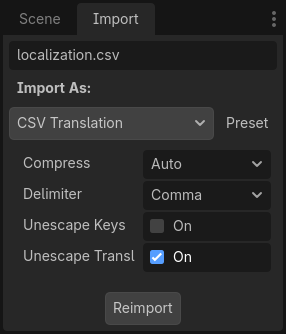
Be sure to click after any change to these options.
Loading the CSV file as a translation
Once a CSV file is imported, it is not automatically registered as a translation source for the project. Remember to follow the steps described in Konfigurieren der importierten Übersetzung so that the translation is actually used when running the project.