Attention: Here be dragons
This is the latest
(unstable) version of this documentation, which may document features
not available in or compatible with released stable versions of Godot.
Checking the stable version of the documentation...
Node type customization using name suffixes
Muchas veces, al editar una escena, hay tareas comunes que deben realizarse después de la exportación:
Añadir detección de colisiones a los objetos.
Configurar objetos como mallas de navegación.
Deleting nodes that are not used in the game engine (like specific lights used for modeling).
To simplify this workflow, Godot offers several suffixes that can be added to the names of the objects in your 3D modeling software. When imported, Godot will detect suffixes in object names and will perform actions automatically.
Advertencia
All the suffixes described below can be used with -, $, and _ and are
case-insensitive.
Opting out
If you do not want Godot to perform any of the actions described below, you
can set the nodes/use_node_type_suffixes import option to false.
This will disable all node type suffixes, which keeps nodes the same type
as the original file indicated. However, the -noimp suffix will still
be respected, as well as non-node suffixes like -vcol or -loop.
Alternatively, you can completely opt out of all name suffixes by setting
the nodes/use_name_suffixes import option to false. This will
completely stop the general scene import code from looking at name suffixes.
However, the format-specific import code may still look at name suffixes,
such as the glTF importer checking for the -loop suffix.
Disabling these options makes editor-imported files more similar to the
original files, and more similar to importing files at runtime.
For an import workflow that works at runtime, gives more predictable
results, and only has explicitly defined behavior, consider setting these
options to false and using GLTFDocumentExtension instead.
Remove nodes and animations (-noimp)
Nodes and animations that have the -noimp suffix will be removed at
import time no matter what their type is. They will not appear in the
imported scene.
This is equivalent to enabling Skip Import for a node in the Advanced Import Settings dialog.
Crear colisiones (-col, -convcol, -colonly, -convcolonly)
La opción -col funcionará sólo para los objetos de Malla. Si se detecta, se agregará un nodo de colisión estática hijo, usando la misma geometría de la malla. Esto creará una forma de colisión de malla triangular, que es una opción lenta, pero precisa para la detección de colisiones. Esta opción es normalmente la que quieres para la geometría del nivel (pero mira también -colonly más abajo).
The option -convcol will create a ConvexPolygonShape3D instead of
a ConcavePolygonShape3D. Unlike triangle meshes which can be concave,
a convex shape can only accurately represent a shape that doesn't have any
concave angles (a pyramid is convex, but a hollow box is concave). Due to this,
convex collision shapes are generally not suited for level geometry. When
representing simple enough meshes, convex collision shapes can result in better
performance compared to a triangle collision shape. This option is ideal for
simple or dynamic objects that require mostly-accurate collision detection.
Sin embargo, en ambos casos, la geometría visual puede ser demasiado compleja o no lo suficientemente suave para las colisiones. Esto puede crear fallas físicas y ralentizar el motor innecesariamente.
To solve this, the -colonly modifier exists. It will remove the mesh upon
importing and will create a StaticBody3D collision instead.
This helps the visual mesh and actual collision to be separated.
The option -convcolonly works in a similar way, but will create a
ConvexPolygonShape3D instead using convex decomposition.
With Collada files, the option -colonly can also be used with Blender's
empty objects. On import, it will create a StaticBody3D with a
collision node as a child. The collision node will have one of a number of
predefined shapes, depending on Blender's empty draw type:
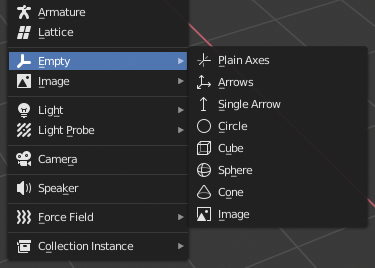
Choosing a draw type for an Empty on creation in Blender
Single arrow will create a SeparationRayShape3D.
Cube will create a BoxShape3D.
Image will create a WorldBoundaryShape3D.
Sphere (and the others not listed) will create a SphereShape3D.
Cuando sea posible, trata de usar unas cuantas formas de colisión primitivas en lugar de mallas triangulares o formas convexas. Las formas primitivas a menudo tienen el mejor rendimiento y fiabilidad.
Nota
For better visibility on Blender's editor, you can set the "X-Ray" option on collision empties and set some distinct color for them by changing Edit > Preferences > Themes > 3D Viewport > Empty.
If using Blender 2.79 or older, follow these steps instead: User Preferences > Themes > 3D View > Empty.
Ver también
Véase Formas de colisión (3D) para una visión general de las formas de colisión.
Create Occluder (-occ, -occonly)
If a mesh is imported with the -occ suffix an Occluder3D node
will be created based on the geometry of the mesh, it does not replace the mesh.
A mesh node with the -occonly suffix will be converted to an
Occluder3D on import.
Crea un VehicleBody (-vehicle)
A mesh node with the -vehicle suffix will be imported as a child to a
VehicleBody3D node.
Crea un VehicleWheel (-wheel)
A mesh node with the -wheel suffix will be imported as a child to a
VehicleWheel3D node.
RigidBody (-rigid)
A mesh node with the -rigid suffix will be imported as a RigidBody3D.
Bucle de animación (-loop, -cycle)
Animation clips in the source 3D file that start or end with the token loop or cycle
will be imported as a Godot Animation with the loop flag set.
Unlike the other suffixes described above, this does not require a hyphen.
En Blender, esto requiere usar el Editor NLA y nombrar la Acción con el prefijo o sufijo bucle o ciclo.
Material alpha (-alpha)
A material with the -alpha suffix will be imported with the
TRANSPARENCY_ALPHA transparency mode.
Material vertex color (-vcol)
A material with the -vcol suffix will be imported with the
FLAG_ALBEDO_FROM_VERTEX_COLOR and
FLAG_SRGB_VERTEX_COLOR flags set.