Attention: Here be dragons
This is the latest
(unstable) version of this documentation, which may document features
not available in or compatible with released stable versions of Godot.
Checking the stable version of the documentation...
Fluxos de áudio
Introdução
Como você já deve ter lido em Barramentos de áudio, um som é enviado para cada barramento a partir de um nó AudioStreamPlayer. Existem diferentes tipos de AudioStreamPlayers. Cada um carrega um AudioStream e o reproduz.
AudioStream
Um fluxo de áudio é um objeto abstrato que emite som. O som pode vir de muitos lugares, mas é mais comumente carregado a partir do sistema de arquivos. Os arquivos de áudio podem ser carregados como AudioStreams e colocados dentro de um AudioStreamPlayer. Você pode encontrar informações sobre formatos suportados e diferenças em Importando amostras de áudio.
There are other types of AudioStreams, such as AudioStreamRandomizer. This one picks a different audio stream from a list of streams each time it's played back, and applies random pitch and volume shifting. This can be helpful for adding variation to sounds that are played back often.
AudioStreamPlayer
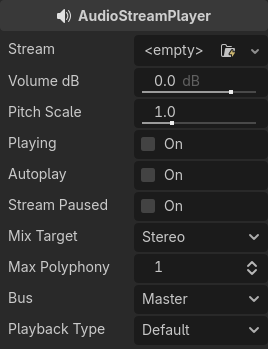
Este é o reprodutor de stream padrão não posicional. Pode tocar em qualquer ônibus. Em configurações de som 5.1, ele pode enviar áudio para mixagem estéreo ou alto-falantes frontais.
Playback Type is an experimental setting, and could change in future versions of Godot. It exists so Web exports use Web Audio-API based samples instead of streaming all sounds to the browser, unlike most platforms. This prevents the audio from being garbled in single-threaded Web exports. By default, only the Web platform will use samples. Changing this setting is not recommended, unless you have an explicit reason to. You can change the default playback type for the web and other platforms in the project settings under Audio > General (advanced settings must be turned on to see the setting).
AudioStreamPlayer2D
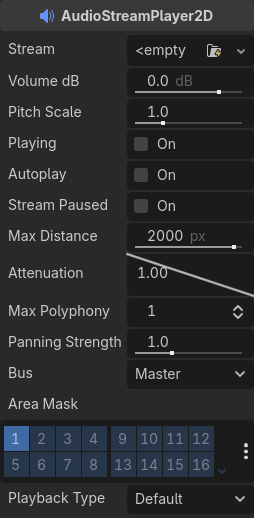
Esta é uma variante do AudioStreamPlayer, mas emite som em um ambiente posicional 2D. Quando próximo à esquerda da tela, o movimento panorâmico irá para a esquerda. Quando perto do lado direito, ele vai para a direita.
Nota
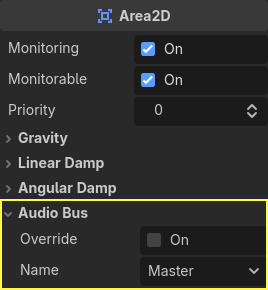
Area2Ds pode ser usado para desviar o som de qualquer AudioStreamPlayer2Ds que eles contêm para barramentos específicos. Isso torna possível criar barramentos com diferentes qualidades de reverb ou som para lidar com a ação que acontece em uma determinada parte do seu mundo de jogo.
AudioStreamPlayer3D
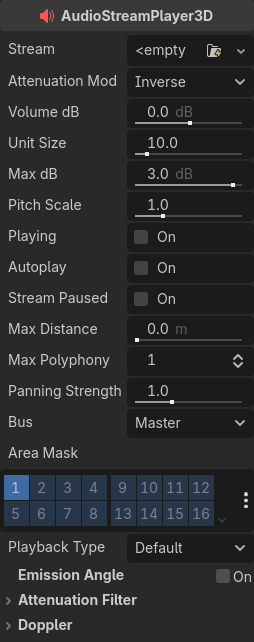
Esta é uma variante do AudioStreamPlayer, mas emite som em um ambiente posicional 3D. Dependendo da localização do reprodutor em relação à tela, ele pode posicionar o som em estéreo 5.1 ou 7.1 dependendo da configuração de áudio escolhida.
Similar to AudioStreamPlayer2D, an Area3D can divert the sound to an audio bus.
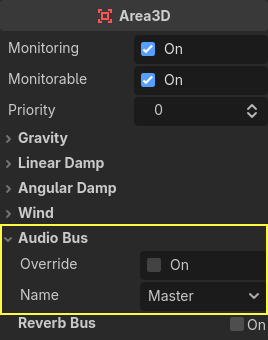
Ao contrário do 2D, a versão 3D do AudioStreamPlayer possui algumas opções mais avançadas:
Barramentos de reverberação
Aviso
This feature is not supported on the web platform if the AudioStreamPlayer's playback mode is set to Sample, which is the default. It will only work if the playback mode is set to Stream, at the cost of increased latency if threads are not enabled.
See Audio playback in the Exporting for the Web documentation for details.
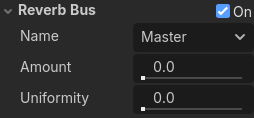
Godot allows for 3D audio streams that enter a specific Area3D node to send dry and wet audio to separate buses. This is useful when you have several reverb configurations for different types of rooms. This is done by enabling this type of reverb in the Reverb Bus section of the Area3D's properties:
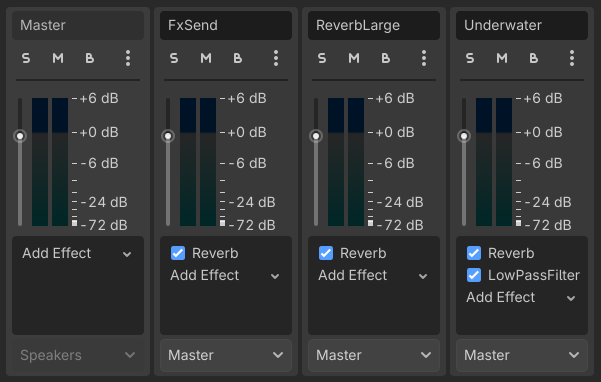
At the same time, a special bus layout is created where each Area3D receives the reverb info from each Area3D. A Reverb effect needs to be created and configured in each reverb bus to complete the setup for the desired effect:
The Area3D's Reverb Bus section also has a parameter named Uniformity. Some types of rooms bounce sounds more than others (like a warehouse), so reverberation can be heard almost uniformly across the room even though the source may be far away. Playing around with this parameter can simulate that effect.
Doppler
Aviso
This feature is not supported on the web platform if the AudioStreamPlayer's playback mode is set to Sample, which is the default. It will only work if the playback mode is set to Stream, at the cost of increased latency if threads are not enabled.
See Audio playback in the Exporting for the Web documentation for details.
Quando a velocidade relativa entre um emissor e um ouvinte muda, isto é percebido como um aumento ou diminuição do tom do som emitido. Godot pode rastrear mudanças de velocidade nos nós AudioStreamPlayer3D e Câmera. Ambos os nós têm esta propriedade, que deve ser habilitada manualmente:
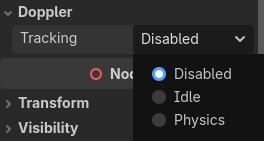
Basta habilitá-lo, definindo-o dependendo de como os objetos serão movidos : Use idle para objetos movidos usando``_process``, ou Physics para objetos movidos usando _physics_process. O rastreamento ocorrerá automaticamente.