Attention: Here be dragons
This is the latest
(unstable) version of this documentation, which may document features
not available in or compatible with released stable versions of Godot.
Checking the stable version of the documentation...
Localização utilizando planilhas
Planilhas são um dos formatos mais comuns para a localização de jogos. No Godot, as planilhas são suportadas por meio do formato CSV. Este guia explica como trabalhar com arquivos CSV.
Os arquivos CSV devem ser salvos com codificação UTF-8, sem uma marca de ordem de byte.
Aviso
Por padrão, o Microsoft Excel sempre salva arquivos CSV com codificação ANSI em vez de UTF-8. Não existe uma maneira nativa de fazer isso, mas há soluções alternativas, conforme descrito aqui.
Recomendamos usar o LibreOffice ou o Google Sheets.
Formatação
Arquivos CSV devem ser formatados da seguinte forma:
chaves |
<lang1> |
<lang2> |
<langN> |
|---|---|---|---|
KEY1 |
string |
string |
string |
KEY2 |
string |
string |
string |
KEYN |
string |
string |
string |
As tags "lang" devem representar um idioma - que deve ser uma das línguas válidas suportadas pela engine - ou devem começar com um sublinhado (_), indicando que a coluna correspondente é tratada como comentário e não será importada. As tags KEY devem ser únicas e representar uma string de forma universal. Por convenção, elas geralmente aparecem em letras maiúsculas para diferenciá-las de outras strings. Essas chaves serão substituídas em tempo de execução pela string traduzida correspondente. Observe que a diferenciação entre maiúsculas e minúsculas é importante: KEY1 e Key1 serão consideradas chaves diferentes. A célula do canto superior esquerdo é ignorada e pode ficar vazia ou conter qualquer conteúdo. Veja um exemplo:
chaves |
en |
es |
ja |
|---|---|---|---|
GREET |
Hello, friend! |
Hola, Amigo! |
こんにちは |
ASK |
How are you? |
Cómo está? |
元気ですか |
BYE |
Goodbye |
Adiós |
さようなら |
QUOTE |
"Hello" said the man. |
"Hola" dijo el hombre. |
「こんにちは」男は言いました |
O mesmo exemplo é mostrado abaixo como um arquivo de texto simples separado por vírgula, que deve ser o resultado da edição acima em uma planilha. Ao editar a versão de texto simples, certifique-se de fechar com aspas duplas qualquer mensagem que contenha vírgula, quebras de linha ou aspas duplas, para que as vírgulas não sejam analisadas como delimitadores, quebras de linha não criam novas entradas e aspas duplas não são tratadas como caracteres de fechamento. Certifique-se de evitar quaisquer aspas duplas que uma mensagem pode conter, precedendo-as com outra aspas dupla. Alternativamente, você pode selecionar outro delimitador do que a vírgula nas opções de importação.
keys,en,es,ja
GREET,"Hello, friend!","Hola, amigo!",こんにちは
ASK,How are you?,Cómo está?,元気ですか
BYE,Goodbye,Adiós,さようなら
QUOTE,"""Hello"" said the man.","""Hola"" dijo el hombre.",「こんにちは」男は言いました
Especificando formas plurais
Desde o Godot 4.6, é possível especificar formas plurais em arquivos CSV.
Isso é feito adicionando uma coluna chamada ?plural em qualquer lugar da tabela (exceto na primeira coluna, que é reservada para as chaves de tradução). Por convenção, recomenda-se colocá-la na segunda coluna. Note que no exemplo abaixo, a coluna da chave é a que contém a localização em inglês.
en,?plural,fr,ru,ja,zh
?pluralrule,,nplurals=2; plural=(n >= 2);,,
There is %d apple,There are %d apples,Il y a %d pomme,Есть %d яблоко,リンゴが%d個あります,那里有%d个苹果
,,Il y a %d pommes,Есть %d яблока,,
,,,Есть %d яблок,,
Nota
Automatic Control translation is not supported when using plural forms. You must translate the string manually using tr_n().
Especificando contextos de tradução
Desde o Godot 4.6, é possível especificar contextos de tradução em arquivos CSV. Isso pode ser usado para eliminar ambiguidades em strings de origem idênticas que possuem significados diferentes. Embora isso geralmente não seja necessário ao usar chaves de tradução como LIKE_THIS, é útil ao usar texto em inglês simples como chaves de tradução.
Isso é feito adicionando uma coluna chamada ?context em qualquer lugar da tabela (exceto na primeira coluna, que é reservada para as chaves de tradução). Por convenção, recomenda-se colocá-la na segunda coluna, ou após ?plural se ele também estiver sendo utilizado. Note que no exemplo abaixo, a coluna da chave é a que contém a localização em inglês.
en,?context,fr,ru,ja,zh
Letter,Alphabet,Lettre,Буква,字母,字母
Letter,Message,Courrier,Письмо,手紙,信件
Importador de CSV
O Godot tratará arquivos CSV como traduções por padrão. Ele irá importá-los e gerar um ou mais arquivos de recursos de tradução comprimidos ao lado dele.
A importação também adicionará a tradução à lista de traduções para carregar quando o jogo for iniciado, especificado em project.godot (ou nas configurações do projeto). Godot permite carregar e remover traduções em tempo de execução também.
Selecione o arquivo .csv e acesse o painel Import para definir opções de importação. É possível ativar a compressão das traduções importadas e selecionar o delimitador usado ao analisar o CSV.
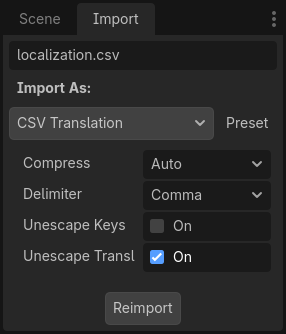
Certifique-se de clicar em após qualquer alteração nessas opções.
Carregando o arquivo CSV como tradução
Uma vez que um arquivo CSV é importado, ele não é registrado automaticamente como uma fonte de tradução para o projeto. Lembre-se de seguir as etapas descritas em Configurando a tradução importada para que a tradução seja de fato utilizada ao executar o projeto.