Attention: Here be dragons
This is the latest
(unstable) version of this documentation, which may document features
not available in or compatible with released stable versions of Godot.
Checking the stable version of the documentation...
Editor theming
The editor has two default theme styles: Modern, the default starting with version 4.6; and Classic, dating back to version 4.0. Each has a different way to handle the presentation of the UI to the user, with the former focusing on having clear, less noisy visuals.
Scroll hints
Scroll hints were introduced with the Modern theme as a less distracting alternative to background panels. They are used to show that more content is available if the user scrolls in the direction the hint is pointing, while also helping to visually delimit different UI elements:
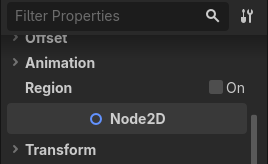
They should be exclusively used in the Modern theme, and only under the following conditions:
A background panel must not be present.
Both sides of the hint (depending if it's horizontal or vertical) should touch the borders of the UI element they are inside of.
There must be other UI elements on the other side of the hint.
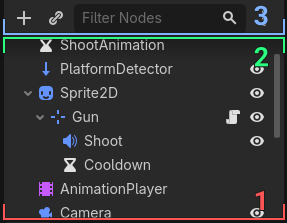
To help with the second rule, UI elements that will be using scroll hints are
placed inside MarginContainers, those being set
with a specific theme variation that extrudes the contents outside the
container. There are multiple variations made for different border sizes, which
can be found in
the file for the Modern theme,
with the name pattern NoBorder*.
注釈
The theme variations are only set in the Modern theme, allowing for them to be ignored in the Classic theme, which relies on borders.
Background panels
Background panels are frequently used in the Classic theme to demarcate UI content, but they still have uses in the Modern theme as well. Mostly, when scrollable content doesn't fit all the three rules, but also when there are multiple scrollables next to each other. For example, the FileSystem dock in split mode:
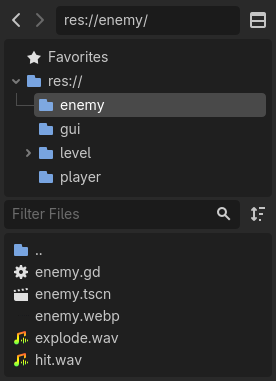
In the Classic theme, nothing else needs to be done for the panels to show.
In the Modern theme, panels are themed with
StyleBoxEmpty (a style that doesn't display
anything), so a theme variation needs to be applied to them in order for panels
to be visible. There are variations for each UI element that contains a panel,
also found in
the file for the Modern theme,
with the name pattern *Secondary.
注釈
Just like the variations for scroll hints, these are only set in the Modern theme, being ignored in the Classic theme, which just makes use of the default panels.