保存遊戲
前言
保存遊戲可能很複雜. 比如, 我們可能會想要儲存跨多個關卡的多個物品的資訊. 更高級的保存遊戲可能需要儲存關於具有任意數量的物件的附加資訊. 當遊戲變得更加複雜時, 這將讓保存函式可以隨著遊戲一同變得更加複雜.
備註
如果你想保存玩家的設定,可以用 ConfigFile 來實作這個目的。
也參考
您可以透過 儲存與載入 (序列化) 專案範例 來實際了解儲存與載入的運作方式。
識別持久化物件
首先,我們應該確定在遊戲會話中要保存那些物件,以及我們要保存這些物件中的哪些資訊。本教學中,我們將使用“群組”來標記和處理要保存的物件,但當然也有其他可行的方法。
首先我們將想要保存的物件新增到“Persist”組。我們既可以通過 GUI 也可以通過腳本完成此操作。讓我們使用 GUI 來新增相關節點吧:
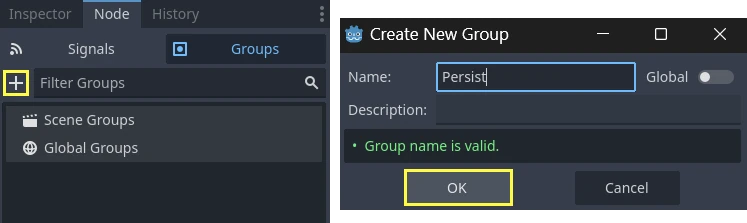
完成這個操作後,我們需要保存遊戲時,就可以獲取所有需要保存的物件,然後通過這個腳本讓這些物件去保存資料:
var save_nodes = get_tree().get_nodes_in_group("Persist")
for node in save_nodes:
    # Now, we can call our save function on each node.
var saveNodes = GetTree().GetNodesInGroup("Persist");
foreach (Node saveNode in saveNodes)
{
    // Now, we can call our save function on each node.
}
序列化
下一步是將資料序列化。這能讓資料更容易儲存到磁碟或從磁碟讀取。在這個範例中,我們假設 Persist 群組的每個成員都是已實例化的節點,因此都有自己的路徑。GDScript 提供 JSON 輔助類別,可在字典與字串之間轉換。我們的節點需要有一個 save 函式來回傳這些資料。save 函式範例如下:
func save():
    var save_dict = {
        "filename" : get_scene_file_path(),
        "parent" : get_parent().get_path(),
        "pos_x" : position.x, # Vector2 is not supported by JSON
        "pos_y" : position.y,
        "attack" : attack,
        "defense" : defense,
        "current_health" : current_health,
        "max_health" : max_health,
        "damage" : damage,
        "regen" : regen,
        "experience" : experience,
        "tnl" : tnl,
        "level" : level,
        "attack_growth" : attack_growth,
        "defense_growth" : defense_growth,
        "health_growth" : health_growth,
        "is_alive" : is_alive,
        "last_attack" : last_attack
    }
    return save_dict
public Godot.Collections.Dictionary<string, Variant> Save()
{
    return new Godot.Collections.Dictionary<string, Variant>()
    {
        { "Filename", SceneFilePath },
        { "Parent", GetParent().GetPath() },
        { "PosX", Position.X }, // Vector2 is not supported by JSON
        { "PosY", Position.Y },
        { "Attack", Attack },
        { "Defense", Defense },
        { "CurrentHealth", CurrentHealth },
        { "MaxHealth", MaxHealth },
        { "Damage", Damage },
        { "Regen", Regen },
        { "Experience", Experience },
        { "Tnl", Tnl },
        { "Level", Level },
        { "AttackGrowth", AttackGrowth },
        { "DefenseGrowth", DefenseGrowth },
        { "HealthGrowth", HealthGrowth },
        { "IsAlive", IsAlive },
        { "LastAttack", LastAttack }
    };
}
我們得到一個樣式為 { "variable_name":that_variables_value } 的字典, 它在載入遊戲資料時會被用到.
保存和讀取資料
正如在 檔案系統 教學中所述, 我們需要打開一個檔來向其中寫入或讀取資料. 既然我們有辦法呼叫我們的組並獲取它們的相關資料, 那麼就讓我們使用 JSON 將資料轉換成一個容易儲存的字串並將它儲存在檔中吧. 這樣做可以確保每一行都是一個完整的物件的資訊, 這樣的話將資料從檔中提取出來也會更加容易.
# Note: This can be called from anywhere inside the tree. This function is
# path independent.
# Go through everything in the persist category and ask them to return a
# dict of relevant variables.
func save_game():
    var save_file = FileAccess.open("user://savegame.save", FileAccess.WRITE)
    var save_nodes = get_tree().get_nodes_in_group("Persist")
    for node in save_nodes:
        # Check the node is an instanced scene so it can be instanced again during load.
        if node.scene_file_path.is_empty():
            print("persistent node '%s' is not an instanced scene, skipped" % node.name)
            continue

        # Check the node has a save function.
        if !node.has_method("save"):
            print("persistent node '%s' is missing a save() function, skipped" % node.name)
            continue

        # Call the node's save function.
        var node_data = node.call("save")

        # JSON provides a static method to serialized JSON string.
        var json_string = JSON.stringify(node_data)

        # Store the save dictionary as a new line in the save file.
        save_file.store_line(json_string)
// Note: This can be called from anywhere inside the tree. This function is
// path independent.
// Go through everything in the persist category and ask them to return a
// dict of relevant variables.
public void SaveGame()
{
    using var saveFile = FileAccess.Open("user://savegame.save", FileAccess.ModeFlags.Write);

    var saveNodes = GetTree().GetNodesInGroup("Persist");
    foreach (Node saveNode in saveNodes)
    {
        // Check the node is an instanced scene so it can be instanced again during load.
        if (string.IsNullOrEmpty(saveNode.SceneFilePath))
        {
            GD.Print($"persistent node '{saveNode.Name}' is not an instanced scene, skipped");
            continue;
        }

        // Check the node has a save function.
        if (!saveNode.HasMethod("Save"))
        {
            GD.Print($"persistent node '{saveNode.Name}' is missing a Save() function, skipped");
            continue;
        }

        // Call the node's save function.
        var nodeData = saveNode.Call("Save");

        // Json provides a static method to serialized JSON string.
        var jsonString = Json.Stringify(nodeData);

        // Store the save dictionary as a new line in the save file.
        saveFile.StoreLine(jsonString);
    }
}
遊戲保存好了! 載入也很簡單. 為此, 我們將讀取每一行, 使用 parse 將其讀回到一個字典中, 然後走訪字典以讀取保存的值. 首先我們需要建立物件, 這可以通過使用檔案名和父值來實作. 這就是我們的載入函式:
# Note: This can be called from anywhere inside the tree. This function
# is path independent.
func load_game():
    if not FileAccess.file_exists("user://savegame.save"):
        return # Error! We don't have a save to load.

    # We need to revert the game state so we're not cloning objects
    # during loading. This will vary wildly depending on the needs of a
    # project, so take care with this step.
    # For our example, we will accomplish this by deleting saveable objects.
    var save_nodes = get_tree().get_nodes_in_group("Persist")
    for i in save_nodes:
        i.queue_free()

    # Load the file line by line and process that dictionary to restore
    # the object it represents.
    var save_file = FileAccess.open("user://savegame.save", FileAccess.READ)
    while save_file.get_position() < save_file.get_length():
        var json_string = save_file.get_line()

        # Creates the helper class to interact with JSON.
        var json = JSON.new()

        # Check if there is any error while parsing the JSON string, skip in case of failure.
        var parse_result = json.parse(json_string)
        if not parse_result == OK:
            print("JSON Parse Error: ", json.get_error_message(), " in ", json_string, " at line ", json.get_error_line())
            continue

        # Get the data from the JSON object.
        var node_data = json.data

        # Firstly, we need to create the object and add it to the tree and set its position.
        var new_object = load(node_data["filename"]).instantiate()
        get_node(node_data["parent"]).add_child(new_object)
        new_object.position = Vector2(node_data["pos_x"], node_data["pos_y"])

        # Now we set the remaining variables.
        for i in node_data.keys():
            if i == "filename" or i == "parent" or i == "pos_x" or i == "pos_y":
                continue
            new_object.set(i, node_data[i])
// Note: This can be called from anywhere inside the tree. This function is
// path independent.
public void LoadGame()
{
    if (!FileAccess.FileExists("user://savegame.save"))
    {
        return; // Error! We don't have a save to load.
    }

    // We need to revert the game state so we're not cloning objects during loading.
    // This will vary wildly depending on the needs of a project, so take care with
    // this step.
    // For our example, we will accomplish this by deleting saveable objects.
    var saveNodes = GetTree().GetNodesInGroup("Persist");
    foreach (Node saveNode in saveNodes)
    {
        saveNode.QueueFree();
    }

    // Load the file line by line and process that dictionary to restore the object
    // it represents.
    using var saveFile = FileAccess.Open("user://savegame.save", FileAccess.ModeFlags.Read);

    while (saveFile.GetPosition() < saveFile.GetLength())
    {
        var jsonString = saveFile.GetLine();

        // Creates the helper class to interact with JSON.
        var json = new Json();
        var parseResult = json.Parse(jsonString);
        if (parseResult != Error.Ok)
        {
            GD.Print($"JSON Parse Error: {json.GetErrorMessage()} in {jsonString} at line {json.GetErrorLine()}");
            continue;
        }

        // Get the data from the JSON object.
        var nodeData = new Godot.Collections.Dictionary<string, Variant>((Godot.Collections.Dictionary)json.Data);

        // Firstly, we need to create the object and add it to the tree and set its position.
        var newObjectScene = GD.Load<PackedScene>(nodeData["Filename"].ToString());
        var newObject = newObjectScene.Instantiate<Node>();
        GetNode(nodeData["Parent"].ToString()).AddChild(newObject);
        newObject.Set(Node2D.PropertyName.Position, new Vector2((float)nodeData["PosX"], (float)nodeData["PosY"]));

        // Now we set the remaining variables.
        foreach (var (key, value) in nodeData)
        {
            if (key == "Filename" || key == "Parent" || key == "PosX" || key == "PosY")
            {
                continue;
            }
            newObject.Set(key, value);
        }
    }
}
現在我們可以保存和載入幾乎任何位於場景樹中的任意數量的物件了! 每個物件可以根據需要保存的內容儲存不同的資料.
一些注釋
我們可能忽略了 "將遊戲狀態設定到適合以載入資料" 這一步. 最終, 這一步怎麼做的決定權在專案建立者手裡. 這通常很複雜, 需要根據單個專案的需求對此步驟進行大量定制.
另外, 此實作假定沒有Persist物件是其他Persist物件的子物件. 否則會產生無效路徑. 如果這是專案的需求之一, 可以考慮分階段保存物件(父物件優先), 以便在載入子物件時可用它們將確保它們可用於 add_child() 呼叫. 由於 NodePath 可能無效, 因此可能還需要某種方式將子項鍊接到父項.
二進位序列化 API
對於簡單的遊戲狀態,JSON 可能會起作用,並且它會產生易於除錯的人類可讀檔案。
但是 JSON 有許多限制。如果你需要儲存更複雜或大量的遊戲狀態,二進位序列化 會是更好的選擇。
限制
以下是使用 JSON 時需要了解的一些重要問題。
檔案大小: JSON 以文字格式儲存資料,比二進位格式大得多。
資料型別: JSON 僅提供一組有限的資料型別。如果您擁有 JSON 沒有的資料型別,則需要在資料與 JSON 可以處理的型別之間進行轉換。例如,JSON 無法解析的一些重要型別是:
Vector2、Vector3、Color、Rect2和``Quaternion``。編碼/解碼所需的自訂邏輯: 如果您有任何想要使用 JSON 儲存的自訂類,您將需要編寫自己的邏輯來編碼和解碼這些類別。
在地化
Binary serialization 是另一種儲存遊戲狀態的方法,您可以將它與 FileAccess 的函式 get_var 和 store_var 一起使用。
二進位序列化應該會產生比 JSON 更小的檔案。
二進位序列化可以處理最常見的資料型別。
二進制序列化需要較少的自訂邏輯來編碼和解碼自訂類別。
請注意,並非所有屬性都會被包含在內。只有設定了 PROPERTY_USAGE_STORAGE 旗標的屬性才會被序列化。你可以透過覆寫類別中的 _get_property_list 方法來為屬性新增使用旗標。也可以呼叫 Object._get_property_list 來檢查屬性的使用配置。請參考 PropertyUsageFlags 以了解所有可用的使用旗標。