從 Godot 4.4 升級到 Godot 4.5
對於大多數以 4.4 製作的遊戲和應用程式來說,升級到 4.5 應該相對安全。本頁將說明專案升級時需要注意的所有事項。
做出更改
如果你要從 4.4 升級到 4.5,這裡列出的不相容變更可能會影響到你的專案。變更內容依領域/系統分類整理。
警告
為了支援 新的 Google Play 規範,現在在將 C# 專案匯出到 Android 時必須以 .NET 9 為目標;其他平台仍以 .NET 8 作為最低需求版本,但亦支援並鼓勵使用更新版本。
若你的專案使用 C# 且要匯出到 Android,你需要將專案升級到 .NET 9(請參見 升級到新的 .NET 版本 取得操作說明)。
這篇文章指出了每項破壞性改動是否會影響 GDScript,以及 C# 的破壞性改動是 二進位相容 還是 原始程式碼相容:
二進位相容 - 現有二進位檔可在無需重新編譯的情況下成功載入與執行,且執行時行為不會改變。
** 原始程式碼相容** —— 在升級 Godot 時,原始程式碼可成功編譯,無需更改。
核心
改動 |
GDScript 格式化字串 |
C# 二進位相容 |
C# 原始程式碼相容 |
簡介 |
|---|---|---|---|---|
JSONRPC |
||||
Method |
❌ |
❌ |
❌ |
|
節點 |
||||
方法 |
❌ |
✔️ |
✔️ |
|
方法 |
✔️ |
✔️ |
✔️ |
算繪
改動 |
GDScript 格式化字串 |
C# 二進位相容 |
C# 原始程式碼相容 |
簡介 |
|---|---|---|---|---|
DisplayServer |
||||
方法 |
✔️ |
✔️ |
✔️ |
|
方法 |
✔️ |
✔️ |
✔️ |
|
算繪 |
||||
方法 |
✔️ |
✔️ |
✔️ |
|
RenderingServer |
||||
方法 |
❌ |
✔️ |
✔️ |
|
方法 |
❌ |
✔️ |
✔️ |
備註
In C#, the enum RenderingDevice.Features breaks compatibility because of the way the bindings generator
detects the enum prefix. New members were added to the enum in GH-103941 that caused the enum member
Address to be renamed to BufferDeviceAddress.
GLTF
改動 |
GDScript 格式化字串 |
C# 二進位相容 |
C# 原始程式碼相容 |
簡介 |
|---|---|---|---|---|
GLTFAccessor |
||||
屬性 |
✔️ |
❌ |
❌ |
|
屬性 |
✔️ |
❌ |
❌ |
|
屬性 |
✔️ |
❌ |
❌ |
|
屬性 |
✔️ |
❌ |
❌ |
|
屬性 |
✔️ |
❌ |
❌ |
|
屬性 |
✔️ |
❌ |
❌ |
|
屬性 |
✔️ |
❌ |
❌ |
|
GLTFBufferView |
||||
屬性 |
✔️ |
❌ |
❌ |
|
屬性 |
✔️ |
❌ |
❌ |
|
屬性 |
✔️ |
❌ |
❌ |
備註
由於型別中繼資料的變更,C# 繫結的型別也從 int (32 位元)改為 long (64 位元)。
文字
改動 |
GDScript 格式化字串 |
C# 二進位相容 |
C# 原始程式碼相容 |
簡介 |
|---|---|---|---|---|
CanvasItem |
||||
方法 |
✔️ |
✔️ |
✔️ |
|
方法 |
✔️ |
✔️ |
✔️ |
|
方法 |
✔️ |
✔️ |
✔️ |
|
方法 |
✔️ |
✔️ |
✔️ |
|
方法 |
✔️ |
✔️ |
✔️ |
|
方法 |
✔️ |
✔️ |
✔️ |
|
字型 |
||||
方法 |
✔️ |
✔️ |
✔️ |
|
方法 |
✔️ |
✔️ |
✔️ |
|
方法 |
✔️ |
✔️ |
✔️ |
|
方法 |
✔️ |
✔️ |
✔️ |
|
方法 |
✔️ |
✔️ |
✔️ |
|
方法 |
✔️ |
✔️ |
✔️ |
|
RichTextLabel |
||||
方法 |
✔️ |
✔️ |
✔️ |
|
方法 |
✔️ |
✔️ |
✔️ |
|
方法 |
✔️ |
✔️ |
✔️ |
|
方法 |
✔️ |
✔️ |
✔️ |
|
方法 |
✔️ |
✔️ |
✔️ |
|
方法 |
✔️ |
✔️ |
✔️ |
|
TextLine |
||||
方法 |
✔️ |
✔️ |
✔️ |
|
方法 |
✔️ |
✔️ |
✔️ |
|
TextParagraph |
||||
方法 |
✔️ |
✔️ |
✔️ |
|
方法 |
✔️ |
✔️ |
✔️ |
|
方法 |
✔️ |
✔️ |
✔️ |
|
方法 |
✔️ |
✔️ |
✔️ |
|
方法 |
✔️ |
✔️ |
✔️ |
|
方法 |
✔️ |
✔️ |
✔️ |
|
TextServer |
||||
方法 |
✔️ |
✔️ |
✔️ |
|
方法 |
✔️ |
✔️ |
✔️ |
|
方法 |
✔️ |
✔️ |
✔️ |
|
方法 |
✔️ |
✔️ |
✔️ |
|
TreeItem |
||||
方法 |
✔️ |
✔️ |
✔️ |
|
TextServerExtension |
||||
方法 |
❌ |
❌ |
❌ |
|
方法 |
❌ |
❌ |
❌ |
|
方法 |
❌ |
❌ |
❌ |
|
方法 |
❌ |
❌ |
❌ |
XR
改動 |
GDScript 格式化字串 |
C# 二進位相容 |
C# 原始程式碼相容 |
簡介 |
|---|---|---|---|---|
OpenXRAPIExtension |
||||
方法 |
✔️ |
✔️ |
✔️ |
|
方法 |
✔️ |
✔️ |
✔️ |
|
方法 |
✔️ |
✔️ |
✔️ |
|
方法 |
✔️ |
✔️ |
✔️ |
|
OpenXRBindingModifierEditor |
||||
型別 |
❌ |
❌ |
❌ |
|
OpenXRInteractionProfileEditor |
||||
型別 |
❌ |
❌ |
❌ |
|
OpenXRInteractionProfileEditorBase |
||||
型別 |
❌ |
❌ |
❌ |
備註
類別 OpenXRBindingModifierEditor、OpenXRInteractionProfileEditor 與 OpenXRInteractionProfileEditorBase 只在編輯器中可用。在編輯器外使用會導致編譯錯誤。
在 C# 中,這代表這些型別已從 GodotSharp 程式集移至 GodotSharpEditor 程式集。請確保將使用這些型別的程式碼包在 #if TOOLS 區塊中,以避免被包含進匯出的遊戲。
此變更也已回溯至 4.4.1。
編輯器外掛程式
改動 |
GDScript 格式化字串 |
C# 二進位相容 |
C# 原始程式碼相容 |
簡介 |
|---|---|---|---|---|
EditorExportPlatform |
||||
方法 |
✔️ |
✔️ |
✔️ |
|
EditorUndoRedoManager |
||||
方法 |
✔️ |
✔️ |
✔️ |
|
EditorExportPlatformExtension |
||||
方法 |
✔️ |
❌ |
❌ |
做出更改
In 4.5, some behavior changes have been introduced, which might require you to adjust your project.
TileMapLayer
TileMapLayer.get_coords_for_body_rid()
will return different values in 4.5 compared to 4.4,
as TileMapLayer physics chunking is enabled by default. Higher values of
TileMapLayer.physics_quadrant_size
will make this function less precise. To get the exact cell coordinates like in 4.4 and prior
versions, you need to set
TileMapLayer.physics_quadrant_size
to 1, which disables physics chunking.
3D 模型匯入
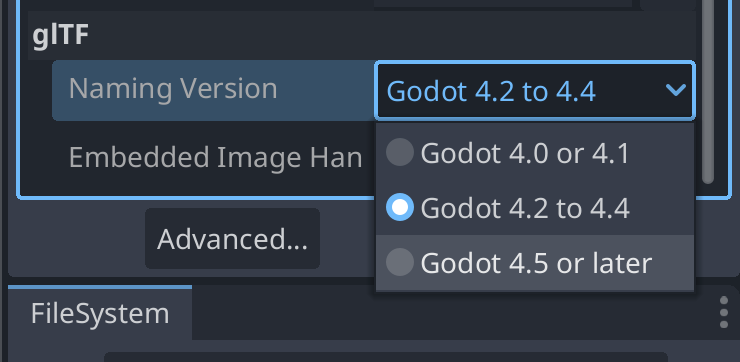
已修正 3D 模型匯入器,能正確處理骨架階層中的非關節節點(GH-104184)。為了維持相容性,預設會以既有行為匯入既有檔案(GH-107352)。新的 .gltf、.glb、.blend 與 .fbx 檔(沒有對應的 .import 檔)將以新行為匯入。不過對既有檔案而言,若你想使用新行為,必須在「匯入」面板底部變更「Naming Version」選項:
核心
備註
Resource.duplicate(true) (which performs deep duplication) now only duplicates resources internal to the resource file it's called on. In 4.4, this duplicated everything instead, including external resources. If you were deep-duplicating a resource that contained references to other external resources, those external resources aren't duplicated anymore. You must call Resource.duplicate_deep(RESOURCE_DEEP_DUPLICATE_ALL) instead to keep the old behavior.
備註
ProjectSettings.add_property_info()
now prints a warning when the dictionary parameter has missing keys or invalid keys.
Most importantly, it will now warn when a usage key is passed, as this key is not used.
This was also the case before 4.5, but it was silently ignored instead.
As a reminder, to set property usage information correctly, you must use
ProjectSettings.set_as_basic(),
ProjectSettings.set_restart_if_changed(),
or ProjectSettings.set_as_internal() instead.
備註
在 C# 中,StringExtensions.PathJoin 現在會在原始字串為空或附加的路徑以分隔符開頭時,避免多加一個路徑分隔符(GH-105281)。
備註
在 C# 中,當原始字串不含副檔名時,StringExtensions.GetExtension 現在會回傳空字串而非原始字串(GH-108041)。
備註
在 C# 中,Quaternion(Vector3, Vector3) 建構式現在能正確建立代表兩輸入向量間最短弧的四元數。先前在某些輸入下會回傳錯誤的值(GH-107618)。
物理
備註
當 3D 物理引擎設定為 Jolt Physics 時,預設情況下現在會永遠回報 Area3D 與靜態物體之間的重疊,因為已移除專案設定 physics/jolt_physics_3d/simulation/areas_detect_static_bodies ( GH-105746 )。若你仍想忽略這類重疊,請改為調整 Area3D 或該靜態物體的碰撞遮罩或圖層。
文字
備註
在 GDScript 中,呼叫 RichTextLabel::add_image 與 RichTextLabel::update_image 仍可運作,但 size_in_percent 參數現在會用作 width_in_percent 的值,且 height_in_percent 預設為 false (GH-107347 )。若要恢復先前行為,你可以將 height_in_percent 明確設為與原先傳入的 size_in_percent 相同的值。