建立腳本範本
Godot 提供了腳本範本的功能,建立新腳本時可於 腳本建立視窗 中選用:
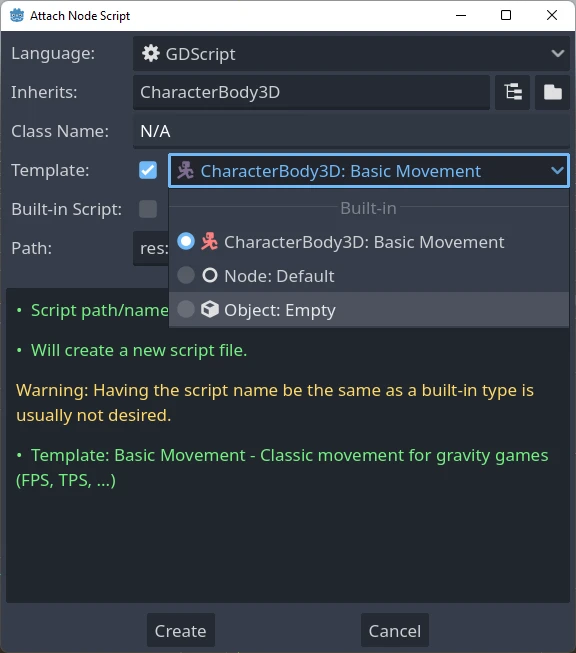
Godot 編輯器內建一組腳本範本,你也可以自行新增範本,並設定為專案或全編輯器預設使用。
範本會連結到特定節點型別,因此建立腳本時只會顯示對應該節點型別或其父類別的範本。例如,如果你為 CharacterBody3D 建立腳本,僅會看到為 CharacterBody3D、Node3D 或 Node 定義的範本。
範本位置
腳本範本有兩種管理方式。
編輯器定義範本
這類範本可用於所有專案,檔案路徑依作業系統而異:
Windows:
%APPDATA%\Godot\script_templates\Linux:
$HOME/.config/godot/script_templates/macOS:
$HOME/Library/Application Support/Godot/script_templates/
如果你不是從 Godot 官方網站下載(例如從 Steam 安裝),資料夾位置可能會不同。你可以在 Godot 編輯器裡選擇「編輯器 > 開啟編輯器資料/設定資料夾」,檔案總管開啟的資料夾中即包含 script_templates 資料夾。
專案定義範本
預設會在專案的 res://script_templates/ 資料夾中搜尋範本。你可以透過編輯器或程式碼修改專案設定 Editor > Script > Templates Search Path 來變更路徑。
若專案內沒有 script_templates 資料夾,則不會載入任何專案範本。
範本組織與命名
編輯器與專案範本的檔案結構如下:
template_path/node_type/file.extension
說明:
template_path是前面提到的兩個路徑其中之一。node_type為此範本適用的節點型別(如 Node 或 CharacterBody3D),區分大小寫。腳本若沒放在正確的型別資料夾下,則不會被偵測到。file是你自訂的範本名稱(如platformer_movement或smooth_camera)。extension為副檔名,對應語言類型(GDScript 用gd,C# 用cs)。
例如:
script_templates/Node/smooth_camera.gdscript_templates/CharacterBody3D/platformer_movement.gd
預設行為與覆寫方式
預設情況下:
範本名稱預設為檔案名稱(去除副檔名,格式化顯示)
說明欄位為空
縮排為 4 個空白字元
不會設定為該節點型別的預設範本
可以在檔案開頭加入中繼標頭來自訂此行為,例如:
# meta-name: Platformer movement
# meta-description: Predefined movement for classical platformers
# meta-default: true
# meta-space-indent: 4
// meta-name: Platformer movement
// meta-description: Predefined movement for classical platformers
// meta-default: true
// meta-space-indent: 4
此範例中,名稱會設定為「平台移動」,並帶有自訂說明,且會成為儲存該檔案之節點型別的預設範本。
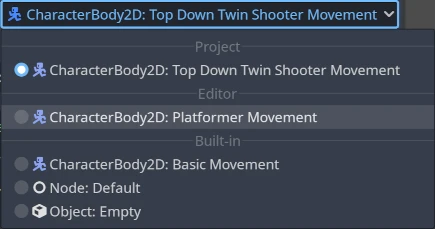
以下範例展示了如何在編輯器與專案層級使用自訂範本:
備註
腳本範本的副檔名與一般腳本相同,這可能會導致 Godot 將其誤當作專案腳本。為避免此問題,請在範本資料夾內建立一個空的 .gdignore 檔案,這樣該資料夾就不會在專案檔案系統中出現,但仍可用外部編輯器隨時修改範本。
小訣竅
預設情況下,專案資料夾內所有 C# 檔案都會被編譯。請手動將腳本範本排除於 C# 專案外,以避免編譯錯誤。詳情請參考 Microsoft 文件:從建置中排除檔案。
你可以建立與專案級等同的編輯器級範本,且名稱可與內建範本重複,所有範本都會在新腳本視窗中顯示。
預設範本
若要覆蓋預設範本,請在 Node 目錄(或更特定的型別目錄)下新增自訂範本,並於檔案開頭加上 meta-default: true 標頭。
同一節點型別同時只能有一個預設範本。
以下提供 GDScript 與 C# 的基本節點 Default 範本內容,可作為撰寫自訂範本的參考基礎:
# meta-description: Base template for Node with default Godot cycle methods

extends _BASE_


# Called when the node enters the scene tree for the first time.
func _ready() -> void:
    pass # Replace with function body.


# Called every frame. 'delta' is the elapsed time since the previous frame.
func _process(delta: float) -> void:
    pass
// meta-description: Base template for Node with default Godot cycle methods

using _BINDINGS_NAMESPACE_;
using System;

public partial class _CLASS_ : _BASE_
{
    // Called when the node enters the scene tree for the first time.
    public override void _Ready()
    {
    }

    // Called every frame. 'delta' is the elapsed time since the previous frame.
    public override void _Process(double delta)
    {
    }
}
Godot 編輯器內建多組實用的節點專用範本,例如 CharacterBody2D 與 CharacterBody3D 的 basic_movement,以及 EditorPlugin 的 plugin 範本。
範本預留字列表
以下為目前支援的所有內建範本預留字列表與說明。
基本預留字
預留字 |
說明 |
|---|---|
|
Godot 命名空間名稱(僅 C# 使用)。 |
|
新類別名稱。 |
|
新類別名稱的 |
|
新腳本繼承的基礎型別。 |
|
縮排預留字。實際縮排空白字元的種類與數量,會根據 EditorSettings 中的 |
型別預留字
Godot 3.x 以前有支援型別提示的預留字(如 %INT_TYPE%、%STRING_TYPE%、%FLOAT_TYPE%、%VOID_RETURN%),套用範本時會自動取代。
這些預留字在 Godot 4.x 已不再適用,但若於 EditorSettings 關閉 text_editor/completion/add_type_hints,則下列數種基本型別的參數與回傳型別提示會自動移除:
intStringArray[String]floatvoid:=會自動轉換為=