利用訊號產生實例
訊號提供了一種讓遊戲物件之間解耦的方法,讓你不必強制節點有固定的排列方式。當你發現自己在用 get_parent() 時,通常就可以考慮改用訊號。直接引用節點的父節點,代表你無法輕易將該節點移動到場景樹中的其他位置。這在執行時產生實例,並希望把它們放到場景樹任意位置時,特別容易造成問題。
下面我們將舉一個這種情境的例子:發射子彈。
射擊範例
假設有一個玩家角色可以旋轉並朝滑鼠方向射擊。每次點擊滑鼠按鈕時,我們就會在玩家的位置建立一顆子彈的實例。詳情請參考 編輯實體。
我們將用 Area2D 節點作為子彈,它會以指定的速度直線移動:
extends Area2D

var velocity = Vector2.RIGHT

func _physics_process(delta):
    position += velocity * delta
using Godot;

public partial class Bullet : Area2D
{
    public Vector2 Velocity { get; set; } = Vector2.Right;

    public override void _PhysicsProcess(double delta)
    {
        Position += Velocity * (float)delta;
    }
}
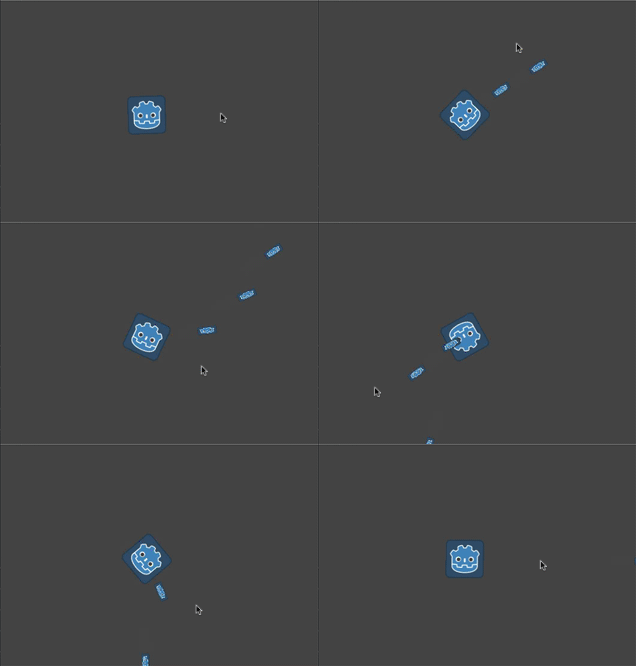
不過,如果子彈被加為玩家的子節點,當角色旋轉時,子彈仍會「跟著」玩家移動:
我們其實需要子彈獨立於玩家的移動——一旦射出,子彈就應該自行沿直線飛行,且玩家再也無法影響它們。與其把子彈加到玩家底下,不如加到「主要」遊戲場景(可能是玩家的父節點或更上層)作為子節點更合適。
你可以直接把子彈加到主場景來達到這個效果:
var bullet_instance = Bullet.instantiate()
get_parent().add_child(bullet_instance)
Node bulletInstance = Bullet.Instantiate();
GetParent().AddChild(bulletInstance);
但這又會帶來另一個問題。如果你想獨立測試「Player」場景,射擊時就會當機,因為找不到父節點。這讓獨立測試玩家程式碼變得困難,而且如果你未來更動主場景的節點結構,玩家的父節點也可能就不再適合作為接收子彈的那個節點。
解決方法是使用訊號,讓玩家「發射」子彈。這樣玩家就不需要「知道」子彈後續發生了什麼——只要有節點連接到這個訊號,就能「接收」子彈並負責產生它們。
以下是玩家角色用訊號發射子彈的程式碼:
extends Sprite2D

signal shoot(bullet, direction, location)

var Bullet = preload("res://bullet.tscn")

func _input(event):
    if event is InputEventMouseButton:
        if event.button_index == MOUSE_BUTTON_LEFT and event.pressed:
            shoot.emit(Bullet, rotation, position)

func _process(delta):
    look_at(get_global_mouse_position())
using Godot;

public partial class Player : Sprite2D
{
    [Signal]
    public delegate void ShootEventHandler(PackedScene bullet, float direction, Vector2 location);

    private PackedScene _bullet = GD.Load<PackedScene>("res://Bullet.tscn");

    public override void _Input(InputEvent @event)
    {
        if (@event is InputEventMouseButton mouseButton)
        {
            if (mouseButton.ButtonIndex == MouseButton.Left && mouseButton.Pressed)
            {
                EmitSignal(SignalName.Shoot, _bullet, Rotation, Position);
            }
        }
    }

    public override void _Process(double delta)
    {
        LookAt(GetGlobalMousePosition());
    }
}
在主場景中,我們要將玩家的訊號連接起來(會出現在「節點」分頁的檢查器裡)
func _on_player_shoot(Bullet, direction, location):
    var spawned_bullet = Bullet.instantiate()
    add_child(spawned_bullet)
    spawned_bullet.rotation = direction
    spawned_bullet.position = location
    spawned_bullet.velocity = spawned_bullet.velocity.rotated(direction)
private void OnPlayerShoot(PackedScene bullet, float direction, Vector2 location)
{
    var spawnedBullet = bullet.Instantiate<Bullet>();
    AddChild(spawnedBullet);
    spawnedBullet.Rotation = direction;
    spawnedBullet.Position = location;
    spawnedBullet.Velocity = spawnedBullet.Velocity.Rotated(direction);
}
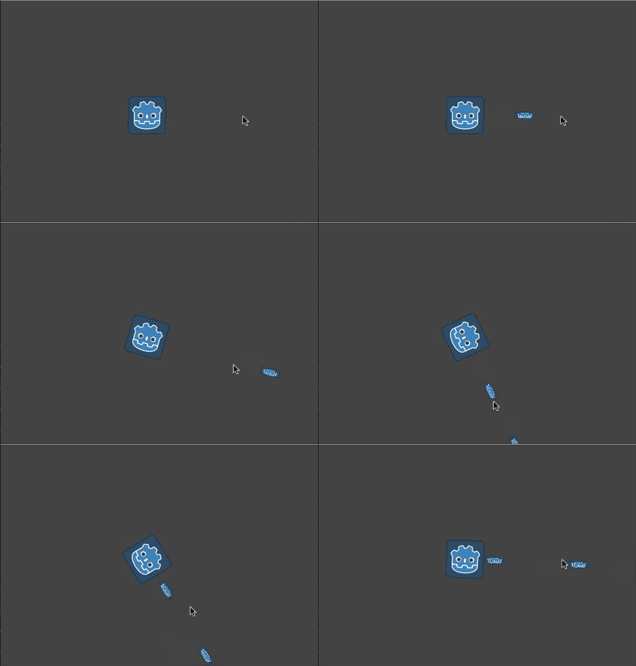
現在子彈將獨立於玩家旋轉,自行運動: