資源
節點與資源
在這個教學之前,我們都專注於 Godot 中的 Node 類別,因為你會用節點來編寫行為,而大多數引擎功能也都依賴於此。但還有一種同樣重要的資料型別:Resource。
節點 提供功能:例如繪製精靈(Sprite)、3D 模型、模擬物理、排列使用者介面等;資源 則是 資料容器,它們本身不會執行任何動作,而是由節點來使用資源中的資料。
Godot 從磁碟儲存或載入的任何內容都是資源。無論是場景(.tscn 或 .scn 檔)、圖片、腳本……以下是一些 Resource 的例子:
當引擎從硬碟載入資源時,只會載入一次。如果該資源的實體已經存在於記憶體中,再次載入同一資源時都會回傳同一份拷貝。由於資源僅包含資料,因此不需要重複複製。
每個物件,無論是節點還是資源,都可以匯出屬性。屬性有許多型別,例如字串、整數、Vector2 等,而這些型別都可以成為資源。這代表節點和資源都可以將其他資源作為屬性來包含:
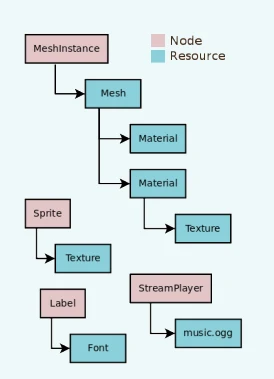
外部資源與內建資源
資源有兩種保存方式:
外部,存放在場景之外,作為獨立檔案儲存於硬碟上。
內建,儲存在所屬的
.tscn或.scn場景檔案之內。
更具體來說,以下範例是在 Sprite2D 節點中指派了一個 Texture2D:
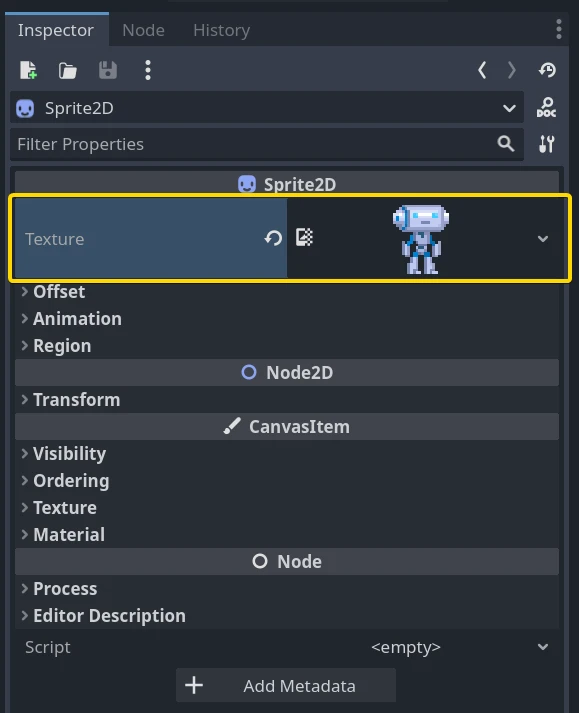
點擊資源預覽圖可以查看該資源的屬性。
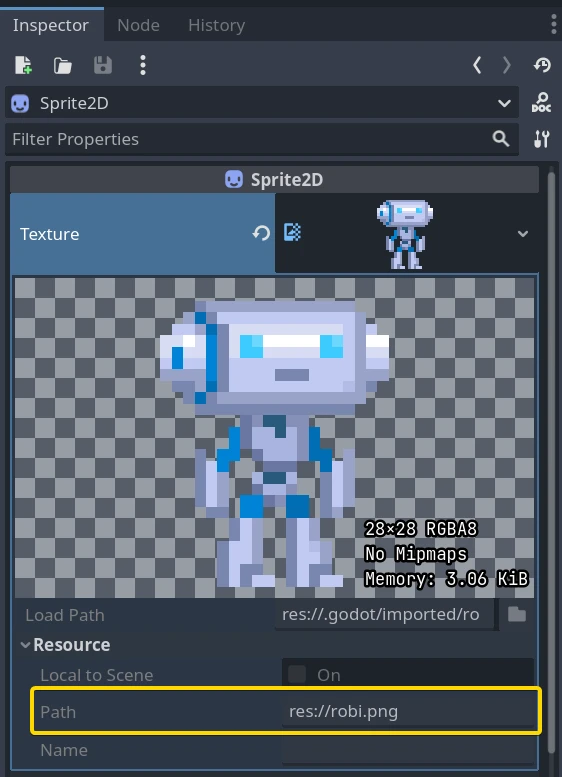
Path 屬性會顯示資源的來源。在這個例子中,來源是一個名為 robi.png 的 PNG 圖片。當資源來自這類檔案時,屬於外部資源;如果將 Path 清空或置空,該資源就變成內建資源。
內建資源與外部資源的切換會在你儲存場景時發生。在上述例子中,如果你將 path 設為空字串並儲存,Godot 會把圖片嵌入到 .tscn 場景檔案內。
備註
即使你儲存的是內建資源,當多次實例化場景時,引擎也只會載入資源的一份拷貝。
從程式碼載入資源
要從程式碼中載入資源有兩種方式。第一種是隨時呼叫 load() 函式:
func _ready():
    # Godot loads the Resource when it reads this very line.
    var imported_resource = load("res://robi.png")
    $sprite.texture = imported_resource
public override void _Ready()
{
    // Godot loads the Resource when it executes this line.
    var texture = GD.Load<Texture>("res://Robi.png");
    var sprite = GetNode<Sprite2D>("sprite");
    sprite.Texture = texture;
}
你也可以使用 preload 預載資源。和 load 不同,這個函式會在編譯階段就從硬碟讀取檔案並載入。因此,preload 不能使用變數路徑,只能用常數字串。
func _ready():
    # Godot loads the resource at compile-time
    var imported_resource = preload("res://robi.png")
    get_node("sprite").texture = imported_resource
// 'preload()' is unavailable in C Sharp.
載入場景
場景也是一種資源,但有個地方要特別注意。儲存到硬碟上的場景是 PackedScene 型別的資源。也就是說,場景被包裝在一個 Resource 物件中。
若要取得場景的實體,必須使用 PackedScene.instantiate() 方法。
func _on_shoot():
        var bullet = preload("res://bullet.tscn").instantiate()
        add_child(bullet)
private PackedScene _bulletScene = GD.Load<PackedScene>("res://Bullet.tscn");

private void OnShoot()
{
    Node bullet = _bulletScene.Instantiate();
    AddChild(bullet);
}
這個方法會依照場景階層建立節點、設定好屬性,然後回傳場景的根節點。你可以將它加入為任何其他節點的子節點。
這種做法有不少優點。由於 PackedScene.instantiate() 相當快速,你可以隨時建立新的敵人、子彈、特效等,而不用每次都從硬碟重新載入。請記得,圖片、網格等資源在所有場景實體之間都是共用的。
釋放資源
當 Resource 不再被使用時,會自動釋放自身。在大多數情況下,資源是被節點所持有的,因此當你釋放節點時,只要沒有其他節點正在使用該資源,引擎也會一併釋放它。
建立自訂資源
如同 Godot 中的任何物件,使用者也能為資源撰寫腳本。資源腳本繼承了在物件屬性與序列化文字或二進位資料(*.tres、*.res)間自由轉換的能力,也繼承自 RefCounted 型別的引用計數記憶體管理。
這相較於其他資料結構(如 JSON、CSV 或自訂 TXT 檔案)有許多明顯優勢。使用者只能將這些檔案匯入為 Dictionary 來解析。而 Resource 最大的不同點在於它繼承了 Object、RefCounted、以及 Resource 的特性:
可以定義常數,免去從其他資料欄位或物件取得常數的需求。
可以定義方法,包括為屬性設定 setter/getter。這能將底層資料抽象化並封裝起來,即使資源腳本結構未來變動,使用該資源的遊戲內容不必跟著改動。
可以定義訊號,讓資源在其資料變動時觸發對應的反應。
可以明確定義屬性,讓使用者確信資料一定存在。
資源的自動序列化與反序列化是 Godot Engine 的內建功能,使用者不需要自訂實作資源檔案資料的匯入/匯出。
資源甚至可以遞迴序列化子資源,因此你可以設計更複雜的資料結構。
使用者可以將資源儲存為適合版本控制的文字檔格式(*.tres)。遊戲匯出時,Godot 會將資源檔案序列化成二進位檔(*.res),提升速度與壓縮率。
Godot Engine 的屬性檢查器(Inspector)可以直接顯示與編輯資源檔案,因此使用者通常不需要自訂資料的視覺化或編輯邏輯。只要在檔案系統(FileSystem) Dock 中雙擊資源檔,或在屬性檢查器裡點擊資料夾圖示並於對話框中開啟檔案即可。
除了基本 Resource 之外,也能擴充 其他 資源型別。
Godot 讓你可以在屬性檢查器中輕鬆建立自訂資源。
在屬性檢查器(Inspector)中建立一個 Resource 物件。只要腳本有繼承該型別,也能建立衍生自 Resource 的型別。
在屬性檢查器中將
script屬性設為你的腳本。
此時檢查器會顯示你的資源腳本的自訂屬性。若編輯了這些值並儲存資源,檢查器也會將自訂屬性一併序列化!要在檢查器中儲存資源,請點擊檢查器頂端的儲存圖示,並選擇「儲存」或「另存新檔…」。
若腳本語言支援 腳本類別,這個流程會更簡潔。只要在腳本內定義類別名稱,該類別就會自動出現在屬性檢查器的建立對話框,並自動將你的腳本加到你建立的資源物件上。
讓我們看個例子。先建立一個 Resource 並命名為 bot_stats,它會以 bot_stats.tres 的全名出現在你的檔案列表中。沒有附加腳本的話沒什麼用,所以我們來加點資料和邏輯吧!附加名為 bot_stats.gd 的腳本(或新建一個腳本再拖曳進去)。
備註
若要讓新的資源類別出現在「建立資源」介面中,你需要在 GDScript 中提供類別名稱,或在 C# 中使用 [GlobalClass] 屬性。
class_name BotStats
extends Resource

@export var health: int
@export var sub_resource: Resource
@export var strings: PackedStringArray

# Make sure that every parameter has a default value.
# Otherwise, there will be problems with creating and editing
# your resource via the inspector.
func _init(p_health = 0, p_sub_resource = null, p_strings = []):
    health = p_health
    sub_resource = p_sub_resource
    strings = p_strings
// BotStats.cs
using Godot;

namespace ExampleProject
{
    [GlobalClass]
    public partial class BotStats : Resource
    {
        [Export]
        public int Health { get; set; }

        [Export]
        public Resource SubResource { get; set; }

        [Export]
        public string[] Strings { get; set; }

        // Make sure you provide a parameterless constructor.
        // In C#, a parameterless constructor is different from a
        // constructor with all default values.
        // Without a parameterless constructor, Godot will have problems
        // creating and editing your resource via the inspector.
        public BotStats() : this(0, null, null) {}

        public BotStats(int health, Resource subResource, string[] strings)
        {
            Health = health;
            SubResource = subResource;
            Strings = strings ?? System.Array.Empty<string>();
        }
    }
}
現在,建立一個 CharacterBody3D,命名為 Bot,然後加上下列腳本:
extends CharacterBody3D

@export var stats: Resource

func _ready():
    # Uses an implicit, duck-typed interface for any 'health'-compatible resources.
    if stats:
        stats.health = 10
        print(stats.health)
        # Prints "10"
// Bot.cs
using Godot;

namespace ExampleProject
{
    public partial class Bot : CharacterBody3D
    {
        [Export]
        public Resource Stats;

        public override void _Ready()
        {
            if (Stats is BotStats botStats)
            {
                GD.Print(botStats.Health); // Prints '10'.
            }
        }
    }
}
現在,選擇我們命名為 bot 的 CharacterBody3D 節點,然後將 bot_stats.tres 資源拖曳到屬性檢查器上。應該會印出 10!當然,這個做法可以延伸到更高階的功能,只要你理解 整個原理,資源系統的其他應用也就能迎刃而解。
備註
資源腳本很像 Unity 的 ScriptableObject。屬性檢查器本身就支援自訂資源。若有需要,用戶也可以設計自己基於 Control 的工具腳本,並與 EditorPlugin 搭配,為資料打造自訂的視覺化介面與編輯器。
Unreal Engine 的 DataTable 和 CurveTable 也能很容易用資源腳本重現。DataTable 就是將字串對應到自訂結構,類似於 Dictionary 將字串對應到一個自訂資源腳本。
# bot_stats_table.gd
extends Resource

const BotStats = preload("bot_stats.gd")

var data = {
    "GodotBot": BotStats.new(10), # Creates instance with 10 health.
    "DifferentBot": BotStats.new(20) # A different one with 20 health.
}

func _init():
    print(data)
using Godot;

[GlobalClass]
public partial class BotStatsTable : Resource
{
    private Godot.Collections.Dictionary<string, BotStats> _stats = new Godot.Collections.Dictionary<string, BotStats>();

    public BotStatsTable()
    {
        _stats["GodotBot"] = new BotStats(10); // Creates instance with 10 health.
        _stats["DifferentBot"] = new BotStats(20); // A different one with 20 health.
        GD.Print(_stats);
    }
}
除了直接在程式內寫死 Dictionary 值之外,你也可以:
從試算表匯入資料並產生鍵值對。
在編輯器內設計視覺化介面,並建立外掛程式,讓你在開啟這類資源時能將該視覺化介面加到屬性檢查器中。
警告
請注意,資源檔(*.tres/*.res)會在檔案中存放它們所使用的腳本路徑。載入時,會依此路徑抓取並載入該腳本,作為其型別的擴充。因此,嘗試指定腳本的內部類別(亦即在 GDScript 中使用 class 關鍵字定義的內部類別)將無法運作。Godot 不會正確序列化腳本內部類別的自訂屬性。
在下方例子中,Godot 會嘗試載入 Node 腳本,發現它沒有繼承 Resource,因型別不相容而導致資源物件載入腳本失敗。
extends Node

class MyResource:
    extends Resource
    @export var value = 5

func _ready():
    var my_res = MyResource.new()

    # This will NOT serialize the 'value' property.
    ResourceSaver.save(my_res, "res://my_res.tres")
using Godot;

public partial class MyNode : Node
{
    [GlobalClass]
    public partial class MyResource : Resource
    {
        [Export]
        public int Value { get; set; } = 5;
    }

    public override void _Ready()
    {
        var res = new MyResource();

        // This will NOT serialize the 'Value' property.
        ResourceSaver.Save(res, "res://MyRes.tres");
    }
}