Attention: Here be dragons
This is the latest
(unstable) version of this documentation, which may document features
not available in or compatible with released stable versions of Godot.
Checking the stable version of the documentation...
플레이어 죽이기
적에게 점프하여 그들을 죽일 수는 있지만, 플레이어는 죽지 않죠. 이것을 수정해봅시다.
우리는 적들을 밟는 것과는 별개로 어딘가에 충돌되었는가를 감지하고 싶습니다. 플레이어가 공중이 아니라 바닥에서 움직이고 있을 때 죽길 바랍니다. 두 종류의 콜리전을 구별할 수 있는 벡터 연산을 수행할 수도 있지만 이 경우에 대신, 히트박스에 대해 잘 작동하는 Area3D 노드를 사용할 것입니다.
Area 노드를 이용한 히트박스
player.tscn 씬으로 돌아가서 새로운 자식 노드인 Area3D를 추가합니다. 이것의 이름을 MobDetector이라고 변경한 후 CollisionShape3D 노드를 이것의 자식으로 추가합니다.
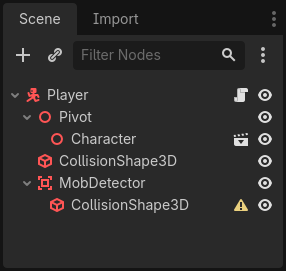
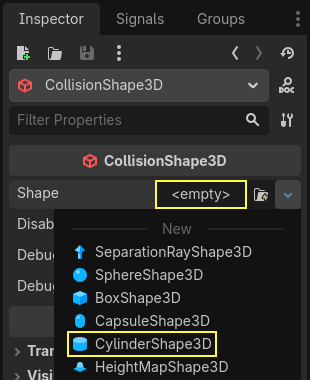
인스펙터 창에서 이것에 실린더 모양을 추가합니다.
플레이어가 지상에 있거나 지상에 가까울 때만 콜리전이 일어나도록 만들 수 있는 트릭이 있습니다. 실린더의 높이를 감소시키고 캐릭터의 위로 이동시킵니다. 이 방법으로 플레이어가 점프할 때 실린더는 적들과 충돌하기에는 너무 높을 것입니다.
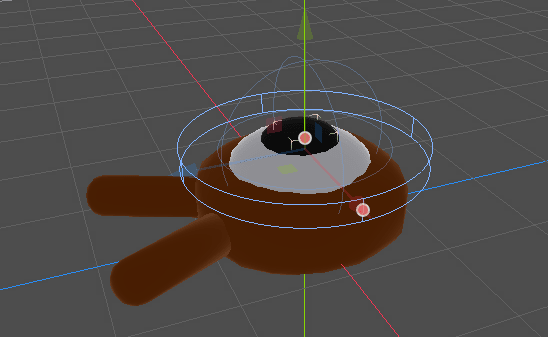
또, 원통이 구체보다 더 넓게 만들고 싶다면 플레이어가 괴물의 콜리전 박스 위에서 충돌하고 밀려나기 전에 히트시키면 됩니다.
실린더가 넓어질 수록 플레이어는 더 죽기 쉬워집니다.
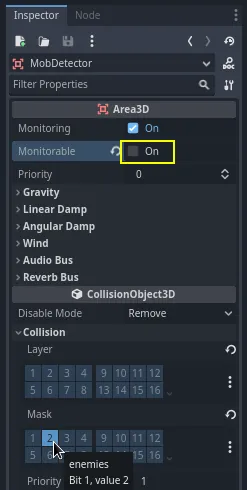
다음으로, MobDetector 노드를 다시 선택합니다. 그리고 인스펙터 창에서 이것의 Monitorable 프로퍼티를 끕니다. 이것은 다른 피직스(물리)노드들은 공간을 감지하지 못하게 막아줍니다. 참고로 Monitoring 프로퍼티는 콜리전을 감지할 수 있게 해줍니다. 그런다음 Collision -> Layer를 제거하고 마스크를 "enemies" 레이어로 설정합니다.
공간이 콜리전을 감지할 때 시그널을 발생시킵니다. 이들 중 하나를 Player 노드에 연결하겠습니다. MobDetector를 선택하고 인스펙터*창의 *노드 탭으로 가 body_entered 시그널을 더블 클릭하여 Player에 연결합니다.
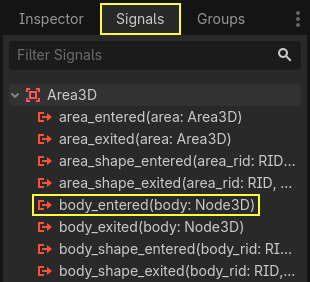
MobDetector는 CharacterBody3D 또는 RigidBody3D 노드가 들어왔을 때 body_entered라는 시그널을 발생시킬 것입니다. 이것은 "enemies" 라는 물리 레이어로서만 마스크되어 있기 때문에 Mob 노드만 감지할 것입니다.
코드별로, 나중에 플레이어를 파괴하고 게임을 종료하는데 사용되는 시그널을 방출시키는 두가지 일을 해야합니다. 이러한 연산들은 설명 레이블을 코드에 넣는데 도움을 주는``die()``함수로 래핑할 수 있습니다.
# Emitted when the player was hit by a mob.
# Put this at the top of the script.
signal hit


# And this function at the bottom.
func die():
    hit.emit()
    queue_free()


func _on_mob_detector_body_entered(body):
    die()
// Don't forget to rebuild the project so the editor knows about the new signal.

// Emitted when the player was hit by a mob.
[Signal]
public delegate void HitEventHandler();

// ...

private void Die()
{
    EmitSignal(SignalName.Hit);
    QueueFree();
}

// We also specified this function name in PascalCase in the editor's connection window.
private void OnMobDetectorBodyEntered(Node3D body)
{
    Die();
}
게임 실행하기
게임을 종료하기 위해 Player의 hit시그널을 사용할 수 있습니다. 이것을 Main 노드에 연결하고 반응에 따라 MobTimer를 중지하는 것이 해야할 전부입니다.
main.tscn을 열고 Player 노드를 선택합니다. 그리고 노드독에서 이것의 hit시그널을 Main 노드에 연결합니다.
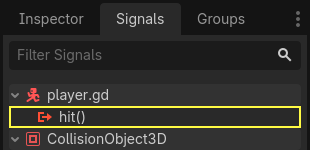
_on_player_hit() 함수에서 타이머를 얻고 중단합니다.
func _on_player_hit():
    $MobTimer.stop()
// We also specified this function name in PascalCase in the editor's connection window.
private void OnPlayerHit()
{
    GetNode<Timer>("MobTimer").Stop();
}
만약 지금 게임을 시도하면 괴물은 플레이어가 죽을 때 소환을 멈출 것입니다. 그리고 나머지는 화면에서 사라질 것입니다.
또한 게임이 더 이상 충돌하거나 플레이어가 죽을 때 오류를 표시하지 않는 다는 것을 알 수 있습니다. MobTimer를 멈췄기 때문에 _on_mob_timer_timeout() 함수를 더 이상 발생시키지 않습니다.
또한 적이 플레이어와의 충돌하여 사망하는 것은 Player와 Mob의 콜리전 모양의 크기와 위치에 따라 달라집니다. 이것들의 위치와 크기를 조절하여 단단한 게임의 느낌을 달성할 수 있습니다.
아직은 조금 서툴지만 그래도 완전한 3D 게임의 프로토타입을 만들었다는 것에 자랑스워하세요.
자, 이제 점수와 게임을 재시작 할 수있는 옵션을 추가하겠습니다. 최소한의 애니메이션으로 게임이 더 생생해 보이도록 만들 수 있습니다.
코드 검사점
여기에 Main, Mob, Player 노드를 위한 전체 스크립트가 있습니다. 이것을 참조해보세요. 이것으로 여러분의 코드와 비교하고 확인해볼 수 있습니다.
main.gd 부터 시작합니다.
extends Node

@export var mob_scene: PackedScene


func _on_mob_timer_timeout():
    # Create a new instance of the Mob scene.
    var mob = mob_scene.instantiate()

    # Choose a random location on the SpawnPath.
    # We store the reference to the SpawnLocation node.
    var mob_spawn_location = get_node("SpawnPath/SpawnLocation")
    # And give it a random offset.
    mob_spawn_location.progress_ratio = randf()

    var player_position = $Player.position
    mob.initialize(mob_spawn_location.position, player_position)

    # Spawn the mob by adding it to the Main scene.
    add_child(mob)

func _on_player_hit():
    $MobTimer.stop()
using Godot;

public partial class Main : Node
{
    [Export]
    public PackedScene MobScene { get; set; }

    private void OnMobTimerTimeout()
    {
        // Create a new instance of the Mob scene.
        Mob mob = MobScene.Instantiate<Mob>();

        // Choose a random location on the SpawnPath.
        // We store the reference to the SpawnLocation node.
        var mobSpawnLocation = GetNode<PathFollow3D>("SpawnPath/SpawnLocation");
        // And give it a random offset.
        mobSpawnLocation.ProgressRatio = GD.Randf();

        Vector3 playerPosition = GetNode<Player>("Player").Position;
        mob.Initialize(mobSpawnLocation.Position, playerPosition);

        // Spawn the mob by adding it to the Main scene.
        AddChild(mob);
    }

    private void OnPlayerHit()
    {
        GetNode<Timer>("MobTimer").Stop();
    }
}
다음은 mob.gd입니다.
extends CharacterBody3D

# Minimum speed of the mob in meters per second.
@export var min_speed = 10.0
# Maximum speed of the mob in meters per second.
@export var max_speed = 18.0

# Emitted when the player jumped on the mob
signal squashed

func _physics_process(_delta):
    move_and_slide()

# This function will be called from the Main scene.
func initialize(start_position, player_position):
    # We position the mob by placing it at start_position
    # and rotate it towards player_position, so it looks at the player.
    look_at_from_position(start_position, player_position, Vector3.UP)
    # Rotate this mob randomly within range of -45 and +45 degrees,
    # so that it doesn't move directly towards the player.
    rotate_y(randf_range(-PI / 4, PI / 4))

    # We calculate a random speed (float)
    var random_speed = randf_range(min_speed, max_speed)
    # We calculate a forward velocity that represents the speed.
    velocity = Vector3.FORWARD * random_speed
    # We then rotate the velocity vector based on the mob's Y rotation
    # in order to move in the direction the mob is looking.
    velocity = velocity.rotated(Vector3.UP, rotation.y)

func _on_visible_on_screen_notifier_3d_screen_exited():
    queue_free()

func squash():
    squashed.emit()
    queue_free() # Destroy this node
using Godot;

public partial class Mob : CharacterBody3D
{
    // Emitted when the played jumped on the mob.
    [Signal]
    public delegate void SquashedEventHandler();

    // Minimum speed of the mob in meters per second
    [Export]
    public float MinSpeed { get; set; } = 10.0f;
    // Maximum speed of the mob in meters per second
    [Export]
    public float MaxSpeed { get; set; } = 18.0f;

    public override void _PhysicsProcess(double delta)
    {
        MoveAndSlide();
    }

    // This function will be called from the Main scene.
    public void Initialize(Vector3 startPosition, Vector3 playerPosition)
    {
        // We position the mob by placing it at startPosition
        // and rotate it towards playerPosition, so it looks at the player.
        LookAtFromPosition(startPosition, playerPosition, Vector3.Up);
        // Rotate this mob randomly within range of -45 and +45 degrees,
        // so that it doesn't move directly towards the player.
        RotateY((float)GD.RandRange(-Mathf.Pi / 4.0, Mathf.Pi / 4.0));

        // We calculate a random speed (float)
        float randomSpeed = GD.RandRange(MinSpeed, MaxSpeed);
        // We calculate a forward velocity that represents the speed.
        Velocity = Vector3.Forward * randomSpeed;
        // We then rotate the velocity vector based on the mob's Y rotation
        // in order to move in the direction the mob is looking.
        Velocity = Velocity.Rotated(Vector3.Up, Rotation.Y);
    }

    public void Squash()
    {
        EmitSignal(SignalName.Squashed);
        QueueFree(); // Destroy this node
    }

    private void OnVisibilityNotifierScreenExited()
    {
        QueueFree();
    }
}
마지막으로 가장 긴 스크립트인 player.gd입니다:
extends CharacterBody3D

signal hit

# How fast the player moves in meters per second
@export var speed = 14
# The downward acceleration while in the air, in meters per second squared.
@export var fall_acceleration = 75
# Vertical impulse applied to the character upon jumping in meters per second.
@export var jump_impulse = 20
# Vertical impulse applied to the character upon bouncing over a mob
# in meters per second.
@export var bounce_impulse = 16

var target_velocity = Vector3.ZERO


func _physics_process(delta):
    # We create a local variable to store the input direction
    var direction = Vector3.ZERO

    # We check for each move input and update the direction accordingly
    if Input.is_action_pressed("move_right"):
        direction.x = direction.x + 1
    if Input.is_action_pressed("move_left"):
        direction.x = direction.x - 1
    if Input.is_action_pressed("move_back"):
        # Notice how we are working with the vector's x and z axes.
        # In 3D, the XZ plane is the ground plane.
        direction.z = direction.z + 1
    if Input.is_action_pressed("move_forward"):
        direction.z = direction.z - 1

    # Prevent diagonal moving fast af
    if direction != Vector3.ZERO:
        direction = direction.normalized()
        # Setting the basis property will affect the rotation of the node.
        $Pivot.basis = Basis.looking_at(direction)

    # Ground Velocity
    target_velocity.x = direction.x * speed
    target_velocity.z = direction.z * speed

    # Vertical Velocity
    if not is_on_floor(): # If in the air, fall towards the floor. Literally gravity
        target_velocity.y = target_velocity.y - (fall_acceleration * delta)

    # Jumping.
    if is_on_floor() and Input.is_action_just_pressed("jump"):
        target_velocity.y = jump_impulse

    # Iterate through all collisions that occurred this frame
    # in C this would be for(int i = 0; i < collisions.Count; i++)
    for index in range(get_slide_collision_count()):
        # We get one of the collisions with the player
        var collision = get_slide_collision(index)

        # If the collision is with ground
        if collision.get_collider() == null:
            continue

        # If the collider is with a mob
        if collision.get_collider().is_in_group("mob"):
            var mob = collision.get_collider()
            # we check that we are hitting it from above.
            if Vector3.UP.dot(collision.get_normal()) > 0.1:
                # If so, we squash it and bounce.
                mob.squash()
                target_velocity.y = bounce_impulse
                # Prevent further duplicate calls.
                break

    # Moving the Character
    velocity = target_velocity
    move_and_slide()

# And this function at the bottom.
func die():
    hit.emit()
    queue_free()

func _on_mob_detector_body_entered(body):
    die()
using Godot;

public partial class Player : CharacterBody3D
{
    // Emitted when the player was hit by a mob.
    [Signal]
    public delegate void HitEventHandler();

    // How fast the player moves in meters per second.
    [Export]
    public int Speed { get; set; } = 14;
    // The downward acceleration when in the air, in meters per second squared.
    [Export]
    public int FallAcceleration { get; set; } = 75;
    // Vertical impulse applied to the character upon jumping in meters per second.
    [Export]
    public int JumpImpulse { get; set; } = 20;
    // Vertical impulse applied to the character upon bouncing over a mob in meters per second.
    [Export]
    public int BounceImpulse { get; set; } = 16;

    private Vector3 _targetVelocity = Vector3.Zero;

    public override void _PhysicsProcess(double delta)
    {
        // We create a local variable to store the input direction.
        var direction = Vector3.Zero;

        // We check for each move input and update the direction accordingly.
        if (Input.IsActionPressed("move_right"))
        {
            direction.X += 1.0f;
        }
        if (Input.IsActionPressed("move_left"))
        {
            direction.X -= 1.0f;
        }
        if (Input.IsActionPressed("move_back"))
        {
            // Notice how we are working with the vector's X and Z axes.
            // In 3D, the XZ plane is the ground plane.
            direction.Z += 1.0f;
        }
        if (Input.IsActionPressed("move_forward"))
        {
            direction.Z -= 1.0f;
        }

        // Prevent diagonal moving fast af
        if (direction != Vector3.Zero)
        {
            direction = direction.Normalized();
            // Setting the basis property will affect the rotation of the node.
            GetNode<Node3D>("Pivot").Basis = Basis.LookingAt(direction);
        }

        // Ground Velocity
        _targetVelocity.X = direction.X * Speed;
        _targetVelocity.Z = direction.Z * Speed;

        // Vertical Velocity
        if (!IsOnFloor()) // If in the air, fall towards the floor. Literally gravity
        {
            _targetVelocity.Y -= FallAcceleration * (float)delta;
        }

        // Jumping.
        if (IsOnFloor() && Input.IsActionJustPressed("jump"))
        {
            _targetVelocity.Y = JumpImpulse;
        }

        // Iterate through all collisions that occurred this frame.
        for (int index = 0; index < GetSlideCollisionCount(); index++)
        {
            // We get one of the collisions with the player.
            KinematicCollision3D collision = GetSlideCollision(index);

            // If the collision is with a mob.
            if (collision.GetCollider() is Mob mob)
            {
                // We check that we are hitting it from above.
                if (Vector3.Up.Dot(collision.GetNormal()) > 0.1f)
                {
                    // If so, we squash it and bounce.
                    mob.Squash();
                    _targetVelocity.Y = BounceImpulse;
                    // Prevent further duplicate calls.
                    break;
                }
            }
        }

        // Moving the Character
        Velocity = _targetVelocity;
        MoveAndSlide();
    }

    private void Die()
    {
        EmitSignal(SignalName.Hit);
        QueueFree();
    }

    private void OnMobDetectorBodyEntered(Node3D body)
    {
        Die();
    }
}
스코어에 점수를 더하고 재시작 옵션을 추가하기 위해 다음 강의에서 봅시다.