Attention: Here be dragons
This is the latest
(unstable) version of this documentation, which may document features
not available in or compatible with released stable versions of Godot.
Checking the stable version of the documentation...
씬 인스턴스하기
시그널는 게임 개체를 분리하는 방법을 제공하므로 노드의 고정된 배열을 강제로 피할 수 있습니다. 시그널가 필요할 수 있다는 신호 중 하나는 ``get_parent()``를 사용하는 경우입니다. 노드의 상위 항목을 직접 참조한다는 것은 해당 노드를 씬 트리의 다른 위치로 쉽게 이동할 수 없음을 의미합니다. 이는 런타임에 개체를 인스턴스화하고 실행 중인 씬 트리의 임의 위치에 개체를 배치하려는 경우 특히 문제가 될 수 있습니다.
아래에서는 총알 발사와 같은 상황의 예를 살펴보겠습니다.
발사 예제
시그널 사용의 다른 예제로, 마우스 방향으로 회전하며 발사할 수 있는 플레이어를 생각해봅시다. 마우스 버튼을 클릭할 때 마다, 플레이어의 위치에 총알의 인스턴스를 만듭니다. 자세한 설명은 인스턴스 만들기를 참고하세요.
주어진 속도로 직선으로 움직이는 총알에 ``Area2D``를 사용하겠습니다.
extends Area2D

var velocity = Vector2.RIGHT

func _physics_process(delta):
    position += velocity * delta
using Godot;

public partial class Bullet : Area2D
{
    public Vector2 Velocity { get; set; } = Vector2.Right;

    public override void _PhysicsProcess(double delta)
    {
        Position += Velocity * (float)delta;
    }
}
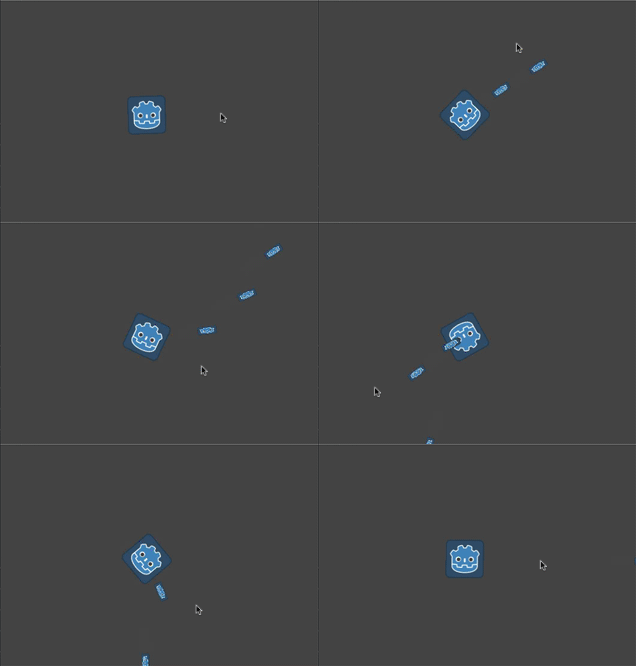
하지만, 총알이 플레이어의 자식으로 추가된다면, 플레이어가 회전하는 것에 따라 "붙어있는 채로" 남아있을 것입니다:
대신, 총알을 플레이어의 움직임에 독립하도록 해야 합니다 - 일단 발사가 되면, 플레이어가 그것에 영향을 주지 않고 직선으로 계속 나아가야 합니다. 플레이어의 자식으로 씬 트리에 추가하는 대신, 총알을 "메인" 게임 씬의 자식으로 추가하는 것이 더 합리적입니다, 이렇게 하면 총알이 플레이어의 부모나 더 위로 올라갈 수도 있습니다.
총알에 직접 이 코드를 추가하는 것으로 가능합니다:
var bullet_instance = Bullet.instantiate()
get_parent().add_child(bullet_instance)
Node bulletInstance = Bullet.Instantiate();
GetParent().AddChild(bulletInstance);
그러나 이것은 다른 문제를 불러올 수 있습니다. 이제 "Player" 씬을 독립적으로 테스트해 보신다면, 접근할 부모 노드가 없기 때문에, 발사를 할 때 팅길 것입니다. 이는 플레이어 코드를 독립적으로 테스트하기가 더 까다로울 뿐만 아니라, 메인 씬의 노드 구조를 바꾸기로 한다면 플레이어의 부모는 더 이상 총알을 받기에 적절한 노드가 아니게 됩니다.
해결책은 플레이어로부터 총알을 "방출"하는 시그널을 사용하는 것입니다. 그렇게 하면 플레이어는 총알이 어떻게 되는지 "알" 필요가 없습니다 - 이 시그널에 연결된 어떤 노드라도 총알을 "받을" 수 있고 총알을 소환하기 위한 적절한 행동을 취해줄 수 있습니다.
이것이 시그널을 사용해 플레이어가 총알을 방출하는 코드입니다:
extends Sprite2D

signal shoot(bullet, direction, location)

var Bullet = preload("res://bullet.tscn")

func _input(event):
    if event is InputEventMouseButton:
        if event.button_index == MOUSE_BUTTON_LEFT and event.pressed:
            shoot.emit(Bullet, rotation, position)

func _process(delta):
    look_at(get_global_mouse_position())
using Godot;

public partial class Player : Sprite2D
{
    [Signal]
    public delegate void ShootEventHandler(PackedScene bullet, float direction, Vector2 location);

    private PackedScene _bullet = GD.Load<PackedScene>("res://Bullet.tscn");

    public override void _Input(InputEvent @event)
    {
        if (@event is InputEventMouseButton mouseButton)
        {
            if (mouseButton.ButtonIndex == MouseButton.Left && mouseButton.Pressed)
            {
                EmitSignal(SignalName.Shoot, _bullet, Rotation, Position);
            }
        }
    }

    public override void _Process(double delta)
    {
        LookAt(GetGlobalMousePosition());
    }
}
메인 씬에서, 이제 플레이어의 시그널을 연결합니다 ("노드" 탭에 나타날 것입니다).
func _on_player_shoot(Bullet, direction, location):
    var spawned_bullet = Bullet.instantiate()
    add_child(spawned_bullet)
    spawned_bullet.rotation = direction
    spawned_bullet.position = location
    spawned_bullet.velocity = spawned_bullet.velocity.rotated(direction)
private void OnPlayerShoot(PackedScene bullet, float direction, Vector2 location)
{
    var spawnedBullet = bullet.Instantiate<Bullet>();
    AddChild(spawnedBullet);
    spawnedBullet.Rotation = direction;
    spawnedBullet.Position = location;
    spawnedBullet.Velocity = spawnedBullet.Velocity.Rotated(direction);
}
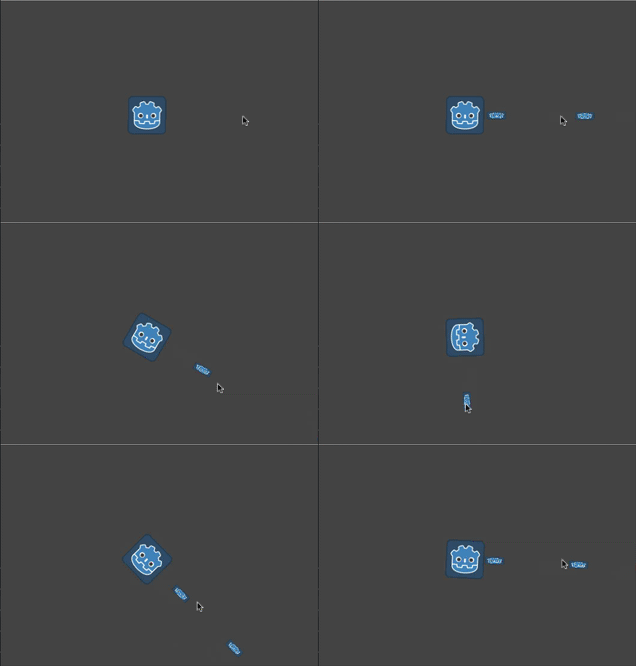
이제 총알은 움직임을 유지한 채로 플레이어의 회전에 독립을 유지할 것입니다: