Attention: Here be dragons
This is the latest
(unstable) version of this documentation, which may document features
not available in or compatible with released stable versions of Godot.
Checking the stable version of the documentation...
WebRTC
HTML5, 웹소켓, WebRTC
Godot의 뛰어난 기능 중 하나는 HTML5/WebAssembly 플랫폼으로 내보내는 기능으로, 사용자가 웹페이지를 방문할 때 게임이 브라우저에서 직접 실행될 수 있습니다.
이것은 데모와 정식 게임 모두에 좋은 기회이지만 예전에는 몇 가지 제한 사항이 있었습니다. 네트워킹 영역에서 브라우저는 최근 WebSocket과 WebRTC가 표준으로 제안되기 전까지 HTTPRequest만 지원했습니다.
웹소켓
WebSocket 프로토콜이 2011년 12월 표준화되었을 때 이를 통해 브라우저는 WebSocket 서버에 대한 안정적인 양방향 연결을 생성할 수 있었습니다. 이 프로토콜은 브라우저에 푸시 알림을 보내는 매우 강력한 도구이며 채팅, 턴제 게임 등을 구현하는 데 사용되었습니다.
그러나 WebSocket은 여전히 TCP 연결을 사용합니다. 이는 안정성에는 좋지만 대기 시간에는 좋지 않으므로 VoIP 및 빠르게 진행되는 게임과 같은 실시간 애플리케이션에는 적합하지 않습니다.
WebRTC
이러한 이유로 Google은 2010년부터 WebRTC라는 새로운 기술을 개발하기 시작했으며, 이후 2017년에 W3C 후보 권장 사항이 되었습니다. WebRTC는 훨씬 더 복잡한 사양 세트이며 두 피어 간의 빠르고 안전한 실시간 통신을 제공하기 위해 이면의 다른 많은 기술(ICE, DTLS, SDP)을 사용합니다.
아이디어는 두 피어 사이의 가장 빠른 경로를 찾고 가능할 때마다 직접 통신을 설정하는 것입니다(예: 중계 서버를 피하려고 시도).
그러나 이는 통신이 시작되기 전에 일부 미디어 정보가 두 피어 간에 교환되어야 한다는 대가를 치르게 됩니다(세션 설명 프로토콜 - SDP 문자열 형식). 이는 일반적으로 소위 WebRTC 신호 서버의 형태를 취합니다.
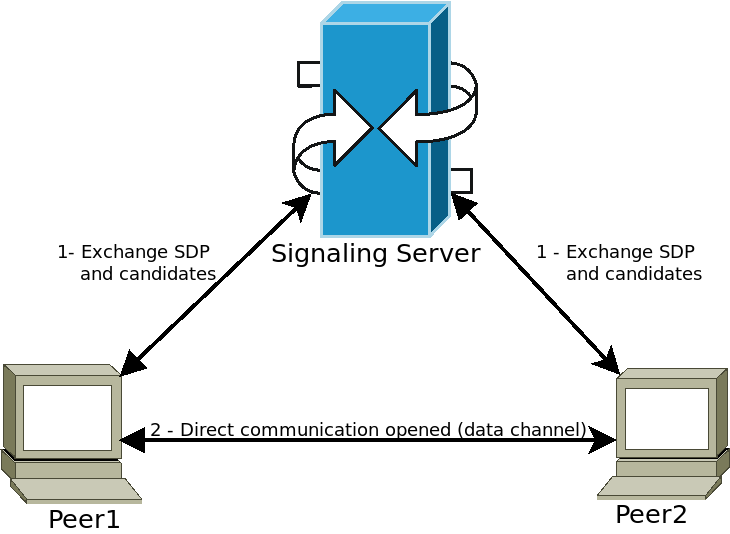
피어는 신호 서버(예: WebSocket 서버)에 연결하고 미디어 정보를 보냅니다. 그런 다음 서버는 이 정보를 다른 피어에게 전달하여 원하는 직접 통신을 설정할 수 있도록 합니다. 이 단계가 완료되면 피어는 신호 서버와의 연결을 끊고 직접 P2P(Peer-to-Peer) 연결을 열린 상태로 유지할 수 있습니다.
Godot에서 WebRTC 사용하기
WebRTC는 Godot에서 두 가지 주요 클래스인 WebRTCPeerConnection과 WebRTCDataChannel, 추가로 멀티플레이어 API 구현인 WebRTCMultiplayerPeer를 통해 구현됩니다. 자세한 사항은 높은 수준 멀티플레이어의 섹션을 참조하세요.
참고
이러한 클래스는 HTML5에서 자동으로 사용할 수 있지만 기본(HTML5가 아닌) 플랫폼에서는 외부 GDExtension 플러그인이 필요합니다. `webrtc 기본 플러그인 저장소 <https://github.com/godotengine/webrtc-native>`__에서 지침을 확인하고 최신 `릴리스 <https://github.com/godotengine/webrtc-native/releases>`__을 받으세요.
경고
Android로 내보낼 때 프로젝트를 내보내거나 원클릭 배포를 사용하기 전에 Android 내보내기 사전 설정에서 INTERNET 권한을 활성화해야 합니다. 그렇지 않으면 모든 종류의 네트워크 통신이 Android에 의해 차단됩니다.
최소 연결 예제
이 예에서는 동일한 애플리케이션의 두 피어 간에 WebRTC 연결을 생성하는 방법을 보여줍니다. 이는 실제 생활에서는 그다지 유용하지 않지만 WebRTC 연결 설정 방법에 대한 좋은 개요를 제공합니다.
extends Node

# Create the two peers
var p1 = WebRTCPeerConnection.new()
var p2 = WebRTCPeerConnection.new()
# And a negotiated channel for each each peer
var ch1 = p1.create_data_channel("chat", {"id": 1, "negotiated": true})
var ch2 = p2.create_data_channel("chat", {"id": 1, "negotiated": true})

func _ready():
    # Connect P1 session created to itself to set local description.
    p1.session_description_created.connect(p1.set_local_description)
    # Connect P1 session and ICE created to p2 set remote description and candidates.
    p1.session_description_created.connect(p2.set_remote_description)
    p1.ice_candidate_created.connect(p2.add_ice_candidate)

    # Same for P2
    p2.session_description_created.connect(p2.set_local_description)
    p2.session_description_created.connect(p1.set_remote_description)
    p2.ice_candidate_created.connect(p1.add_ice_candidate)

    # Let P1 create the offer
    p1.create_offer()

    # Wait a second and send message from P1.
    await get_tree().create_timer(1).timeout
    ch1.put_packet("Hi from P1".to_utf8_buffer())

    # Wait a second and send message from P2.
    await get_tree().create_timer(1).timeout
    ch2.put_packet("Hi from P2".to_utf8_buffer())

func _process(_delta):
    # Poll connections
    p1.poll()
    p2.poll()

    # Check for messages
    if ch1.get_ready_state() == ch1.STATE_OPEN and ch1.get_available_packet_count() > 0:
        print("P1 received: ", ch1.get_packet().get_string_from_utf8())
    if ch2.get_ready_state() == ch2.STATE_OPEN and ch2.get_available_packet_count() > 0:
        print("P2 received: ", ch2.get_packet().get_string_from_utf8())
이렇게 출력됩니다:
P1 received: Hi from P1
P2 received: Hi from P2
로컬 시그널 예제
이 예제는 이전 예제를 확장하여 두 개의 서로 다른 장면에서 피어를 분리하고 :ref:`싱글톤 <doc_singletons_autoload>`을 신호 서버로 사용합니다.
extends Node
# An example p2p chat client.

var peer = WebRTCPeerConnection.new()

# Create negotiated data channel.
var channel = peer.create_data_channel("chat", {"negotiated": true, "id": 1})

func _ready():
    # Connect all functions.
    peer.ice_candidate_created.connect(self._on_ice_candidate)
    peer.session_description_created.connect(self._on_session)

    # Register to the local signaling server (see below for the implementation).
    Signaling.register(String(get_path()))


func _on_ice_candidate(mid, index, sdp):
    # Send the ICE candidate to the other peer via signaling server.
    Signaling.send_candidate(String(get_path()), mid, index, sdp)


func _on_session(type, sdp):
    # Send the session to other peer via signaling server.
    Signaling.send_session(String(get_path()), type, sdp)
    # Set generated description as local.
    peer.set_local_description(type, sdp)


func _process(delta):
    # Always poll the connection frequently.
    peer.poll()
    if channel.get_ready_state() == WebRTCDataChannel.STATE_OPEN:
        while channel.get_available_packet_count() > 0:
            print(String(get_path()), " received: ", channel.get_packet().get_string_from_utf8())


func send_message(message):
    channel.put_packet(message.to_utf8_buffer())
이제 로컬 신호 서버의 경우:
참고
이 로컬 신호 서버는 :ref:`싱글톤 <doc_singletons_autoload>`로 사용되어 동일한 씬에 있는 두 피어를 연결하도록 되어 있습니다.
# A local signaling server. Add this to autoloads with name "Signaling" (/root/Signaling)
extends Node

# We will store the two peers here
var peers = []

func register(path):
    assert(peers.size() < 2)
    peers.append(path)
    if peers.size() == 2:
        get_node(peers[0]).peer.create_offer()


func _find_other(path):
    # Find the other registered peer.
    for p in peers:
        if p != path:
            return p
    return ""


func send_session(path, type, sdp):
    var other = _find_other(path)
    assert(other != "")
    get_node(other).peer.set_remote_description(type, sdp)


func send_candidate(path, mid, index, sdp):
    var other = _find_other(path)
    assert(other != "")
    get_node(other).peer.add_ice_candidate(mid, index, sdp)
다음과 같은 스크립트를 만드세요:
# Main scene (main.gd)
extends Node

const Chat = preload("res://chat.gd")

func _ready():
    var p1 = Chat.new()
    var p2 = Chat.new()
    add_child(p1)
    add_child(p2)

    # Wait a second and send message from P1
    await get_tree().create_timer(1).timeout
    p1.send_message("Hi from %s" % String(p1.get_path()))

    # Wait a second and send message from P2
    await get_tree().create_timer(1).timeout
    p2.send_message("Hi from %s" % String(p2.get_path()))
그러면 다음과 비슷한 내용이 인쇄됩니다.
/root/main/@@3 received: Hi from /root/main/@@2
/root/main/@@2 received: Hi from /root/main/@@3
WebSocket을 사용한 원격 신호
신호 피어에 WebSocket을 사용하는 고급 데모와 WebRTCMultiplayerPeer <class_WebRTCMultiplayerPeer>`는 `godot 데모 프로젝트 <https://github.com/godotengine/godot-demo-projects>`_에서 `networking/webrtc_signaling 아래에 있습니다.