Attention: Here be dragons
This is the latest
(unstable) version of this documentation, which may document features
not available in or compatible with released stable versions of Godot.
Checking the stable version of the documentation...
설정
모든 종류의 증강 현실 애플리케이션의 경우 실제 정보에 액세스하고 실제 위치를 추적할 수 있어야 합니다. OpenXR의 공간 엔터티 API는 바로 이러한 목적으로 도입되었습니다.
매우 모듈화된 디자인을 가지고 있습니다. API의 핵심은 실제 엔터티가 구조화되는 방식, 엔터티를 찾는 방법, 엔터티에 대한 정보가 저장 및 액세스되는 방식을 정의합니다.
마커 추적, 평면 추적 및 앵커와 같은 특정 시스템을 구현하는 다양한 확장이 상단에 추가됩니다. 이를 공간적 능력이라고 합니다.
시스템에서 처리할 수 있는 각 엔터티는 더 작은 구성 요소로 분할되므로 시스템을 쉽게 확장하고 새로운 기능을 추가할 수 있습니다.
공급업체는 핵심 API와 함께 사용할 수 있는 추가 기능과 구성 요소 유형을 구현하고 노출할 수 있습니다. Godot의 경우 이는 확장으로 구현될 수 있습니다. 그러나 이러한 구현은 이 매뉴얼의 범위를 벗어납니다.
마지막으로 공간 엔터티 시스템이 비동기 기능을 사용한다는 점에 유의하는 것이 중요합니다. 즉, 프로세스를 시작한 다음 나중에 완료되었다는 알림을 받을 수 있습니다.
설정
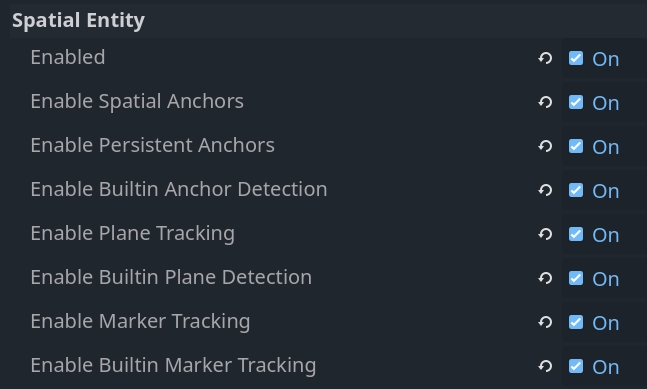
공간 엔터티를 사용하려면 관련 프로젝트 설정을 활성화해야 합니다. OpenXR 섹션에서 다음 항목을 찾을 수 있습니다.
설정 |
설명 |
|---|---|
활성화 |
공간 엔터티 시스템의 핵심을 활성화합니다. 공간 엔터티 시스템이 작동하려면 이 기능을 활성화해야 합니다. |
공간 앵커 활성화 |
공간 앵커를 생성하고 추적할 수 있는 공간 앵커 기능을 활성화합니다. |
영구 앵커 활성화 |
공간 앵커를 지속적으로 만드는 기능을 활성화합니다. 이는 해당 위치가 저장되고 후속 세션에서 검색될 수 있음을 의미합니다. |
내장 앵커 감지 활성화 |
내장된 앵커 감지 논리를 활성화하면 자동으로 영구 앵커를 검색하고 추적이 업데이트될 때 앵커 위치를 조정합니다. |
노드와 전문 용어(Nodes and terminology) |
바닥, 벽, 천장, 테이블 등의 표면을 감지할 수 있는 평면 추적 기능을 활성화합니다. |
내장 평면 감지 활성화 |
내장된 평면 감지 로직을 활성화하면 새로운 평면 데이터가 제공될 때 자동으로 반응합니다. |
마커 추적 활성화 |
QR 코드, Aruco 마커 및 April 태그와 같은 마커를 감지할 수 있는 마커 추적 기능을 활성화합니다. |
내장 마커 추적 활성화 |
내장된 마커 감지 로직을 활성화하면 새로운 마커가 발견되거나 플레이어 공간에서 마커가 이동하는 것에 자동으로 반응합니다. |
참고
다양한 XR 장치에도 권한 플래그를 설정해야 합니다. 내보내기 사전 설정에서 이를 활성화해야 합니다.
다양한 기능을 활성화하면 관련 OpenXR API가 활성화되지만 이 데이터와 상호 작용하려면 추가 논리가 필요합니다. 각 핵심 시스템마다 이를 수행할 수 있는 내장 로직이 있습니다.
내장 로직이 먼저 활성화된다는 가정하에 공간 엔터티 시스템에 대해 논의하겠습니다. 그런 다음 기본 API와 이를 직접 구현할 수 있는 방법을 살펴보겠습니다. 그러나 이는 종종 과도한 작업이며 기본 API는 GDExtension 플러그인이 추가 기능을 구현할 수 있도록 대부분 노출된다는 점에 유의해야 합니다.
첫 번째 씬 만들기
공간 엔터티가 감지되거나 생성되면 OpenXRSpatialEntityTracker 개체가 인스턴스화되고 :ref:`XRServer<class_XRServer>`에 등록됩니다.
각 유형의 공간 엔터티는 자체 하위 클래스를 구현하므로 각 유형의 엔터티에 다르게 반응할 수 있습니다.
Generally speaking we will instantiate different subscenes for each type of entity. As the tracker objects can be used with XRAnchor3D nodes, these subscenes should have such a node as their root node.
모든 개체 추적기는 default 포즈를 통해 위치를 노출합니다.
관리자 개체를 생성하여 이러한 하위 장면을 자동으로 생성하고 씬 트리에 추가할 수 있습니다. 모든 위치는 XROrigin3D 노드에 로컬이므로 관리자를 원본 노드의 자식 노드로 생성해야 합니다.
다음은 관리자 로직을 구현하는 스크립트의 기본입니다.
class_name SpatialEntitiesManager
extends Node3D

## Signals a new spatial entity node was added.
signal added_spatial_entity(node: XRNode3D)

## Signals a spatial entity node is about to be removed.
signal removed_spatial_entity(node: XRNode3D)

## Scene to instantiate for spatial anchor entities.
@export var spatial_anchor_scene: PackedScene

## Scene to instantiate for plane tracking spatial entities.
@export var plane_tracker_scene: PackedScene

## Scene to instantiate for marker tracking spatial entities.
@export var marker_tracker_scene: PackedScene

# Trackers we manage nodes for.
var _managed_nodes: Dictionary[XRTracker, XRAnchor3D]

# Enter tree is called whenever our node is added to our scene.
func _enter_tree():
    # Connect to signals that inform us about tracker changes.
    XRServer.tracker_added.connect(_on_tracker_added)
    XRServer.tracker_updated.connect(_on_tracker_updated)
    XRServer.tracker_removed.connect(_on_tracker_removed)

    # Set up existing trackers.
    var trackers : Dictionary = XRServer.get_trackers(XRServer.TRACKER_ANCHOR)
    for tracker_name in trackers:
        var tracker: XRTracker = trackers[tracker_name]
        if tracker and tracker is OpenXRSpatialEntityTracker:
            _add_tracker(tracker)


# Exit tree is called whenever our node is removed from our scene.
func _exit_tree():
    # Clean up our signals.
    XRServer.tracker_added.disconnect(_on_tracker_added)
    XRServer.tracker_updated.disconnect(_on_tracker_updated)
    XRServer.tracker_removed.disconnect(_on_tracker_removed)

    # Clean up trackers.
    for tracker in _managed_nodes:
        removed_spatial_entity.emit(_managed_nodes[tracker])
        remove_child(_managed_nodes[tracker])
        _managed_nodes[tracker].queue_free()

    _managed_nodes.clear()


# See if this tracker should be managed by us and add it.
func _add_tracker(tracker: OpenXRSpatialEntityTracker):
    var new_node: XRAnchor3D

    if _managed_nodes.has(tracker):
        # Already being managed by us!
        return

    if tracker is OpenXRAnchorTracker:
        # Note: Generally spatial anchors are controlled by the developer and
        # are unlikely to be handled by our manager.
        # But just for completeness we'll add it in.
        if spatial_anchor_scene:
            var new_scene = spatial_anchor_scene.instantiate()
            if new_scene is XRAnchor3D:
                new_node = new_scene
            else:
                push_error("Spatial anchor scene doesn't have an XRAnchor3D as a root node and can't be used!")
                new_scene.free()
    elif tracker is OpenXRPlaneTracker:
        if plane_tracker_scene:
            var new_scene = plane_tracker_scene.instantiate()
            if new_scene is XRAnchor3D:
                new_node = new_scene
            else:
                push_error("Plane tracking scene doesn't have an XRAnchor3D as a root node and can't be used!")
                new_scene.free()
    elif tracker is OpenXRMarkerTracker:
        if marker_tracker_scene:
            var new_scene = marker_tracker_scene.instantiate()
            if new_scene is XRAnchor3D:
                new_node = new_scene
            else:
                push_error("Marker tracking scene doesn't have an XRAnchor3D as a root node and can't be used!")
                new_scene.free()
    else:
        # Type of spatial entity tracker we're not supporting?
        push_warning("OpenXR Spatial Entities: Unsupported anchor tracker " + tracker.get_name() + " of type " + tracker.get_class())

    if not new_node:
        # No scene defined or able to be instantiated? We're done!
        return

    # Set up and add to our scene.
    new_node.tracker = tracker.name
    new_node.pose = "default"
    _managed_nodes[tracker] = new_node
    add_child(new_node)

    added_spatial_entity.emit(new_node)


# A new tracker was added to our XRServer.
func _on_tracker_added(tracker_name: StringName, type: int):
    if type == XRServer.TRACKER_ANCHOR:
        var tracker: XRTracker = XRServer.get_tracker(tracker_name)
        if tracker and tracker is OpenXRSpatialEntityTracker:
            _add_tracker(tracker)


# A tracked managed by XRServer was changed.
func _on_tracker_updated(_tracker_name: StringName, _type: int):
    # For now we ignore this, there aren't any changes here we need to react
    # to and the instantiated scene can react to this itself if needed.
    pass


# A tracker was removed from our XRServer.
func _on_tracker_removed(tracker_name: StringName, type: int):
    if type == XRServer.TRACKER_ANCHOR:
        var tracker: XRTracker = XRServer.get_tracker(tracker_name)
        if _managed_nodes.has(tracker):
            # We emit this right before we remove it!
            removed_spatial_entity.emit(_managed_nodes[tracker])

            # Remove the node.
            remove_child(_managed_nodes[tracker])

            # Queue free the node.
            _managed_nodes[tracker].queue_free()

            # And remove from our managed nodes.
            _managed_nodes.erase(tracker)
공간 셰이더
공간 앵커를 사용하면 XR 런타임이 이러한 위치를 추적하고 필요에 따라 조정하는 방식으로 가상 세계에서 실제 위치를 매핑할 수 있습니다. 지원되는 경우 앵커를 영구적으로 만들 수 있습니다. 즉, 애플리케이션이 다시 시작될 때 앵커가 올바른 위치에 다시 생성됩니다.
다음과 같은 사용 사례를 생각해 볼 수 있습니다. - 애플리케이션이 다시 시작될 때 다시 생성되는 공간 주위에 가상 창 배치 - 테이블이나 벽에 가상 객체 배치 및 다시 생성
공간 앵커는 XRServer에 등록된 OpenXRAnchorTracker 개체를 사용하여 추적됩니다.
필요한 경우 공간 앵커의 위치가 자동으로 업데이트됩니다. 관련 추적기의 포즈가 업데이트되므로 XRAnchor3D 노드의 위치가 변경됩니다.
공간 앵커가 영구적으로 만들어지면 UUID(Universally Unique Identifier)가 앵커에 할당됩니다. 씬을 재구성하는 데 필요한 모든 정보와 함께 이를 저장해야 합니다. 아래 예제 코드에서는 단순히 set_scene_path 및 ``get_scene_path``를 호출하지만 이러한 기능에 대한 자체 구현을 제공해야 합니다.
영구 앵커를 생성하려면 특정 흐름을 따라야 합니다. - 공간 앵커 만들기 - 추적 상태가 ``ENTITY_TRACKING_STATE_TRACKING``로 변경될 때까지 기다립니다. - 앵커를 영구하게 만듭니다. - UUID를 가져와 저장합니다.
기존 영구 앵커가 발견되면 UUID가 이미 설정된 새 추적기가 추가됩니다. 새로운 영구 앵커와 기존 영구 앵커에 올바르게 반응할 수 있는 것은 바로 이러한 작업 흐름의 차이입니다.
참고
앵커를 유지하지 않으면 UUID가 삭제되지만 앵커는 자동으로 제거되지 않습니다. 앵커의 지속성 해제가 완료되면 대응한 다음 이를 정리해야 합니다. 또한 여전히 지속되는 앵커를 삭제하려고 하면 오류가 발생합니다.
앵커 시스템을 완성하려면 먼저 공간 관리자 노드의 앵커에 대해 인스턴스화하기 위해 씬로 설정할 씬을 생성합니다.
이 씬에는 루트로 XRAnchor3D 노드가 있어야 하지만 다른 것은 없습니다. 앵커의 실제 시각적 측면을 포함하는 하위 장면을 로드하는 스크립트를 추가하여 씬에서 다양한 앵커를 만들 수 있습니다. 이러한 앵커를 지속적으로 만들고 이 하위 장면에 대한 경로를 UUID의 메타데이터로 저장하려는 의도가 있다고 가정합니다.
class_name OpenXRSpatialAnchor3D
extends XRAnchor3D

var anchor_tracker: OpenXRAnchorTracker
var child_scene: Node
var made_persistent: bool = false

## Return the scene path for our UUID.
func get_scene_path(p_uuid: String) -> String:
    # Placeholder, implement this.
    return ""


## Store our scene path for our UUID.
func set_scene_path(p_uuid: String, p_scene_path: String):
    # Placeholder, implement this.
    pass


## Remove info related to our UUID.
func remove_uuid(p_uuid: String):
    # Placeholder, implement this.
    pass


## Set our child scene for this anchor, call this when creating a new anchor.
func set_child_scene(p_child_scene_path: String):
    var packed_scene: PackedScene = load(p_child_scene_path)
    if not packed_scene:
        return

    child_scene = packed_scene.instantiate()
    if not child_scene:
        return

    add_child(child_scene)


# Called when our tracking state changes.
func _on_spatial_tracking_state_changed(new_state) -> void:
    if new_state == OpenXRSpatialEntityTracker.ENTITY_TRACKING_STATE_TRACKING and not made_persistent:
        # Only attempt to do this once.
        made_persistent = true

        # This warning is optional if you don't want to rely on persistence.
        if not OpenXRSpatialAnchorCapability.is_spatial_persistence_supported():
            push_warning("Persistent spatial anchors are not supported on this device!")
            return

        # Make this persistent, this will notify that the UUID changed on the anchor,
        # we can then store our scene path which we've already applied to our
        # tracked scene.
        OpenXRSpatialAnchorCapability.persist_anchor(anchor_tracker, RID(), Callable())


func _on_uuid_changed() -> void:
    if anchor_tracker.uuid != "":
        made_persistent = true

        if child_scene:
            # If we already have a subscene, save that with the UUID.
            set_scene_path(anchor_tracker.uuid, child_scene.scene_file_path)
        else:
            # If we do not, look up the UUID in our stored cache.
            var scene_path: String = get_scene_path(anchor_tracker.uuid)
            if scene_path.is_empty():
                # Give a warning that we don't have a scene file stored for this UUID.
                push_warning("Unknown UUID given, can't determine child scene.")

                # Load a default scene so we can at least see something.
                set_child_scene("res://unknown_anchor.tscn")
                return

            set_child_scene(scene_path)


func _ready():
    anchor_tracker = XRServer.get_tracker(tracker)
    if anchor_tracker:
        _on_uuid_changed()

        anchor_tracker.spatial_tracking_state_changed.connect(_on_spatial_tracking_state_changed)
        anchor_tracker.uuid_changed.connect(_on_uuid_changed)
앵커 씬을 사용하면 공간 관리자 스크립트에 몇 가지 기능을 추가하여 앵커를 생성하거나 제거할 수 있습니다.
...

## Create a new spatial anchor with the associated child scene.
## If persistent anchors are supported, this will be created as a persistent node
## and we will store the child scene path with the anchor's UUID for future recreation.
func create_spatial_anchor(p_transform: Transform3D, p_child_scene_path: String):
    # Do we have anchor support?
    if not OpenXRSpatialAnchorCapability.is_spatial_anchor_supported():
        push_error("Spatial anchors are not supported on this device!")
        return

    # Adjust our transform to local space.
    var t: Transform3D = global_transform.inverse() * p_transform

    # Create anchor on our current manager.
    var new_anchor = OpenXRSpatialAnchorCapability.create_new_anchor(t, RID())
    if not new_anchor:
        push_error("Couldn't create an anchor for %s." % [ p_child_scene_path ])
        return

    # Creating a new anchor should have resulted in an XRAnchor being added to the scene
    # by our manager. We can thus continue assuming this has happened.

    var anchor_scene = get_tracked_scene(new_anchor)
    if not anchor_scene:
        push_error("Couldn't locate anchor scene for %s, has the manager been configured with an applicable anchor scene?" % [ new_anchor.name ])
        return
    if not anchor_scene is OpenXRSpatialAnchor3D:
        push_error("Anchor scene for %s is not an OpenXRSpatialAnchor3D scene, has the manager been configured with an applicable anchor scene?" % [ new_anchor.name ])
        return

    anchor_scene.set_child_scene(p_child_scene_path)


## Removes this spatial anchor from our scene.
## If the spatial anchor is persistent, the associated UUID will be cleared.
func remove_spatial_anchor(p_anchor: XRAnchor3D):
    # Do we have anchor support?
    if not OpenXRSpatialAnchorCapability.is_spatial_anchor_supported():
        push_error("Spatial anchors are not supported on this device!")
        return

    var tracker: XRTracker = XRServer.get_tracker(p_anchor.tracker)
    if tracker and tracker is OpenXRAnchorTracker:
        var anchor_tracker: OpenXRAnchorTracker = tracker
        if anchor_tracker.has_uuid() and OpenXRSpatialAnchorCapability.is_spatial_persistence_supported():
            # If we have a UUID we should first make the anchor unpersistent
            # and then remove it on its callback.
            remove_uuid(anchor_tracker.uuid)
            OpenXRSpatialAnchorCapability.unpersist_anchor(anchor_tracker, RID(), _on_unpersist_complete)
        else:
            # Otherwise we can just remove it.
            # This will remove it from the XRServer, which in turn will trigger cleaning up our node.
            OpenXRSpatialAnchorCapability.remove_anchor(tracker)


func _on_unpersist_complete(p_tracker: XRTracker):
    # Our tracker is now no longer persistent, we can remove it.
    OpenXRSpatialAnchorCapability.remove_anchor(p_tracker)


## Retrieve the scene we've added for a given tracker (if any).
func get_tracked_scene(p_tracker: XRTracker) -> XRNode3D:
    for node in get_children():
        if node is XRNode3D and node.tracker == p_tracker.name:
            return node

    return null
참고
위의 코드에는 약간의 마법이 일어나는 것 같습니다. 앵커 기능에서 공간 앵커가 생성되거나 제거될 때마다 관련 추적기 개체가 생성되거나 제거됩니다. 이로 인해 공간 관리자가 이 앵커에 대한 하위 씬을 추가하거나 제거하게 됩니다. 그러므로 우리는 여기서 이것에 의존할 수 있습니다.
굽기
평면 추적을 통해 플레이어 근처의 벽, 바닥, 천장, 테이블과 같은 표면을 감지할 수 있습니다. 이 데이터는 과거 언제든지 사용자가 수행한 방 캡처에서 나오거나 광학 센서에 의해 실시간으로 감지될 수 있습니다. 비행기 추적 확장 프로그램은 여기서 구별하지 않습니다.
참고
일부 XR 런타임에는 이 프로세스를 활성화 및/또는 구성하기 위해 공급업체 확장이 필요하지만 데이터는 이 확장을 통해 노출됩니다.
공간 관리자를 위해 위에서 작성한 코드는 이미 새로운 평면을 감지합니다. 새로운 씬을 설정하고 해당 씬을 공간 관리자에 할당해야 합니다.
이 씬에 대한 루트 노드는 XRAnchor3D 노드여야 합니다. StaticBody3D 노드를 자식으로 추가하고 정적 몸체의 CollisionShape3D 및 MeshInstance3D 노드를 자식 노드로 추가하겠습니다.
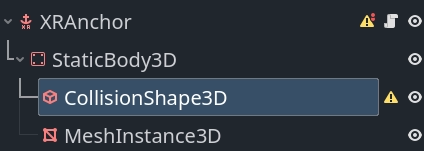
정적 몸체와 충돌 모양을 사용하면 비행기를 상호작용할 수 있게 만들 수 있습니다.
메쉬 인스턴스 노드를 사용하면 "구멍 펀치" 재질을 평면에 적용할 수 있으며, 통과와 결합하면 평면이 시각적 차단기로 전환됩니다. 또는 디버깅을 위해 평면을 시각화하는 머티리얼을 할당할 수도 있습니다.
이 재질을 MeshInstance3D에서 material_override 재질로 구성합니다. "홀 펀치" 재료의 경우 :ref:`ShaderMaterial<class_ShaderMaterial>`를 생성하고 다음 코드를 셰이더 코드로 사용합니다.
shader_type spatial;
render_mode unshaded, shadow_to_opacity;

void fragment() {
    ALBEDO = vec3(0.0, 0.0, 0.0);
}
또한 충돌 및 메시가 적용되도록 씬에 스크립트를 추가해야 합니다.
extends XRAnchor3D

var plane_tracker: OpenXRPlaneTracker

func _update_mesh_and_collision():
    if plane_tracker:
        # Place our static body using our offset so both collision
        # and mesh are positioned correctly.
        $StaticBody3D.transform = plane_tracker.get_mesh_offset()

        # Set our mesh so we can occlude the surface.
        $StaticBody3D/MeshInstance3D.mesh = plane_tracker.get_mesh()

        # And set our shape so we can have things collide things with our surface.
        $StaticBody3D/CollisionShape3D.shape = plane_tracker.get_shape()


func _ready():
    plane_tracker = XRServer.get_tracker(tracker)
    if plane_tracker:
        _update_mesh_and_collision()

        plane_tracker.mesh_changed.connect(_update_mesh_and_collision)
XR 런타임에서 지원하는 경우 평면 추적기 개체에 대해 쿼리할 수 있는 추가 메타데이터가 있습니다. 특히 주목할 점은 사용 가능한 경우 표면 유형을 식별하는 plane_label 속성입니다. 자세한 내용은 OpenXRPlaneTracker 클래스 문서를 참조하세요.
굽기
마커 추적은 실제 세계의 특정 마커를 감지합니다. 일반적으로 QR 코드와 같은 인쇄된 이미지입니다.
API는 4가지 코드, QR 코드, Micro QR 코드, Aruco 코드 및 April 태그에 대한 지원을 제공하지만 XR 런타임은 이들 모두를 지원할 필요는 없습니다.
마커가 감지되면 OpenXRMarkerTracker 개체가 인스턴스화되고 XRServer에 등록됩니다.
기존 공간 관리자 코드는 이미 이를 감지했습니다. 루트에 XRAnchor3D 노드가 포함된 씬을 생성하고 이를 저장한 다음 공간 관리자에 씬로 할당하여 마커에 대해 인스턴스화하기만 하면 됩니다.
마커 추적기는 할당 시 완전히 구성되어야 하므로 마커 데이터에 반응하는 _ready 기능만 있으면 됩니다. 다음은 필수 코드에 대한 템플릿입니다.
extends XRAnchor3D

var marker_tracker: OpenXRMarkerTracker

func _ready():
    marker_tracker = XRServer.get_tracker(tracker)
    if marker_tracker:
        match marker_tracker.marker_type:
            OpenXRSpatialComponentMarkerList.MARKER_TYPE_QRCODE:
                var data = marker_tracker.get_marker_data()
                if data is String:
                    # Data is a QR code as a string, usually a URL.
                    pass
                elif data is PackedByteArray:
                    # Data is binary, can be anything.
                    pass
            OpenXRSpatialComponentMarkerList.MARKER_TYPE_MICRO_QRCODE:
                var data = marker_tracker.get_marker_data()
                if data is String:
                    # Data is a QR code as a string, usually a URL.
                    pass
                elif data is PackedByteArray:
                    # Data is binary, can be anything.
                    pass
            OpenXRSpatialComponentMarkerList.MARKER_TYPE_ARUCO:
                # Use marker_tracker.marker_id to identify the marker.
                pass
            OpenXRSpatialComponentMarkerList.MARKER_TYPE_APRIL_TAG:
                # Use marker_tracker.marker_id to identify the marker.
                pass
보시다시피 QR 코드는 문자열 또는 바이트 배열인 데이터 블록을 제공합니다. Aruco 및 April 태그는 코드에서 읽은 ID를 제공합니다.
마커 데이터를 로드해야 하는 씬에 연결하는 가장 좋은 방법은 사용 사례에 달려 있습니다. 예를 들어 QR 코드에 표시하려는 애셋의 이름을 인코딩하는 것입니다.
백그라운드 처리
대부분의 경우 공급업체 확장과 함께 핵심 시스템은 대부분의 사용자가 제공된 대로 사용해야 합니다.
공급업체 확장을 구현하는 사용자나 기본 제공 로직이 충분하지 않은 사용자의 경우 싱글톤 개체 집합을 통해 백엔드 액세스가 제공됩니다.
이러한 개체는 사용 중인 헤드셋이 지원하는 기능을 쿼리하는 데에도 사용할 수 있습니다. 위 섹션의 공간 관리자 및 공간 앵커 코드에서 이를 확인하는 코드를 이미 추가했습니다.
참고
공간 엔터티 시스템은 RID로 반환되는 리소스에 많은 OpenXR 엔터티를 캡슐화합니다.
3D / 공간 편집기
핵심 공간 엔터티 기능은 OpenXRSpatialEntityExtension 싱글톤를 통해 노출됩니다.
Specific logic is exposed through capabilities that introduce specialized component types, and give access to specific types of entities, however they all use the same mechanisms for accessing the entity data managed by the spatial entity system.
먼저 핵심 시스템을 구성하는 개별 구성 요소를 살펴보겠습니다.
번역 맥락
공간 컨텍스트는 공간 엔터티 시스템을 쿼리하는 주요 개체입니다. 공간 컨텍스트를 사용하면 하나 이상의 기능과 상호 작용하는 방법을 구성할 수 있습니다.
상호 작용하려는 각 기능에 대해 공간적 컨텍스트를 생성하는 것이 권장됩니다. 실제로 이것이 Godot가 내장된 논리를 위해 수행하는 작업입니다.
액세스하려는 기능에 대한 기능 구성 개체를 설정하는 것부터 시작합니다. 각 기능은 해당 기능을 지원하는 구성 요소를 활성화합니다. 설정에 따라 활성화할 구성 요소가 결정됩니다. 지원되는 각 기능을 살펴보면서 이러한 구성 개체를 더 자세히 살펴보겠습니다.
공간 컨텍스트를 만드는 것은 비동기 작업입니다. 이는 우리가 XR 런타임에 공간적 맥락을 생성하도록 요청하고, 미래의 어느 시점에 XR 런타임이 우리에게 결과를 제공할 것임을 의미합니다.
다음 스크립트는 예제의 시작이며 씬에 노드로 추가할 수 있습니다. 평면 추적을 위한 공간 컨텍스트 생성을 보여주고 엔터티 검색을 설정합니다.
extends Node

var spatial_context: RID

func _set_up_spatial_context():
    # Already set up?
    if spatial_context:
        return

    # Not supported or we're not yet ready?
    if not OpenXRSpatialPlaneTrackingCapability.is_supported():
        return

    # We'll use plane tracking as an example here, our configuration object
    # here does not have any additional configuration. It just needs to exist.
    var plane_capability : OpenXRSpatialCapabilityConfigurationPlaneTracking = OpenXRSpatialCapabilityConfigurationPlaneTracking.new()

    var future_result : OpenXRFutureResult = OpenXRSpatialEntityExtension.create_spatial_context([ plane_capability ])

    # Wait for async completion.
    await future_result.completed

    # Obtain our result.
    spatial_context = future_result.get_spatial_context()
    if spatial_context:
        # Connect to our discovery signal.
        OpenXRSpatialEntityExtension.spatial_discovery_recommended.connect(_on_perform_discovery)

        # Perform our initial discovery.
        _on_perform_discovery(spatial_context)


func _enter_tree():
    var openxr_interface : OpenXRInterface = XRServer.find_interface("OpenXR")
    if openxr_interface and openxr_interface.is_initialized():
        # Just in case our session hasn't started yet,
        # call our spatial context creation on start.
        openxr_interface.session_begun.connect(_set_up_spatial_context)

        # And in case it is already up and running, call it already,
        # it will exit if we've called it too early.
        _set_up_spatial_context()


func _exit_tree():
    if spatial_context:
        # Disconnect from our discovery signal.
        OpenXRSpatialEntityExtension.spatial_discovery_recommended.disconnect(_on_perform_discovery)

        # Free our spatial context, this will clean it up.
        OpenXRSpatialEntityExtension.free_spatial_context(spatial_context)
        spatial_context = RID()

    var openxr_interface : OpenXRInterface = XRServer.find_interface("OpenXR")
    if openxr_interface and openxr_interface.is_initialized():
        openxr_interface.session_begun.disconnect(_set_up_spatial_context)


func _on_perform_discovery(p_spatial_context):
    # See next section.
    pass
검색 스냅샷
공간 컨텍스트가 생성되면 XR 런타임은 지정된 기능의 구성에 따라 공간 엔터티를 관리하기 시작합니다.
새 엔터티를 찾거나 현재 엔터티에 대한 정보를 얻기 위해 검색 스냅샷을 만들 수 있습니다. 이는 XR 런타임이 현재 공간 컨텍스트에서 관리하는 모든 공간 엔터티와 관련된 특정 데이터를 수집하도록 지시합니다.
이 기능은 데이터를 수집하고 결과를 제공하는 데 다소 시간이 걸릴 수 있으므로 비동기식입니다. 일반적으로 새 엔터티가 발견되면 검색 스냅샷을 수행하려고 합니다. OpenXR은 처리할 새 엔터티가 있을 때 이벤트를 생성합니다. 이로 인해 OpenXRSpatialEntityExtension 싱글톤에서 spatial_discovery_recommended 시그널가 생성됩니다.
위에 표시된 예제 코드에서는 이미 이 시그널에 연결하고 노드에서 _on_perform_discovery 메서드를 호출하고 있습니다. 이것을 구현해보자:
...

var discovery_result : OpenXRFutureResult

func _on_perform_discovery(p_spatial_context):
    # We get this signal for all spatial contexts, so exit if this is not for us.
    if p_spatial_context != spatial_context:
        return

    # If we currently have an ongoing discovery result, cancel it.
    if discovery_result:
        discovery_result.cancel_discovery()

    # Perform our discovery.
    discovery_result = OpenXRSpatialEntityExtension.discover_spatial_entities(spatial_context, [ \
            OpenXRSpatialEntityExtension.COMPONENT_TYPE_BOUNDED_2D, \
            OpenXRSpatialEntityExtension.COMPONENT_TYPE_PLANE_ALIGNMENT \
        ])

    # Wait for async completion.
    await discovery_result.completed

    var snapshot : RID = discovery_result.get_spatial_snapshot()
    if snapshot:
        # Process our snapshot result.
        _process_snapshot(snapshot)

        # And clean up our snapshot.
        OpenXRSpatialEntityExtension.free_spatial_snapshot(snapshot)


func _process_snapshot(p_snapshot):
    # See further down.
    pass
``discover_spatial_entities``를 호출할 때 구성 요소 목록을 지정합니다. 검색 쿼리는 공간 컨텍스트에 의해 관리되고 지정된 구성 요소 중 하나 이상이 포함된 모든 엔터티를 찾습니다.
스냅샷 업데이트
업데이트 스냅샷을 수행하면 검색 스냅샷을 통해 이전에 이미 찾은 엔터티에 대한 업데이트된 정보를 얻을 수 있습니다. 이 기능은 동기식이며 주로 상태 및 위치 데이터를 얻기 위한 것이며 매 프레임마다 실행될 수 있습니다.
일반적으로 엔터티가 변경되거나 수명 프로세스가 있을 가능성이 있는 경우에만 업데이트 스냅샷을 수행합니다. 이에 대한 좋은 예는 영구 앵커와 마커입니다. 이것이 필요한지 확인하려면 기능에 대한 설명서를 참조하세요.
평면 추적에는 필요하지 않지만 예제를 완료하는 데에는 업데이트 스냅샷이 필요한 경우 평면 추적에 대한 업데이트 스냅샷이 어떻게 표시되는지에 대한 예가 있습니다.
...

func _process(_delta):
    if not spatial_context:
        return

    if entities.is_empty():
        return

    var entity_rids: Array[RID]
    for entity_id in entities:
        entity_rids.push_back(entities[entity_id].entity)

    var snapshot : RID = OpenXRSpatialEntityExtension.update_spatial_entities(spatial_context, entity_rids, [ \
            OpenXRSpatialEntityExtension.COMPONENT_TYPE_BOUNDED_2D, \
            OpenXRSpatialEntityExtension.COMPONENT_TYPE_PLANE_ALIGNMENT \
        ])
    if snapshot:
        # Process our snapshot.
        _process_snapshot(snapshot)

        # And clean up our snapshot.
        OpenXRSpatialEntityExtension.free_spatial_snapshot(snapshot)
여기 예시에서는 동일한 _process_snapshot 함수를 사용하여 스냅샷을 처리하고 있습니다. 이는 대부분의 상황에서 의미가 있습니다. 그러나 스냅샷을 생성할 때 지정한 구성 요소가 검색 스냅샷과 업데이트 스냅샷 간에 다른 경우에는 다른 구성 요소를 고려해야 합니다.
스냅샷 쿼리 중
스냅샷이 있으면 해당 스냅샷에 대해 쿼리를 실행하여 그 안에 보관된 데이터를 얻을 수 있습니다. 스냅샷은 해제할 때까지 변경되지 않은 상태로 유지됩니다.
스냅샷에 추가한 각 구성 요소마다 데이터 개체가 함께 제공됩니다. 이 데이터 개체에는 이중 기능이 있습니다. 이를 쿼리에 추가하면 해당 구성 요소 유형을 쿼리하고 쿼리된 데이터가 로드되는 개체가 됩니다.
요청 목록에 항상 첫 번째 항목으로 추가되어야 하는 특수 데이터 개체가 하나 있는데, 바로 :ref:`OpenXRSpatialQueryResultData<class_OpenXRSpatialQueryResultData>`입니다. 이 개체는 고유 ID 및 엔터티의 현재 상태와 함께 반환된 모든 엔터티에 대한 항목을 보유합니다.
인터페이스를 활성화하기 위해, 다음 코드를 실행합니다:
...

var entities : Dictionary[int, OpenXRSpatialEntityTracker]

func _process_snapshot(p_snapshot):
    # Always include our query result data.
    var query_result_data : OpenXRSpatialQueryResultData = OpenXRSpatialQueryResultData.new()

    # Add our bounded 2D component data.
    var bounded2d_list : OpenXRSpatialComponentBounded2DList = OpenXRSpatialComponentBounded2DList.new()

    # And our plane alignment component data.
    var alignment_list : OpenXRSpatialComponentPlaneAlignmentList = OpenXRSpatialComponentPlaneAlignmentList.new()

    if OpenXRSpatialEntityExtension.query_snapshot(p_snapshot, [ query_result_data, bounded2d_list, alignment_list]):
        for i in query_result_data.get_entity_id_size():
            var entity_id = query_result_data.get_entity_id(i)
            var entity_state = query_result_data.get_entity_state(i)

            if entity_state == OpenXRSpatialEntityTracker.ENTITY_TRACKING_STATE_STOPPED:
                # This state should only appear when doing an update snapshot
                # and tells us this entity is no longer tracked.
                # We thus remove it from our dictionary which should result
                # in the entity being cleaned up.
                if entities.has(entity_id):
                    var entity_tracker : OpenXRSpatialEntityTracker = entities[entity_id]
                    entity_tracker.spatial_tracking_state = entity_state
                    XRServer.remove_tracker(entity_tracker)
                    entities.erase(entity_id)
            else:
                var entity_tracker : OpenXRSpatialEntityTracker
                var register_with_xr_server : bool = false
                if entities.has(entity_id):
                    entity_tracker = entities[entity_id]
                else:
                    entity_tracker = OpenXRSpatialEntityTracker.new()
                    entity_tracker.entity = OpenXRSpatialEntityExtension.make_spatial_entity(spatial_context, entity_id)
                    entities[entity_id] = entity_tracker
                    register_with_xr_server = true

                # Copy the state.
                entity_tracker.spatial_tracking_state = entity_state

                # If we're tracking, we should query the rest of our components.
                if entity_state == OpenXRSpatialEntityTracker.ENTITY_TRACKING_STATE_TRACKING:
                    var center_pose : Transform3D = bounded2d_list.get_center_pose(i)
                    entity_tracker.set_pose("default", center_pose, Vector3(), Vector3(), XRPose.XR_TRACKING_CONFIDENCE_HIGH)

                    # For this example I'm using OpenXRSpatialEntityTracker which does not
                    # hold further data. You should extend this class to store the additional
                    # state retrieved. For plane tracking this would be OpenXRPlaneTracker
                    # and we can store the following data in the tracker:
                    var size : Vector2 = bounded2d_list.get_size(i)
                    var alignment = alignment_list.get_plane_alignment(i)
                else:
                    entity_tracker.invalidate_pose("default")

                # We don't register our tracker until after we've set our initial data.
                if register_with_xr_server:
                    XRServer.add_tracker(entity_tracker)
참고
위의 예에서는 ``ENTITY_TRACKING_STATE_STOPPED``를 사용하여 더 이상 추적되지 않는 공간 엔터티를 정리합니다. 이는 업데이트 스냅샷에서만 사용할 수 있습니다.
검색 스냅샷에만 의존하는 기능의 경우 상태 변경에 의존하는 대신 더 이상 스냅샷의 일부가 아닌 엔터티를 기반으로 정리를 수행할 수 있습니다.
머티리얼
위의 정보를 통해 이제 공간 엔터티를 쿼리하고 이에 대한 정보를 얻는 방법을 알았지만 엔터티 자체에 관해서는 조금 더 살펴봐야 합니다.
이론적으로는 스냅샷에서 모든 데이터를 가져오지만 OpenXR에는 엔터티 ID에서 공간 엔터티 개체를 생성하는 추가 API가 있습니다. 이 객체가 존재하는 동안 XR 런타임은 우리가 이 엔터티를 사용하고 있으며 해당 엔터티가 조기에 정리되지 않는다는 것을 알고 있습니다. 이는 이 엔터티에 대한 업데이트 쿼리를 수행하기 위한 전제 조건입니다.
예제 코드에서는 ``OpenXRSpatialEntityExtension.make_spatial_entity``를 호출하여 이를 수행합니다.
일부 공간 엔터티 API는 자동으로 객체를 생성합니다. 이 경우 생성된 객체를 구현에 등록하려면 ``OpenXRSpatialEntityExtension.add_spatial_entity``를 호출해야 합니다.
두 함수 모두 엔터티 개체가 필요한 추가 함수에서 사용할 수 있는 RID를 반환합니다.
완료되면 ``OpenXRSpatialEntityExtension.free_spatial_entity``에 전화할 수 있습니다.
예제 코드에서는 그렇게 하지 않았습니다. 이는 OpenXRSpatialEntityTracker 인스턴스가 삭제되면 자동으로 처리됩니다.
공간 앵커 기능
공간 앵커는 OpenXRSpatialAnchorCapability 싱글톤 개체로 관리됩니다. OpenXR 세션이 생성된 후 ``OpenXRSpatialAnchorCapability.is_spatial_anchor_supported``를 호출하여 하드웨어에서 공간 앵커 기능이 지원되는지 확인할 수 있습니다.
공간 앵커 기능은 위에 표시된 것과는 약간 다릅니다.
공간 앵커 시스템을 사용하면 물리적 위치를 식별, 추적, 유지 및 공유할 수 있습니다. 이것이 다른 점은 앵커를 생성하고 파괴하여 수명주기를 관리한다는 것입니다.
따라서 우리는 이전 세션에서 생성되고 지속된 앵커 또는 우리와 공유된 앵커를 검색하는 데에만 검색 시스템을 사용합니다.
참고
앵커 공유는 현재 공간 엔터티 사양에서 지원되지 않습니다.
이전 예제에서 보여준 것처럼 항상 공간 컨텍스트 생성으로 시작하지만 이제는 OpenXRSpatialCapabilityConfigurationAnchor 구성 개체를 사용합니다. 지속성 범위에 대해 논의한 후 이 코드의 예를 보여 드리겠습니다. 먼저 로컬 앵커 관리를 살펴보겠습니다.
기본 제공 논리에 대해 논의한 것과 공간 앵커를 만드는 데에는 차이가 없습니다. 유일하게 중요한 것은 자신의 공간 컨텍스트를 매개변수로 ``OpenXRSpatialAnchorCapability.create_new_anchor``에 전달하는 것입니다.
앵커를 지속적으로 만들려면 앵커가 추적될 때까지 기다려야 합니다. 이는 상태 변경을 처리할 수 있도록 생성한 모든 앵커에 대해 업데이트 쿼리를 수행해야 함을 의미합니다.
앵커를 지속적으로 만들려면 지속성 범위도 설정해야 합니다. OpenXR의 핵심에서는 두 가지 유형의 지속성 범위가 지원됩니다.
열거형 |
설명 |
|---|---|
PERSISTENCE_SCOPE_SYSTEM_MANAGED |
시스템에서 지속되고 관리되는 공간 엔터티에 대한 읽기 전용 액세스(즉, 애플리케이션이 이 저장소를 수정할 수 없음)를 애플리케이션에 제공합니다. 애플리케이션은 이 저장소에 대한 지속성 구성 요소의 UUID를 사용하여 공간 컨텍스트 및 장치 재부팅 전반에 걸쳐 엔터티를 상호 연관시킬 수 있습니다. |
PERSISTENCE_SCOPE_LOCAL_ANCHORS |
Persistence operations and data access is limited to spatial anchors, on the same device, for the same user and app (using persist_anchor() and unpersist_anchor() functions) |
공간 앵커를 처리하는 새로운 스크립트부터 시작하겠습니다. 앞서 제시된 스크립트와 유사하지만 몇 가지 차이점이 있습니다.
첫 번째는 지속성 범위를 만드는 것입니다.
extends Node

var persistence_context : RID

func _set_up_persistence_context():
    # Already set up?
    if persistence_context:
        # Check our spatial context.
        _set_up_spatial_context()
        return

    # Not supported or we're not yet ready? Just exit.
    if not OpenXRSpatialAnchorCapability.is_spatial_anchor_supported():
        return

    # If we can't use a persistence scope, just create our spatial context without one.
    if not OpenXRSpatialAnchorCapability.is_spatial_persistence_supported():
        _set_up_spatial_context()
        return

    var scope : int = 0
    if OpenXRSpatialAnchorCapability.is_persistence_scope_supported(OpenXRSpatialAnchorCapability.PERSISTENCE_SCOPE_LOCAL_ANCHORS):
        scope = OpenXRSpatialAnchorCapability.PERSISTENCE_SCOPE_LOCAL_ANCHORS
    elif OpenXRSpatialAnchorCapability.is_persistence_scope_supported(OpenXRSpatialAnchorCapability.PERSISTENCE_SCOPE_SYSTEM_MANAGED):
        scope = OpenXRSpatialAnchorCapability.PERSISTENCE_SCOPE_SYSTEM_MANAGED
    else:
        # Don't have a known persistence scope, report and just set up without it.
        push_error("No known persistence scope is supported.")
        _set_up_spatial_context()
        return

    # Create our persistence scope.
    var future_result : OpenXRFutureResult = OpenXRSpatialAnchorCapability.create_persistence_context(scope)
    if not future:
        # Couldn't create persistence scope? Just set up without it.
        _set_up_spatial_context()
        return

    # Now wait for our process to complete.
    await future_result.completed

    # Get our result.
    persistence_context = future_result.get_result()
    if persistence_context:
        # Now set up our spatial context.
        _set_up_spatial_context()


func _enter_tree():
    var openxr_interface : OpenXRInterface = XRServer.find_interface("OpenXR")
    if openxr_interface and openxr_interface.is_initialized():
        # Just in case our session hasn't started yet,
        # call our context creation on start beginning with our persistence scope.
        openxr_interface.session_begun.connect(_set_up_persistence_context)

        # And in case it is already up and running, call it already,
        # it will exit if we've called it too early.
        _set_up_persistence_context()


func _exit_tree():
    if spatial_context:
        # Disconnect from our discovery signal.
        OpenXRSpatialEntityExtension.spatial_discovery_recommended.disconnect(_on_perform_discovery)

        # Free our spatial context, this will clean it up.
        OpenXRSpatialEntityExtension.free_spatial_context(spatial_context)
        spatial_context = RID()

    if persistence_context:
        # Free our persistence context...
        OpenXRSpatialAnchorCapability.free_persistence_context(persistence_context)
        persistence_context = RID()

    var openxr_interface : OpenXRInterface = XRServer.find_interface("OpenXR")
    if openxr_interface and openxr_interface.is_initialized():
        openxr_interface.session_begun.disconnect(_set_up_persistence_context)
지속성 범위가 생성되었으므로 이제 공간 컨텍스트를 생성할 수 있습니다.
...

var spatial_context: RID

func _set_up_spatial_context():
    # Already set up?
    if spatial_context:
        return

    # Not supported or we're not yet set up.
    if not OpenXRSpatialAnchorCapability.is_spatial_anchor_supported():
        return

    # Create our anchor capability.
    var anchor_capability : OpenXRSpatialCapabilityConfigurationAnchor = OpenXRSpatialCapabilityConfigurationAnchor.new()

    # And set up our persistence configuration object (if needed).
    var persistence_config : OpenXRSpatialContextPersistenceConfig
    if persistence_context:
        persistence_config = OpenXRSpatialContextPersistenceConfig.new()
        persistence_config.add_persistence_context(persistence_context)

    var future_result : OpenXRFutureResultg = OpenXRSpatialEntityExtension.create_spatial_context([ anchor_capability ], persistence_config)

    # Wait for async completion.
    await future_result.completed

    # Obtain our result.
    spatial_context = future_result.get_spatial_context()
    if spatial_context:
        # Connect to our discovery signal.
        OpenXRSpatialEntityExtension.spatial_discovery_recommended.connect(_on_perform_discovery)

        # Perform our initial discovery.
        _on_perform_discovery(spatial_context)
앵커에 대한 검색 스냅샷을 생성하는 것은 이전과 거의 동일하지만 영구 앵커에 대한 스냅샷을 생성하는 것이 합리적입니다. 우리는 세션 중에 생성한 앵커를 이미 알고 있으므로 XR 런타임에서 나오는 앵커에 액세스하려고 합니다.
또한 정기적인 업데이트 쿼리를 수행하고 싶습니다. 여기서는 상태에만 관심이 있으므로 스냅샷을 약간 다르게 처리하려고 합니다.
앵커 시스템을 통해 다음 두 가지 구성 요소에 액세스할 수 있습니다.
비교 |
클래스 |
설명 |
|---|---|---|
COMPONENT_TYPE_ANCHOR |
각 앵커의 포즈(위치 + 방향)를 제공합니다. |
|
COMPONENT_TYPE_PERSISTENCE |
각 앵커의 지속성 상태와 UUID를 제공합니다. |
...

var discovery_result : OpenXRFutureResult
var entities : Dictionary[int, OpenXRAnchorTracker]

func _on_perform_discovery(p_spatial_context):
    # We get this signal for all spatial contexts, so exit if this is not for us.
    if p_spatial_context != spatial_context:
        return

    # Skip this if we don't have a persistence context.
    if not persistence_context:
        return

    # If we currently have an ongoing discovery result, cancel it.
    if discovery_result:
        discovery_result.cancel_discovery()

    # Perform our discovery.
    discovery_result = OpenXRSpatialEntityExtension.discover_spatial_entities(spatial_context, [ \
            OpenXRSpatialEntityExtension.COMPONENT_TYPE_ANCHOR, \
            OpenXRSpatialEntityExtension.COMPONENT_TYPE_PERSISTENCE \
        ])

    # Wait for async completion.
    await discovery_result.completed

    var snapshot : RID = discovery_result.get_spatial_snapshot()
    if snapshot:
        # Process our snapshot result.
        _process_snapshot(snapshot, true)

        # And clean up our snapshot.
        OpenXRSpatialEntityExtension.free_spatial_snapshot(snapshot)


func _process(_delta):
    if not spatial_context:
        return

    if entities.is_empty():
        return

    var entity_rids: Array[RID]
    for entity_id in entities:
        entity_rids.push_back(entities[entity_id].entity)

    # We just want our anchor component here.
    var snapshot : RID = OpenXRSpatialEntityExtension.update_spatial_entities(spatial_context, entity_rids, [ \
            OpenXRSpatialEntityExtension.COMPONENT_TYPE_ANCHOR, \
        ])
    if snapshot:
        # Process our snapshot.
        _process_snapshot(snapshot)

        # And clean up our snapshot.
        OpenXRSpatialEntityExtension.free_spatial_snapshot(snapshot)


func _process_snapshot(p_snapshot, p_get_uuids):
    pass
마지막으로 스냅샷을 처리할 수 있습니다. 이미 앵커에 대한 모든 지원이 내장되어 있으므로 추적기 클래스로 :ref:`OpenXRAnchorTracker<class_OpenXRAnchorTracker>`를 사용하고 있습니다.
...

func _process_snapshot(p_snapshot, p_get_uuids):
    var result_data : Array

    # Always include our query result data.
    var query_result_data : OpenXRSpatialQueryResultData = OpenXRSpatialQueryResultData.new()
    result_data.push_back(query_result_data)

    # Add our anchor component data.
    var anchor_list : OpenXRSpatialComponentAnchorList = OpenXRSpatialComponentAnchorList.new()
    result_data.push_back(anchor_list)

    # And our persistent component data.
    var persistent_list : OpenXRSpatialComponentPersistenceList
    if p_get_uuids:
        # Only add this when we need it.
        persistent_list = OpenXRSpatialComponentPersistenceList.new()
        result_data.push_back(persistent_list)

    if OpenXRSpatialEntityExtension.query_snapshot(p_snapshot, result_data):
        for i in query_result_data.get_entity_id_size():
            var entity_id = query_result_data.get_entity_id(i)
            var entity_state = query_result_data.get_entity_state(i)

            if entity_state == OpenXRSpatialEntityTracker.ENTITY_TRACKING_STATE_STOPPED:
                # This state should only appear when doing an update snapshot
                # and tells us this entity is no longer tracked.
                # We thus remove it from our dictionary which should result
                # in the entity being cleaned up.
                if entities.has(entity_id):
                    var entity_tracker : OpenXRAnchorTracker = entities[entity_id]
                    entity_tracker.spatial_tracking_state = entity_state
                    XRServer.remove_tracker(entity_tracker)
                    entities.erase(entity_id)
            else:
                var entity_tracker : OpenXRAnchorTracker
                var register_with_xr_server : bool = false
                if entities.has(entity_id):
                    entity_tracker = entities[entity_id]
                else:
                    entity_tracker = OpenXRAnchorTracker.new()
                    entity_tracker.entity = OpenXRSpatialEntityExtension.make_spatial_entity(spatial_context, entity_id)
                    entities[entity_id] = entity_tracker
                    register_with_xr_server = true

                # Copy the state.
                entity_tracker.spatial_tracking_state = entity_state

                # If we're tracking, we update our position.
                if entity_state == OpenXRSpatialEntityTracker.ENTITY_TRACKING_STATE_TRACKING:
                    var anchor_transform = anchor_list.get_entity_pose(i)
                    entity_tracker.set_pose("default", anchor_transform, Vector3(), Vector3(), XRPose.XR_TRACKING_CONFIDENCE_HIGH)
                else:
                    entity_tracker.invalidate_pose("default")

                # But persistence data is a big exception, it can be provided even if we're not tracking.
                if p_get_uuids:
                    var persistent_state = persistent_list.get_persistent_state(i)
                    if persistent_state == 1:
                        entity_tracker.uuid = persistent_list.get_persistent_uuid(i)

                # We don't register our tracker until after we've set our initial data.
                if register_with_xr_server:
                    XRServer.add_tracker(entity_tracker)
비행기 추적 기능
평면 추적은 OpenXRSpatialPlaneTrackingCapability 싱글톤 클래스에서 처리됩니다.
OpenXR 세션이 생성된 후 ``OpenXRSpatialPlaneTrackingCapability.is_supported``를 호출하여 하드웨어에서 평면 추적 기능이 지원되는지 확인할 수 있습니다.
위에서는 평면 추적을 위한 대부분의 코드를 제공했지만 몇 가지 작은 수정 사항이 있으므로 아래에서는 전체 구현을 제시하겠습니다. 여기에서는 스냅샷을 업데이트할 필요가 없습니다. 검색 스냅샷을 수행하고 프로세스 기능을 구현하기만 하면 됩니다.
평면 추적을 통해 지원이 보장되는 두 가지 구성 요소와 세 가지 선택적 구성 요소에 액세스할 수 있습니다.
비교 |
클래스 |
설명 |
|---|---|---|
COMPONENT_TYPE_BOUNDED_2D |
각 평면의 중심 포즈와 경계 사각형을 제공합니다. |
|
COMPONENT_TYPE_PLANE_ALIGNMENT |
각 평면의 정렬을 제공합니다. |
|
COMPONENT_TYPE_MESH_2D |
각 평면을 형성하는 2D 메시를 제공합니다. |
|
COMPONENT_TYPE_POLYGON_2D |
각 평면을 형성하는 2D 다각형을 제공합니다. |
|
COMPONENT_TYPE_PLANE_SEMANTIC_LABEL |
각 비행기의 유형 식별을 제공합니다. |
평면 추적 구성 개체는 이미 지원되는 모든 구성 요소를 활성화하지만 이를 조사하여 인스턴스를 멤버 변수에 저장해야 합니다. OpenXRPlaneTracker 추적기 개체를 사용하여 구성 요소 데이터를 저장할 수 있습니다.
extends Node

var plane_capability : OpenXRSpatialCapabilityConfigurationPlaneTracking
var spatial_context: RID
var discovery_result : OpenXRFutureResult
var entities : Dictionary[int, OpenXRPlaneTracker]

func _set_up_spatial_context():
    # Already set up?
    if spatial_context:
        return

    # Not supported or we're not yet ready?
    if not OpenXRSpatialPlaneTrackingCapability.is_supported():
        return

    # We'll use plane tracking as an example here, our configuration object
    # here does not have any additional configuration. It just needs to exist.
    plane_capability = OpenXRSpatialCapabilityConfigurationPlaneTracking.new()

    var future_result : OpenXRFutureResult = OpenXRSpatialEntityExtension.create_spatial_context([ plane_capability ])

    # Wait for async completion.
    await future_result.completed

    # Obtain our result.
    spatial_context = future_result.get_spatial_context()
    if spatial_context:
        # Connect to our discovery signal.
        OpenXRSpatialEntityExtension.spatial_discovery_recommended.connect(_on_perform_discovery)

        # Perform our initial discovery.
        _on_perform_discovery(spatial_context)


func _enter_tree():
    var openxr_interface : OpenXRInterface = XRServer.find_interface("OpenXR")
    if openxr_interface and openxr_interface.is_initialized():
        # Just in case our session hasn't started yet,
        # call our spatial context creation on start.
        openxr_interface.session_begun.connect(_set_up_spatial_context)

        # And in case it is already up and running, call it already,
        # it will exit if we've called it too early.
        _set_up_spatial_context()


func _exit_tree():
    if spatial_context:
        # Disconnect from our discovery signal.
        OpenXRSpatialEntityExtension.spatial_discovery_recommended.disconnect(_on_perform_discovery)

        # Free our spatial context, this will clean it up.
        OpenXRSpatialEntityExtension.free_spatial_context(spatial_context)
        spatial_context = RID()

    var openxr_interface : OpenXRInterface = XRServer.find_interface("OpenXR")
    if openxr_interface and openxr_interface.is_initialized():
        openxr_interface.session_begun.disconnect(_set_up_spatial_context)


func _on_perform_discovery(p_spatial_context):
    # We get this signal for all spatial contexts, so exit if this is not for us.
    if p_spatial_context != spatial_context:
        return

    # If we currently have an ongoing discovery result, cancel it.
    if discovery_result:
        discovery_result.cancel_discovery()

    # Perform our discovery.
    discovery_result = OpenXRSpatialEntityExtension.discover_spatial_entities(spatial_context, \
            plane_capability.get_enabled_components())

    # Wait for async completion.
    await discovery_result.completed

    var snapshot : RID = discovery_result.get_spatial_snapshot()
    if snapshot:
        # Process our snapshot result.
        _process_snapshot(snapshot)

        # And clean up our snapshot.
        OpenXRSpatialEntityExtension.free_spatial_snapshot(snapshot)


func _process_snapshot(p_snapshot):
    var result_data : Array

    # Make a copy of the entities we've currently found.
    var org_entities : PackedInt64Array
    for entity_id in entities:
        org_entities.push_back(entity_id)

    # Always include our query result data.
    var query_result_data : OpenXRSpatialQueryResultData = OpenXRSpatialQueryResultData.new()
    result_data.push_back(query_result_data)

    # Add our bounded 2D component data.
    var bounded2d_list : OpenXRSpatialComponentBounded2DList = OpenXRSpatialComponentBounded2DList.new()
    result_data.push_back(bounded2d_list)

    # And our plane alignment component data.
    var alignment_list : OpenXRSpatialComponentPlaneAlignmentList = OpenXRSpatialComponentPlaneAlignmentList.new()
    result_data.push_back(alignment_list)

    # We need either a Mesh2D or a Polygon2D, we don't need both.
    var mesh2d_list : OpenXRSpatialComponentMesh2DList
    var polygon2d_list : OpenXRSpatialComponentPolygon2DList
    if plane_capability.get_supports_mesh_2d():
        mesh2d_list = OpenXRSpatialComponentMesh2DList.new()
        result_data.push_back(mesh2d_list)
    elif plane_capability.get_supports_polygons():
        polygon2d_list = OpenXRSpatialComponentPolygon2DList.new()
        result_data.push_back(polygon2d_list)

    # And add our semantic labels if supported.
    var label_list : OpenXRSpatialComponentPlaneSemanticLabelList
    if plane_capability.get_supports_labels():
        label_list = OpenXRSpatialComponentPlaneSemanticLabelList.new()
        result_data.push_back(label_list)

    if OpenXRSpatialEntityExtension.query_snapshot(p_snapshot, result_data):
        for i in query_result_data.get_entity_id_size():
            var entity_id = query_result_data.get_entity_id(i)
            var entity_state = query_result_data.get_entity_state(i)

            # Remove the entity from our original list.
            if org_entities.has(entity_id):
                org_entities.erase(entity_id)

            if entity_state == OpenXRSpatialEntityTracker.ENTITY_TRACKING_STATE_STOPPED:
                # We're not doing update snapshots so we shouldn't get this,
                # but just to future proof:
                if entities.has(entity_id):
                    var entity_tracker : OpenXRPlaneTracker = entities[entity_id]
                    entity_tracker.spatial_tracking_state = entity_state
                    XRServer.remove_tracker(entity_tracker)
                    entities.erase(entity_id)
            else:
                var entity_tracker : OpenXRPlaneTracker
                var register_with_xr_server : bool = false
                if entities.has(entity_id):
                    entity_tracker = entities[entity_id]
                else:
                    entity_tracker = OpenXRPlaneTracker.new()
                    entity_tracker.entity = OpenXRSpatialEntityExtension.make_spatial_entity(spatial_context, entity_id)
                    entities[entity_id] = entity_tracker
                    register_with_xr_server = true

                # Copy the state.
                entity_tracker.spatial_tracking_state = entity_state

                # If we're tracking, we should query the rest of our components.
                if entity_state == OpenXRSpatialEntityTracker.ENTITY_TRACKING_STATE_TRACKING:
                    var center_pose : Transform3D = bounded2d_list.get_center_pose(i)
                    entity_tracker.set_pose("default", center_pose, Vector3(), Vector3(), XRPose.XR_TRACKING_CONFIDENCE_HIGH)

                    entity_tracker.bounds_size = bounded2d_list.get_size(i)
                    entity_tracker.plane_alignment = alignment_list.get_plane_alignment(i)

                    if mesh2d_list:
                        entity_tracker.set_mesh_data( \
                                mesh2d_list.get_transform(i), \
                                mesh2d_list.get_vertices(p_snapshot, i), \
                                mesh2d_list.get_indices(p_snapshot, i))
                    elif polygon2d_list:
                        # The logic in our tracker will convert the polygon to a mesh.
                        entity_tracker.set_mesh_data( \
                                polygon2d_list.get_transform(i), \
                                polygon2d_list.get_vertices(p_snapshot, i))
                    else:
                        entity_tracker.clear_mesh_data()

                    if label_list:
                        entity_tracker.plane_label = label_list.get_plane_semantic_label(i)
                else:
                    entity_tracker.invalidate_pose("default")

                # We don't register our tracker until after we've set our initial data.
                if register_with_xr_server:
                    XRServer.add_tracker(entity_tracker)

    # Any entities we've got left over, we can remove.
    for entity_id in org_entities:
        var entity_tracker : OpenXRPlaneTracker = entities[entity_id]
        entity_tracker.spatial_tracking_state = OpenXRSpatialEntityTracker.ENTITY_TRACKING_STATE_STOPPED
        XRServer.remove_tracker(entity_tracker)
        entities.erase(entity_id)
마커 추적 기능
마커 추적은 OpenXRSpatialMarkerTrackingCapability 싱글톤 클래스에서 처리됩니다.
마커 추적은 평면 추적과 유사하게 작동하지만 이제 종이와 같은 개체에 인쇄된 일부 코드를 기반으로 실제 세계의 특정 개체를 추적하고 있습니다.
다양한 마커 추적 옵션이 있습니다. OpenXR은 기본적으로 4가지를 지원합니다. 다음 표에서는 헤드셋이 특정 옵션을 지원하는지 확인하는 데 사용할 수 있는 추가 정보와 기능 이름을 제공합니다.
최적화(Optimization) |
입력을 확인합니다. |
구성 섹선 |
|---|---|---|
2021년 4월 |
|
|
아루코 |
|
|
XCode |
|
|
마이크로 QR 코드 |
|
각 옵션에는 공간 엔터티를 생성할 때 사용할 수 있는 자체 구성 개체가 있습니다.
QR 코드를 사용하면 XR 런타임에 의해 디코딩되고 마커가 발견되면 액세스할 수 있는 문자열을 인코딩할 수 있습니다. April 태그 및 Aruco 마커를 사용하면 마커가 발견되면 다시 액세스할 수 있는 바이너리 데이터가 인코딩되지만 올바른 디코딩 형식으로 감지를 구성해야 합니다.
예를 들어 QR 코드와 Aruco 마커를 찾는 공간 컨텍스트를 생성하겠습니다.
extends Node

var qrcode_config : OpenXRSpatialCapabilityConfigurationQrCode
var aruco_config : OpenXRSpatialCapabilityConfigurationAruco
var spatial_context: RID

func _set_up_spatial_context():
    # Already set up?
    if spatial_context:
        return

    var configurations : Array

    # Add our QR code configuration.
    if not OpenXRSpatialMarkerTrackingCapability.qrcode_is_supported():
        qrcode_config = OpenXRSpatialCapabilityConfigurationQrCode.new()
        configurations.push_back(qrcode_config)

    # Add our Aruco marker configuration.
    if not OpenXRSpatialMarkerTrackingCapability.aruco_is_supported():
        aruco_config = OpenXRSpatialCapabilityConfigurationAruco.new()
        aruco_config.aruco_dict = OpenXRSpatialCapabilityConfigurationAruco.ARUCO_DICT_7X7_1000
        configurations.push_back(aruco_config)

    # Nothing supported?
    if configurations.is_empty():
        return

    var future_result : OpenXRFutureResult = OpenXRSpatialEntityExtension.create_spatial_context(configurations)

    # Wait for async completion.
    await future_result.completed

    # Obtain our result.
    spatial_context = future_result.get_spatial_context()
    if spatial_context:
        # Connect to our discovery signal.
        OpenXRSpatialEntityExtension.spatial_discovery_recommended.connect(_on_perform_discovery)

        # Perform our initial discovery.
        _on_perform_discovery(spatial_context)


func _enter_tree():
    var openxr_interface : OpenXRInterface = XRServer.find_interface("OpenXR")
    if openxr_interface and openxr_interface.is_initialized():
        # Just in case our session hasn't started yet,
        # call our spatial context creation on start.
        openxr_interface.session_begun.connect(_set_up_spatial_context)

        # And in case it is already up and running, call it already,
        # it will exit if we've called it too early.
        _set_up_spatial_context()


func _exit_tree():
    if spatial_context:
        # Disconnect from our discovery signal.
        OpenXRSpatialEntityExtension.spatial_discovery_recommended.disconnect(_on_perform_discovery)

        # Free our spatial context, this will clean it up.
        OpenXRSpatialEntityExtension.free_spatial_context(spatial_context)
        spatial_context = RID()

    var openxr_interface : OpenXRInterface = XRServer.find_interface("OpenXR")
    if openxr_interface and openxr_interface.is_initialized():
        openxr_interface.session_begun.disconnect(_set_up_spatial_context)
유형에 관계없이 모든 마커는 두 가지 구성 요소로 구성됩니다.
비교 |
클래스 |
설명 |
|---|---|---|
COMPONENT_TYPE_MARKER |
각 마커의 유형, ID(Aruco 및 April Tag) 및/또는 데이터(QR 코드)를 제공합니다. |
|
COMPONENT_TYPE_BOUNDED_2D |
각 평면의 중심 포즈와 경계 사각형을 제공합니다. |
저희는 검색 구현 기능을 추가합니다:
...

var discovery_result : OpenXRFutureResult
var entities : Dictionary[int, OpenXRMarkerTracker]

func _on_perform_discovery(p_spatial_context):
    # We get this signal for all spatial contexts, so exit if this is not for us.
    if p_spatial_context != spatial_context:
        return

    # If we currently have an ongoing discovery result, cancel it.
    if discovery_result:
        discovery_result.cancel_discovery()

    # Perform our discovery.
    discovery_result = OpenXRSpatialEntityExtension.discover_spatial_entities(spatial_context, [\
            OpenXRSpatialEntityExtension.COMPONENT_TYPE_MARKER, \
            OpenXRSpatialEntityExtension.COMPONENT_TYPE_BOUNDED_2D \
        ])

    # Wait for async completion.
    await discovery_result.completed

    var snapshot : RID = discovery_result.get_spatial_snapshot()
    if snapshot:
        # Process our snapshot result.
        _process_snapshot(snapshot, true)

        # And clean up our snapshot.
        OpenXRSpatialEntityExtension.free_spatial_snapshot(snapshot)


func _process_snapshot(p_snapshot, bool p_is_discovery):
    var result_data : Array

    # Make a copy of the entities we've currently found.
    var org_entities : PackedInt64Array
    if p_is_discovery:
        # Only on discovery will we check if we have untracked entities to clean up.
        for entity_id in entities:
            org_entities.push_back(entity_id)

    # Always include our query result data.
    var query_result_data : OpenXRSpatialQueryResultData = OpenXRSpatialQueryResultData.new()
    result_data.push_back(query_result_data)

    # And our marker component data.
    var marker_list : OpenXRSpatialComponentMarkerList
    if p_is_discovery:
        # Only on discovery do we check our marker data
        marker_list = OpenXRSpatialComponentMarkerList.new()
        result_data.push_back(marker_list)

    # Add our bounded 2D component data.
    var bounded2d_list : OpenXRSpatialComponentBounded2DList = OpenXRSpatialComponentBounded2DList.new()
    result_data.push_back(bounded2d_list)

    if OpenXRSpatialEntityExtension.query_snapshot(p_snapshot, result_data):
        for i in query_result_data.get_entity_id_size():
            var entity_id = query_result_data.get_entity_id(i)
            var entity_state = query_result_data.get_entity_state(i)

            # Remove the entity from our original list.
            if org_entities.has(entity_id):
                org_entities.erase(entity_id)

            if entity_state == OpenXRSpatialEntityTracker.ENTITY_TRACKING_STATE_STOPPED:
                # We should only get this when doing an update,
                # and we'll remove our marker in that case.
                if entities.has(entity_id):
                    var entity_tracker : OpenXRMarkerTracker = entities[entity_id]
                    entity_tracker.spatial_tracking_state = entity_state
                    XRServer.remove_tracker(entity_tracker)
                    entities.erase(entity_id)
            else:
                var entity_tracker : OpenXRMarkerTracker
                var register_with_xr_server : bool = false
                if entities.has(entity_id):
                    entity_tracker = entities[entity_id]
                else:
                    entity_tracker = OpenXRMarkerTracker.new()
                    entity_tracker.entity = OpenXRSpatialEntityExtension.make_spatial_entity(spatial_context, entity_id)
                    entities[entity_id] = entity_tracker
                    register_with_xr_server = true

                # Copy the state.
                entity_tracker.spatial_tracking_state = entity_state

                # If we're tracking, we should query the rest of our components.
                if entity_state == OpenXRSpatialEntityTracker.ENTITY_TRACKING_STATE_TRACKING:
                    var center_pose : Transform3D = bounded2d_list.get_center_pose(i)
                    entity_tracker.set_pose("default", center_pose, Vector3(), Vector3(), XRPose.XR_TRACKING_CONFIDENCE_HIGH)

                    entity_tracker.bounds_size = bounded2d_list.get_size(i)

                    if p_is_discovery:
                        entity_tracker.marker_type = marker_list.get_marker_type(i)
                        entity_tracker.marker_id = marker_list.get_marker_id(i)
                        entity_tracker.marker_data = marker_list.get_marker_data(p_snapshot, i)
                else:
                    entity_tracker.invalidate_pose("default")

                # We don't register our tracker until after we've set our initial data.
                if register_with_xr_server:
                    XRServer.add_tracker(entity_tracker)

    if p_is_discovery:
        # Any entities we've got left over, we can remove.
        for entity_id in org_entities:
            var entity_tracker : OpenXRMarkerTracker = entities[entity_id]
            entity_tracker.spatial_tracking_state = OpenXRSpatialEntityTracker.ENTITY_TRACKING_STATE_STOPPED
            XRServer.remove_tracker(entity_tracker)
            entities.erase(entity_id)
그리고 업데이트 기능을 추가합니다.
...


func _process(_delta):
    if not spatial_context:
        return

    if entities.is_empty():
        return

    var entity_rids: Array[RID]
    for entity_id in entities:
        entity_rids.push_back(entities[entity_id].entity)

    # We just want our anchor component here.
    var snapshot : RID = OpenXRSpatialEntityExtension.update_spatial_entities(spatial_context, entity_rids, [ \
            OpenXRSpatialEntityExtension.COMPONENT_TYPE_BOUNDED_2D, \
        ])
    if snapshot:
        # Process our snapshot.
        _process_snapshot(snapshot, false)

        # And clean up our snapshot.
        OpenXRSpatialEntityExtension.free_spatial_snapshot(snapshot)