Attention: Here be dragons
This is the latest
(unstable) version of this documentation, which may document features
not available in or compatible with released stable versions of Godot.
Checking the stable version of the documentation...
Exportation pour le Web
Voir aussi
Cette page explique comment exporter un projet Godot vers HTML5. Si vous cherchez à compiler l’éditeur ou les binaires du modèle d'exportation depuis le code source, voyez plutôt Compilation pour le Web.
HTML5 export allows publishing games made in Godot Engine to the browser. This requires support for WebAssembly and WebGL 2.0 in the user's browser.
Attention
Projects written in C# using Godot 4 currently cannot be exported to the web. See this blog post for more information.
To use C# on web platforms, use Godot 3 instead.
Astuce
Utilisez la console de développement intégrée au navigateur, généralement ouverte avec F12 ou Ctrl + Maj + I (Cmd + Option + I sur macOS), pour afficher les informations de débogage comme les erreurs JavaScript, moteur et WebGL.
If the shortcut doesn't work, it's because Godot actually captures the input. You can still open the developer console by accessing the browser's menu.
Note
Due to security concerns with SharedArrayBuffer due to various exploits,
the use of multiple threads for the Web platform has multiple drawbacks,
including requiring specific server-side headers and complete cross-origin isolation
(meaning no ads, nor third-party integrations on the website hosting your game).
Since Godot 4.3, Godot supports exporting your game on a single thread, which solves this issue. While it has some drawbacks on its own (it cannot use threads, and is not as performant as the multi-threaded export), it doesn't require as much overhead to install. It is also more compatible overall with stores like itch.io or Web publishers like Poki or CrazyGames. The single-threaded export works very well on macOS and iOS too, where it always had compatibility issues with multiple threads exports.
For these reasons, it is the preferred and now default way to export your games on the Web.
For more information, see this blog post about single-threaded Web export.
Voir aussi
See the list of open issues on GitHub related to the web export for a list of known bugs.
Export file name
We suggest users to export their Web projects with index.html as the file name.
index.html is usually the default file loaded by web servers when accessing the
parent directory, usually hiding the name of that file.
Attention
The Godot 4 Web export expects some files to be named the same name as the one set in the initial export. Some issues could occur if some exported files are renamed, including the main HTML file.
Version WebGL
Godot 4 can only target WebGL 2.0 (using the Compatibility rendering method). Forward+/Mobile are not supported on the web platform, as these rendering methods are designed around modern low-level graphics APIs. Godot currently does not support WebGPU, which is a prerequisite for allowing Forward+/Mobile to run on the web platform.
See Can I use WebGL 2.0 for a list of browser versions supporting WebGL 2.0. Note that Safari has several issues with WebGL 2.0 support that other browsers don't have, so we recommend using a Chromium-based browser or Firefox if possible.
Mobile considerations
The Web export can run on mobile platforms with some caveats. While native Android and iOS exports will always perform better by a significant margin, the Web export allows people to run your project without going through app stores.
Remember that CPU and GPU performance is at a premium when running on mobile devices. This is even more the case when running a project exported to Web (as it's WebAssembly instead of native code). See Performance section of the documentation for advice on optimizing your project. If your project runs on platforms other than Web, you can use Tags de fonctionnalité to apply low-end-oriented settings when running the project exported to Web.
To speed up loading times on mobile devices, you should also compile an optimized export template with unused features disabled. Depending on the features used by your project, this can reduce the size of the WebAssembly payload significantly, making it faster to download and initialize (even when cached).
Audio playback
Since Godot 4.3, audio playback is done using the Web Audio API on the web platform. This Sample playback mode allows for low latency even when the project is exported without thread support, but it has several limitations:
AudioEffects ne sont pas pris en charge.
Reverberation and doppler effects are not supported.
Procedural audio generation is not supported.
Positional audio may not always work correctly depending on the node's properties.
To use Godot's own audio playback system on the web platform, you can change the default playback mode using the Audio > General > Default Playback Type.web project setting, or change the Playback Type property to Stream on an AudioStreamPlayer, AudioStreamPlayer2D or AudioStreamPlayer3D node. This leads to increased latency (especially when thread support is disabled), but it allows the full suite of Godot's audio features to work.
Options d'exportation
Si un modèle d'exportation Web fonctionnel est disponible, un bouton apparaît entre les boutons Arrêter la scène et Jouer la scène éditée dans l'éditeur pour ouvrir rapidement le jeu dans le navigateur par défaut pour le tester.
If your project uses GDExtension, Extension Support needs to be enabled.
Si vous prévoyez d'utiliser la Compression VRAM, assurez-vous que Compression de texture VRAM est activée pour les plateformes ciblées (activer à la fois Pour bureau et Pour mobile entraînera une exportation plus grosse, mais plus compatible).
Si un chemin d'accès à un fichier Custom HTML shell est fourni, il sera utilisé à la place de la page HTML par défaut. Voir Page HTML custom pour un export Web.
Head Include est ajouté à l'élément <head> de la page HTML générée. Cela permet, par exemple, de charger des polices Web et des API JavaScript tierces, d'inclure du CSS ou d'exécuter du code JavaScript.
The window size will automatically match the browser window size by default. If you want to use a fixed size instead regardless of the browser window size, change Canvas Resize Policy to None. This allows controlling the window size with custom JavaScript code in the HTML shell. You can also set it to Project to make it behave closer to a native export, according to the project settings.
Important
Chaque projet doit générer son propre fichier HTML. Lors de l'exportation, plusieurs caractères génériques de texte sont remplacés dans le fichier HTML généré spécifiquement pour les options d'exportation données. Toute modification directe du fichier HTML généré sera perdue dans les exportations futures. Pour personnaliser le fichier généré, utilisez l'option Custom HTML shell.
Support d'extension et de fil d'exécution
If Thread Support is enabled, the exported project will be able to make use of multithreading to improve performance. This also allows for low-latency audio playback when the playback type is set to Stream (instead of the default Sample that is used in web exports). Enabling this feature requires the use of cross-origin isolation headers, which are described in the Distribuer les fichiers section below.
If Extensions Support is enabled, GDExtensions will be able to be loaded. Note that GDExtensions still need to be specifically compiled for the web platform to work. Like thread support, enabling this feature requires the use of cross-origin isolation headers.
Exporting as a Progressive Web App (PWA)
If Progressive Web App > Enable is enabled, it will have several effects:
Configure high-resolution icons, a display mode and screen orientation. These are configured at the end of the Progressive Web App section in the export options. These options are used if the user adds the project to their device's homescreen, which is common on mobile platforms. This is also supported on desktop platforms, albeit in a more limited capacity.
Allow the project to be loaded without an Internet connection if it has been loaded at least once beforehand. This works thanks to the service worker that is installed when the project is first loaded in the user's browser. This service worker provides a local fallback when no Internet connection is available.
Note that web browsers can choose to evict the cached data if the user runs low on disk space, or if the user hasn't opened the project for a while. To ensure data is cached for a longer duration, the user can bookmark the page, or ideally add it to their device's home screen.
If the offline data is not available because it was evicted from the cache, you can configure an Offline Page that will be displayed in this case. The page must be in HTML format and will be saved on the client's machine the first time the project is loaded.
Ensure cross-origin isolation headers are always present, even if the web server hasn't been configured to send them. This allows exports with threads enabled to work when hosted on any website, even if there is no way for you to control the headers it sends.
This behavior can be disabled by unchecking Enable Cross Origin Isolation Headers in the Progressive Web App section.
Limites
Pour des raisons de sécurité et de confidentialité, de nombreuses fonctionnalités qui fonctionnent sans effort sur les plates-formes natives sont plus compliquées sur la plate-forme Web. Voici une liste de limitations dont vous devez être conscient lorsque vous portez un jeu Godot sur le web.
Important
Les fournisseurs de navigateurs rendent de plus en plus de fonctionnalités disponibles uniquement dans des contextes sécurisés, ce qui signifie que ces fonctionnalités ne sont disponibles que si la page web est servie via une connexion HTTPS sécurisée (localhost est généralement exempt de cette exigence).
Traitement en arrière-plan
Le projet sera mis en pause par le navigateur lorsque l'onglet n'est plus l'onglet actif dans le navigateur de l'utilisateur. Cela signifie que les fonctions telles que process() et process() ne seront plus exécutées jusqu'à ce que l'onglet soit rendu actif par l'utilisateur (en retournant à l'onglet). Cela peut entraîner la déconnexion des jeux en réseau si l'utilisateur change d'onglet pendant une longue période.
Cette limitation ne s'applique pas aux fenêtres de navigateur non focalisées. Par conséquent, du côté de l'utilisateur, il est possible de contourner ce problème en exécutant le projet dans une fenêtre distincte plutôt que dans un onglet séparé.
Capture plein écran et à la souris
Les navigateurs n'autorisent pas l'accès arbitraire en plein écran. Il en va de même pour la capture du curseur. Au lieu de cela, ces actions doivent se produire en réponse à un événement d'entrée JavaScript. Dans Godot, cela signifie qu'il faut entrer en plein écran à partir d'un rappel d'événement d'entrée pressé tel que _input ou _unhandled_input. Interroger le singleton Input n'est pas suffisant, l'événement d'entrée pertinent doit être actuellement actif.
Pour la même raison, le réglage du projet en plein écran ne fonctionne pas à moins que le moteur ne soit démarré à partir d'un gestionnaire d'événements d'entrée valide. Cela nécessite customization of the HTML page.
Audio
Some browsers restrict autoplay for audio on websites. The easiest way around this limitation is to request the player to click, tap or press a key/button to enable audio, for instance when displaying a splash screen at the start of your game.
Voir aussi
Google offers additional information about their Web Audio autoplay policies.
Apple's Safari team also posted additional information about their Auto-Play Policy Changes for macOS.
Avertissement
L'accès au microphone nécessite un contexte sécurisé.
Avertissement
Since Godot 4.3, by default Web exports will use samples instead of streams to play audio.
This is due to the way browsers prefer to play audio and the lack of processing power available when exporting Web games with the Use Threads export option off.
Please note that audio effects aren't yet implemented for samples.
Réseau
Low-level networking is not implemented due to lacking support in browsers.
Actuellement, seuls HTTP client, HTTP requests, WebSocket (client) et WebRTC sont supportés.
Les classes HTTP ont plusieurs restrictions sur la plate-forme HTML5 :
L'accès ou la modification du
StreamPeern'est pas possibleLe mode Threaded/Blocking n'est pas disponible
Ne peut pas progresser plus d'une fois par image, dès lors l'interrogation dans une boucle se figera
Pas de réponses fragmentées
La vérification de l'hôte ne peut pas être désactivée
Sujet à la same-origin policy
Presse-papiers
La synchronisation du presse-papiers entre le moteur et le système d'exploitation nécessite un navigateur prenant en charge Clipboard API, en outre, en raison de la nature asynchrone de l'API, cela pourrait ne pas être fiable lorsqu'on y accède depuis GDScript.
Avertissement
Requiert un secure context.
Manettes de jeu
Les manettes ne seront pas détectées jusqu'à ce qu'un de leurs boutons soit pressé. Les manettes de jeu peuvent avoir un mauvais mappage en fonction de la combinaison navigateur/OS/manette de jeu, malheureusement la Gamepad API ne fournit pas un moyen fiable de détecter les informations de manette de jeu nécessaires pour les remapper en fonction du modèle/vendeur/OS en raison de considérations de confidentialité.
Avertissement
Requiert un secure context.
Distribuer les fichiers
L'exportation pour le Web génère plusieurs fichiers à transférer depuis un serveur Web, y compris une page HTML par défaut de présentation. Un fichier HTML personnalisé peut être utilisé, voir Page HTML custom pour un export Web.
Avertissement
Only when exporting with Use Threads, to ensure low audio latency and the ability to use Thread in web exports, Godot 4 web exports use SharedArrayBuffer. This requires a secure context, while also requiring the following CORS headers to be set when serving the files:
Cross-Origin-Opener-Policy: same-origin
Cross-Origin-Embedder-Policy: require-corp
If you don't control the web server or are unable to add response headers, check Progressive Web App > Enable in the export options. This applies a service worker-based workaround that allows the project to run by simulating the presence of these response headers. A secure context is still required in this case.
If the client doesn't receive the required response headers or the service worker-based workaround is not applied, the project will not run.
Le fichier .html généré peut être utilisé comme DirectoryIndex dans les serveurs Apache et peut être renommé, par exemple, index.html à tout moment. Son nom n'est jamais utilisé par défaut.
The HTML page draws the game at maximum size within the browser window.
This way, it can be inserted into an <iframe> with the game's size, as is
common on most web game hosting sites.
Les autres fichiers exportés sont transférés tels quels, à côté du fichier .html, noms inchangés. Le fichier .wasm est un module WebAssembly binaire implémentant le moteur. Le fichier .pck est le pack principal de Godot contenant votre jeu. Le fichier .js contient du code de démarrage et est utilisé par le fichier .html pour accéder au moteur. Le fichier .png contient l'image de démarrage.
Le fichier .pck est binaire, généralement fourni avec le MIME-type application/octet-stream. Le fichier .wasm est fourni sous la forme application/wasm.
Avertissement
La livraison du module WebAssembly (.wasm) avec un type MIME autre que application/wasm peut empêcher certaines optimisations de démarrage.
Delivering the files with server-side compression is recommended especially for
the .pck and .wasm files, which are usually large in size. The
WebAssembly module compresses particularly well, down to around a quarter of its
original size with gzip compression. Consider using Brotli precompression if
supported on your web server for further file size savings.
Hébergeurs qui fournissent une compression à la volée : Pages GitHub (gzip)
Hosts that don't provide on-the-fly compression: itch.io, GitLab Pages (supports manual gzip precompression)
Astuce
The Godot repository includes a Python script to host a local web server. This script is intended for testing the web editor, but it can also be used to test exported projects.
Save the linked script to a file called serve.py, move this file to the
folder containing the exported project's index.html, then run the
following command in a command prompt within the same folder:
# You may need to replace `python` with `python3` on some platforms.
python serve.py --root .
On Windows, you can open a command prompt in the current folder by holding Shift and right-clicking on empty space in Windows Explorer, then choosing Open PowerShell window here.
This will serve the contents of the current folder and open the default web browser automatically.
Note that for production use cases, this Python-based web server should not be used. Instead, you should use an established web server such as Apache or nginx.
Interacting with the browser and JavaScript
See the dedicated page on how to interact with JavaScript and access some unique Web browser features.
Variables d'environnement
You can use the following environment variables to set export options outside of the editor. During the export process, these override the values that you set in the export menu.
Options d'exportation |
Variable d'environnement |
|---|---|
Cryptage / Clé de cryptage |
|
Dépannage
Running the export locally shows another project instead
If you use one-click deploy in multiple projects, you may notice that one of the projects you've previously deployed is shown instead of the project you're currently working on. This is due to service worker caching which currently lacks an automated cache busting mechanism.
As a workaround, you can manually unregister the current service worker so that the cache is reset. This also allows a new service worker to be registered. In Chromium-based browsers, open the Developer Tools by pressing F12 or Ctrl + Shift + I (Cmd + Option + I on macOS), then click on the Application tab in DevTools (it may be hidden behind a chevron icon if the devtools pane is narrow). You can either check and reload the page, or click next to the service worker that is currently registered, then reload the page.
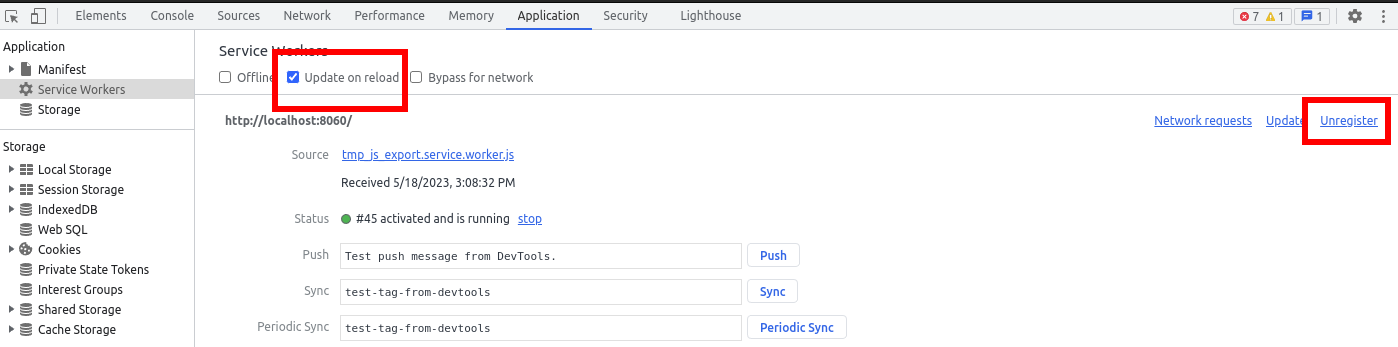
Unregistering the service worker in Chromium-based browsers' DevTools
The procedure is similar in Firefox. Open developer tools by pressing F12 or Ctrl + Shift + I (Cmd + Option + I on macOS), click on the Application tab in DevTools (it may be hidden behind a chevron icon if the devtools pane is narrow). Click next to the service worker that is currently registered, then reload the page.
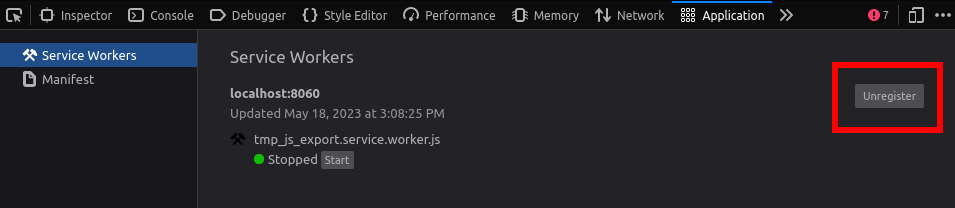
Unregistering the service worker in Firefox's DevTools
Options d'exportation
You can find a full list of export options available in the EditorExportPlatformWeb class reference.