Attention: Here be dragons
This is the latest
(unstable) version of this documentation, which may document features
not available in or compatible with released stable versions of Godot.
Checking the stable version of the documentation...
AR / Passthrough
La réalité augmentée est supportée par diverses méthodes selon les capacités du matériel.
Headsets such as the Magic Leap and glasses such as TiltFive show the rendered result on see-through displays allowing the user to see the real world.
Les casques tels que le Quest, HTC Elite et Lynx R1 implémentent ceci à travers une technique appelée video passthrough, où les caméras enregistrent le monde réel et ces images sont utilisées comme arrière-plan sur lequel notre résultat rendu est utilisé.
Note
Le passthrough est implémenté très différemment selon les plateformes.
In Godot 4.3 we have implemented a unified approach that is explained on this help page so you don't need to worry about these differences, the XRInterface implementation is now responsible for applying the correct platform-dependent method [1].
Pour les casques tels que le Meta Quest et le HTC Elite, vous devrez utiliser le plugin fournisseur OpenXR v3.0.0 ou postérieur pour activer le passthrough vidéo.
Pour la rétrocompatibilité, l'ancienne API pour le passthrough est toujours disponible, mais il est recommandé de suivre les nouvelles instructions ci-dessous.
Environment blend modes
La façon dont nous configurons la fonctionnalité RV ou RA est de configurer le mode de mélange d'environnement. Ce mode détermine comment l'environnement (le monde réel) est mélangé avec le monde virtuel.
Mode de mélange |
Description |
|---|---|
XR_ENV_BLEND_MODE_OPAQUE |
L'image rendue est opaque, nous ne voyons pas le monde réel. Nous sommes en mode RV. Cela va désactiver le passthrough si le vidéo-passthrough est utilisé. |
XR_ENV_BLEND_MODE_ADDITIVE |
L'image rendue est ajoutée au monde réel et aura l'air semi transparente. Ce mode est généralement utilisé avec des dispositifs see-through qui sont incapables d'obscurcir le monde réel. Cela va activer le passthrough si le vidéo-passthrough est utilisé. |
XR_ENV_BLEND_MODE_ALPHA_BLEND |
The rendered image is alpha blended with the real world. On see-through devices that support this, the alpha will control the translucency of the optics. On video-passthrough devices alpha blending is applied with the video image. passthrough will also be enabled if applicable. |
Vous pouvez définir le mode de mélange d'environnement pour votre application à travers la propriété environment_blend_mode de l'instance XRInterface.
You can query the supported blend modes on the hardware using the
get_supported_environment_blend_modes property on the same instance.
Configurer votre arrière-plan
When setting the blend mode to XR_ENV_BLEND_MODE_ALPHA_BLEND you must set
the transparent_bg property on Viewport to true.
When using the XR_ENV_BLEND_MODE_ADDITIVE blend mode you should set your
background color to black.
Either solution will result in the background rendering not contributing to lighting. It is thus also recommended you adjust your environment settings accordingly and ensure there is adequate ambient light set to illuminate your scene.
Note
Some AR SDKs do provide ambient lighting information or even provide a full radiance map to allow for real world reflections in your virtual objects. The core Godot XR functionality doesn't currently have support for this, however this functionality can be exposed through plugins.
Spécifique OpenXR
In OpenXR you can configure the default blend mode you want to use. Godot will select this blend mode at startup if available. If not available Godot will default to the first supported blend mode provided by the XR runtime.
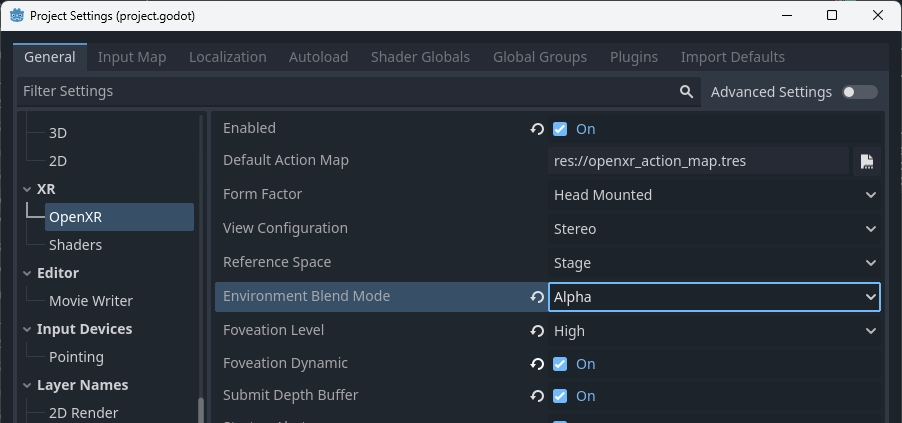
For passthrough devices OpenXR requires additional settings to be configured. These settings are platform-dependent and provided through the OpenXR vendors plugin.
Par exemple, ceux-ci sont les paramètres requis sur Meta Quest :
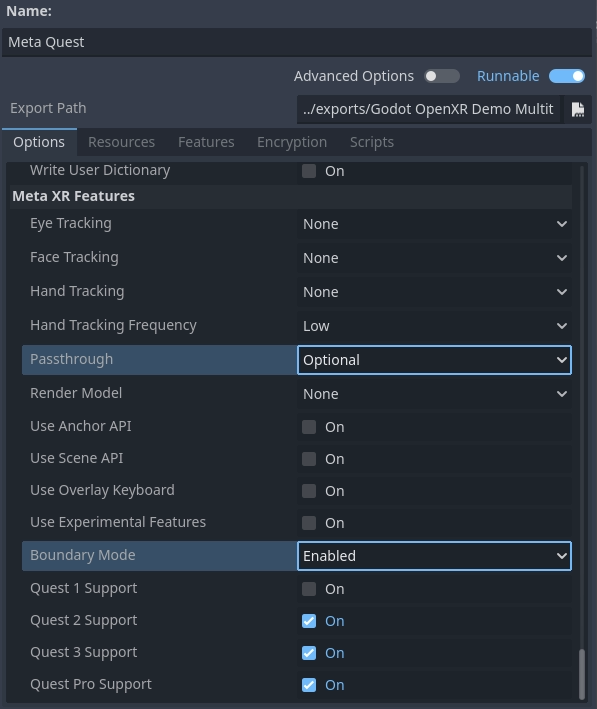
The Passthrough setting defines whether passthrough is supported or even required.
The Boundary Mode allows you to define whether the guardian is needed,
disabling this fully requires passthrough to be enabled at all times.
Mettre tout cela ensemble
Putting the above together we can use the following code as a base:
@onready var viewport : Viewport = get_viewport()
@onready var environment : Environment = $WorldEnvironment.environment

func switch_to_ar() -> bool:
    var xr_interface: XRInterface = XRServer.primary_interface
    if xr_interface:
        var modes = xr_interface.get_supported_environment_blend_modes()
        if XRInterface.XR_ENV_BLEND_MODE_ALPHA_BLEND in modes:
            xr_interface.environment_blend_mode = XRInterface.XR_ENV_BLEND_MODE_ALPHA_BLEND
            viewport.transparent_bg = true
        elif XRInterface.XR_ENV_BLEND_MODE_ADDITIVE in modes:
            xr_interface.environment_blend_mode = XRInterface.XR_ENV_BLEND_MODE_ADDITIVE
            viewport.transparent_bg = false
    else:
        return false

    environment.background_mode = Environment.BG_COLOR
    environment.background_color = Color(0.0, 0.0, 0.0, 0.0)
    environment.ambient_light_source = Environment.AMBIENT_SOURCE_COLOR
    return true

func switch_to_vr() -> bool:
    var xr_interface: XRInterface = XRServer.primary_interface
    if xr_interface:
        var modes = xr_interface.get_supported_environment_blend_modes()
        if XRInterface.XR_ENV_BLEND_MODE_OPAQUE in modes:
            xr_interface.environment_blend_mode = XRInterface.XR_ENV_BLEND_MODE_OPAQUE
        else:
            return false

    viewport.transparent_bg = false
    environment.background_mode = Environment.BG_SKY
    environment.ambient_light_source = Environment.AMBIENT_SOURCE_BG
    return true
Shadow to opacity
Shadow to opacity is a render mode for Godot spatial shaders that was introduced in Godot 3 specifically for AR. It is a special render mode where the more a surface is in shadow, the more opaque the surface becomes. When a surface is fully lit, the surface becomes fully transparent and thus shows the real world.
However the surface is rendered during the opaque state effectively. This has two consequences:
Comme le tampon de profondeur et le tampon de couleur sont écrits dedans, nous occluons toute géométrie derrière notre surface même lorsqu'elle est complètement transparente.
Comme nous rendons la surface opaque si elle est dans l'ombre, nous pouvons avoir des objets virtuels jetant des ombres sur des objets du monde réel [2].
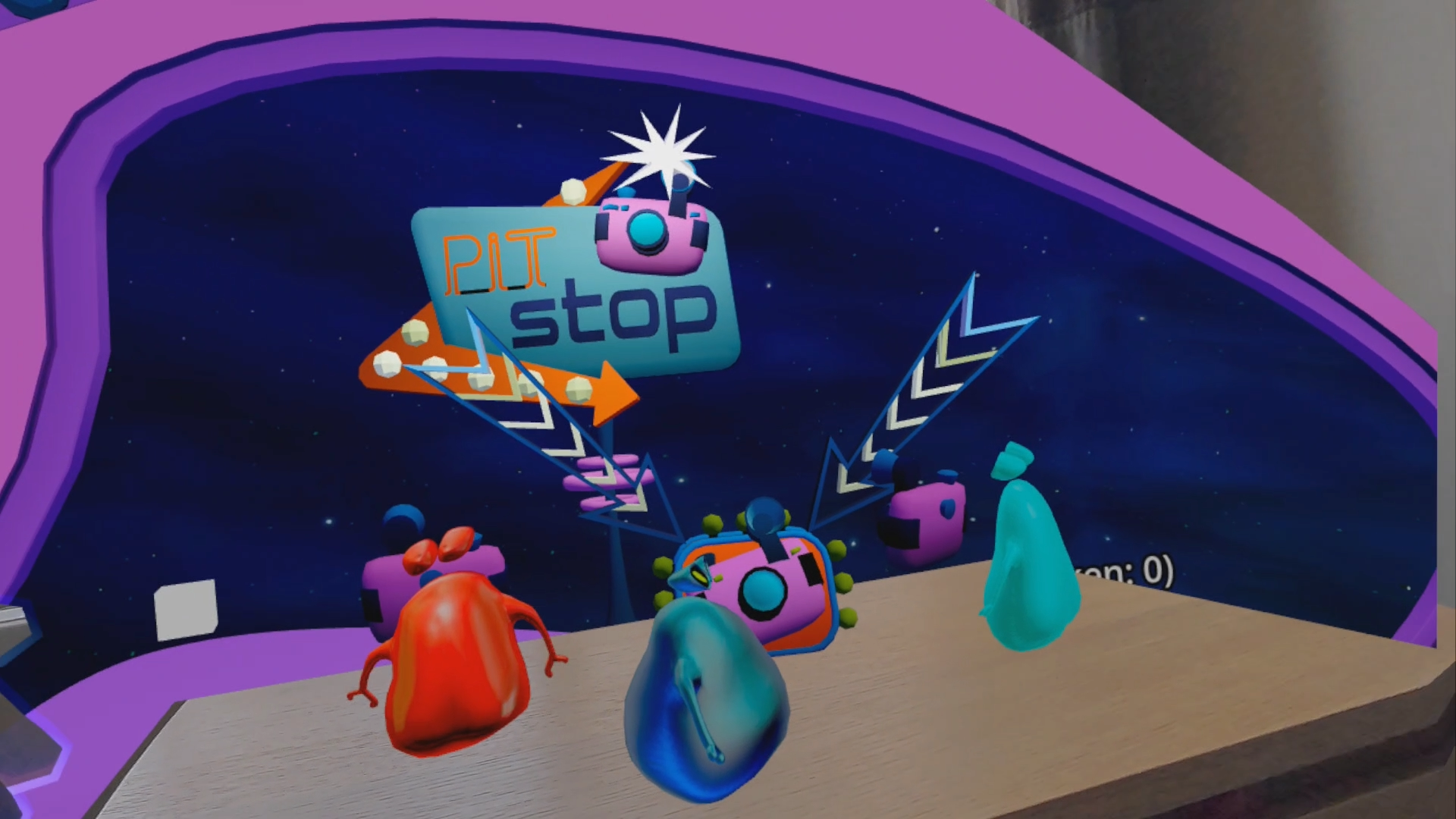
Image showing shadow to opacity being used to show the user's desk.
This enabled the following use cases:
You can render a box mesh around a real world table, this ensures the table remains visible even if a virtual object is placed underneath it. The virtual object will be correctly occluded. Placing a virtual object on top of the real world table, will result in a shadow being cast on the table.
You can use a shader with this render mode when render a hand mesh using the hand tracking functionality, and ensure your hands properly occlude virtual objects.
The following shader code is a good base for this functionality:
shader_type spatial;
render_mode blend_mix, depth_draw_opaque, cull_back, shadow_to_opacity;

void fragment() {
    ALBEDO = vec3(0.0, 0.0, 0.0);
}