Attention: Here be dragons
This is the latest
(unstable) version of this documentation, which may document features
not available in or compatible with released stable versions of Godot.
Checking the stable version of the documentation...
BBCode en RichTextLabel
Introducción
Los nodos Label son ideales para mostrar texto básico, pero tienen limitaciones. Si desea cambiar el color o la alineación del texto, solo puede hacerlo en toda la etiqueta. No puede cambiar el color de una parte del texto ni centrarla. Para evitar estas limitaciones, utilice un nodo RichTextLabel.
RichTextLabel permite un formato complejo de texto mediante una sintaxis de marcado o la API integrada. Utiliza BBCodes para la sintaxis de marcado, un sistema de etiquetas que define las reglas de formato para una parte del texto. Quizás te resulten familiares si alguna vez has usado foros (también conocidos como "tablones de anuncios", de ahí la "BB" en "BBCode").
A diferencia de Label, RichTextLabel también incluye su propia barra de desplazamiento vertical. Esta barra se muestra automáticamente si el texto no cabe en el tamaño del control. Puede desactivarla desmarcando la propiedad Desplazamiento activo en el inspector de RichTextLabel.
Nótese que las etiquetas de BBCode también pueden ser usadas, hasta cierto punto, para otros casos de uso:
BBCode se puede utilizar para dar formato a los comentarios en la fuente XML de la referencia de clase.
BBCode se puede utilizar en los comentarios de la documentación de GDScript.
Se puede utilizar BBCode al imprimir texto enriquecido en el panel inferior de Salida.
Ver también
Puede ver cómo funciona BBCode en RichTextLabel en acción utilizando el proyecto de demostración Rich Text Label con BBCode.
Usar BBCode
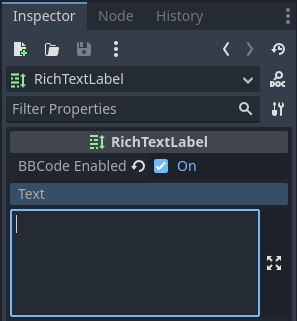
By default, RichTextLabel functions like a normal Label. It has the text property, which you can edit to have uniformly formatted text. To be able to use BBCode for rich text formatting, you need to turn on the BBCode mode by setting bbcode_enabled. After that, you can edit the text property using available tags. Both properties are located at the top of the inspector after selecting a RichTextLabel node.
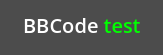
Por ejemplo, BBCode [color=green]test[/color] representaría la palabra "test" con un color verde.
La mayoría de los BBCodes constan de tres partes: la etiqueta de apertura, el contenido y la etiqueta de cierre. La etiqueta de apertura delimita el inicio de la parte formateada y también puede incluir opciones de configuración. Algunas etiquetas de apertura, como la de color mostrada arriba, también requieren un valor para funcionar. Otras etiquetas de apertura pueden aceptar varias opciones (separadas por espacios dentro de la etiqueta de apertura). La etiqueta de cierre delimita el final de la parte formateada. En algunos casos, tanto la etiqueta de cierre como el contenido pueden omitirse.
A diferencia de BBCode en HTML, los espacios en blanco iniciales y finales no se eliminan con RichTextLabel al mostrarse. Los espacios duplicados también se muestran tal cual en el resultado final. Esto significa que, al mostrar un bloque de código en RichTextLabel, no es necesario usar una etiqueta de texto preformateada.
[tag]content[/tag]
[tag=value]content[/tag]
[tag option1=value1 option2=value2]content[/tag]
[tag][/tag]
[tag]
Nota
RichTextLabel no admite etiquetas BBCode entrelazadas. Por ejemplo, en lugar de usar:
[b]bold[i]bold italic[/b]italic[/i]
Usar:
[b]bold[i]bold italic[/i][/b][i]italic[/i]
Manejo seguro de la entrada del usuario
En un escenario donde los usuarios pueden introducir texto libremente (como en el chat de una partida multijugador), debe asegurarse de que no puedan usar etiquetas BBCode arbitrarias que RichTextLabel analizará. Esto evita el uso inapropiado del formato, que puede ser problemático si RichTextLabel gestiona las etiquetas [url] (ya que los jugadores podrían crear enlaces clicables a sitios de phishing o similares).
Usando las etiquetas [lb] y/o [rb] de RichTextLabel, podemos reemplazar los corchetes de apertura y/o cierre de cualquier etiqueta BBCode en un mensaje con esas etiquetas de escape. Esto evita que los usuarios usen BBCode que se analizará como etiquetas; en su lugar, el BBCode se mostrará como texto.

Ejemplo de entrada de usuario sin escape que resulta en inyección de BBCode (segunda línea) y entrada de usuario con escape (tercera línea)
La imagen de arriba fue creada usando el siguiente script:
extends RichTextLabel

func _ready():
    append_chat_line("Player 1", "Hello world!")
    append_chat_line("Player 2", "Hello [color=red]BBCode injection[/color] (no escaping)!")
    append_chat_line_escaped("Player 2", "Hello [color=red]BBCode injection[/color] (with escaping)!")


# Returns escaped BBCode that won't be parsed by RichTextLabel as tags.
func escape_bbcode(bbcode_text):
    # We only need to replace opening brackets to prevent tags from being parsed.
    return bbcode_text.replace("[", "[lb]")


# Appends the user's message as-is, without escaping. This is dangerous!
func append_chat_line(username, message):
    append_text("%s: [color=green]%s[/color]\n" % [username, message])


# Appends the user's message with escaping.
# Remember to escape both the player name and message contents.
func append_chat_line_escaped(username, message):
    append_text("%s: [color=green]%s[/color]\n" % [escape_bbcode(username), escape_bbcode(message)])
Rendimiento
En la mayoría de los casos, puedes usar BBCode directamente tal cual, ya que formatear texto rara vez es una tarea compleja. Sin embargo, con RichTextLabels particularmente grandes (como los registros de consola que abarcan miles de líneas), podrías experimentar trastabilleo durante el juego al actualizar el texto de RichTextLabels.
Hay varias maneras de aliviar esto:
Utiliza la función
append_text()en lugar de añadir a la propiedadtext. Esta función solo analizará el BBCode del texto añadido, en lugar de analizarlo desde toda la propiedadtext.Use
push_[tag]()andpop()functions to add tags to RichTextLabel instead of using BBCode.Activa la propiedad Hilos > Hilado en RichTextLabel. Esto no acelerará el procesamiento, pero prevendrá que el hilo principal se bloquee, lo que evita trastabilleos durante el juego. Sólo activa el hilado si en realidad es necesario en tu proyecto, ya que el hilado tiene un cierto costo.
Using push_[tag]() and pop() functions instead of BBCode
If you don't want to use BBCode for performance reasons, you can use functions provided by RichTextLabel to create formatting tags without writing BBCode in the text.
Every BBCode tag (including effects) has a push_[tag]() function (where
[tag] is the tag's name). There are also a few convenience functions
available, such as push_bold_italics() that combines both push_bold()
and push_italics() into a single tag. See the
RichTextLabel class reference for a complete list of
push_[tag]() functions.
The pop() function is used to end any tag. Since BBCode is a tag stack,
using pop() will close the most recently started tags first.
The following script will result in the same visual output as using
BBCode [color=green]test [i]example[/i][/color]:
extends RichTextLabel

func _ready():
    append_text("BBCode ")  # Trailing space separates words from each other.
    push_color(Color.GREEN)
    append_text("test ")  # Trailing space separates words from each other.
    push_italics()
    append_text("example")
    pop()  # Ends the tag opened by `push_italics()`.
    pop()  # Ends the tag opened by `push_color()`.
Advertencia
Do not set the text property directly when using formatting functions.
Appending to the text property will erase all modifications made to the
RichTextLabel using the append_text(), push_[tag]() and pop()
functions.
Referencia
Ver también
Algunas de estas etiquetas BBCode se pueden usar en la información sobre herramientas de las variables de script @export, así como en el código fuente XML de la referencia de clase. Para más información, véase Referencia de clase BBCode.
Etiqueta |
Ejemplo |
b
Makes
{text} use the bold (or bold italics) font of RichTextLabel. |
|
i
Makes
{text} use the italics (or bold italics) font of RichTextLabel. |
|
u
Makes
{text} underlined. |
|
s
Makes
{text} strikethrough. |
|
code
Hace que
{text} utilice la fuente mono de RichTextLabel. |
|
char
Adds Unicode character with hexadecimal UTF-32
{codepoint}. |
|
p
Adds new paragraph with
{text}. Supports configuration options,
see Paragraph options. |
[p]{text}[/p][p {options}]{text}[/p] |
br
Adds line break in a text, without adding a new paragraph.
If used within a list, this won't create a new list item,
but will add a line break within the current item instead.
|
|
hr
Adds new a horizontal rule to separate content. Supports configuration options,
see Horizontal rule options.
|
[hr][hr {options}] |
centrado
Makes
{text} horizontally centered.Same as
[p align=center]. |
|
left
Makes
{text} horizontally left-aligned.Same as
[p align=left]. |
|
derecho
Makes
{text} horizontally right-aligned.Same as
[p align=right]. |
|
llenar
Makes
{text} fill the full width of RichTextLabel.Same as
[p align=fill]. |
|
indentar
Indents
{text} once.
The indentation width is the same as with [ul] or [ol], but without a bullet point. |
|
url
Creates a hyperlink (underlined and clickable text). Can contain optional
{text} or display {link} as is. Supports configuration options,
see URL options.Must be handled with the "meta_clicked" signal to have an effect, see El manejo de clics de la etiqueta [url].
|
[url]{link}[/url][url={link}]{text}[/url][url {options}]{text}[/url] |
hint
Creates a tooltip hint that is displayed when hovering the text with the mouse.
While not required, it's recommended to put tooltip text between double or single quotes.
Note that it is not possible to escape quotes using
\" or \'. To use
single quotes for apostrophes in the hint string, you must use double quotes
to surround the string. |
[hint="{tooltip text displayed on hover}"]{text}[/hint] |
img
Inserts an image from the
{path} (can be any valid Texture2D resource).If
{width} is provided, the image will try to fit that width maintaining
the aspect ratio.If both
{width} and {height} are provided, the image will be scaled
to that size.Add
% to the end of {width} or {height} value to specify it as percentages of the control width instead of pixels.Add
em to the end of {width} or {height} value to specify it as a ratio of the current font size. For example, height=1em will make the image as tall as the surrounding text.If
{valign} configuration is provided, the image will try to align to the
surrounding text, see Image and table vertical alignment.Supports configuration options, see Image options.
|
[img]{path}[/img][img={width}]{path}[/img][img={width}x{height}]{path}[/img][img={valign}]{path}[/img][img {options}]{path}[/img] |
fuente
Makes
{text} use a font resource from the {path}.Supports configuration options, see Opciones de fuente.
|
[font={path}]{text}[/font][font {options}]{text}[/font] |
font_size
Use custom font size for
{text}. |
|
dropcap
Use a different font size and color for
{text}, while making the tag's contents
span multiple lines if it's large enough.A drop cap is typically one
uppercase character, but
[dropcap] supports containing multiple characters.
margins values are comma-separated and can be positive, zero or negative.
Values must not be separated by spaces; otherwise, the values won't be parsed correctly.
Negative top and bottom margins are particularly useful to allow the rest of
the paragraph to display below the dropcap. |
|
opentype_features
Enables custom OpenType font features for
{text}. Features must be provided as
a comma-separated {list}. Values must not be separated by spaces;
otherwise, the list won't be parsed correctly. |
[opentype_features={list}]{text}[/opentype_features] |
lang
Overrides the language for
{text} that is set by the BiDi > Language property
in RichTextLabel. {code} must be an ISO language code.
This can be used to enforce the use of a specific script for a language without
starting a new paragraph. Some font files may contain script-specific substitutes,
in which case they will be used. |
|
color
Changes the color of
{text}. Color must be provided by a common name (see
Colores con nombre) or using the HEX format (e.g.
#ff00ff, see Códigos Hexadecimales de color). |
|
bgcolor
Draws the color behind
{text}. This can be used to highlight text.
Accepts same values as the color tag.
By default, there is a slight padding which is controlled by the
text_highlight_h_padding and text_highlight_v_padding theme items
in the RichTextLabel node. Set padding to 0 to avoid potential overlapping
issues when there are background colors on neighboring lines/columns. |
|
fgcolor
Draws the color in front of
{text}. This can be used to "redact" text by using
an opaque foreground color. Accepts same values as the color tag.
By default, there is a slight padding which is controlled by the
text_highlight_h_padding and text_highlight_v_padding theme items
in the RichTextLabel node. Set padding to 0 to avoid potential overlapping
issues when there are foreground colors on neighboring lines/columns. |
|
outline_size
Use custom font outline size for
{text}. |
[outline_size={size}]{text}[/outline_size] |
outline_color
Use custom outline color for
{text}. Accepts same values as the color tag. |
[outline_color={code/name}]{text}[/outline_color] |
tabla
Creates a table with the
{number} of columns. Use the cell tag to define
table cells.If
{valign} configuration is provided, the table will try to align to the
surrounding text, see Image and table vertical alignment.If baseline alignment is used, the table is aligned to the baseline of the row with index
{alignment_row} (zero-based).{name} is a table name for assistive apps (screen reader). |
[table={number}]{cells}[/table][table={number},{valign}]{cells}[/table][table={number},{valign},{alignment_row}]{cells}[/table][table={number},{valign},{alignment_row} name={name}]{cells}[/table] |
celda
Adds a cell with
{text} to the table.If
{ratio} is provided, the cell will try to expand to that value proportionally
to other cells and their ratio values.Supports configuration options, see Cell options.
|
[cell]{text}[/cell][cell={ratio}]{text}[/cell][cell {options}]{text}[/cell] |
ul
Adds an unordered list. List
{items} must be provided by putting one item per
line of text.The bullet point can be customized using the
{bullet} parameter,
see Lista con viñetas desordenada. |
[ul]{items}[/ul][url=<url>]{text}[/url] |
ol
Adds an ordered (numbered) list of the given
{type} (see Ordered list types).
List {items} must be provided by putting one item per line of text. |
|
lb, rb
Adds
[ and ] respectively. Allows escaping BBCode markup.These are self-closing tags, which means you do not need to close them
(and there is no
[/lb] or [/rb] closing tag). |
[lb]b[rb]text[lb]/b[rb] will display as [b]text[/b]. |
Several Unicode control characters can be added using their own self-closing tags.
This can result in easier maintenance compared to pasting those
control characters directly in the text.
|
[lrm] (left-to-right mark), [rlm] (right-to-left mark), [lre] (left-to-right embedding),[rle] (right-to-left embedding), [lro] (left-to-right override), [rlo] (right-to-left override),[pdf] (pop directional formatting), [alm] (Arabic letter mark), [lri] (left-to-right isolate),[rli] (right-to-left isolate), [fsi] (first strong isolate), [pdi] (pop directional isolate),[zwj] (zero-width joiner), [zwnj] (zero-width non-joiner), [wj] (word joiner),[shy] (soft hyphen) |
Nota
Tags for bold ([b]) and italics ([i]) formatting work best if the
appropriate custom fonts are set up in the RichTextLabelNode's theme
overrides. If no custom bold or italic fonts are defined,
faux bold and italic fonts
will be generated by Godot. These fonts rarely look good in comparison to hand-made bold/italic font variants.
The monospaced ([code]) tag only works if a custom font is set up in
the RichTextLabel node's theme overrides. Otherwise, monospaced text will use the regular font.
Todavía no hay etiquetas BBCode para controlar el centrado vertical del texto.
Options can be skipped for all tags.
Paragraph options
align
Values
left(orl),center(orc),right(orr),fill(orf)Default
leftText horizontal alignment.
bidi_override, st
Values
default(ofd),uri(oru),file(orf),email(ore),list(orl),none(orn),custom(orc)Default
defaultStructured text override.
justification_flags, jst
Values
Comma-separated list of the following values (no space after each comma):
kashida(ork),word(orw),trim(ortr),after_last_tab(orlt),skip_last(orsl),skip_last_with_chars(orsv),do_not_skip_single(orns).Default
word,kashida,skip_last,do_not_skip_singleJustification (fill alignment) option. See TextServer for more details.
direction, dir
Values
ltr(orl),rtl(orr),auto(ora)Default
Inherit
Base BiDi direction.
language, lang
Values
Códigos ISO de idiomas. Véase Códigos de localización
Default
Inherit
Locale override. Some font files may contain script-specific substitutes, in which case they will be used.
tab_stops
Values
List of floating-point numbers, e.g.
10.0,30.0Default
Width of the space character in the font
Overrides the horizontal offsets for each tab character. When the end of the list is reached, the tab stops will loop over. For example, if you set
tab_stopsto10.0,30.0, the first tab will be at10pixels, the second tab will be at10 + 30 = 40pixels, and the third tab will be at10 + 30 + 10 = 50pixels from the origin of the RichTextLabel.
El manejo de clics de la etiqueta [url]
Por defecto, las etiquetas [url] no hacen nada cuando se hace clic en ellas. Esto permite un uso flexible de las etiquetas [url] en lugar de limitarlas a la apertura de URL en un navegador web.
To handle clicked [url] tags, connect the RichTextLabel node's
meta_clicked signal to a script function.
For example, the following method can be connected to meta_clicked to open
clicked URLs using the user's default web browser:
# This assumes RichTextLabel's `meta_clicked` signal was connected to
# the function below using the signal connection dialog.
func _richtextlabel_on_meta_clicked(meta):
    # `meta` is not guaranteed to be a String, so convert it to a String
    # to avoid script errors at runtime.
    OS.shell_open(str(meta))
For more advanced use cases, it's also possible to store JSON in a [url]
tag's option and parse it in the function that handles the meta_clicked signal.
For example:
[url={"example": "value"}]JSON[/url]
Horizontal rule options
color
Values
Color name or color in HEX format
Default
Color(1, 1, 1, 1)Color tint of the rule (modulation).
height
Values
Integer number
Default
2Target height of the rule in pixels, add
%to the end of value to specify it as percentages of the control width instead of pixels.width
Values
Integer number
Default
90%Target width of the rule in pixels, add
%to the end of value to specify it as percentages of the control width instead of pixels.align
Values
left(orl),center(orc),right(orr)Default
leftHorizontal alignment.
URL options
underline
Values
always,never,hoverDefault
alwaysModo de subrayado de URL.
tooltip
Values
String.
Default
URL tooltip.
href
Values
String.
Default
URL target address.
Image options
color
Values
Color name or color in HEX format
Default
Inherit
Color tint of the image (modulation).
height
Values
Floating-point number
Default
Inherit
Target height of the image in pixels.
Alternative units to pixels can be specified:
Add
%to the end of the value to specify it as a percentage of the control width instead of pixels. For example,height=50%will make the image half as tall as the control is wide.Add
emto the end of the value to specify it as a ratio of the surrounding font size instead of pixels. For example,height=1emwill make the image as tall as the surrounding text.
width
Values
Floating-point number
Default
Inherit
Target width of the image in pixels.
Alternative units to pixels can be specified:
Add
%to the end of the value to specify it as a percentage of the control width instead of pixels. For example,width=50%will make the image take up half of the control width.Add
emto the end of the value to specify it as a ratio of the surrounding font size instead of pixels. For example,width=1emwill make the image as wide as the surrounding text is tall.
region
Values
x,y,width,height in pixels
Default
Inherit
Region rect of the image. This can be used to display a single image from a spritesheet.
rellenar
Values
false,trueDefault
falseIf set to
true, and the image is smaller than the size specified bywidthandheight, the image padding is added to match the size instead of upscaling.tooltip
Values
Cadena
Default
Tooltip de imágen.
align
Values
Default
center,centerImage alignment to the surrounding text.
alt
Values
Cadena
Default
Image description for assistive apps (screen reader).
Image and table vertical alignment
When a vertical alignment value is provided with the [img] or [table] tag
the image/table will try to align itself against the surrounding text. Alignment is
performed using a vertical point of the image and a vertical point of the text.
There are 3 possible points on the image (top, center, and bottom) and 4
possible points on the text and table (top, center, baseline, and bottom),
which can be used in any combination.
To specify both points, use their full or short names as a value of the image/table tag:
text [img=top,bottom]...[/img] text
text [img=center,center]...[/img] text
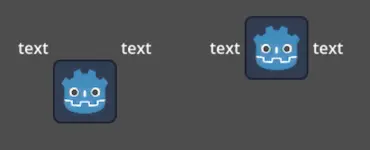
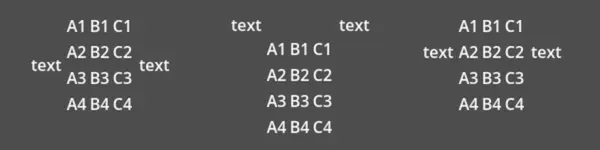
text [table=3,center]...[/table] text  # Center to center.
text [table=3,top,bottom]...[/table] text # Top of the table to the bottom of text.
text [table=3,baseline,baseline,1]...[/table] text # Baseline of the second row (rows use zero-based indexing) to the baseline of text.
You can also specify just one value (top, center, or bottom) to make
use of a corresponding preset (top-top, center-center, and bottom-bottom
respectively).
Short names for the values are t (top), c (center), l (baseline),
and b (bottom).
Opciones de fuente
name, n
Values
A valid Font resource path.
Default
Inherit
Ruta del recurso fuente.
size, s
Values
Number in pixels.
Default
Inherit
Tamaño de fuente personalizado.
glyph_spacing, gl
Values
Number in pixels.
Default
Inherit
Extra spacing for each glyph.
space_spacing, sp
Values
Number in pixels.
Default
Inherit
Extra spacing for the space character.
top_spacing, top
Values
Number in pixels.
Default
Inherit
Extra spacing at the top of the line.
bottom_spacing, bt
Values
Number in pixels.
Default
Inherit
Extra spacing at the bottom of the line.
embolden, emb
Values
Número de punto flotante.
Default
0.0Font embolden strength, if it is not equal to zero, emboldens the font outlines. Negative values reduce the outline thickness.
face_index, fi
Values
Número entero.
Default
0An active face index in the TrueType / OpenType collection.
slant, sln
Values
Número de punto flotante.
Default
0.0Font slant strength, positive values slant glyphs to the right. Negative values to the left.
opentype_variation, otv
Values
Comma-separated list of the OpenType variation tags (no space after each comma).
Default
Font OpenType variation coordinates. See OpenType variation tags.
Note: The value should be enclosed in
"to allow using=inside it:
[font otv="wght=200,wdth=400"] # Sets variable font weight and width.
opentype_features, otf
Values
Comma-separated list of the OpenType feature tags (no space after each comma).
Default
Font OpenType features. See OpenType features tags.
Note: The value should be enclosed in
"to allow using=inside it:
[font otf="calt=0,zero=1"] # Disable contextual alternates, enable slashed zero.
Colores con nombre
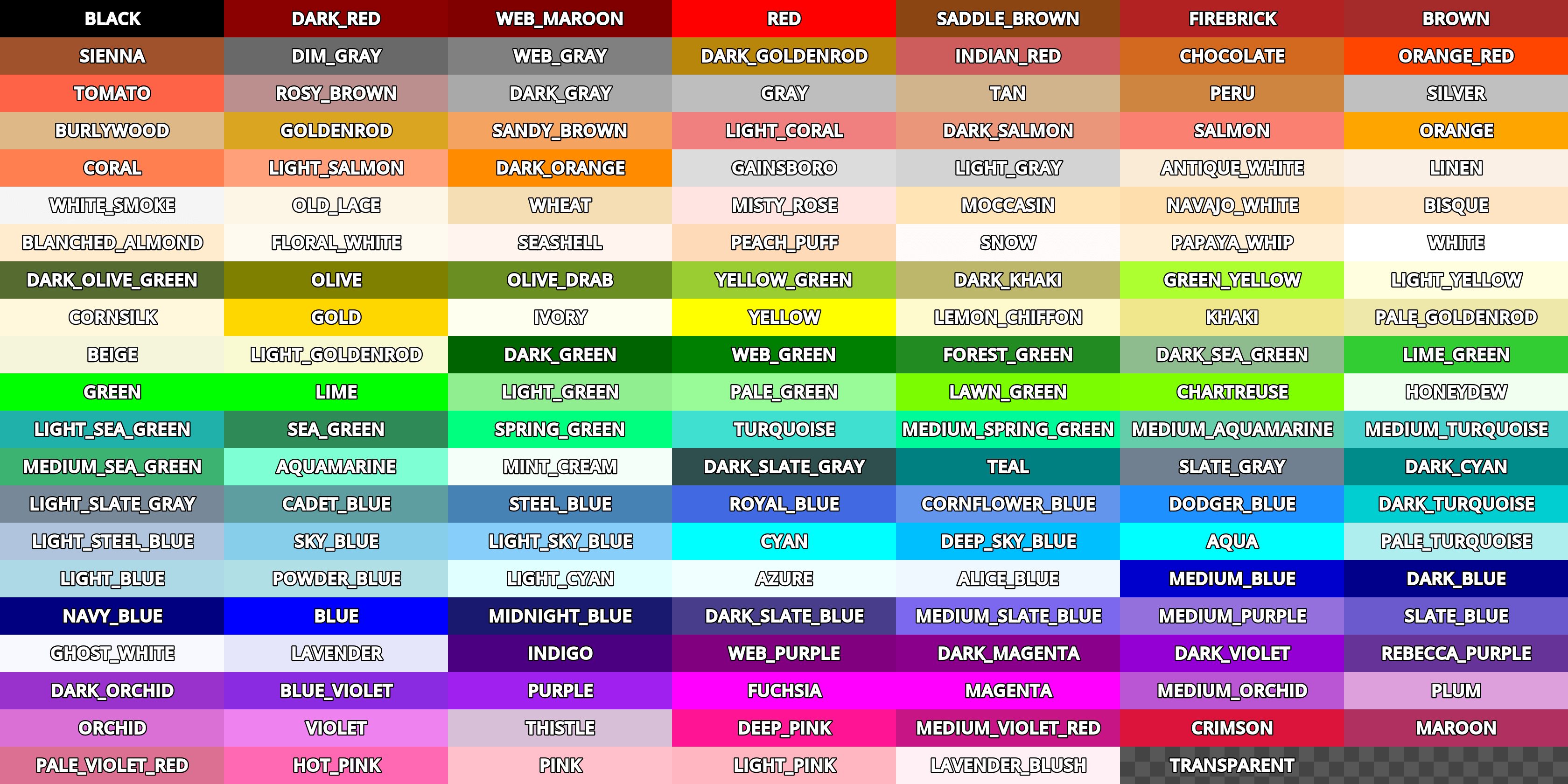
For tags that allow specifying a color by name, you can use names of the constants from
the built-in Color class. Named classes can be specified in a number of
styles using different casings: DARK_RED, DarkRed, and darkred will give
the same exact result.
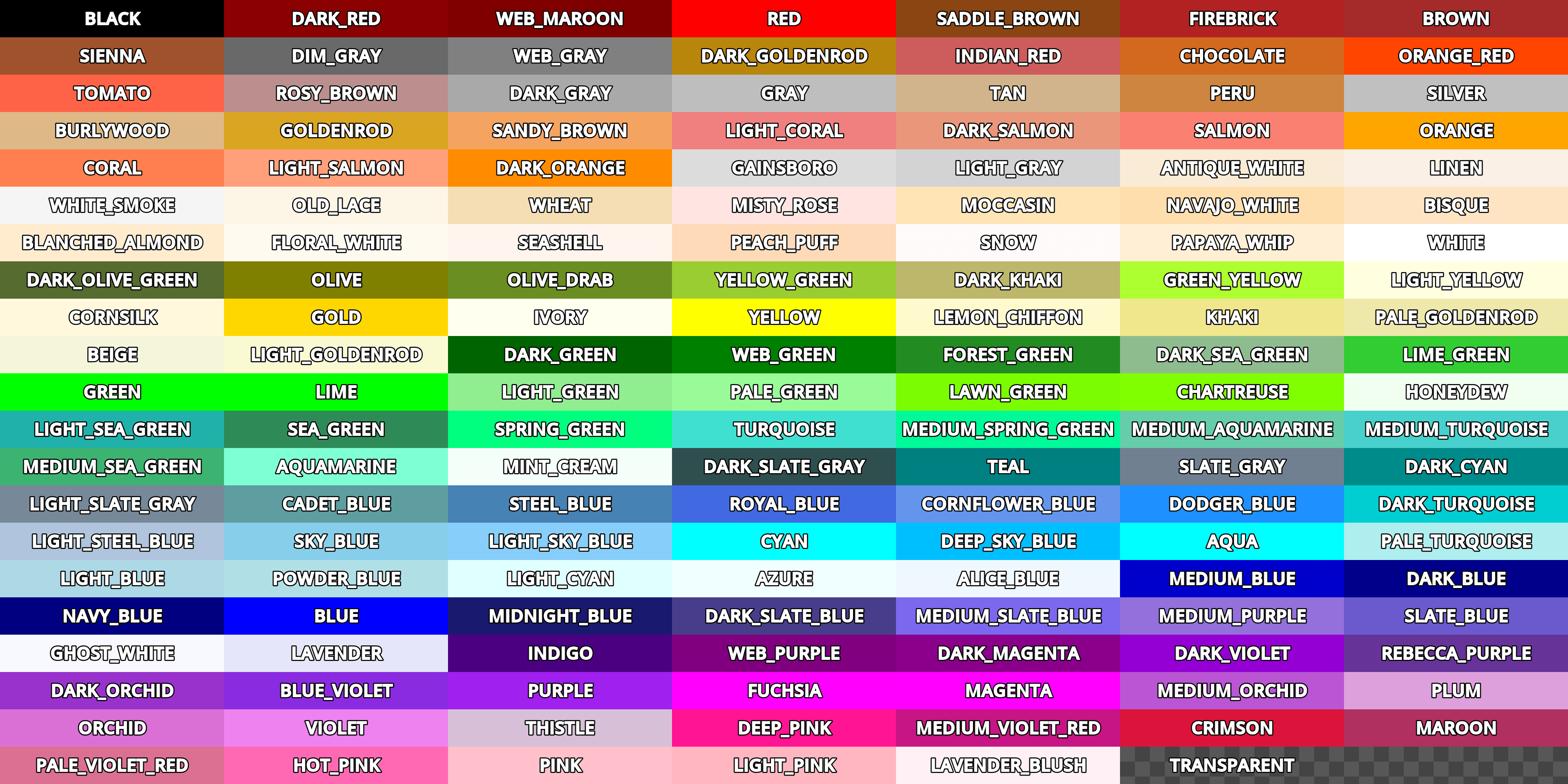
See this image for a list of color constants:
Códigos Hexadecimales de color
For opaque RGB colors, any valid 6-digit hexadecimal code is supported, e.g.
[color=#ffffff]white[/color]. Shorthand RGB color codes such as #6f2
(equivalent to #66ff22) are also supported.
For transparent RGB colors, any RGBA 8-digit hexadecimal code can be used,
e.g. [color=#ffffff88]translucent white[/color]. Note that the alpha channel
is the last component of the color code, not the first one. Short RGBA
color codes such as #6f28 (equivalent to #66ff2288) are supported as well.
Cell options
shrink
Values
false,trueDefault
trueIf
true, cell can shrink to its contents.expand
Values
Integer number
Default
1
Cell expansion ratio. This defines which cells will try to expand to proportionally to other cells and their expansion ratios.
border
Values
Color name or color in HEX format
Default
Inherit
Cell border color.
bg
Values
Color name or color in HEX format
Default
Inherit
Cell background color. For alternating odd/even row backgrounds, you can use
bg=odd_color,even_color.padding
Values
4 comma-separated floating-point numbers (no space after each comma)
Default
0,0,0,0Left, top, right, and bottom cell padding.
Lista con viñetas desordenada
By default, the [ul] tag uses the U+2022 "Bullet" Unicode glyph as the
bullet character. This behavior is similar to web browsers. The bullet character
can be customized using [ul bullet={bullet}]. If provided, this {bullet}
parameter must be a string with no enclosing quotes (for example,
[bullet=*]). You can add trailing spaces after the bullet character
to increase the spacing between the bullet and the list item text.
See Bullet (typography) on Wikipedia
for a list of common bullet characters that you can paste directly in the bullet parameter.
Ordered list types
Ordered lists can be used to automatically mark items with numbers or letters in ascending order. This tag supports the following type options:
1- Numbers, using language specific numbering system if possible.a,A- Lower and upper case Latin letters.i,I- Lower and upper case Roman numerals.
Efectos de texto
BBCode can also be used to create different text effects that can optionally be animated. Several customizable effects are provided out of the box, and you can easily create your own. By default, animated effects will pause when the SceneTree is paused. You can change this behavior by adjusting the RichTextLabel's Process > Mode property.
All examples below mention the default values for options in the listed tag format.
Nota
Text effects that move characters' positions may result in characters being clipped by the RichTextLabel node bounds.
You can resolve this by disabling Control > Layout > Clip Contents in the inspector after selecting the RichTextLabel node, or ensuring there is enough margin added around the text by using line breaks above and below the line using the effect.
Pulso
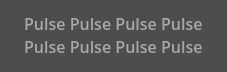
Pulse creates an animated pulsing effect that multiplies each character's
opacity and color. It can be used to bring attention to specific text. Its tag
format is [pulse freq=1.0 color=#ffffff40 ease=-2.0]{text}[/pulse].
freq controls the frequency of the half-pulsing cycle (higher is faster). A
full pulsing cycle takes 2 * (1.0 / freq) seconds. color is the target
color multiplier for blinking. The default mostly fades out text, but not
entirely. ease is the easing function exponent to use. Negative values
provide in-out easing, which is why the default is -2.0.
Ola
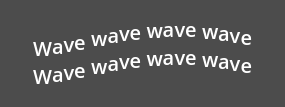
Wave makes the text go up and down. Its tag format is
[wave amp=50.0 freq=5.0 connected=1]{text}[/wave].
amp controls how high and low the effect goes, and freq controls how
fast the text goes up and down. A freq value of 0 will result in no
visible waves, and negative freq values won't display any waves either. If
connected is 1 (default), glyphs with ligatures will be moved together.
If connected is 0, each glyph is moved individually even if they are
joined by ligatures. This can work around certain rendering issues with font
ligatures.
Tornado
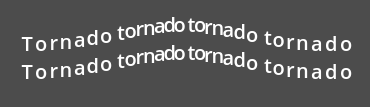
Tornado makes the text move around in a circle. Its tag format is
[tornado radius=10.0 freq=1.0 connected=1]{text}[/tornado].
radius is the radius of the circle that controls the offset, freq is how
fast the text moves in a circle. A freq value of 0 will pause the
animation, while negative freq will play the animation backwards. If
connected is 1 (default), glyphs with ligatures will be moved together.
If connected is 0, each glyph is moved individually even if they are
joined by ligatures. This can work around certain rendering issues with font
ligatures.
Agitado
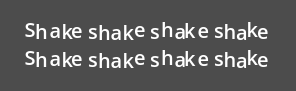
Shake makes the text shake. Its tag format is
[shake rate=20.0 level=5 connected=1]{text}[/shake].
rate controls how fast the text shakes, level controls how far the text
is offset from the origin. If connected is 1 (default), glyphs with
ligatures will be moved together. If connected is 0, each glyph is moved
individually even if they are joined by ligatures. This can work around certain
rendering issues with font ligatures.
Desaparecer
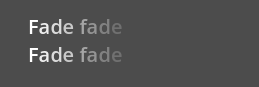
Fade creates a static fade effect that multiplies each character's opacity.
Its tag format is [fade start=4 length=14]{text}[/fade].
start controls the starting position of the falloff relative to where the fade
command is inserted, length controls over how many characters should the fade
out take place.
Arcoiris
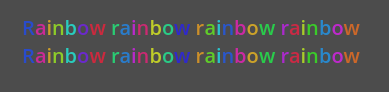
Rainbow gives the text a rainbow color that changes over time. Its tag format is
[rainbow freq=1.0 sat=0.8 val=0.8 speed=1.0]{text}[/rainbow].
freq determines how many letters the rainbow extends over before it repeats itself,
sat is the saturation of the rainbow, val is the value of the rainbow. speed
is the number of full rainbow cycles per second. A positive speed value will play
the animation forwards, a value of 0 will pause the animation, and a negative
speed value will play the animation backwards.
Font outlines are not affected by the rainbow effect (they keep their original color). Existing font colors are overridden by the rainbow effect. However, CanvasItem's Modulate and Self Modulate properties will affect how the rainbow effect looks, as modulation multiplies its final colors.
Etiquetas BBCode personalizadas y efectos de texto
Puedes extender el tipo de recurso RichTextEffect para crear tus propias etiquetas personalizadas de BBCode. Crea un nuevo script que extienda el recurso RichTextEffect y asigna una class_name así el efecto puede selecctionarse desde el inspector. Agrega la anotación @tool a tu archivo GDScript si deseas que estos efectos personalizados se ejecuten dentro del propio editor. El RichTextLabel no necesita tener un script adjunto, ni tampoco necesita estar en modo tool. El nuevo efecto se podrá registrar desde el inspector agregándolo al arreglo Markup > Custom Effects, o desde código con el método install_effect():
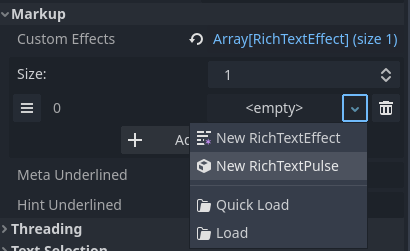
Selecting a custom RichTextEffect after saving a script that extends RichTextEffect with a class_name
Advertencia
If the custom effect is not registered within the RichTextLabel's Markup > Custom Effects property, no effect will be visible and the original tag will be left as-is.
There is only one function that you need to extend: _process_custom_fx(char_fx).
Optionally, you can also provide a custom BBCode identifier by adding a member
name bbcode. The code will check the bbcode property automatically or will
use the name of the file to determine what the BBCode tag should be.
_process_custom_fx
This is where the logic of each effect takes place and is called once per glyph during the draw phase of text rendering. This passes in a CharFXTransform object, which holds a few variables to control how the associated glyph is rendered:
outlineistrueif effect is called for drawing text outline.rangetells you how far into a given custom effect block you are in as an index.elapsed_timees la cantidad total de tiempo que el efecto de texto ha estado funcionando.visiblewill tell you whether the glyph is visible or not and will also allow you to hide a given portion of text.offsetis an offset position relative to where the given glyph should render under normal circumstances.coloris the color of a given glyph.glyph_indexandfontis glyph being drawn and font data resource used to draw it.Finally,
envis a Dictionary of parameters assigned to a given custom effect. You can use get() with an optional default value to retrieve each parameter, if specified by the user. For example[custom_fx spread=0.5 color=#FFFF00]test[/custom_fx]would have a floatspreadand Colorcolorparameters in itsenvDictionary. See below for more usage examples.
The last thing to note about this function is that it is necessary to return a boolean
true value to verify that the effect processed correctly. This way, if there's a problem
with rendering a given glyph, it will back out of rendering custom effects entirely until
the user fixes whatever error cropped up in their custom effect logic.
Aquí hay unos ejemplos de efectos personalizados:
Fantasma
@tool
extends RichTextEffect
class_name RichTextGhost

# Syntax: [ghost freq=5.0 span=10.0][/ghost]

# Define the tag name.
var bbcode = "ghost"

func _process_custom_fx(char_fx):
    # Get parameters, or use the provided default value if missing.
    var speed = char_fx.env.get("freq", 5.0)
    var span = char_fx.env.get("span", 10.0)

    var alpha = sin(char_fx.elapsed_time * speed + (char_fx.range.x / span)) * 0.5 + 0.5
    char_fx.color.a = alpha
    return true
Matriz
@tool
extends RichTextEffect
class_name RichTextMatrix

# Syntax: [matrix clean=2.0 dirty=1.0 span=50][/matrix]

# Define the tag name.
var bbcode = "matrix"

# Gets TextServer for retrieving font information.
func get_text_server():
    return TextServerManager.get_primary_interface()

func _process_custom_fx(char_fx):
    # Get parameters, or use the provided default value if missing.
    var clear_time = char_fx.env.get("clean", 2.0)
    var dirty_time = char_fx.env.get("dirty", 1.0)
    var text_span = char_fx.env.get("span", 50)

    var value = get_text_server().font_get_char_from_glyph_index(char_fx.font, 1, char_fx.glyph_index)

    var matrix_time = fmod(char_fx.elapsed_time + (char_fx.range.x / float(text_span)), \
                           clear_time + dirty_time)

    matrix_time = 0.0 if matrix_time < clear_time else \
                  (matrix_time - clear_time) / dirty_time

    if matrix_time > 0.0:
        value = int(1 * matrix_time * (126 - 65))
        value %= (126 - 65)
        value += 65
    char_fx.glyph_index = get_text_server().font_get_glyph_index(char_fx.font, 1, value, 0)
    return true
Esto agregará unos nuevos comandos BBCode que pueden ser usados de este modo:
[center][ghost]This is a custom [matrix]effect[/matrix][/ghost] made in
[pulse freq=5.0 height=2.0][pulse color=#00FFAA freq=2.0]GDScript[/pulse][/pulse].[/center]